
If you’re using a high-performance laptop like the Razer Blade 16, heat is something you can’t ignore. Whether you’re gaming, editing videos, or pushing the system hard, temperatures can rise quickly—and that’s where choosing the Best Cooling Pads for Razer Blade 16 becomes important.
A good cooling pad doesn’t just keep your laptop cool—it helps maintain stable performance, better frame rates, and longer hardware life. The difference between a basic cooling pad and a well-designed one can be noticeable, especially during long gaming sessions.
In this guide, we’ve picked cooling pads that actually make sense for the Blade 16—focusing on strong airflow, efficient cooling design, and real-world usability. Whether you want maximum cooling power or a simple everyday solution, these options will help you get more consistent performance from your laptop.
Before that, also read more articles:
Razer Laptop Cooling Pad (Adaptive Smart)
Best for: Maximum cooling performance with smart control for Razer Blade 16
If you’re using a high-end machine like the Razer Blade 16, a basic cooling pad won’t make much difference. This is where the Razer Laptop Cooling Pad (Adaptive Smart) stands out—it’s built specifically for serious thermal control, not just airflow.
What makes it different from typical options in the Best Cooling Pads for Razer Blade 16 is the airtight pressure chamber design. Instead of just blowing air under the laptop, it seals the bottom and forces cool air directly into the system, which leads to noticeably better cooling during heavy gaming or editing sessions.
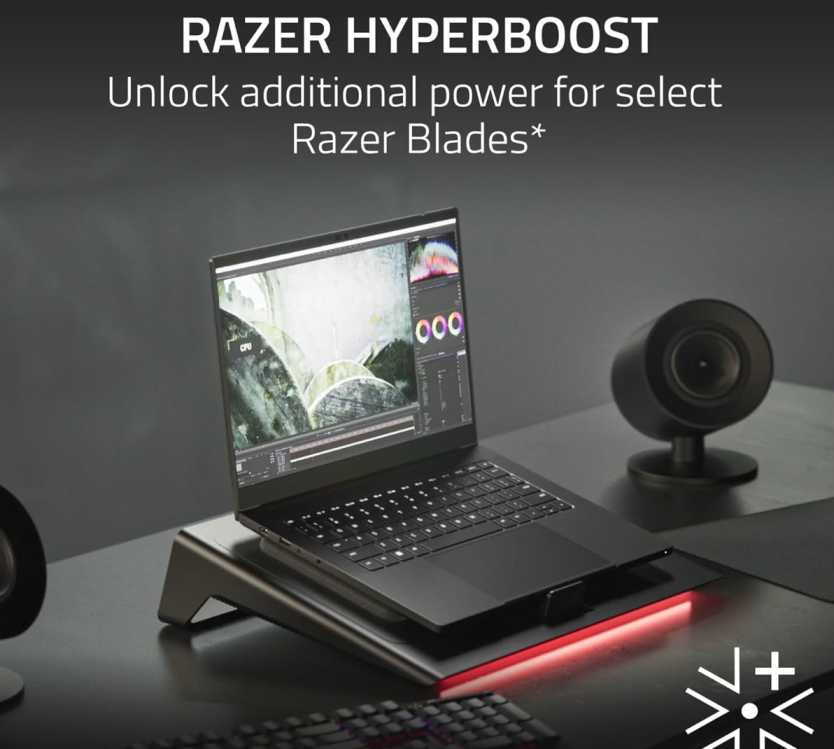
The 140mm high-speed fan (up to 3000 RPM) is powerful, but the real advantage is the smart fan control. It automatically adjusts speeds based on system load, so you don’t have to keep tweaking settings. If you prefer manual control, you can set custom fan curves using Razer Synapse.
It’s also designed to fit a wide range of laptops (14″ to 18″), and the magnetic frames with foam seals help maintain proper airflow pressure—something most cooling pads don’t offer.
Beyond cooling, it adds extra functionality. You get a 3-port USB hub, which is useful if your laptop ports are already occupied, and customizable buttons with RGB lighting, which adds to the overall experience without feeling unnecessary.
What works well
- Airtight cooling system delivers better real-world results
- Smart fan control + custom curves for flexibility
- High-speed 3000 RPM fan for strong airflow
- Fits multiple laptop sizes (14″–18″)
- Extra USB ports for connectivity
What to consider
- Premium pricing compared to regular cooling pads
- Slightly bulky and heavier than basic options
- Best performance mainly with compatible Razer laptops
Overall, if you want the most effective cooling solution for the Razer Blade 16, this is easily one of the top choices. It’s not just a cooling pad—it’s a performance-focused accessory that actually helps your laptop run better under load.
Tilted Nation Gaming Laptop Cooling Pad
Best for: Balanced cooling, ergonomics, and value
If you don’t want to spend premium money but still want solid cooling performance with extra features, this is a strong mid-range option in the Best Cooling Pads for Razer Blade 16.
The cooling performance here is surprisingly good for the price. With fan speeds up to 2800 RPM, it can handle heat during gaming or heavy workloads without struggling. It’s not as advanced as pressure-based cooling systems, but for most users, it delivers noticeable temperature improvement.
One thing that makes this stand out is the adjustability. You get 7 tilt levels (20°–40°), which actually helps with posture during long sessions. It’s not just about cooling—it also improves how you use your laptop daily.
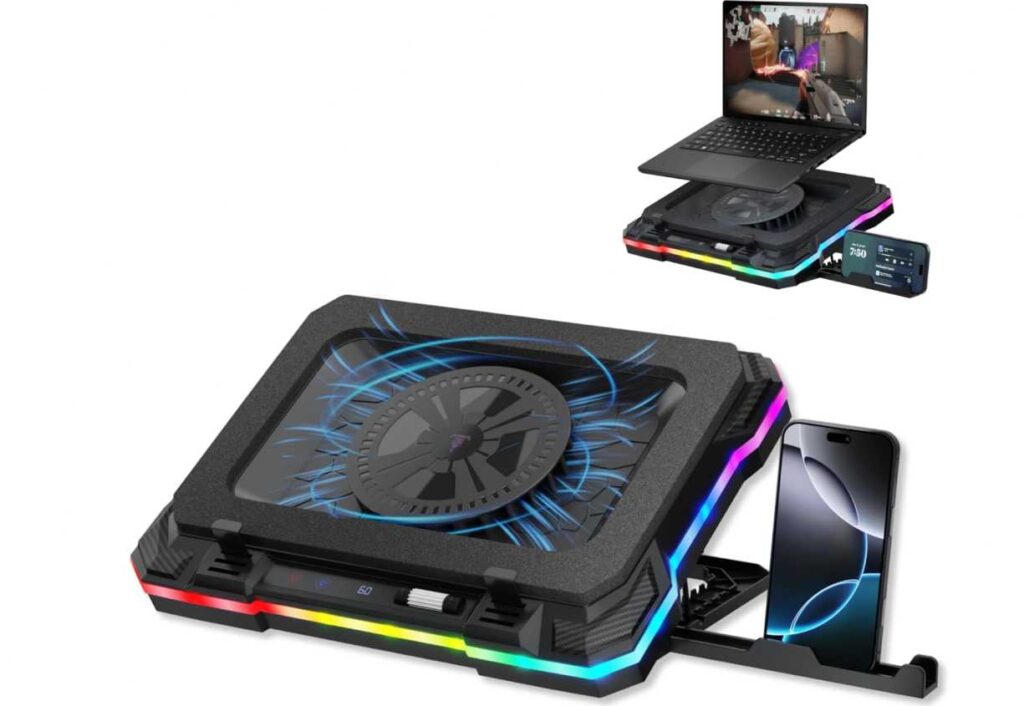
Another big advantage is the built-in USB hub. With 2 USB-A and 2 USB-C ports, you can connect accessories easily without relying only on your laptop. For Razer Blade 16 users with limited ports, this is genuinely useful.
There are also some thoughtful extras like the phone holder, which keeps your phone visible while gaming or working, and customizable RGB lighting if you care about setup aesthetics.
What works well
- Strong fan speeds (up to 2800 RPM) for effective cooling
- Adjustable height (7 levels) improves comfort
- 4-port USB hub (USB-A + USB-C) adds connectivity
- Good value for money compared to premium options
- Extra features like phone holder and RGB lighting
What to consider
- No sealed or pressure-based cooling system
- Build quality is decent but not premium
- RGB may not appeal to everyone
Overall, if you want a feature-packed cooling pad without spending too much, this is a practical choice in the Best Cooling Pads for Razer Blade 16. It offers a good mix of cooling, comfort, and usability for everyday gaming and work.
FORCHN Turbo Cooling Pad (High-Speed Fan)
Best for: Aggressive cooling performance with adjustable control
If your Razer Blade 16 runs hot during gaming or heavy workloads, this is the kind of cooling pad that focuses purely on maximum cooling power. It’s not subtle—and that’s exactly the point.
What sets this apart in the Best Cooling Pads for Razer Blade 16 is the industrial-grade turbofan setup. Instead of standard fans, it uses a high-speed turbo system (up to 3300 RPM) combined with sealed foam design, which helps push air more directly into the laptop. The result is stronger cooling compared to typical open-air pads.
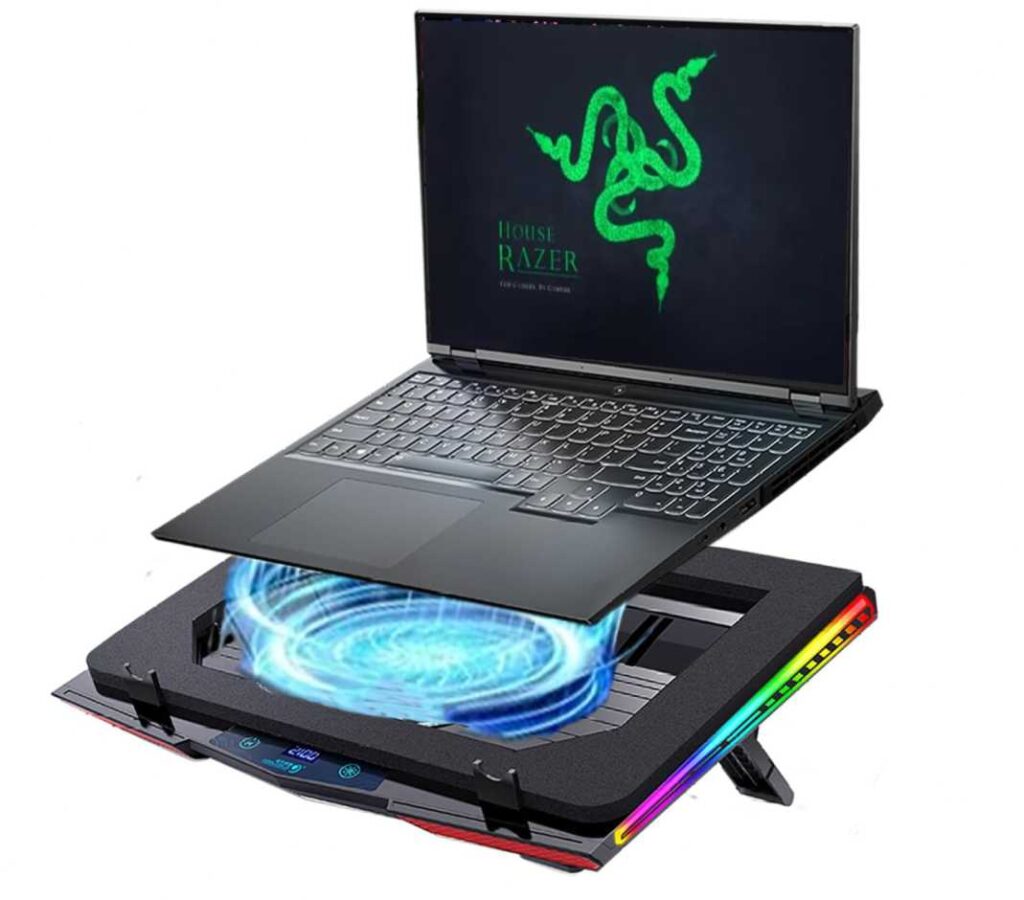
You also get fully adjustable fan speeds, so you can dial it down for quieter use or push it to max when gaming. The touch controls and LED display make it easy to manage settings without interrupting what you’re doing.
Another thing worth noting is the 360° cooling approach. It doesn’t rely heavily on exact vent alignment, so it works well even if your laptop’s airflow design isn’t perfectly matched.
That said, power comes with a trade-off. At higher speeds, it gets noticeably loud (up to ~65dB). So if you’re sensitive to noise, this might not be the best fit.
What works well
- Ultra-powerful turbofan cooling (up to 3300 RPM)
- Sealed airflow design improves cooling efficiency
- Adjustable speed control for different use cases
- Touch controls + LED display for easy operation
- Strong performance for gaming and heavy workloads
What to consider
- Can get loud at high speeds
- Bulkier and more performance-focused design
- Not ideal for quiet environments
Overall, if your goal is maximum cooling performance over comfort or silence, this is one of the more powerful options in the Best Cooling Pads for Razer Blade 16. It’s built for users who push their laptop hard and need cooling that can keep up.
PHAPPY Turbo Cooling Pad (High-Speed Booster Fan)
Best for: Users who just want the strongest cooling possible
This is not a normal cooling pad. It’s built for one thing—pushing as much air as possible into your laptop. If your Razer Blade 16 gets hot during gaming or heavy work, this kind of setup makes a real difference.
The biggest highlight is the turbofan system that goes up to 3500 RPM. That’s much higher than standard cooling pads, and you can feel it in actual use. Instead of gentle airflow, it delivers focused, high-pressure cooling, especially because of the sealed design that directs air straight into the laptop vents.
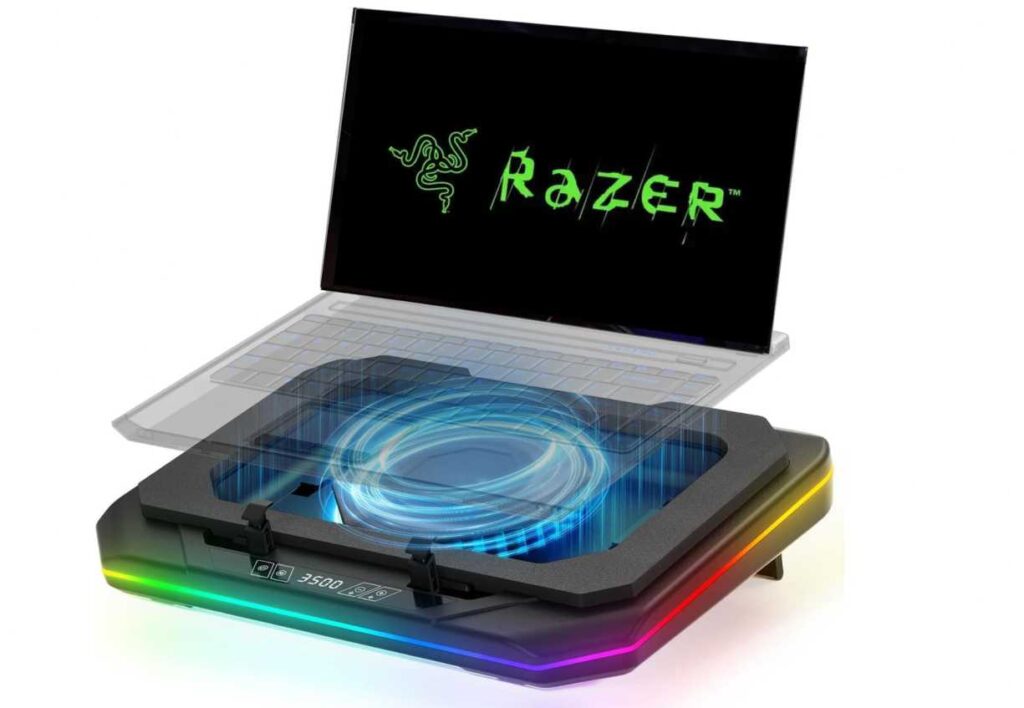
You’re not stuck with full power all the time though. The adjustable speed control lets you lower the fan when you’re just browsing or working, and increase it when things heat up. The touch controls and display make it quick to adjust without overthinking.
Another thing that’s easy to overlook—but useful—is the dust filter. Over time, laptops collect dust internally, especially gaming ones. This helps reduce that, which is a small but practical benefit.
It also comes with USB ports, so you can plug in accessories without losing connectivity on your laptop. And the adjustable frame helps keep larger laptops stable, which matters for bigger devices like the Blade 16.
Now the honest part—this thing is not quiet. When you push it to higher speeds, the noise is noticeable. It’s the trade-off for getting this level of cooling.
What works well
- Very powerful cooling performance (feels different from basic pads)
- High-speed fan up to 3500 RPM
- Sealed airflow design actually improves results
- Adjustable speed depending on your usage
- Useful extras like dust filter and USB ports
What to consider
- Noise increases at higher speeds
- Bulkier than simple cooling pads
- Not designed for minimal or quiet setups
If you just want something simple and quiet, this isn’t it. But if your goal is to keep temperatures down during heavy use, this is one of the more effective options in the Best Cooling Pads for Razer Blade 16.
ChillCore RGB Gaming Cooling Pad (K1)
Best for: Budget-friendly cooling with strong airflow and comfort features
If you want something affordable that still delivers noticeable cooling and better ergonomics, this is an easy pick in the Best Cooling Pads for Razer Blade 16—especially if you don’t want to spend a lot.
The main highlight is the 5.5-inch turbofan, which is larger than what you usually get at this price. It pushes a decent amount of air, and with adjustable speeds (300–2200 RPM), you can balance between cooling and noise depending on what you’re doing.
Where this cooling pad really feels practical is in daily use. The 7 adjustable height levels make a big difference if you spend long hours gaming or working. It’s not just about cooling—it actually improves your posture and comfort.
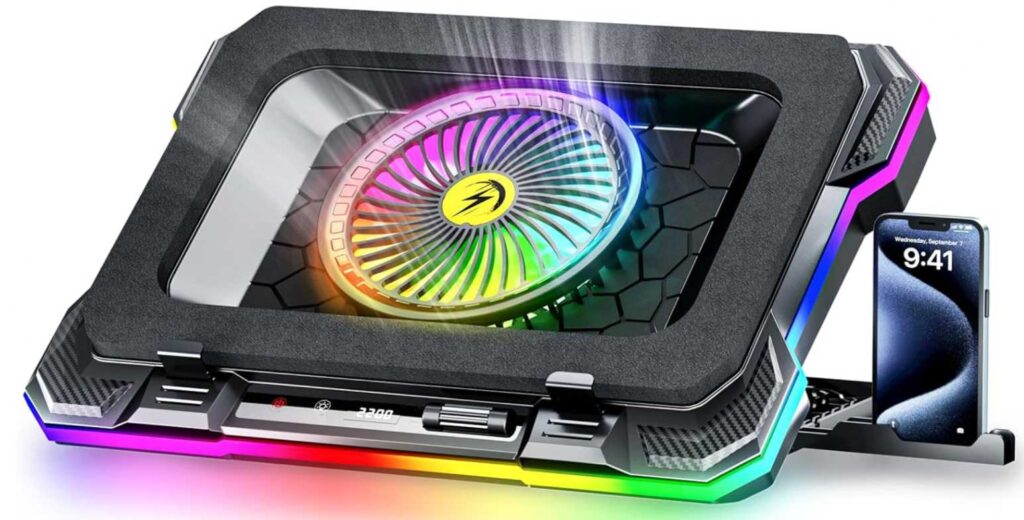
You also get some extra touches like a phone holder, which is surprisingly useful when you want to keep notifications or calls in view, and RGB lighting if you like a gaming-style setup.
Noise levels are fairly controlled at lower speeds, so it doesn’t feel distracting during normal tasks. At higher speeds, you’ll hear it—but that’s expected with most cooling pads in this range.
What works well
- Large 5.5-inch fan for better airflow at this price
- Adjustable fan speed for different use cases
- Ergonomic height adjustment (7 levels)
- Affordable pricing compared to other options
- Useful extras like phone holder and RGB lighting
What to consider
- Not as powerful as turbo or sealed cooling pads
- RGB lighting may not appeal to everyone
- Build quality is decent, not premium
If you’re looking for something budget-friendly that still improves cooling and comfort, this is a solid option in the Best Cooling Pads for Razer Blade 16. It’s simple, practical, and does more than you’d expect at this price.
IETS GT600 RGB Cooling Pad (Turbo-Fan)
Best for: High-end cooling with pressure-based airflow (serious users)
If you’re looking for something that goes beyond normal cooling pads, this is where things start to feel next level. The IETS GT600 isn’t just pushing air—it’s built to force airflow into your laptop, which makes it one of the more effective options in the Best Cooling Pads for Razer Blade 16.
The biggest difference here is the sealed foam + turbo-fan combination. Most cooling pads lose air around the sides, but this one locks the airflow in place, so the cool air actually goes inside your laptop vents instead of escaping. In real use, that translates to better temperature drops, especially during gaming.

The 5.5-inch turbo fan is powerful and creates strong air pressure, not just airflow. That’s why it works well even with laptops that have tricky vent placements like the Blade 16.
Build quality also feels a step above. The metal body gives it a solid, durable feel, and the adjustable sealing foam (magnetic) helps you get a better fit depending on your laptop size.
There are also a lot of practical features packed in:
- USB hub for connectivity
- Adjustable height levels for comfort
- Front control panel + display for easy control
- Dust filter to reduce internal buildup over time
And unlike some RGB-heavy designs, here you can actually turn the lighting off, which is a nice touch.
Now, the trade-off—this is a performance-focused cooling pad, and it behaves like one. At higher speeds, it gets loud (up to ~65dB). So if you want silent operation, this isn’t the right pick.
What works well
- Sealed airflow design delivers real cooling improvement
- Powerful 5.5-inch turbo fan with strong air pressure
- Premium metal build quality
- Adjustable fit with magnetic foam seal
- Extra features like USB hub, display, dust filter
What to consider
- Noticeable noise at high speeds
- Heavier and bulkier than basic cooling pads
- More expensive than standard options
If you want something simple, this is overkill. But if you’re trying to control heat on a high-performance laptop like the Razer Blade 16, this is one of the most effective cooling pads you can get in the Best Cooling Pads for Razer Blade 16 lineup.
llano V12 Gaming Cooling Pad (Turbo Fan)
Best for: Strong cooling with better balance between power and usability
Some cooling pads focus only on raw power, but the llano V12 tries to balance cooling performance, control, and everyday usability. That’s what makes it a strong option in the Best Cooling Pads for Razer Blade 16.
At its core, you get a 5.5-inch turbo fan with sealed foam design, which means it doesn’t just blow air—it pushes it directly into the laptop vents. This results in noticeably better cooling compared to standard open pads, especially during gaming or heavy workloads.
What makes this different from similar turbo-style pads is the control system. Instead of fixed steps, you get a scroll wheel for precise fan adjustment, so you can fine-tune cooling based on what you’re doing—quiet for normal use, powerful when needed.

Another practical feature is the dust filter system. Over time, dust buildup can reduce your laptop’s performance, and this helps prevent that. It’s a small addition, but it actually improves long-term usability.
You also get a 3-port USB hub, which is useful for connecting accessories without relying only on your laptop ports. The build feels solid, and it supports larger laptops comfortably.
In terms of comfort, it offers adjustable tilt angles, helping reduce strain during long sessions. It’s not overly complex, but it does the job well.
What works well
- Turbo fan + sealed airflow improves real cooling performance
- Precise speed control (scroll wheel) instead of fixed levels
- Dust filter system for long-term protection
- 3-port USB hub adds convenience
- Good balance of power and usability
What to consider
- Noise increases at higher speeds
- Slightly bulky design
- RGB may not be for everyone
If you want something that’s powerful but still practical for daily use, this is a well-rounded choice in the Best Cooling Pads for Razer Blade 16. It gives you strong cooling without feeling overly complicated or extreme.
Final Thoughts
Picking the Best Cooling Pads for Razer Blade 16 really comes down to how hard you push your laptop—and how much cooling you actually need.
If you’re running heavy games, 4K editing, or long sessions, high-performance options with turbo fans and sealed airflow designs are worth it. They make a real difference in temperature and help maintain consistent performance.
For more balanced use, cooling pads with adjustable speeds, ergonomic design, and decent airflow are often the smarter choice. They keep your laptop cool without adding too much noise or bulk.
And if you’re on a budget, even simpler cooling pads can still improve airflow and comfort—just don’t expect extreme temperature drops.
The key is simple: don’t just pick the most powerful option—pick the one that matches your usage. Whether you prioritize maximum cooling, quieter operation, or better ergonomics, there’s a right fit for your setup.
Choose wisely, and your Razer Blade 16 will run cooler, more stable, and last longer under pressure.