
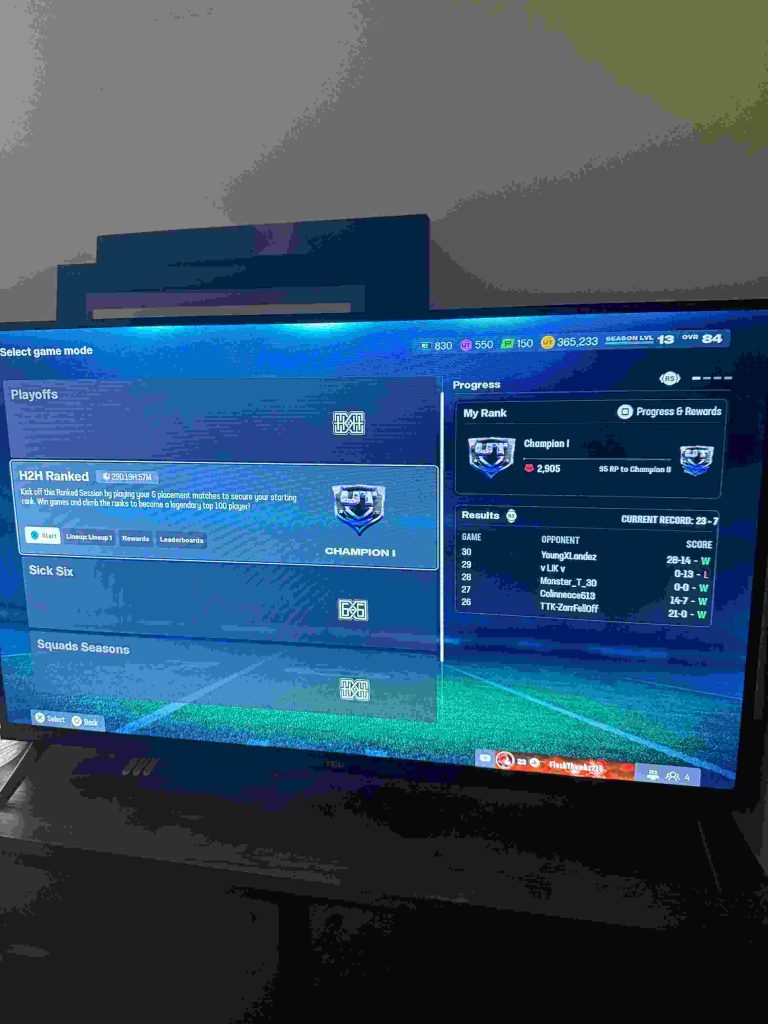
Many players in Madden NFL 26 Ultimate Team (MUT 26) have reported that their ranked rewards are missing, even after successfully completing all placement matches and achieving a top rank.
This frustrating issue often appears as MUT 26 champion rewards not received, or being downgraded to a lower-tier pack, such as a hero pack, instead of the expected champion fantasy pack. For competitive players, this not only affects progression but can also impact their ability to compete in future ranked sessions.
Madden NFL 26 Ultimate Team – Missing Ranked Rewards Explained
One of the main causes of this problem is the way MUT 26 handles reward distribution. In some cases, the game requires players to start a new session or match before rewards are properly delivered. If a player quits immediately after the season ends or fails to launch another game, the system may fail to register the completed rank, resulting in lost ranked rewards in MUT 26.
Server synchronization and account issues are another common factor. If your profile does not fully sync with EA servers at the end of the ranked season, the game may fail to recognize your final standing. This problem is especially common during peak server times, maintenance periods, or when playing across multiple platforms. Players often search for solutions using phrases like “Madden 26 Ultimate Team rewards missing,” “lost ranked rewards MUT 26,” or “MUT 26 champion rewards not received.”
Additionally, some minor bugs can occur after patch updates, where cached data or session conflicts prevent the proper delivery of champion rewards. Understanding these causes is the first step in resolving the issue and recovering your rightful rewards.
In the following sections, we will cover step-by-step fixes, temporary workarounds, checking server sync, and reporting to EA support. These solutions are designed to help players reclaim their MUT 26 champion fantasy packs and ensure they continue progressing in Ultimate Team without being penalized for technical errors.
Champion Ranked Rewards Missing After Season Completion
Many Madden NFL 26 Ultimate Team (MUT 26) players have reported that their champion ranked rewards are missing after completing a season. Even after finishing all placement matches and achieving a top rank, some players notice that their expected champion fantasy pack reward is not delivered. Instead, they may receive a lower-tier reward or nothing at all, which can be incredibly frustrating for those who invested time and effort to earn their rank.
This issue typically occurs due to reward distribution glitches. In some cases, the system requires players to start a new game or session before recognizing the completed rank. Failing to do so can result in ranked session rewards not given or being mistakenly downgraded. Players often describe this as “didn’t get season ranked rewards”, highlighting the disconnect between their achieved rank and the rewards actually received.
Another common factor is server synchronization and account issues. If the player’s profile did not properly sync with EA’s servers at the end of the season, the game may fail to register their final standing. This can happen during peak server times, scheduled maintenance, or when playing across multiple platforms, leading to lost or downgraded rewards.
For many players, phrases like “champion ranked rewards missing”, “didn’t get season ranked rewards”, and “ranked session rewards not given” are common search queries while seeking solutions. Understanding that these issues often stem from server or session recognition problems is the first step in resolving them.
In the next sections, we’ll explore step-by-step fixes, temporary workarounds, and reporting procedures to help players recover their missing champion rewards, claim their rightful fantasy packs, and continue progressing in MUT 26 without losing hard-earned rank rewards.
Why Ranked Rewards Were Downgraded to a Hero Pack
In Madden NFL 26 Ultimate Team (MUT 26), some players experience their ranked rewards downgraded to a hero pack instead of receiving the expected champion pack. For example, an 88 OVR hero pack is given instead of the 89 OVR champion reward. This issue usually occurs because the game only grants rewards after players start a new game or session. If you quit immediately after the season ends or fail to trigger a new match, the system may not register your champion rank properly.
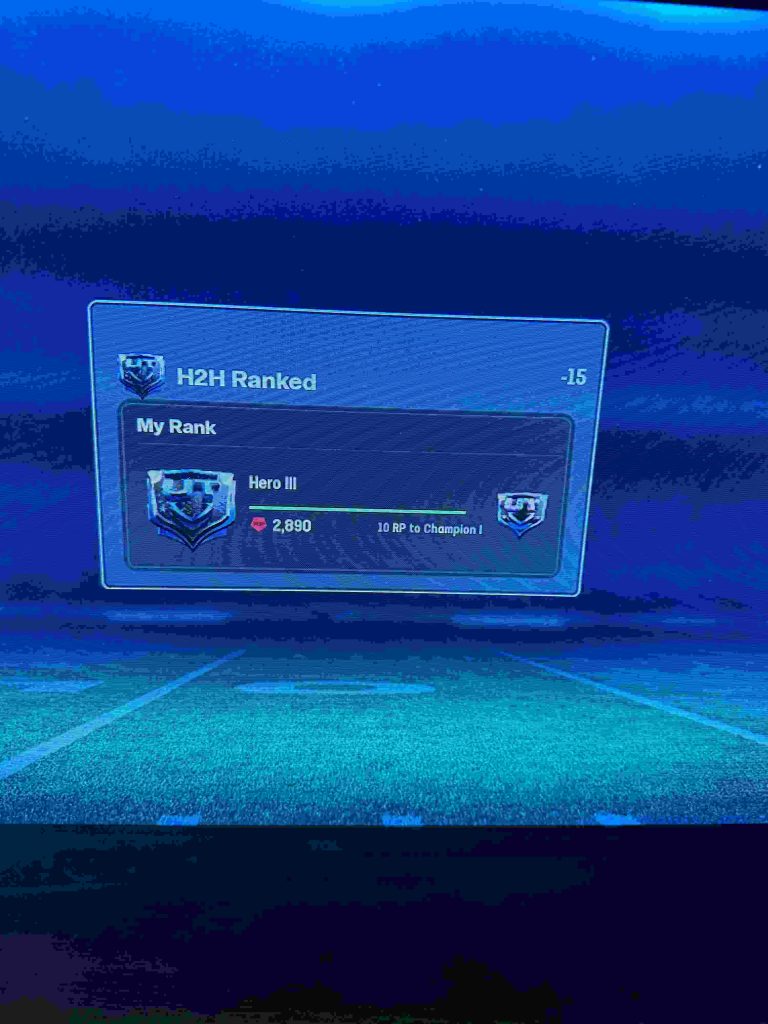
Other contributing factors include minor server sync issues, account connection problems, or temporary glitches in reward distribution. Players searching for solutions often use terms like “ranked rewards downgraded to hero pack,” “88 OVR hero pack instead of 89 OVR champion,” or “reward only given after starting game.” Understanding this helps players know why they didn’t receive the correct pack and what steps to take next to claim their rightful rewards.
Step-by-Step Fixes to Claim Missing Champion Rewards
Experiencing missing champion rewards in Madden NFL 26 Ultimate Team (MUT 26) can be extremely frustrating, especially after completing all your placement matches and finishing at the top of your ranked session. Many players report that they didn’t get champion pack rewards or were given lower-tier hero packs instead of their rightful champion fantasy packs. The good news is that there are several steps you can take to claim champion rewards after season and resolve this issue. This guide will walk you through all the necessary steps to recover your rewards.
1. Start a New Game or Session
Often, the game requires players to start a new session before rewards are delivered. If you quit immediately after the season ended, the system may not register your champion rank properly, which can result in champion rewards not received or a downgrade to a hero pack.
- Launch Madden NFL 26 and start a quick match or practice session.
- After entering the match lobby, exit normally and return to the main menu.
- Check your Ultimate Team inventory to see if the champion fantasy pack has appeared.
Players frequently search for phrases like “reward only given after starting game” or “start game to get rewards”, highlighting this as a common solution.
2. Check Your Ranked Session Progress and Points
Before contacting support, confirm that your ranked session points reflect your final position. Quitting mid-match or during certain menus can sometimes cause lost champion rank rewards.
- Navigate to your Ultimate Team ranked stats.
- Verify that your champion rank is correctly recorded.
- If points were deducted incorrectly, take screenshots for reference.
This documentation is crucial when filing a support case with EA.
3. Clear Cache and Restart Your Console or PC
Cached data or session conflicts may prevent the game from properly recognizing your season completion. Clearing cache can often resolve this issue:
For Console Players:
- Power off your console completely.
- Unplug it for 30 seconds and restart.
For PC Players:
- Close Madden NFL 26 completely.
- Clear temporary files or restart your launcher (Steam/EA app).
After restarting, log back in and check if your missing champion fantasy pack reward appears.
4. Sync Your Account with EA Servers
Sometimes the champion rewards not received issue occurs due to server or account sync problems. Make sure your profile is fully connected:
- Ensure your EA account is linked correctly to your platform (Xbox, PlayStation, Steam).
- Check for any server notifications on the EA server status page.
- Re-login to your EA account if necessary to force a sync.
Players experiencing ranked rewards downgraded to hero pack often find that syncing their account resolves the discrepancy.
5. Check for Pending Game Updates
EA frequently releases patches to fix known issues in MUT 26, including reward distribution problems.
- Navigate to your game launcher or console store and verify that Madden NFL 26 is fully updated.
- Install any pending updates, restart the game, and check your Ultimate Team inventory for missing rewards.
6. Use Temporary Workarounds
While waiting for a permanent fix, some players use workarounds to regain access to their champion rewards:
- Create a temporary offline Ultimate Team session.
- Start a casual or practice match to trigger the reward check system.
- Some players report that playing a small number of online matches after the season ends prompts the system to deliver the missing pack.
7. Document Everything for EA Support
If none of the above steps work, contact EA Support to file a case for your missing champion fantasy pack reward. Include the following:
- Screenshots of your final ranked session and points.
- Images showing the hero pack received instead of your champion pack.
- Platform and account details (Xbox, PlayStation, Steam).
- Any troubleshooting steps you have already attempted.
Searching for “support missing champion rewards” or “how to claim champion rewards after season” will often lead players directly to the EA help portal.
8. Monitor EA Server Status
Occasionally, ranked session rewards not given can be due to server outages or maintenance. Check:
- EA server status page for any downtime.
- Social media channels like Twitter or EA forums for official updates.
- Avoid making major progress or quitting games during known server maintenance windows to prevent lost champion rank rewards.
9. Prevent Future Reward Issues
To reduce the likelihood of missing rewards in future seasons:
- Always complete at least one new session after the season ends.
- Avoid quitting immediately from menus or post-match screens.
- Keep your game fully updated and your console/PC synced with EA servers.
- Backup screenshots of your final rankings and rewards if possible.
10. Community Discussions and Crowdsourced Tips
Many players share solutions on forums, Reddit, and EA Answers HQ. Searching for “champion ranked rewards missing”, “didn’t get champion pack rewards”, or “lost champion rank rewards” can provide additional workarounds and updates from other MUT 26 players.
11. Verify Platform-Specific Restrictions
Sometimes, missing rewards occur due to platform-specific issues:
- Crossplay conflicts: Players on Steam vs. console may experience synchronization issues.
- Console-specific bugs: Xbox or PlayStation may have temporary glitches affecting reward delivery.
- Solution: Ensure your platform is fully updated, check for firmware updates, and avoid switching platforms mid-season.
12. Re-Link Your EA Account
If your MUT 26 champion rewards not received, it may be caused by a broken link between your EA account and platform:
- Go to your EA account settings.
- Re-link your Xbox, PlayStation, or Steam account.
- Relaunch the game and check if rewards appear.
Re-linking often fixes lost champion rank rewards caused by miscommunication between your profile and EA servers.
13. Reinstall the Game
Corrupted game files can prevent ranked session rewards from being given:
- Backup your save files if needed.
- Uninstall Madden NFL 26 completely.
- Reinstall the game and log in with the same EA account.
Many players have successfully retrieved their missing champion packs after a clean reinstall.
14. Check Your Inventory Carefully
Sometimes rewards appear, but players don’t notice them immediately:
- Open your Ultimate Team pack inventory.
- Check for champion fantasy packs, hero packs, or unclaimed items.
- Some rewards may be hidden under “unassigned items” or similar menus.
15. Avoid Quitting During Reward Distribution
Quitting during post-season menus can trigger lost champion rank rewards:
- Finish all post-match or post-season prompts completely.
- Avoid alt+f4 or forcing a shutdown immediately after a session.
- Ensure the game confirms reward delivery before leaving.
16. Use EA’s Reward Recovery Tool (If Available)
EA occasionally releases tools or in-game prompts to recover lost ranked rewards:
- Navigate to the rewards section.
- Check for prompts like “claim missing rewards”.
- Follow the on-screen instructions to recover your champion fantasy pack.
17. Wait for Server Refresh
Sometimes the reward delivery system is delayed due to server issues:
- Log out and wait a few hours or overnight.
- Check EA’s server status for updates on delays.
- Upon the next login, rewards may appear automatically.
18. Contact EA Support via Multiple Channels
If fixes above fail, escalate your case:
- Use live chat, email, or phone support.
- Include screenshots, session history, and troubleshooting attempts.
- Reference keywords like “support missing champion rewards” to help agents locate your issue quickly.
19. Keep Proof of Your Rank
For future issues, maintain documentation:
- Screenshot your final ranked position, points, and completed matches.
- Keep track of your reward inventory before and after seasons.
This evidence helps EA verify claims and ensures faster resolution.
20. Join Community Forums for Updates
Players often share solutions on Reddit, EA Answers HQ, or Discord:
- Search threads with “didn’t get champion pack rewards” or “lost champion rank rewards.”
- Follow EA announcements about reward fixes or patch updates.
- Some users share unofficial workarounds or tips that aren’t in official guides.
21. Double-Check Cross-Platform Sessions
If you play MUT 26 across different platforms (e.g., Steam and Xbox):
- Make sure you always complete your ranked season on the same platform.
- Switching mid-season can prevent proper reward delivery.
- Check that your EA account is linked to the platform where you earned your rank.
22. Verify Your Ultimate Team Packs Inventory
Sometimes rewards are present but hidden in “unassigned items”:
- Open MUT 26, navigate to the packs inventory.
- Look for unopened champion fantasy packs or hero packs.
- Claim them manually if required.
23. Clear Persistent Cache
Corrupted cache files can block reward recognition:
- On consoles: Power cycle the system and clear temporary files.
- On PC: Delete temporary EA/MUT folders and restart the launcher.
- Relaunch the game to check if missing champion packs appear.
24. Avoid Network Interruptions During Reward Processing
- Ensure a stable internet connection during post-season and reward screens.
- Avoid disconnecting mid-session, which can trigger lost champion rank rewards.
25. Use Different Internet Connection (Optional)
Some players have fixed missing rewards by switching to a wired connection or a different Wi-Fi network:
- Wired connections reduce packet loss or server errors.
- Re-log into your EA account after switching networks.
26. Wait for Official Patch Releases
EA occasionally issues hotfixes or patches to address reward distribution issues:
- Check for game updates regularly.
- Follow EA’s official Twitter or forum for announcements.
- Installing these patches may automatically deliver missing champion rewards.
27. Avoid Multiple Accounts During Ranked Seasons
If you use multiple EA accounts on the same platform:
- Only play the ranked season with your main account.
- Logging in with secondary accounts can interfere with reward allocation.
28. Test Reward Delivery With a Friend
Some players confirm rewards by playing a small online match after season ends:
- Invite a friend to a casual or ranked session.
- Complete a match and return to MUT 26 inventory.
- Often triggers delayed champion pack delivery.
29. Check for Regional or Server-Specific Delays
- Some regions experience slower reward delivery due to server load.
- If rewards don’t appear immediately, log out and try again a few hours later.
30. Keep Detailed Records for Future Claims
- Screenshot your ranked points, placement matches, and any received packs.
- Maintain a list of troubleshooting steps you attempted.
- This will help EA Support verify and resolve missing champion rewards more quickly.
Temporary Workarounds for Lost Champion Fantasy Pack Rewards
Many Madden NFL 26 Ultimate Team (MUT 26) players report receiving a missing champion fantasy pack reward after completing ranked seasons. While official fixes may take time, several temporary workarounds can help recover these rewards. One of the most effective methods is to start a new game or session. Often, the system only recognizes your champion rank once a new match is loaded. By playing a quick match, whether online or offline, you can trigger the reward system, sometimes restoring the lost pack.
Other workarounds include checking your Ultimate Team inventory, especially the “unassigned items” section, as the reward may have been delivered but not automatically assigned. Some players have successfully regained lost champion rank rewards by relaunching the game, logging in and out of their EA account, or switching temporarily to a wired internet connection for better server sync.
While these fixes are temporary, they provide immediate relief for players who cannot wait for an official patch. If the reward still does not appear, document your steps and prepare to escalate the issue to EA Support.
Checking Server Status and Account Sync Issues
A common reason for ranked session rewards not given in MUT 26 is server or account synchronization issues. EA servers occasionally experience downtime or delays, which can prevent your final rank from being recognized, resulting in champion ranked rewards missing. Players often encounter this problem when multiple players are trying to claim rewards at peak times, during scheduled maintenance, or after a new game patch.
To check server status, visit the official EA server status page or monitor Twitter and EA forums for updates. Ensuring your EA account is fully linked to your platform is essential. Re-login or relink your account to synchronize any unregistered progress. This step often resolves reward discrepancies before reaching out to support.
For persistent issues, take screenshots of your final ranking and reward inventory to show that your ranked session rewards were not given. Proper documentation will help EA Support address your case more efficiently and ensure that your champion rewards are restored.
Reporting Missing Champion Rewards to EA Support
If all workarounds fail, reporting your missing champion rewards to EA Support is the next step. Begin by gathering evidence: screenshots of your final ranked session, proof of your completed matches, and details of your platform (Xbox, PlayStation, Steam). Clearly describe the issue, including that you didn’t get season ranked rewards or that the champion rewards were not received.
Submit your report through the EA Help website or live chat. Using precise keywords like “support missing champion rewards” in your report helps the support team identify your case quickly. Provide a chronological account of what you attempted, including restarting the game, checking inventory, starting new sessions, and syncing your account.
EA Support may escalate the case if necessary, and documented evidence improves the likelihood of receiving your lost champion rank rewards. Regularly check your inbox or EA messages for updates on the case.
Preventing Ranked Reward Issues in Future Seasons
To avoid champion rewards not received in future MUT 26 seasons, proactive steps are key. Always start at least one new session after completing the ranked season to ensure your champion rank is registered. Avoid quitting immediately from menus or post-match screens.
Keep your game fully updated, and ensure your EA account is correctly linked to your platform. This helps prevent issues like ranked rewards downgraded to hero pack. Maintaining a stable internet connection, preferably wired, reduces the likelihood of server-related glitches.
Document your rank, points, and rewards each season. Having screenshots ensures you can provide evidence if issues arise, improving the chances of successfully claiming champion rewards after season.
Community Discussions and Player-Shared Solutions
The MUT 26 community is an excellent resource for troubleshooting missing champion rewards. Many players share tips and solutions for when champion ranked rewards are missing. Forums such as Reddit, EA Answers HQ, and Discord channels often have step-by-step guides for recovering lost champion rank rewards.
Players commonly recommend starting a new game, relinking EA accounts, clearing cache, or checking the “unassigned items” inventory. Crowdsourced solutions provide insights into temporary workarounds and platform-specific fixes. Monitoring these discussions also helps identify if a widespread server issue is affecting rewards.
FAQ – Common Questions About Missing Champion Ranked Rewards
Q1: Why didn’t I get my champion pack reward?
A1: Often due to quitting immediately after the season, server sync issues, or account linking problems.
Q2: Can I claim champion rewards after the season?
A2: Yes, start a new session, check your inventory, or contact EA Support if rewards are still missing.
Q3: Who do I contact for missing champion rewards?
A3: EA Support via live chat, email, or the EA Help website, providing screenshots and detailed account info.
Conclusion – How to Handle Missing Champion Ranked Rewards
Missing MUT 26 champion rewards can be frustrating, especially when 88 OVR hero packs are given instead of 89 OVR champion packs. By starting a new session, syncing your account, checking inventory, clearing cache, and documenting everything, you can recover most lost champion rank rewards. If all else fails, reporting to EA Support ensures your case is addressed.
Following proactive measures, including completing post-season sessions, keeping your game updated, and monitoring server status, will minimize future issues and ensure you reliably receive your earned rewards.
For product like rohit sharma t shirt for NFL contact us.