
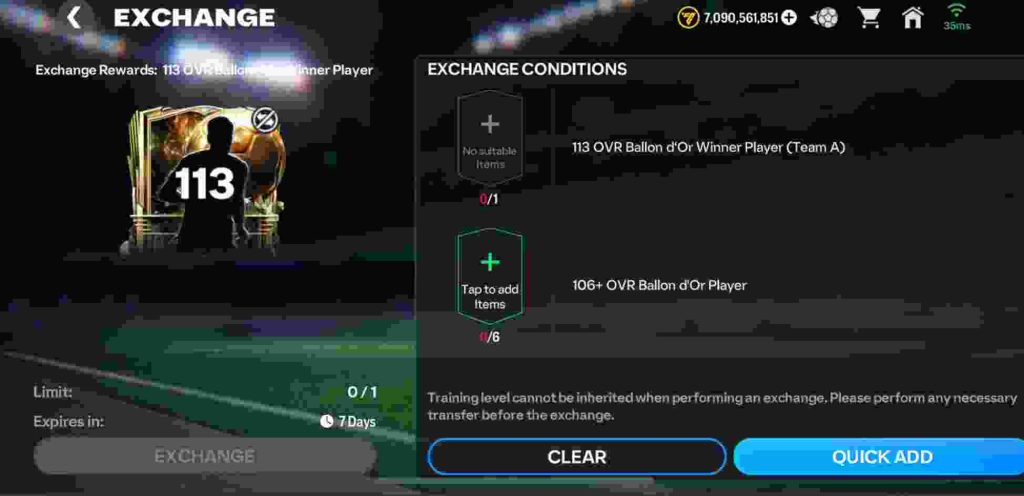
Many EA FC Mobile players are frustrated that their 113 Yashin Ballon d’Or winner card cannot be placed into the exchange, even though the requirement clearly states “113 Ballon d’Or winner player.” At first glance, this looks like a bug, but the issue comes down to card eligibility and tradability rules in the exchange system.
The 113 Ballon d’Or Exchange only accepts certain versions of the player cards. In most cases, EA has locked untradeable or special reward versions of Ballon d’Or players from being submitted. For example, if your 113 Yashin was earned through an event path, login rewards, or objectives, it is considered “untradeable” and therefore will not appear as an option in the exchange. The system only accepts tradable versions of the card pulled from packs or the market.
This is why your Yashin doesn’t show up or isn’t accepted, even if he’s not in your squad. It isn’t necessarily a glitch — it’s by design. If you want to complete the exchange, you’ll need a tradable 113 Ballon d’Or card version of Yashin or another eligible player.
Does the 113 Ballon d’Or Exchange Require a Tradable Player Card?
One of the biggest frustrations EA FC Mobile players are facing is that their 113 Ballon d’Or winner cards — like Yashin 113 — cannot be used in the Ballon d’Or Exchange. At first, many thought this was a bug or glitch, since the exchange clearly lists a “113 Ballon d’Or winner player” as the requirement. However, after testing and community discussions, it has become clear that the exchange requires a tradable card version of the player, not an untradeable reward card.
If you pulled your 113 Ballon d’Or Yashin from the market or from a pack, it is tradable and should appear in the exchange requirement slot. But if you earned Yashin through event rewards, login milestones, or objectives, that version is untradeable and therefore will not be accepted by the system. This is why some players see their 113 cards appear for exchange while others cannot use theirs.
The logic behind this is likely tied to EA’s market economy. By restricting exchanges to tradable cards, EA ensures that exchanges don’t devalue special event rewards and that players still need to engage with packs or the transfer market to complete high-level exchanges. While this may feel unfair, it’s consistent with how many other exchanges in FC Mobile work.
So to answer the question directly: Yes, the 113 Ballon d’Or Exchange requires a tradable player card. If your Yashin doesn’t show up, it means you have the untradeable version. Unfortunately, there’s no workaround — you’ll need to obtain a tradable 113 Ballon d’Or card from the market or pack pulls to complete the exchange.
Why Is My 113 Yashin Not Eligible for Exchange in EA FC Mobile?
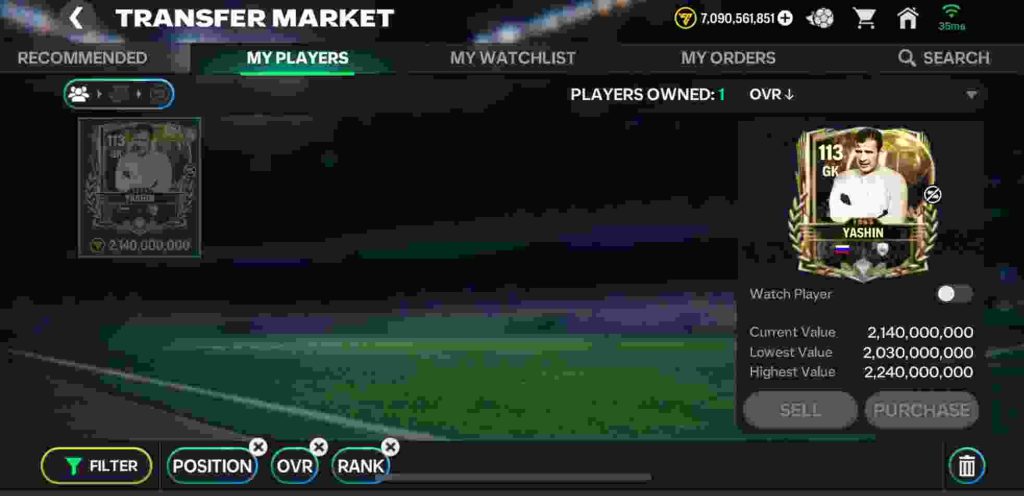
Many players in EA FC Mobile are confused and frustrated when their 113 Yashin Ballon d’Or card doesn’t work in the Ballon d’Or exchange. On paper, the requirement looks simple: it asks for a 113 Ballon d’Or winner player. Naturally, players try to use their Yashin, but the game refuses to accept it. So why is 113 Yashin not eligible for exchange?
The main reason is that the exchange only accepts tradable versions of the 113 Ballon d’Or winner cards. If your Yashin came from event rewards, login rewards, or objective milestones, that card is untradeable, which makes it ineligible for the exchange. EA has designed many exchanges this way to control the in-game economy. They don’t want free or untradeable cards to be recycled into high-value exchanges because it would disrupt the balance of rewards and market prices.
Another reason could be tied to how EA classifies different card variants. Even though two cards share the same rating and name (for example, Yashin 113), they may have different backend IDs in the system — one for market tradable cards and another for event reward cards. Only the market-tradable version is recognized by the exchange, which is why the untradeable Yashin doesn’t show up.
This isn’t technically a bug, even though many players are calling it a 113 exchange glitch. It’s simply EA’s intentional rule for the exchange requirement. The only way to complete the exchange is to acquire a tradable 113 Ballon d’Or card through the transfer market or packs.
In short: if your 113 Yashin is not accepted in the exchange, it’s because you own the untradeable version, and only the tradable version is eligible.
113 Yashin Exchange Bug or Feature – What’s Really Happening?
Players in EA FC Mobile are raising the same question: “Why can’t I put my 113 Yashin into the Ballon d’Or exchange?” At first glance, it feels like a clear 113 Yashin exchange bug, since the game requirement states: 113 Ballon d’Or winner. Naturally, Yashin fits that description, but when players try to use him, the card isn’t accepted.
So is this truly a bug, or just an intentional feature by EA?
The answer is that this is not a bug but a restriction by design. The 113 Ballon d’Or exchange requires tradable player cards, and many Yashin cards obtained through rewards, objectives, or events are untradeable. EA often separates tradable and untradeable versions of the same card, even if they look identical to players. This means your 113 untradeable Yashin is not eligible, while a 113 tradable Yashin from packs or market purchases would work.
Another point adding to confusion is EA’s poor communication. Players see the “Ballon d’Or Winner” label and assume any version counts. But behind the scenes, EA assigns different IDs to card variations, so the exchange recognizes only specific ones.
In short, the 113 Yashin exchange issue is not a glitch. It’s an intentional requirement meant to keep in-game exchanges fair and to prevent players from recycling free or reward-based cards for high-value items.
If your 113 Yashin isn’t showing in the exchange, it’s almost certainly the untradeable version. Unfortunately, the only workaround is to buy or pack a tradable 113 Ballon d’Or card to complete the exchange.
How to Fix 113 Ballon d’Or Winner Exchange Not Working
If your 113 Ballon d’Or Winner Exchange Not Working in EA FC Mobile, you’re not alone. Many players have reported being unable to submit their 113 Yashin, Benzema, or Messi cards into the Ballon d’Or exchange despite meeting all visible requirements.
While this looks like a bug, most of the time the issue comes down to EA’s backend restrictions on card types, versions, and trade status.
Here’s a complete step-by-step guide to fix the problem and understand exactly why your card isn’t showing up.
1. Check if Your Card Is Tradable
The most common reason your 113 Ballon d’Or Winner Exchange Not Working is because your card is untradeable.
EA usually locks event and reward cards to prevent them from being used in exchanges.
Only cards purchased or pulled from packs that are tradable can be submitted.
✅ Fix:
- Go to your player card details.
- If you see the label “Untradeable”, that card cannot be used.
- You’ll need to obtain a tradable version of that 113 Ballon d’Or card from the transfer market or store packs.
Example:
If you earned 113 Yashin from an event milestone, that version won’t work. But if you bought Yashin on the market, the tradable copy should appear in the exchange menu.
2. Confirm the Exact Exchange Requirement
Another major reason your 113 Ballon d’Or Winner Exchange Not Working could be because the exchange only accepts specific versions of a player.
Some 113 OVR players share the same name and rating, but only the official “Ballon d’Or Winner” version is eligible.
✅ Fix:
- Read the exchange requirement text carefully.
- Look for phrases like “Ballon d’Or Winner,” “Special Edition,” or “Icon Version.”
- Check your card’s event tag — not every 113 OVR player qualifies.
Example:
A 113-rated “Goalkeeper Yashin” from an event may not count, while the Ballon d’Or Winner Yashin (with the gold badge) does.
3. Restart and Refresh the Game
Sometimes the issue isn’t your card — it’s just a temporary display bug.
If you’ve just bought or packed the card, it might not appear until you refresh the game.
✅ Fix:
- Fully close EA FC Mobile.
- Clear app cache (on Android) or simply restart your device (iOS/Android).
- Relaunch the game and reopen the exchange menu.
Many players report that the 113 Ballon d’Or Winner Exchange Not Working glitch resolves itself after a simple restart.
4. Update EA FC Mobile to the Latest Version
EA frequently releases hotfixes to address exchange-related issues.
If your game version is outdated, it may fail to recognize certain new card templates or exchange parameters.
✅ Fix:
- Go to your App Store or Google Play Store.
- Search for EA FC Mobile.
- Tap Update if available.
- After updating, restart the app and check the exchange again.
Keeping your client updated ensures your exchanges sync properly with EA’s latest server configurations.
5. Double-Check Card Locks or Team Assignments
If your Ballon d’Or card is in your active lineup or favorited, it won’t appear as exchange-eligible.
✅ Fix:
- Remove the card from your team lineup.
- Unfavorite or unlock it in your player inventory.
- Reopen the exchange and refresh the screen.
Once unlocked, your tradable 113 card should appear in the exchange list.
6. Verify Market Versions and Tags
EA sometimes releases multiple editions of the same player — such as Prime Icon, TOTY, or Ballon d’Or editions.
Only one specific version works for the exchange.
✅ Fix:
- Open the exchange details → Tap on the player requirement.
- Check the “Item Type” or “Program” listed.
- Ensure your card matches that exact type.
If your 113 Ballon d’Or card comes from a different event, the exchange will reject it.
7. Wait for EA to Roll Out Server Sync
Occasionally, after an event or update, EA delays enabling certain exchanges.
This means even eligible cards temporarily won’t show up.
✅ Fix:
- Wait a few hours or check EA’s official X (Twitter) handle @EAFCMOBILE.
- Watch for patch announcements or sync updates.
- Retry the exchange after EA confirms maintenance is complete.
These temporary issues are common right after new event drops or patch rollouts.
8. Reinstall the Game (Advanced Fix)
If your exchange is still broken despite using a tradable card, reinstalling can clear outdated data or missing asset files.
✅ Fix:
- Backup your EA login credentials.
- Uninstall EA FC Mobile.
- Reinstall it from the official store.
- Log back in and retry the 113 Ballon d’Or exchange.
A fresh install often resolves backend data mismatches that cause exchange bugs.
9. Check Event Timers and Availability
Sometimes, the exchange expires or gets replaced with a new one, even though the screen still shows it.
✅ Fix:
- Tap the exchange info icon.
- Check if the timer is still active or expired.
- If expired, wait for EA to release the next version or rerun.
An expired or inactive exchange will always show no eligible cards.
10. Report the Issue to EA Support
If you’ve confirmed your card is tradable, correct version, and your game is updated, but it still doesn’t work — it may be an actual bug.
✅ Fix:
Go to help.ea.com and open a support ticket. Include:
- Your EA ID or Player Tag
- Platform (iOS / Android)
- Screenshots showing the error message and card details
- Mention: “113 Ballon d’Or Winner Exchange Not Working”
EA’s support team can verify if the exchange is bugged or if your card version is ineligible on their servers.
11. Remove All Filters in the Exchange Menu
Sometimes, players accidentally apply filters (like OVR, position, or nationality) that hide eligible cards from the exchange screen.
✅ Fix:
- Open the exchange menu.
- Tap on “Filter” or “Search.”
- Clear all filters (OVR, League, Nation, or Program).
- Reopen the list of available cards.
Removing filters ensures your 113 Ballon d’Or card appears if it’s eligible and tradable. Many players overlook this simple step.
12. Check for Temporary Market Locks
EA occasionally locks newly bought cards for several hours to prevent quick reselling or recycling into exchanges.
✅ Fix:
- Wait 1–2 hours after buying a 113 Ballon d’Or card.
- Try adding it to the exchange again.
This delay usually resolves automatically — your card should appear once the system verifies it’s trade-safe.
13. Make Sure You’re Using the Correct Event Card
Not every Ballon d’Or-themed player counts as a “Ballon d’Or Winner” card. EA sometimes releases lookalike versions in side events.
✅ Fix:
- Check the card’s program name (below the player’s rating).
- Ensure it says “Ballon d’Or Winner” or “Ballon d’Or Special”.
- Cards from “Icons,” “Founders,” or “Heritage” events won’t work.
Only the official Ballon d’Or program cards can be exchanged — even if the overall rating is the same.
14. Wait for EA’s Daily Content Reset
Sometimes, exchanges don’t refresh correctly after daily server resets or new content drops.
✅ Fix:
- Wait until after the EA daily reset (usually UTC 00:00).
- Reopen the game and check again.
EA’s exchange database updates globally once per day — your card may appear after the reset cycle completes.
15. Don’t Keep Your Card on Transfer List
If your Ballon d’Or card is listed for sale (even if it’s not sold yet), it won’t appear in the exchange.
✅ Fix:
- Go to My Listings → Transfer List.
- Remove your 113 Ballon d’Or card.
- Re-enter the exchange.
Once removed from listings, the game will recognize your card as available for submission.
16. Avoid Mixing Versions of the Same Player
Some exchanges require a specific variant (for example, “113 Yashin Ballon d’Or” instead of “113 Yashin Base Icon”).
✅ Fix:
- Tap on the “i” (info) icon in the exchange.
- Read the description carefully — look for the exact card tag.
- Use only the version mentioned in the exchange title.
Mixing versions of the same player (even with identical stats) will cause the exchange to reject your submission.
17. Log Out and Back Into EA FC Mobile
Session desync can prevent cards from showing up properly — especially if your account has been idle or switched between devices.
✅ Fix:
- Log out from the EA FC Mobile menu.
- Close the app completely.
- Log back in using the same EA ID.
- Check the exchange again.
Logging out forces a full server resync and often fixes visibility issues with exchanges.
18. Test the Exchange Using a Different Device
In some cases, device cache or temporary storage can prevent cards from showing correctly in menus.
✅ Fix:
- Log into your EA FC Mobile account on another device.
- Go to the exchange and check if your card appears.
- If it works there, clear cache on your primary device and retry.
Testing on another device helps you confirm if the issue is server-side or local to your phone.
19. Make Sure You’re Using the Right Exchange Tab
EA sometimes releases multiple “Ballon d’Or” exchanges with similar icons. Players often try submitting cards to the wrong one.
✅ Fix:
- Carefully check the title (e.g., 113 Ballon d’Or Winner vs. Ballon d’Or Reward Exchange).
- Only submit to the exact one that matches the event description.
Mixing up exchange categories is a common reason for 113 Ballon d’Or Winner Exchange Not Working errors.
20. Check for EA Maintenance or Live Server Downtime
During scheduled maintenance or server instability, exchanges may appear incomplete or inaccessible.
✅ Fix:
- Check the official EA FC Mobile Twitter/X (@EAFCMOBILE) or EA Help page for server alerts.
- Avoid attempting exchanges during maintenance windows.
- Wait for the “Servers Live” confirmation before retrying.
Server downtime frequently causes temporary data mismatch — once servers stabilize, the 113 Ballon d’Or Exchange typically functions normally again.
21. Make Sure You Haven’t Locked the Player in Training
If your 113 Ballon d’Or card is currently being used in training or skill upgrades, it’s temporarily locked from exchanges.
✅ Fix:
- Go to your Player Training section.
- Remove the 113 Ballon d’Or player if it’s in use for upgrades.
- Reopen the exchange tab and check again.
Cards in training mode cannot be moved, listed, or exchanged — even if they are tradable.
22. Check Player Tags for “Event Locked”
Some Ballon d’Or cards are tagged as “Event Locked,” meaning they’re restricted to the event you earned them in.
✅ Fix:
- Open your 113 player card.
- Look for a small lock icon or “Event Locked” text near the program label.
- These versions cannot be used in exchanges.
Only non-event versions of 113 Ballon d’Or winners are exchange-eligible.
23. Re-Enter Ultimate Team After Resetting Your Connection
Connection timeouts during an exchange check can make cards appear missing.
✅ Fix:
- Close EA FC Mobile completely.
- Turn airplane mode ON → then OFF (or switch Wi-Fi networks).
- Relaunch the game and go directly to Ultimate Team → Exchange.
This forces a clean handshake with EA servers, refreshing all card data.
24. Verify You’re Not Using a Loan or Temporary Card
If your 113-rated Ballon d’Or card came from a short-term reward or “Loan” event, it can’t be exchanged.
✅ Fix:
- Open the card info.
- Look for “Loan,” “Trial,” or “Limited Use” indicators.
- These cards expire and are not valid for permanent exchanges.
Many players mistake loaned event cards for permanent versions — a common reason the 113 Ballon d’Or Winner Exchange Not Working.
25. Avoid Using Duplicates of the Same Player
If you have multiple 113 Ballon d’Or versions of the same player (e.g., Yashin or Benzema), the game may only recognize one copy for eligibility.
✅ Fix:
- Sell or quick-list your duplicates.
- Keep only one version of the player in your inventory.
- Restart the game and reopen the exchange.
This forces EA FC Mobile to reindex your card list and properly recognize eligible items.
26. Refresh Player Database by Performing a Simple Exchange
Sometimes, performing any small exchange forces the server to refresh your player data.
✅ Fix:
- Complete a low-level exchange (like a gold or elite trade).
- Return to the 113 Ballon d’Or exchange screen.
This action updates your exchange registry and can make the missing 113 player appear again.
27. Disable Battery Saver or Performance Mode
On some Android devices, “Battery Saver” or “Performance Optimization” interferes with EA FC Mobile’s asset loading.
✅ Fix:
- Go to your phone settings → Battery → Disable Battery Saver.
- Restart the game.
Disabling battery optimization ensures all exchange menus load properly — especially on mid-range devices.
28. Reinstall Only Game Data (Without Full Reinstall)
If you have stable internet, you can refresh only the core data files instead of reinstalling the entire app.
✅ Fix:
- In EA FC Mobile, go to Settings → Game Data → Clear or Refresh.
- Restart your device.
- Open the 113 exchange again.
Refreshing game data repairs incomplete downloads that can cause invisible exchanges or missing cards.
29. Check for Hidden “Trade Cooldown” Timers
After buying a player, EA applies a cooldown timer before it becomes fully tradeable or usable in exchanges.
✅ Fix:
- Wait at least 1 hour after purchasing your 113 Ballon d’Or player.
- Check again after the cooldown expires.
This hidden timer is meant to prevent quick flips and scams — it’s not a bug, but it often confuses players.
30. Confirm You’re on the Correct Region Server
EA sometimes runs separate regional servers (Asia, EU, NA), and exchanges may activate at slightly different times.
✅ Fix:
- Check your region under Settings → Account → Server.
- If the exchange hasn’t gone live in your area, wait for local activation.
Regional delays are common during global events — your 113 Ballon d’Or Winner Exchange Not Working simply because it hasn’t been synced to your region yet.
Why Doesn’t the Exchange Accept 113 Ballon d’Or Yashin?
One of the most common frustrations in EA FC Mobile right now is the 113 Ballon d’Or Winner Exchange not accepting 113 Yashin, even though he’s a Ballon d’Or winner card. At first glance, this feels like a glitch — but the issue is tied to how EA designed the exchange system.
1. Untradeable vs. Tradable Cards
The biggest reason your 113 Yashin isn’t showing up is because he’s untradeable. Many players earn this card from events, packs, or objectives, and those versions can’t be used in high-value exchanges. EA limits exchanges to tradable versions only, which can be bought and sold on the market. If your Yashin has the “Untradeable” tag, the system automatically blocks it.
2. Card Tagging Differences
Not every 113 OVR Yashin is labeled correctly in the backend as a “Ballon d’Or Winner” card, even though visually it looks the same. This can cause confusion, where your card looks like it fits the requirement but technically doesn’t.
3. Exchange Restrictions by EA
EA often sets strict rules to prevent players from dumping free or event cards into premium exchanges. This ensures the in-game economy and market value stay balanced. That’s why you’ll notice only market-purchased or pack-pulled tradable versions count.
4. Possible Visual Bug
In rare cases, the card doesn’t show up because of a menu or cache bug. Restarting the game or reinstalling can sometimes refresh the exchange list.
Is the 113 Exchange Glitched in EA FC Mobile Right Now?
Many EA FC Mobile players are confused about whether the 113 Ballon d’Or Winner Exchange is actually glitched or just designed in a confusing way. On the surface, it feels like a bug because cards such as 113 Yashin, clearly marked as Ballon d’Or winners, don’t appear as eligible for the exchange. However, in most cases, this isn’t a true glitch but rather a design limitation from EA.
The confusion comes from the fact that multiple versions of the same Ballon d’Or player exist. For example, Yashin might come from an event path as an untradeable reward card, while others can pull him from market packs as a tradable card. EA often sets exchanges to only accept tradable versions, meaning the free or untradeable event cards cannot be submitted.
That said, there have been instances where EA accidentally sets backend tagging issues that mislabel cards. This makes certain cards, even if they meet the criteria, invisible in the exchange menu. These scenarios are rare but have happened in past Ultimate Team and FC Mobile events, where a patch or hotfix was later required.
For now, players should assume that the 113 Ballon d’Or Exchange is working as designed and that untradeable cards are intentionally locked out. If EA later confirms an actual bug, it will likely appear on their official channels such as EA Help or Answers HQ forums.
So, while it feels like a glitch when your 113 card won’t slot in, most of the time it’s an eligibility rule, not a broken system.
Why Do Some 113 Ballon d’Or Cards Not Show in Exchange?
The main reason some 113 Ballon d’Or cards don’t show in the exchange is due to card eligibility rules coded into EA FC Mobile. Not all versions of the same player are treated equally, and here’s why:
- Untradeable vs. Tradable – If your 113 Ballon d’Or card (like Yashin) was earned through an event, milestone, or free login reward, it’s likely marked untradeable. Exchanges are programmed to reject these cards to prevent players from completing high-value SBC-style challenges without spending coins or market value.
- Incorrect Backend Tagging – Sometimes, cards are visually identical but tagged differently in EA’s database. For example, your card may look like a Ballon d’Or winner but isn’t internally flagged with the “Exchange Eligible” tag. This causes confusion, as some players’ cards work and others don’t.
- Event-Specific Restrictions – EA often creates event paths where only cards from certain sources (like packs or market pulls) are allowed for use in exchanges. This ensures the market stays active and players engage in more grinding or spending.
- Sync or Cache Errors – On rare occasions, cards don’t show up due to a temporary bug in the menu. Restarting the game, clearing cache, or reinstalling may fix it.
In short, not all 113 Ballon d’Or Yashin cards are equal. If your version doesn’t show up, it’s almost certainly an untradeable or non-exchange-tagged version of the card.
Does the 113 Ballon d’Or Exchange Only Accept Specific Versions?
Yes, the 113 Ballon d’Or Exchange only accepts specific versions of 113 Ballon d’Or players, not every version that exists. EA designs it this way deliberately, and it catches many players off guard.
Here’s the breakdown:
- Tradable Market Cards Only – In almost all cases, EA requires tradable Ballon d’Or cards. These are the versions you can buy, sell, or list on the transfer market. If your Yashin is untradeable, he won’t be accepted.
- Source of the Card Matters – Cards obtained from event passes, objectives, or free packs are typically excluded. Meanwhile, cards pulled from paid packs or bought off the market are flagged as eligible.
- Card ID Differences – Even though two Yashin 113s look identical, their internal card IDs can be different. One might be coded as “Ballon d’Or Exchange Eligible,” while the other is “Untradeable Reward.” This hidden tag decides eligibility.
- Event Design – EA often limits which versions can be used in order to control the economy of exchanges. If everyone could dump free untradeable versions, the market for Ballon d’Or players would collapse.
So yes — the exchange only accepts specific versions, and that’s why players are frustrated. What looks like a glitch is actually an intentional restriction.
Steps to Solve 113 Yashin Not Accepted in the Exchange
If your 113 Yashin isn’t being accepted in the Ballon d’Or Exchange, here are step-by-step solutions you can try:
- Check Trade Status – Open the card and see if it says “Untradeable.” If so, it’s automatically blocked. You’ll need to buy or pack a tradable version.
- Restart the Game – Sometimes the card doesn’t appear due to a cache bug. Restarting or reinstalling may refresh the exchange list.
- Update EA FC Mobile – Make sure you’re running the latest patch. EA often hotfixes card eligibility bugs without major announcements.
- Clear Cache or Data – If on mobile, clearing app cache or reinstalling can refresh the database, sometimes making the card appear.
- Try Another Platform – If you’re cross-linked (Google/Apple/Facebook), log in from another device to see if the issue persists.
- Check EA Forums / Answers HQ – Many times, EA staff confirm whether an exchange has a bug or is “working as intended.”
- Contact EA Help – Submit a support ticket with screenshots of your 113 Yashin and the blocked exchange screen. EA can confirm if it’s a bug or restriction.
- Buy a Tradable Version – If EA confirms untradeable cards aren’t eligible, the only solution is buying or pulling a tradable 113 Ballon d’Or card from the market.
- Wait for a Patch – If it’s a known bug, EA will likely patch it in a future update. Keep checking announcements.
- Use Alternative Exchanges – If this specific exchange blocks you, look for other ongoing challenges where untradeable Yashin might be usable.
By following these steps, you’ll know if it’s a bug you can fix or simply a design restriction that requires a tradable version.
FAQ – Common Questions About 113 Yashin Exchange
Q1: Why can’t I put my 113 Yashin into the Ballon d’Or Exchange?
A: Most likely, your 113 Yashin is untradeable. The exchange only accepts tradable Ballon d’Or cards, typically pulled from packs or bought on the market. Event or reward versions are usually blocked.
Q2: Is this a bug in EA FC Mobile?
A: In most cases, it is not a bug. The system is intentionally designed to only accept specific tradable versions of Ballon d’Or players. However, rare backend glitches can occasionally prevent eligible cards from showing.
Q3: Can untradeable 113 Ballon d’Or cards ever be used in the exchange?
A: No. If your card is labeled untradeable, it won’t be accepted. You’ll need a tradable version to complete the exchange.
Q4: How can I tell if my 113 Yashin is tradable?
A: Open the card details. If it shows “Untradeable”, it cannot be submitted. Tradable cards can be listed in the market or exchanged in SBC-style challenges.
Q5: Will EA fix this in a future update if it’s a glitch?
A: If the issue is a genuine backend bug, EA may release a patch. Always check EA Help, Answers HQ, or official announcements for updates.
Q6: Are there workarounds if my card is not accepted?
A: The only reliable solution is obtaining a tradable 113 Ballon d’Or card. Some players also restart the game, clear cache, or log in on a different device to rule out display glitches.
Conclusion – How to Handle 113 Yashin Exchange Issues
The 113 Yashin exchange problem in EA FC Mobile is usually not a true bug, but a result of EA’s eligibility restrictions. Only tradable 113 Ballon d’Or cards are accepted in the exchange, while untradeable or event reward versions are blocked.
Players should first check their card’s tradable status. If it is untradeable, the only solution is to acquire a tradable version through packs or the market. For visual or menu-related glitches, restarting the game, clearing cache, or reinstalling can sometimes help.
Staying updated with EA Help announcements and community forums like Reddit or Answers HQ can also provide guidance if a genuine bug appears. Understanding the system’s rules will save time and prevent frustration.