
In NFL 26 Franchise Mode, many players have reported an unusual problem: they are unable to save their custom coach name because the game flags it as containing profanity.
This occurs even when the name is completely normal and free from offensive language. For gamers trying to create a realistic or personalized coach for their franchise, this can be extremely frustrating, interrupting the immersion and customization experience.
The root cause of this issue lies in the game’s overly strict profanity filter.
EA Sports implemented this filter to prevent players from using offensive or inappropriate names in online modes, ensuring a safe environment for all users.
However, the filter sometimes mistakenly blocks legitimate names, including those that are uncommon, foreign, or contain letter combinations that the system incorrectly identifies as inappropriate.
As a result, even perfectly valid names can be rejected, leaving players unable to proceed without altering their intended coach identity. While this issue does not affect other aspects of gameplay, it disrupts the creative freedom that franchise mode enthusiasts value most.
Understanding why this happens is the first step toward finding workarounds and fixes that allow players to use their preferred coach names without triggering the profanity filter.
Why NFL 26 Blocks Coach Names
Many players in NFL 26 Franchise Mode have experienced the frustration of being unable to save their custom coach name. This happens due to a combination of in-game restrictions, filters, and global content rules that are designed to prevent offensive content but sometimes block completely harmless names.
1. Overprotective Profanity Filter
At the core of the issue is an overprotective profanity filter. NFL 26 scans all text inputs, including coach names, for words or substrings deemed inappropriate. The filter is sensitive not only to full offensive words but also to partial matches, slang, double meanings, or letter combinations that could resemble banned terms.
For example, names containing words like “Hooker,” “Bender,” “Moore,” or other similar terms may be automatically blocked, even if they are legitimate surnames or references. The system treats any substring match with caution, resulting in false positives. This means even completely innocent names can trigger the filter, preventing the coach name from being saved.
2. Global Content Rules
NFL 26 applies content rules across all supported regions and languages. Words or combinations that might be inappropriate in one region are flagged globally. As a result, a name that is perfectly normal in your locale can still be rejected if it matches a restricted word or pattern in another language. This approach helps EA maintain a consistent online environment but also increases the chances of harmless names being blocked.
3. Online Validation
Another factor is online validation. When you are connected to EA servers while creating or editing your coach, the game performs a real-time check against the profanity database. If the name matches a blocked term, the game prevents it from being saved. Players who attempt this offline sometimes bypass the restriction because the online filter isn’t actively applied.
These three mechanisms — the overprotective profanity filter, global content rules, and online validation — work together to prevent offensive content but can also inadvertently block legitimate coach names, frustrating players who want to create a realistic or personalized franchise experience.
How to Fix Coach Names Being Blocked in NFL 26 Franchise Mode
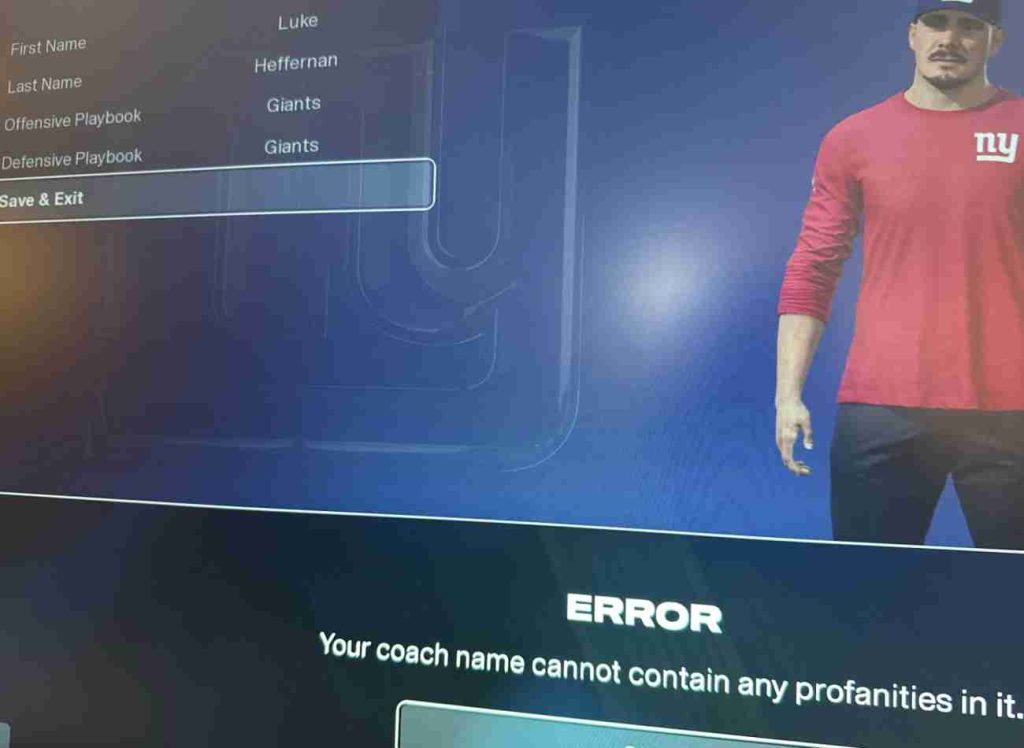
Many NFL 26 Franchise Mode players have faced the frustrating problem of custom coach names being blocked. Even perfectly normal names like “Hooker,” “Moore,” or “LaPorta” are sometimes flagged by the game’s overprotective profanity filter, preventing you from saving them. This occurs because the filter is designed to prevent offensive content online, but it occasionally misidentifies harmless names as inappropriate.
Fortunately, there are multiple workarounds and solutions that players have successfully used to bypass this restriction. Below is a comprehensive list of 15 fixes to help you save your coach name while keeping it recognizable.
1. Modify the Name Slightly
One of the easiest solutions is to make minor alterations to your name:
- Replace letters with numbers or symbols: “Hooker” → “H00ker”
- Add accents: “Moore” → “Moóre”
- Insert spaces or hyphens: “LaPorta” → “La-Porta”
These subtle changes often allow the name to save while keeping it readable.
2. Go Offline While Editing
When connected to EA servers, the online profanity filter actively blocks certain names. Disconnect from the internet or play offline, then create or edit your coach name. After saving, reconnect to your account — the name may now be accepted.
3. Try Alternate Spellings
Slight variations in spelling can bypass the filter:
- “Bender” → “Bend3r”
- “Bendér”
These changes keep the name recognizable but avoid triggering the profanity system.
4. Use Abbreviations or Initials
If the full surname is blocked, try using initials or shortened versions:
- “LaPorta” → “L. Porta”
- “Hooker” → “H. Hooker”
This often satisfies the filter while maintaining identity.
5. Add a Prefix or Suffix
Adding characters before or after the name can help:
- “Hooker” → “Coach Hooker”
- “Moore” → “Moore_01”
Filters often block standalone words but may allow them in a longer string.
6. Use Alternate Fonts or Unicode Characters
Some players insert Unicode letters or accented characters:
- “Moore” → “Mοοre” (replace the letter “o” with Greek omicron)
- “Bender” → “Bénder”
This bypasses substring detection while keeping the name visually similar.
7. Insert Invisible Characters
Adding zero-width spaces or non-printing characters can trick the filter:
- “Hooker” → “Hooker”
The name looks the same but is technically different for the system.
8. Combine First and Last Name Differently
If your full name triggers the filter, swap or combine parts creatively:
- “John Hooker” → “Hooker John”
- “LaPorta Smith” → “Smith-LaPorta”
9. Use Nicknames or Common Variations
Instead of the full surname, use a recognized nickname:
- “Hooker” → “Hookie”
- “Bender” → “Bendy”
This is a safe way to retain personality while avoiding blocked words.
10. Edit Name in a Different Region or Language Setting
Changing your language or region setting in the game has helped some players bypass false positives:
- Switch from your local language to English (US) temporarily.
- Enter your coach name, save it, then switch back.
11. Restart the Game After Changes
After applying any of the above fixes, fully restart NFL 26. Some blocked names may only be recognized as valid after the client refreshes.
12. Clear Cache on Console or PC
Cached data can sometimes cause repeated false positives. Clear temporary files:
- On PC, clear the Origin or EA App cache.
- On console, restart and clear system cache if possible.
13. Log Out and Back Into EA Account
Logging out and back in can refresh account validation and allow previously blocked names to save. This is especially effective if the issue is linked to online validation checks.
14. Report False Positives to EA Support
If all else fails, submit a ticket to EA with:
- Your platform (PC, Xbox, PlayStation)
- The blocked coach name
- Screenshots of the error message
EA may whitelist legitimate names in future patches.
15. Use a Temporary Placeholder Name
If you want to progress without delays, enter a temporary safe name (like “Coach123”) and then attempt the preferred name later after applying the above fixes. Often, temporary entry allows the system to re-evaluate available characters and names.
Additional Tips
- Avoid words that contain substrings of banned terms, even if harmless.
- Be mindful that online validation is stricter than offline; temporary offline editing can help.
- Minor spelling tweaks, accents, and symbol insertion are usually sufficient to bypass the filter.
Final Thoughts
While the NFL 26 coach name profanity filter can be frustrating, the above 15 fixes provide multiple ways to work around the issue. From minor spelling changes and offline editing to reporting false positives to EA, players have successfully restored full creative control over their franchise identities.
By combining these methods, you can save your preferred coach name, maintain immersion in Franchise Mode, and avoid triggering the overprotective filter. Always double-check account linking and game updates, and consider reporting persistent false positives to EA to help improve future versions.
Tips for Creating Coach Names in NFL 26
Creating a custom coach name in NFL 26 Franchise Mode can be tricky because of the game’s overprotective profanity filter. Here are some practical tips to help you choose names that are both safe and recognizable:
- Avoid Common Words Flagged as Slang
Some everyday words or surnames may be blocked because they resemble offensive terms or slang. Check your intended name against EA’s filter patterns by testing minor variations before finalizing. - Use Symbols, Accents, or Spacing
Inserting accents, hyphens, or symbols can help bypass the filter without changing the name too much. For example:
- “Moore” → “Moóre”
- “Hooker” → “H00ker”
- “LaPorta” → “La-Porta”
- Keep a List of Saved Variations
Maintain a small list of previously tested and accepted variations. This makes it easier to reuse names in future franchises without repeated trial and error. - Check Online Forums for Workarounds
Communities like Reddit and EA Forums often share specific names and spelling tweaks that bypass the filter. Reviewing other users’ experiences can save time and help you pick creative yet acceptable coach names.
By following these tips, you can avoid the coach name blocked issue while keeping your franchise experience personalized and immersive.
Conclusion
The NFL 26 coach name profanity filter is designed to prevent offensive or inappropriate content in Franchise Mode, but it can sometimes mistakenly block legitimate names. This overprotective system can be frustrating for players who want to create a personalized or realistic coach for their team.
Fortunately, there are multiple ways to work around the issue. Slight modifications to the name, such as adding accents, symbols, or spaces, often allow the game to accept it. Going offline while editing or using alternate spellings can also bypass the filter. For persistent problems, reporting false positives to EA Support can help ensure your preferred name is recognized in future updates.
By applying these strategies, you can navigate the profanity filter effectively and enjoy full creative freedom in NFL 26 Franchise Mode, saving the coach name you want without unnecessary frustration.
NFL 26 Coach Name Profanity FAQ
Q1: Why does NFL 26 say my coach name contains profanity?
A: NFL 26 has an automated profanity filter to block offensive words. Sometimes it falsely flags legitimate names that resemble banned words, such as “Hooker,” “Bender,” or “Moore.”
Q2: Can I use real player or coach last names in NFL 26?
A: Not always. If the name contains a word or substring flagged as offensive, the game will prevent it. Using slight modifications (accents, hyphens, or numbers) usually works.
Q3: How can I bypass the coach name filter in NFL 26?
A: Workarounds include:
- Slightly changing the spelling (e.g., “H00ker” instead of “Hooker”)
- Using symbols or accents (e.g., “La-Porta”)
- Editing your coach name while offline from EA servers
Q4: Will EA fix this issue permanently?
A: EA occasionally updates its profanity filter and may whitelist names reported as false positives. Submitting a support ticket with the blocked name increases the chances of it being corrected.
Q5: Does this affect Franchise and Career Mode?
A: Yes. Any mode where you create a custom coach can be affected. The filter applies to all modes to prevent inappropriate content in multiplayer and online interactions.
Q6: Are there lists of blocked names in NFL 26?
A: EA does not publish a full list. Community forums sometimes share names that trigger the filter, which can help you anticipate issues when creating a coach.