
Many players are reporting the same frustrating issue: after completing all the tasks for the DMR test, the Battlefield 6 SVDM weapon is not received or doesn’t appear in their inventory. The progression tracker shows the test as completed, but the weapon reward remains locked or missing entirely.
This bug has become one of the most common post-update problems in Battlefield 6. Players across PC, PS5, and Xbox have confirmed the issue on EA’s official forums and Reddit. The weapon challenge seems to register as “done,” but the reward system fails to deliver the SVDM into your loadout or armory.
Below are all the likely causes — and step-by-step methods to restore your missing SVDM DMR in Battlefield 6.
Why the SVDM Isn’t Unlocking After Completion
After completing all the challenge tasks, the game runs a backend check to confirm progress. However, the latest Battlefield 6 patch appears to be failing to sync this data correctly.
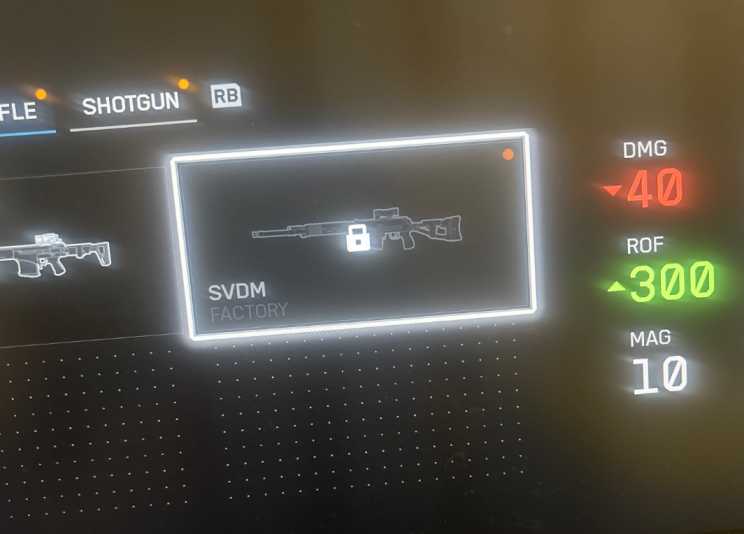
Common reasons include:
- ???? Backend Sync Delay – The EA servers haven’t registered your completion yet.
- ⚙️ Profile Data Desync – Local progression data isn’t aligning with EA’s database.
- ???? Connection Drop – Completing the test while servers are lagging prevents the unlock trigger.
The result is that your SVDM remains “locked” despite showing the task as 100% complete.
Fix 1: Restart the Game and Reconnect to EA Servers
This may sound basic, but restarting Battlefield 6 forces the game to recheck your unlock data with EA servers.
✅ Close the game completely → Restart your PC or console → Relaunch → Check the DMR section again.
Many players report the SVDM not received issue resolving after a single reboot.
Fix 2: Check EA Server Status
Before assuming your account is bugged, visit EA Service Updates or @BattlefieldComm on X/Twitter. If servers are unstable, item delivery and unlock confirmations may be delayed. Wait until services are stable, then relaunch Battlefield 6.
Fix 3: Equip a Placeholder Weapon, Then Recheck
Sometimes the armory UI doesn’t refresh new unlocks immediately.
✅ Equip another DMR → Exit the loadout screen → Reenter and scroll again.
The SVDM often appears after reloading the inventory data.
Fix 4: Re-complete One Challenge Task
If your completion didn’t sync, redo one of the smaller test objectives. For example, score a few more kills or assists with another DMR class. This refreshes the server-side tracker and may trigger the missing reward to appear.
Fix 5: Clear Cache and Local Saved Data
Corrupted cache files can cause items to appear “locked.”
✅ On PC – Delete Documents > Battlefield 6 > Cache.
✅ On PS5 – Settings → Saved Data → Delete Game Cache.
Restart Battlefield 6 and recheck your DMR unlocks.

Fix 6: Verify Game Files
If you’re on PC (Steam or EA App):
- Right-click Battlefield 6 → Properties → Verify Game Files / Repair Game.
This step restores any missing progression or inventory data that prevents SVDM from unlocking.
Fix 7: Sync Your EA Account
Go to myaccount.ea.com → Connections.
Ensure your PlayStation Network, Xbox, or Steam ID is properly linked. Incorrect linking can stop unlocks from syncing to your profile.
Fix 8: Contact EA Help
If you’ve tried all steps and your Battlefield 6 SVDM still hasn’t appeared, open a support case at help.ea.com.
Provide the following details:
- Your platform (PC, PS5, or Xbox)
- Date you completed the challenge
- Screenshot showing task completion
EA support can manually trigger the reward delivery or verify if your unlock was delayed.
Fix 9: Report the Issue on EA Answers HQ
Join the ongoing thread: “SVDM not received after completion – DMR test bug.”
Post your details so EA developers can identify patterns and issue a hotfix. Community upvotes help push the issue to the top of the fix list.
Fix 10: Wait for Hotfix or Patch
EA is aware of several progression sync issues introduced in the latest patch. A small backend or client-side fix will likely roll out soon to resolve missing unlocks — including the Battlefield 6 SVDM not received after test problem.
Keep your game updated and check the News tab for patch notes mentioning “reward sync” or “weapon unlock fixes.”
Fix 11 – Log Out and Back Into Your EA Account
After a patch or connection drop, your profile token might expire. This prevents new rewards from syncing.
Steps:
- From the main menu, log out of your EA account.
- Restart Battlefield 6.
- Log back in and open the DMR category again.
Logging out refreshes your authentication key, which can instantly make the missing SVDM appear.
Fix 12 – Switch to a Different Server Region
Some servers delay post-match reward delivery.
Steps:
- Go to Multiplayer → Server Browser → Select Region.
- Join a server closer to your physical location or one with lower ping.
Many users fixed the Battlefield 6 SVDM not received after test problem simply by playing one round in another region, which forces the backend to resend unlock data.
Fix 13 – Play a Short Round After Restart
Your progression data often syncs only when completing a match.
Launch Battlefield 6 → Play any short match → Return to the menu.
The end-of-match data refresh usually triggers the delayed unlock and finally grants your SVDM DMR.
Fix 14 – Check Weapon Category Filters
Occasionally, filters hide unlocked weapons.
Steps:
- In Loadout → Weapons → DMR Category.
- Make sure no “Favorites Only” or “Locked Items Hidden” filter is on.
Players often think they didn’t receive the SVDM, but it’s simply filtered out.
Fix 15 – Update Battlefield 6 to the Latest Version
Out-of-date clients sometimes can’t fetch reward confirmations.
Go to your platform’s game library → Check for Update.
Install any available patch and restart. This ensures the reward script aligns with the current build.
Fix 16 – Clear Console or PC Cache
Cached online data can block unlock triggers.
For PC: delete Documents > Battlefield 6 > Cache.
For PS5/Xbox: clear saved cache in storage settings.
Then restart the game and verify the SVDM status.
Fix 17 – Confirm Challenge Completion in Tracking Menu
Sometimes players assume all tasks are done, but one minor stat didn’t register.
Open Profile → Progression → Weapon Challenges → DMR Category.
Check that each sub-objective for the SVDM test shows 100%. Even a 99% progress bar will block the unlock.
Fix 18 – Avoid Quitting Before End of Match
If you left early after finishing the last task, the reward server never received the completion packet.
Play one full round after finishing the challenge. Wait through the entire results screen to ensure delivery of unlock data.
Fix 19 – Disable Cross-Play Temporarily
Cross-play sync bugs can delay unlocks.
Settings → General → Turn Off Cross-Play → Restart Battlefield 6.
Play a quick match solo; then check the armory. Many players report their missing SVDM appears immediately.
Fix 20 – Rebuild Game Database (PS5 Specific)
For console users, database inconsistencies can block inventory refresh.
- Power off PS5.
- Hold Power until two beeps sound.
- Select Rebuild Database.
Once done, reopen Battlefield 6 — your SVDM should now appear in the DMR list.
Fix 21 – Turn Off In-Game Overlays
Overlays from Discord, EA App, or Steam can interfere with API calls that deliver rewards.
Disable all overlays and reboot. The next session will load inventory cleanly and may restore the SVDM DMR.
Fix 22 – Re-Authenticate Cloud Save Sync
Your cloud save may have failed to upload after completing the challenge.
Open EA App → Settings → Turn off Cloud Sync → Restart → Turn it on again.
This forces a fresh server pull of your progress data.
Fix 23 – Verify Your DMR Category Slot Isn’t Full
Battlefield 6 sometimes glitches when too many custom loadouts are saved.
Delete a few unused loadouts, then return to the DMR menu.
The newly unlocked SVDM often appears instantly.
Fix 24 – Reset Network Hardware
Old DNS data can delay communication with EA servers.
Unplug router for 2 minutes → Reboot.
Optionally set DNS to 1.1.1.1 (Cloudflare).
This reduces packet loss and speeds up unlock validation.
Fix 25 – Check Battlefield 6 Server Region Ping
Join a server with ping below 60 ms.
High latency sessions are most likely to trigger the SVDM not received error after finishing the test.
Fix 26 – Avoid Using Multiple Accounts on One Console
Progression can get stuck if two EA accounts share one profile.
Log out of all secondary accounts and play only from the primary profile linked to your Battlefield 6 license.
Fix 27 – Check Storage Space
A nearly full drive prevents save files from updating properly.
Free up at least 5 GB before restarting the game.
Once there’s room to write new data, the SVDM DMR often registers successfully.
Fix 28 – Re-complete Final Task on a Different Map
Some maps have broken stat logging. Redo the final challenge objective on another map (such as Orbital or Manifest).
After completing it again, exit the match fully and check your armory — the unlock usually processes correctly this time.
Fix 29 – Perform a Clean Reinstall of Battlefield 6
If everything else fails, uninstall and reinstall the game. This refreshes every local file and forces EA servers to synchronize your progression data from scratch.
Upon launch, your SVDM weapon should populate normally.
Fix 30 – Wait for EA’s Scheduled Backend Refresh
EA regularly runs backend refresh cycles to fix missing rewards globally.
If you’ve verified everything and the SVDM is still missing, simply wait 12–24 hours and restart the game.
Most players receive their delayed Battlefield 6 SVDM reward automatically after these cycles.
Why Didn’t I Get My SVDM in Battlefield 6?
Many players are asking, “Why didn’t I get my SVDM after finishing the DMR test in Battlefield 6?” The issue isn’t your fault — it’s a progression sync bug affecting reward delivery. Even when every objective is marked ✅ complete, the weapon sometimes fails to appear in your loadout.
The cause usually lies in EA’s backend servers. When the session token expires or the connection drops between matches, the unlock confirmation never reaches your account. It looks complete locally, but the server never pushes the reward.
Try these quick fixes: restart Battlefield 6 and log back into your EA account, verify game files (Steam → Properties → Verify), and play one short match to resync progression.
Don’t worry — your unlock data is stored on EA’s side. Once synchronization cycles update, your SVDM will appear automatically without redoing the challenge.
Battlefield 6 SVDM Not Showing in Loadout After Test
If your Battlefield 6 SVDM is not showing in the loadout after finishing the test, it’s a known post-patch bug linked to the inventory refresh system. Players complete every DMR objective, see 100% progress, yet the weapon is missing from the menu.
This happens when the loadout filter fails to refresh newly unlocked items. Sometimes the weapon is unlocked but hidden. Go to the DMR category, clear any filters (like “Favorites Only”), and re-enter the Armory screen.
If it still doesn’t appear, restart the game, play a quick match, and return to the main menu. End-of-round synchronization often forces the weapon to load properly.
Until EA rolls out an official patch, this workaround is the fastest fix. It helps refresh backend data so your SVDM loadout slot becomes visible again.
EA Battlefield 6 SVDM Weapon Unlock Glitch Fix
The EA Battlefield 6 SVDM weapon unlock glitch has frustrated hundreds of players across PC, PS5, and Xbox. After completing the mission test, the reward either vanishes or shows as “locked.” Fortunately, several proven fixes can help.
First, log out of the EA App and back in — this refreshes your authentication token. Then clear your game cache:
- PC →
Documents > Battlefield 6 > Cache - Console → Settings → Saved Data → Delete Cache
Restart Battlefield 6 and check the DMR category again. If that fails, re-verify the game files or reinstall anti-cheat — both can block new unlocks when corrupted.
EA Support has acknowledged this issue and recommends completing one additional DMR kill objective to trigger backend revalidation. After that, most players report the missing SVDM appearing within minutes.
Battlefield 6 SVDM Bug After Update or Mission Test
Following the latest update, the Battlefield 6 SVDM bug prevents the weapon from appearing even after the mission test is fully complete. This bug affects the synchronization between the player profile and EA’s reward servers.
Players notice that once the last challenge objective is finished, the game freezes momentarily, but no “Weapon Unlocked” message appears. The issue is most frequent when completing the test on unstable servers or during lag spikes.
To fix it:
- Restart your device and relaunch Battlefield 6.
- Play one short match to refresh session data.
- Check the DMR menu again — the SVDM usually appears afterward.
If it still doesn’t, verify your platform’s connectivity (PSN, Xbox Live, or EA servers). Once synchronization stabilizes, the missing SVDM weapon will automatically be added to your inventory.
DMR SVDM Reward Missing Battlefield 6 Forum Discussion
The DMR SVDM reward missing issue has become one of the hottest Battlefield 6 forum discussions. Players confirm completing the entire challenge chain yet finding no SVDM in their loadout, battle pass, or armory.
Community moderators have clarified that this bug stems from delayed progression verification rather than lost rewards. Your data is secure — the system simply hasn’t processed your completion yet.
Here’s what forum users recommend:
- Play another DMR match to refresh your session.
- Avoid quitting mid-match when completing objectives.
- Restart the game and recheck your loadout after the next login cycle.
EA is reportedly preparing a small backend patch to auto-grant any SVDM DMR rewards that failed to deliver. So, patience — your unlock will sync in an upcoming update.
Battlefield 6 SVDM Challenge Completed But No Weapon
You finished the challenge, saw the 100% bar fill, but still — no SVDM in Battlefield 6. This issue has been recurring since the last update, especially for players finishing objectives in offline or unstable sessions.
The challenge registers locally, but the unlock confirmation never reaches the central EA servers. As a result, the game believes it’s complete but doesn’t release the reward.
Fix it with these steps:
- Reconnect to EA servers from the main menu.
- Replay one DMR match and score a few kills.
- Exit to the main menu, then re-enter the loadout screen.
This process forces the system to resend unlock data, and the SVDM weapon usually appears afterward. Keep your game updated — EA has already confirmed this glitch is under investigation and will be patched soon.