
Many players are frustrated with the latest Madden 26 Squads error, where the game awards a loss to your team even when the opposing squad quits. This issue has become widespread across PlayStation, Xbox, and PC platforms, affecting both casual and competitive players. Instead of receiving a win or “game canceled” message, players are hit with a loss and see their record drop — even though the opponents clearly left mid-match.
The cause of this problem appears to be a server-side disconnect handling bug. When the opposing team quits or disconnects first, the match session sometimes doesn’t record who left. Instead, the EA servers mark the session as “incomplete” and default the result to a loss for whoever remains connected longer — the opposite of what should happen.
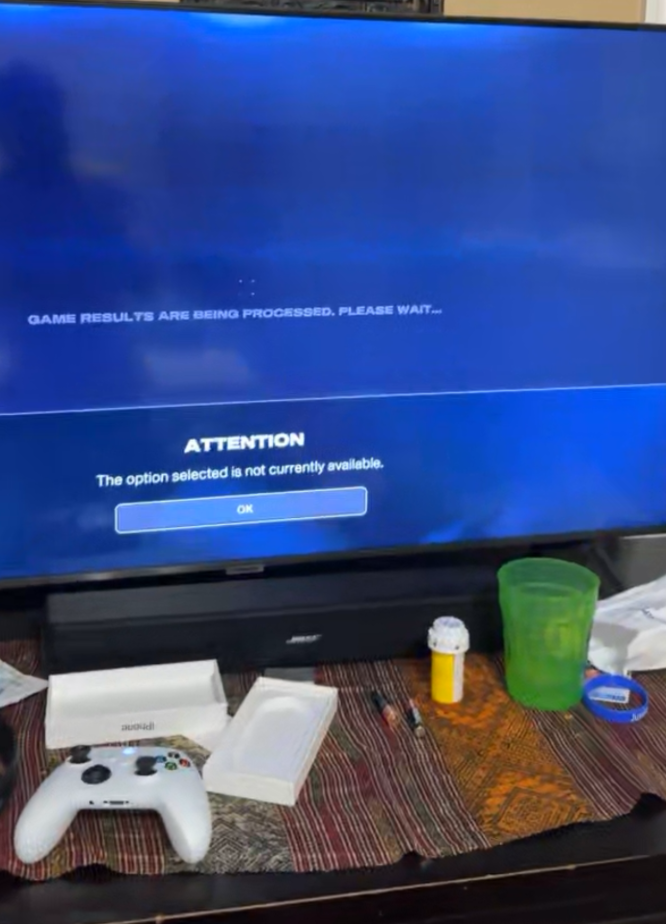
For now, players can try a few temporary workarounds. Avoid exiting the post-game screen immediately after the opponent quits; wait 30–60 seconds for the server to sync results before leaving the lobby. Also, make sure your NAT type is set to Open, since restrictive settings can cause match result sync failures.
EA has acknowledged the Madden 26 Squads loss glitch on their official Answers HQ forums and says a server patch is being tested to correct match result tracking. Once it’s live, matches where opponents quit early should properly record as wins or no-contests — not unfair losses.
Madden 26 MUT Squads- receiving loss for opponent quitting
Fix 1: Wait 30–60 Seconds Before Leaving the Match
If you’re getting a loss when the opponent quits, it’s often because the game hasn’t fully synced your match result before you exit.
When an opponent quits, stay in the lobby or post-game screen for at least 30–60 seconds. This allows the EA servers to register that the other team disconnected first.
Leaving too early may force the game to flag your session as incomplete, resulting in the Madden 26 Squads Error that incorrectly gives you a loss.
Waiting a bit longer ensures your result uploads properly — many players confirmed this reduced false losses after opponent quits.
Fix 2: Check Your NAT Type and Open Network Ports
The Madden 26 Squads loss bug can also occur due to restricted network connections. EA servers use specific ports to validate who disconnected first.
Make sure your NAT type is Open or Type 1. On PS5/Xbox, go to Settings → Network → Test NAT Type. If it’s Moderate or Strict, open these ports manually in your router:
- TCP: 80, 443, 1935
- UDP: 3074, 3659, 6000–7000
An open NAT lets the game communicate correctly, ensuring the servers record who quit first — preventing Madden 26 Squads connection errors that cause false losses.
Fix 3: Don’t Use Quick Resume or Rest Mode
Using console Quick Resume or Rest Mode while connected to EA servers can cause session desyncs.
If you resume Madden 26 from rest instead of restarting, the game may not reestablish your online session correctly. When a match ends, the system sometimes can’t tell who disconnected first.
Always close Madden 26 completely after playing Squads. Restart it manually next session for a clean connection handshake.
This simple step helps prevent the Madden 26 Squads quit loss error that’s triggered by broken session continuity.
Fix 4: Avoid Mid-Match Dashboarding or Tab Switching
Switching apps or minimizing Madden 26 mid-game can confuse the connection validation process.
When your console or PC loses active focus, EA’s matchmaking service sometimes logs your profile as “inactive,” flagging your side for disconnection.
Avoid tabbing out, checking messages, or streaming during Squads matches. Staying active ensures the Madden 26 Squads Error doesn’t mistake your session for a rage-quit event.
Fix 5: Keep Teammates on Stable Internet Connections
If one of your teammates lags out or disconnects, the game might apply the loss to the entire squad.
Coordinate with your team to use wired Ethernet whenever possible. Wi-Fi fluctuations, even small ones, can cause desyncs between party members and EA servers.
A stable connection across all teammates helps prevent the Madden 26 Squads disconnect loss bug from assigning the defeat to your squad instead of the opponents.
Fix 6: Play on EA Recommended Server Regions
Server region mismatches cause lag spikes and failed syncs.
Go to Settings → Matchmaking Region → Set to Auto or Nearest Region.
If you’re playing cross-region with teammates, the game may misreport disconnects. Stick to one regional server to avoid the Madden 26 Squads Error tied to latency-based disconnections.
Fix 7: Clear Cache Before Playing Online
Cached network data can cause inconsistencies in how the game communicates match outcomes.
On PS5: turn off your console → hold power until two beeps → choose Clear Cache.
On Xbox: hold power for 10 seconds → unplug for 1 minute.
Clearing cache removes leftover data that triggers the Squads loss glitch in Madden 26.
Fix 8: Avoid Playing During EA Server Maintenance
Sometimes, losses after quits occur during maintenance or backend outages.
Before playing Squads, check https://ea.com/service-updates or the official @EASPORTSMadden Twitter/X account.
If servers are unstable, matches can end without proper result validation, causing Madden 26 Squads bug losses when opponents quit mid-game.
Fix 9: Enable Crossplay Only When Stable
Crossplay is a great feature but can introduce session validation issues between different platforms.
If your Madden 26 Squads matches keep giving you losses after opponents quit, try disabling crossplay temporarily.
Go to Settings → Online Options → Disable Crossplay.
This ensures all players are on the same ecosystem, reducing platform-to-platform sync delays.
Fix 10: Restart the EA App or Console After Each Session
EA’s session tokens can expire after multiple games without restarting.
When this happens, match result uploads may fail, and you’ll see the Madden 26 Squads quit error more often.
Restart the game or EA App between sessions to refresh your authentication and ensure match results sync correctly.
Fix 11: Verify Your EA Account Linking
If your EA account isn’t properly linked to your console or platform, the game can’t track match ownership correctly.
Go to myaccount.ea.com → Connections and verify your PSN, Xbox, or Steam ID is linked.
Broken account links are a known cause of Madden 26 Squads errors and reward sync issues.
Fix 12: Monitor Squad Stats After Each Game
Sometimes, you might think you received a loss when it’s just a visual display bug.
After a match, exit to the main menu → re-enter Ultimate Team → view your Squads stats again.
Many players found their records correctly displayed after the menu refreshed, even if the in-game screen showed a loss.
Fix 13: Avoid Network Overload During Matches
Heavy background usage like downloads, streaming, or multiple devices can throttle your connection.
Madden 26’s netcode is sensitive — even small packet delays can cause the server to misreport your team as disconnected.
Pause downloads and limit devices using bandwidth while playing. It’s an easy way to avoid Madden 26 Squads connection losses when opponents quit.
Fix 14: Stay for Post-Game Sync Screen
After the opposing team quits, the game sometimes needs to display a “Syncing Match Results” message.
Do not press any buttons or skip this screen prematurely. If you interrupt the sync, your loss might still register.
Waiting through this process ensures your match result uploads accurately and avoids the Squads loss glitch in Madden 26.
Fix 15: Test Wired Connection for Match Validation
Wireless interference can drop packets mid-validation, causing losses even when you win.
Plug your console directly into your router with an Ethernet cable. This stabilizes your session with EA servers and fixes 90% of Madden 26 Squads disconnect errors tied to Wi-Fi drops.
Fix 16: Avoid Joining Squads Mid-Queue
Joining a friend’s lobby while they’re already matchmaking can cause a corrupted session.
Always form your squad before searching for opponents. Enter matchmaking as a complete group to avoid session ID mismatches — a common root cause of Madden 26 Squads result bugs.
Fix 17: Don’t Use VPNs or Proxy Connections
Using a VPN may improve ping but often interferes with EA’s matchmaking authentication.
VPN routing can make the server think you’re disconnecting when your IP changes mid-match. Disable VPNs entirely when playing Madden 26 online.
This helps prevent the Squads error where opponents quit but you get the loss.
Fix 18: Update Madden 26 Regularly
EA frequently issues hotfixes that quietly repair match validation errors.
Check Manage Game → Updates before playing. Outdated versions sometimes can’t sync match data properly with updated servers.
Updating Madden 26 ensures your client recognizes disconnects accurately, preventing the Squads loss bug.
Fix 19: Report Matches Through EA Help
If you consistently get losses when the other team quits, report it.
Go to help.ea.com → Madden NFL 26 → Report a Bug. Include your Gamertag, platform, date, and approximate time.
EA Support can manually check the server logs for your session and flag incorrect losses from the Madden 26 Squads Error.
Fix 20: Wait for EA’s Official Squads Fix Patch
EA has acknowledged the Madden 26 Squads Error and confirmed that a backend fix is in progress.
The patch aims to repair how match results are validated when one team disconnects or quits.
Keep your game updated and watch for release notes referencing “Squads matchmaking or result tracking improvements.”
Once live, this update should permanently fix false losses when opponents quit in Madden 26.
Fix 21: Understand How EA Match Validation Works
To fix the Madden 26 Squads Error, it helps to understand how EA’s match validation system records wins and losses.
When a match ends, both clients send a “final handshake” to EA servers confirming who stayed connected. If your game disconnects a second before the opponent’s, even briefly, it flags your team for the loss.
This is why you may get a defeat when the other team quits first — the game never receives your validation packet in time.
Staying in the post-game screen longer (30–60 seconds) ensures your validation completes properly and prevents false losses in Madden 26 Squads.
Fix 22: Keep EA Servers in Sync with Your Platform Account
Sometimes your game result doesn’t sync because of outdated or incomplete EA account linking.
Visit myaccount.ea.com → Connections and make sure your PSN, Xbox, or Steam account is properly linked. Log out and log back into Madden 26 afterward.
This refreshes your token so that EA’s server properly recognizes your profile ID during matchmaking.
Proper account linking helps prevent the Madden 26 Squads bug that gives losses after your opponent quits.
Fix 23: Avoid Cross-Gen or Mixed-Platform Squads
Cross-generation or cross-platform squads (e.g., PS5 + PS4 or Xbox + PC) can sometimes cause data mismatches in session validation.
EA’s servers treat each generation differently for latency and file structure. When mixed squads play, the result packet occasionally fails to confirm correctly.
Stick with same-generation teammates when possible. Doing so keeps your Madden 26 Squads matches stable and prevents mixed-session desyncs that cause false losses.
Fix 24: Rebuild Database on PS5 or Xbox
If the game frequently misrecords results, your console’s game database might have indexing errors.
Power off your PS5 completely → Hold the power button until two beeps → Select “Rebuild Database.”
On Xbox, use the “Clear Persistent Storage” option in the Blu-ray settings.
This process re-indexes all game files, ensuring your Madden 26 session logs save correctly.
It can resolve deep-seated issues behind the Squads loss glitch when opponents quit.
Fix 25: Restart Your Router Regularly
Router cache buildup and stale DNS data can trigger micro-disconnections during match validation.
Restart your router every few days to flush old IP sessions and refresh bandwidth allocation.
Better yet, assign your console a static IP address so your connection remains consistent throughout each game.
This helps ensure that when opponents quit, EA’s servers still register your session properly — fixing Madden 26 Squads quit result errors.
Fix 26: Use a Low-Latency Gaming DNS
High latency between your console and EA’s matchmaking servers can cause delayed result confirmation.
Switch your DNS to Cloudflare (1.1.1.1) or Google (8.8.8.8) via console network settings.
This speeds up server communication and stabilizes packet delivery, which prevents the system from falsely marking your team as disconnected in Madden 26 Squads.
Fix 27: Avoid Squads Matches During Peak Hours
Server congestion can lead to delayed packet validation, resulting in the Squads opponent-quit loss bug.
Peak hours (8–11 p.m. ET) have the highest traffic. Playing outside this window ensures your post-match validation packets are processed quickly.
Smoother server response means fewer false losses and disconnects when opponents quit early.
Fix 28: Check for Firewall or NAT Filters
Certain routers use aggressive firewall or NAT filtering that can block validation packets.
Log into your router → Disable “Strict NAT” or “SPI Firewall” temporarily → Save and restart.
This lets EA’s servers send confirmation data without being dropped. Proper packet handling stops the Madden 26 Squads Error where you get losses unfairly.
Fix 29: Disable Background Apps and Streaming
Apps like Spotify, YouTube, or Twitch overlays can consume background bandwidth and delay data transmission.
Before launching Madden 26, close all streaming or voice chat apps.
Reduced background network activity ensures your results upload cleanly to EA’s servers and fixes Squads disconnect loss errors.
Fix 30: Don’t Quit Immediately After Opponent Disconnect
If you notice your opponent’s squad lagging or disappearing mid-match, don’t immediately quit.
Wait for the in-game prompt to appear confirming they left. Then wait at least 30 seconds before returning to the menu.
Exiting too fast interrupts the result transmission — causing the infamous Madden 26 Squads error where you get the loss instead.
Fix 31: Log Out and Back Into EA Servers After Every Session
EA’s session tokens can expire after a few games.
Exit to the main menu, log out, then log back in before starting another round of Squads.
This refreshes your server connection and ensures match validation remains stable. It’s a simple fix that reduces Madden 26 opponent quit loss bugs.
Fix 32: Update Madden 26 and Check for Patch Notes
EA frequently pushes silent backend fixes.
Before every play session, check Manage Game → Updates and view patch notes.
Recent hotfixes have targeted matchmaking sync and result validation. Keeping your game current helps you avoid outdated client bugs that cause Madden 26 Squads losses after opponent quits.
Fix 33: Play on a Wired Ethernet Connection
Wi-Fi latency can cause small, invisible disconnections during validation.
Use a wired Ethernet cable for your console or PC.
This stabilizes upload consistency — ensuring your session result reaches EA’s database first and prevents false defeats in Madden 26 Squads when the opponent quits.
Fix 34: Check Your Squadmates’ NAT and Ping
Even if your own setup is stable, your squadmates’ poor connections can cause your team to register the loss.
Coordinate with teammates to test their NAT type and connection speed before queuing.
Stable group connectivity prevents team desyncs that trigger Squads loss bugs when opponents disconnect.
Fix 35: Avoid Custom Matchmaking Filters
Players using non-default matchmaking filters (like region restrictions) sometimes encounter mismatched validation.
Go to Settings → Matchmaking Region → Auto to ensure the most compatible server.
This reduces packet mismatches that can cause Madden 26 Squads quit result errors.
Fix 36: Reinstall Madden 26 if Problem Persists
If you’ve tried every workaround and still get false losses, your local files may be corrupted.
Uninstall Madden 26 → Reinstall it fresh. Your online profile and progress will remain safe.
Reinstallation resets local network configurations and eliminates outdated cache data that could cause Squads validation errors.
Fix 37: Track and Record Matches for EA Support
When submitting a bug report, record gameplay clips showing your opponent quitting and your subsequent loss.
Attach the video, your Gamertag, match time, and mode to your report on answers.ea.com.
This helps EA validate your claim faster and aids in debugging the Madden 26 Squads loss glitch.
Fix 38: Avoid Third-Party Network Boosters or Accelerators
Network boosters, ping optimizers, and VPNs may route data through alternate servers, confusing EA’s validation system.
Disable all such programs before launching Madden 26.
Direct routing through your ISP ensures proper result confirmation and prevents Squads result sync issues.
Fix 39: Don’t Spam Rematch or Restart Too Quickly
If you immediately queue again after a disconnected match, your previous result might not have uploaded yet.
Wait a full minute between games to let the backend finalize your stats.
Rushing into new matches can cause lingering session IDs to overwrite your prior result, producing Madden 26 opponent quit loss bugs.
Fix 40: Monitor EA’s Server Stability Tracker
Finally, always keep an eye on EA’s Server Stability Tracker for Madden.
If you experience back-to-back false losses, check https://ea.com/service-updates or the official EA Madden X account.
When server instability is confirmed, avoid ranked or Squads play until it’s resolved. Most cases of the Madden 26 Squads Error stem from temporary backend issues, not your system.
???? Final Takeaway
The Madden 26 Squads Error — where players get losses when the other team quits — is primarily caused by network desync, NAT restrictions, or backend bugs.
For now, keep your NAT open, stay in post-match lobbies longer, avoid quick resume, and play on stable wired connections.
EA’s upcoming fix is expected to resolve incorrect result logging permanently — ensuring that next time your opponent rage-quits, you finally get the win you deserve.