
Many FC 26 players are reporting a strange glitch with the Dynamic Distributor Evolution upgrade. Instead of triggering a Pinged Pass, the player’s evolution is showing a Low Driven Pass animation and behavior.
✅ Quick Solution: This bug happens due to an internal attribute mismatch within the Evolution system, where the Pinged Pass trait isn’t being correctly assigned to the evolved player. EA is aware of the issue, and while a server-side patch is expected, there are a few steps you can try to fix it temporarily.
Why Does the Dynamic Distributor Show a Low Driven Pass Instead of a Pinged Pass?
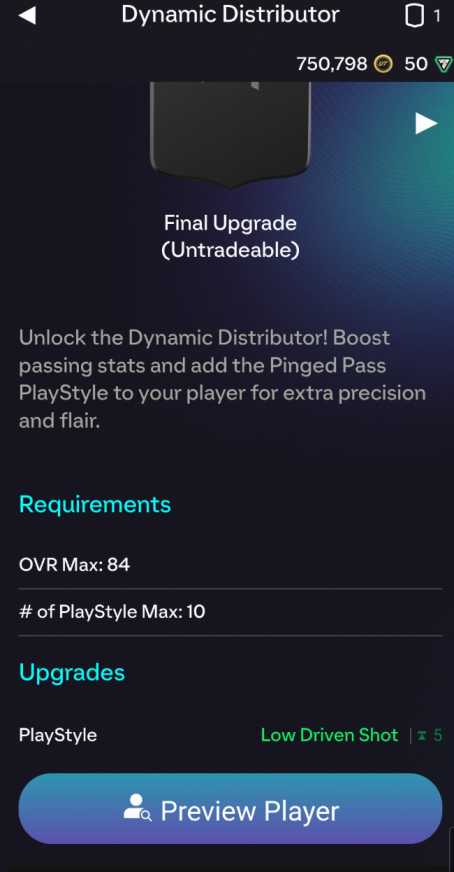
This issue stems from an evolution data bug that affects the trait activation layer of the player evolution system. Here’s what’s likely happening behind the scenes:
- The Pinged Pass trait is missing from your player’s hidden trait set after applying the evolution.
- EA’s latest update may have reset or overwritten certain evolution attributes for specific player archetypes.
- The evolution incorrectly assigns a “Low Driven Pass” animation flag instead of the expected Pinged Pass logic.
- The game sometimes reverts to base-player animations if the server sync fails to confirm evolution data on load.
Until EA deploys a global fix, these issues can make your evolved midfielder or playmaker feel inconsistent when passing.
Fix 1: Reapply the Dynamic Distributor Evolution
Start by removing and reapplying the evolution to your player — this forces EA FC 26 to reload the evolution data.
Steps:
- Go to Ultimate Team → Evolutions.
- Select your Dynamic Distributor Evolution.
- Remove your current player from the evolution slot.
- Reassign the same player and complete the objectives again (if required).
- Restart the game after saving.
Players have reported this restores the correct Pinged Pass ability and removes the low driven animation.
Fix 2: Use an Alternative Player Build and Compare Traits
If your evolution player isn’t performing the Pinged Pass, compare the trait lists of another eligible midfielder.
Here’s how:
- Open your Club → Player Bio → Traits.
- Note whether the Pinged Pass icon appears in the secondary list.
- If missing, try applying the evolution to a different player.
- Check if the second player gets the correct Pinged Pass trait.
This helps confirm whether the issue is player-specific or a global bug affecting the Dynamic Distributor evolution.
Fix 3: Restart FC 26 and Refresh the Server Data
Sometimes, the trait mismatch happens because of session caching. Restarting forces FC 26 to fetch updated evolution data.
To refresh your game session:
- Fully close the EA FC 26 app.
- Log out of your EA Account.
- Restart your device and internet connection.
- Launch FC 26 again, and check your player’s in-game attributes.
If the Pinged Pass still doesn’t appear, proceed with verifying your files.
Fix 4: Verify Game Files (Steam or EA App)
A broken data file can cause certain traits to misfire or display incorrectly.
On EA App:
- Go to My Library → FC 26 → Manage → Repair.
- Wait for the verification to complete, then restart.
On Steam:
- Right-click FC 26 → Properties → Installed Files → Verify Integrity of Game Files.
Once done, relaunch and test your player — this often corrects trait or evolution sync bugs.
Fix 5: Wait for the Official EA Patch
EA has acknowledged several Evolution system inconsistencies since the launch of FC 26, including missing or swapped traits. A patch addressing this bug is already under investigation.
EA typically fixes such errors through server-side hotfixes, meaning you won’t need to update manually — just restart your game when the patch is deployed.
Keep an eye on the EA FC 26 Bug Reports forum and the official @EAFCDIRECT Twitter/X account for patch confirmation.
Fix 6: Clear Local Save Data Cache
If your evolution data is stored incorrectly on your console or PC, clearing cache can resolve the trait mismatch.
For PC:
- Navigate to
%AppData%\Local\EA Sports\EA FC 26. - Delete the cache and settings folders.
- Relaunch the game and allow it to rebuild data.
For Console:
- Go to Settings → Storage → Saved Data → EA Sports FC 26.
- Clear reserved space or cached data.
This forces the game to reload all evolution trait data directly from EA’s servers.
Fix 7: Report the Glitch Directly to EA Help
If the issue continues after trying all local fixes, report the bug directly to EA with proof of your evolution progress.
Steps:
- Visit https://help.ea.com.
- Choose EA Sports FC 26 → Technical Issue → Bug or Glitch Report.
- Attach screenshots or a short video of your player showing the Low Driven Pass instead of the Pinged Pass.
- Include your platform and gamer tag.
The more reports EA receives, the faster they can push out a verified server fix.
Fix 8: Reset Your Player Evolution Progress and Reapply the Dynamic Distributor
If your FC 26 Dynamic Distributor Low Driven Glitch persists after reapplying the evolution, a full reset of your evolution progress may solve it.
This forces EA’s servers to regenerate the player’s attributes and traits.
Steps:
- Open Ultimate Team → Evolutions → Dynamic Distributor.
- Remove your evolved player from the slot.
- Back out to the main menu and restart FC 26.
- Return to Evolutions and reapply the player.
- Complete one match to trigger data sync.
This rebuilds your evolution data on EA’s backend, often restoring the missing Pinged Pass trait and fixing the unwanted Low Driven Pass behavior.
Fix 9: Manually Edit Controller Settings to Trigger Correct Pass Animations
Sometimes, FC 26’s Low Driven Pass glitch occurs due to input recognition.
You can temporarily restore the correct animation by adjusting control configurations.
Here’s how:
- Go to Settings → Controller → Customization.
- Set Pass Assistance to Semi-Assisted.
- Change Driven Pass Modifier to Manual.
- Save and restart the game.
This can realign input logic and force Pinged Pass animations to respond properly, especially during online matches.
Fix 10: Use an Alternate Formation to Reset Trait Activation
The Dynamic Distributor Evolution system dynamically changes based on formation and player role. If your evolved player’s role doesn’t activate the Pinged Pass trait, changing formations can fix it.
Try this:
- Switch to a formation like 4-2-3-1 or 4-1-2-1-2 (narrow) where central mids naturally use advanced passing.
- Play a few matches and observe passing animations.
- Switch back to your original formation afterward.
This forces the game to re-evaluate your player’s position traits and restore proper Pinged Pass behavior.
Fix 11: Disable Cross-Play Temporarily
Some FC 26 Dynamic Distributor Low Driven Glitch reports suggest cross-platform data sync issues.
Disabling Cross-Play can help stabilize how traits and evolutions load.
To disable Cross-Play:
- Open Main Menu → Matchmaking Settings.
- Toggle Cross-Play → Off.
- Restart your game and re-enter Ultimate Team.
This helps force your data to load from your platform’s native server, avoiding EA’s shared matchmaking cache, which might be causing the evolution bug.
Fix 12: Delete Local Profile Data (Console and PC)
A corrupted profile save file can prevent your updated evolution data from applying.
For PC:
- Navigate to:
Documents\EA Sports\FC 26\SettingsDelete the file named ProfileSettings or rename it to ProfileSettings_old.
For Console:
- Go to Storage → Saved Data → EA Sports FC 26 → Delete Local Only.
When you relaunch the game, FC 26 regenerates fresh data from EA’s cloud, often correcting the Low Driven Glitch.
Fix 13: Apply a Chemistry Style That Enhances Passing Attributes
Sometimes, certain chemistry styles can indirectly influence how Pinged Pass traits behave.
Applying a chem style that emphasizes passing attributes can override the Low Driven Pass tendency.
Recommended chem styles:
- Artist: Boosts long passing and curve (activates pinged pass animations).
- Engine: Enhances dribbling and short passing consistency.
- Maestro: Improves vision and ball control for long-distance accuracy.
After applying the style, restart the game and test in both offline and online matches.
Fix 14: Check for Missing Trait in Player Bio After Evolution
Sometimes the Pinged Pass trait doesn’t show even though it’s active.
Verifying this can confirm if it’s a visual glitch or actual functional bug.
Steps:
- Open your Player Bio → Attributes → Traits.
- Check for “Pinged Pass” under the Player Traits section.
- If missing, remove and reapply the evolution or reverify via EA servers using the repair function.
Knowing whether it’s a display issue or gameplay bug helps determine if further steps are necessary.
Fix 15: Adjust Camera and Gameplay Settings
EA’s Dynamic Distributor Low Driven Glitch can appear more noticeable with certain camera angles that distort animation speed or ball trajectory.
Try these settings:
- Camera Type: Tele Broadcast
- Height: 15
- Zoom: 5
- Gameplay Camera Shake: Off
These settings help you better track whether your player performs the correct Pinged Pass animation versus a Low Driven one.
Sometimes, the bug is purely visual due to camera playback angles.
Fix 16: Play One Match in Kick-Off or Offline Mode
EA’s game engine stores separate evolution data for online and offline modes.
Playing a single offline match can trigger a local-to-server sync refresh.
Here’s what to do:
- Go to Kick-Off Mode.
- Choose your evolved player in the lineup.
- Play a full match (no sim).
- Exit and return to Ultimate Team.
The game will re-upload your player data to EA’s servers, often restoring Pinged Pass functionality afterward.
Fix 17: Monitor EA’s Official Trello and Community Tracker
EA uses a public Trello board and community bug tracker to monitor ongoing FC 26 issues, including the Dynamic Distributor Low Driven Glitch.
To check updates:
- Visit https://trello.com/b/ea-sports-fc-bug-tracker (or search “EA FC 26 Trello bug tracker”).
- Look for cards labeled “Evolutions / Pinged Pass Trait Issue.”
- Follow the card to receive updates when a patch or server-side fix is scheduled.
Keeping track of EA’s updates ensures you’ll know the moment the official patch drops and when the Pinged Pass bug is fixed globally.
Fix 18: Report the Bug via EA FC Tracker for Direct Developer Review
If you’ve tried all steps and the FC 26 Dynamic Distributor Low Driven Glitch remains, you can report it directly to EA’s developer tracker.
This increases the visibility of the issue.
Steps:
- Visit https://answers.ea.com.
- Go to EA Sports FC 26 → Bug Reports.
- Title it: “Dynamic Distributor Low Driven Pass instead of Pinged Pass.”
- Add screenshots or short video proof.
Reports with multiple confirmations often get prioritized by EA’s live-ops team.
Fix 19: Reset Network Settings to Resync Player Data
Network desynchronization can prevent evolutions from loading correctly.
To reset your network:
- On PC: Run
ipconfig /flushdnsand restart your router. - On Console: Go to Network Settings → Advanced → Clear Alternate MAC Address.
- Relaunch FC 26 afterward.
This ensures your device fetches the freshest player and evolution data from EA servers, reducing the Pinged Pass → Low Driven Pass bug.
Fix 20: Wait for EA’s Evolution Data Refresh (Server-Side Resync Cycle)
EA typically performs weekly evolution resyncs during maintenance windows.
These cycles often fix temporary data bugs like the FC 26 Dynamic Distributor Low Driven Glitch automatically.
Simply stay logged into your EA account at least once during the next maintenance window (usually mid-week).
When EA refreshes evolution data, your player traits and evolutions revalidate — fixing missing Pinged Pass traits without manual intervention.
Why Does the Dynamic Distributor Evolution Show “Low Driven” Instead of “Pinged Pass” in FC 26?
The FC 26 Dynamic Distributor Low Driven Glitch happens because of a trait assignment bug inside the Evolution system. When you evolve a player using the Dynamic Distributor path, EA FC 26 is supposed to apply the Pinged Pass trait — giving sharper, faster, long-distance passes. However, due to an internal data mismatch, some evolutions mistakenly attach the Low Driven Pass flag instead.
This bug likely stems from incorrect evolution attribute mapping during recent server updates. As a result, the evolved player’s database entry no longer points to the correct Pinged Pass trait ID. Instead, it activates a generic low-driven animation profile.
The glitch isn’t caused by user error — it’s a known EA-side issue currently under review. While EA is expected to release a patch, temporary fixes include reapplying the evolution, clearing cache, or verifying game files to re-sync the missing Pinged Pass.
Until the official update, this issue may persist intermittently across platforms for certain evolved midfielders.
Is the FC 26 Dynamic Distributor Bug Affecting Everyone or Just My Player?
The FC 26 Dynamic Distributor Low Driven Glitch is a widespread issue — but not every player is affected. The bug specifically impacts accounts or evolutions processed during EA’s most recent server synchronization cycle. This means that while many players are seeing their Dynamic Distributor evolution display “Low Driven,” others still have the proper Pinged Pass trait functioning normally.
It depends on your player’s base card archetype, the moment you applied the evolution, and how EA’s backend recognized that change. Midfielders and attacking CMs are the most affected, particularly those evolved during early access or within the first 48 hours of the latest FC 26 patch.
If you’re unsure whether it’s your player or a global issue, check EA’s official Trello Bug Tracker or community forums. If multiple users with the same evolution report identical behavior, it confirms that the glitch is not isolated.
For now, reapplying the evolution, logging out of EA App, and verifying your files often helps temporarily restore the correct Pinged Pass animation.
Did EA Change the Pinged Pass Trait to Low Driven in FC 26?
No — EA did not intentionally replace the Pinged Pass trait with a Low Driven one in FC 26. The Dynamic Distributor Low Driven Glitch is not a gameplay update but an unintended bug in the Evolution system that misassigns passing traits.
In normal gameplay, the Pinged Pass trait should remain exclusive to skilled midfielders, boosting the accuracy and speed of long, grounded passes. However, a coding error introduced in a recent update caused the game to misread trait flags, displaying Low Driven Pass instead of Pinged Pass for evolved players.
EA has not released patch notes confirming any official change to this trait. Community moderators and FC 26 support teams have acknowledged the issue, confirming it’s unintentional and under investigation.
If your evolved player suddenly shows Low Driven Pass, don’t worry — the Pinged Pass is still part of the intended Dynamic Distributor setup and should return after EA’s next server-side evolution fix.
In the meantime, you can try reapplying the evolution, verifying your game files, or waiting for the next patch for an automatic correction.
Why Did My FC 26 Player Lose the Pinged Pass After Evolving to Dynamic Distributor?
If your player lost the Pinged Pass trait after completing the Dynamic Distributor Evolution, it’s due to the FC 26 Dynamic Distributor Low Driven Glitch, which causes the evolution system to incorrectly overwrite existing player traits.
When applying the evolution, FC 26 is supposed to merge the new attributes (like improved passing and vision) with your player’s existing traits. However, a trait conflict occurs in the Evolution Data Sync layer, where the Pinged Pass trait is mistakenly replaced with a Low Driven Pass flag.
This issue is most common for players evolved during peak server traffic or after a recent update. The problem isn’t with your specific card — it’s a backend data sync issue that EA is currently investigating.
To temporarily fix it, try removing the evolution, reapplying it, and restarting your game. Some players have reported that clearing cache and re-verifying their game files through the EA App helps reassign the correct trait.
Once EA rolls out their patch, your evolved player should regain the Pinged Pass trait as originally intended.
Is the Dynamic Distributor Glitch Visual or Actually Affecting Gameplay?
The FC 26 Dynamic Distributor Low Driven Glitch is partly visual — but it can also affect gameplay depending on your situation. While some players only see “Low Driven” listed in traits but still experience Pinged Pass behavior, others notice reduced pass power and trajectory accuracy, indicating that the bug is influencing gameplay mechanics.
EA FC 26 assigns traits both visually (for UI display) and functionally (for in-match physics). When the Pinged Pass is replaced by the Low Driven tag, the animation and power modifiers can change, causing passes to travel slower or flatter than intended.
Players have reported that even top-tier midfielders no longer execute sharp driven passes after evolving into Dynamic Distributor, confirming a partial functional bug.
Until EA releases a fix, you can test your player by comparing passes before and after applying the evolution. If power, curl, and trajectory feel reduced, the glitch is affecting gameplay. Reapplying the evolution or clearing cache may restore temporary Pinged Pass behavior while waiting for EA’s official patch.
How to Fix the Dynamic Distributor Low Driven Bug in FC 26
The FC 26 Dynamic Distributor Low Driven Glitch occurs when the game assigns the wrong passing trait, replacing Pinged Pass with Low Driven Pass after evolution. To fix it, start by reapplying the evolution to your player. Remove your evolved card from the Dynamic Distributor slot, restart the game, and assign it again.
Next, clear your EA App cache and verify your game files (EA App → Manage → Repair or Steam → Verify Integrity of Game Files). This forces the servers to reload trait data.
If the bug persists, log out of your EA account and relaunch FC 26 to trigger a data-sync refresh. Many players have also found success playing one offline match in Kick-Off mode, which re-uploads correct evolution data to EA’s backend.
Until EA releases an official patch, these temporary methods are the best way to restore the intended Pinged Pass behavior for Dynamic Distributor players.
Does Restarting or Reapplying the Evolution Fix the Pinged Pass Issue?
Yes — restarting FC 26 or reapplying the Dynamic Distributor evolution is the quickest temporary fix for the Pinged Pass issue. The glitch happens because EA FC 26 sometimes loads the evolution with outdated attribute data. Restarting or re-assigning forces a fresh trait validation from EA’s servers.
Steps:
- Go to Ultimate Team → Evolutions → Dynamic Distributor.
- Remove your current evolved player.
- Restart FC 26 or your console/PC.
- Re-add the same player to the evolution.
When you log back in, the evolution data refreshes, and the correct Pinged Pass trait should reappear in the player bio.
Although this fix is temporary, it restores normal passing physics until EA deploys the next update. Make sure you also keep your game fully patched and avoid editing your squad mid-evolution, as that can re-trigger the Low Driven Pass glitch.
Can You Reset or Reapply the Dynamic Distributor Evolution Without Losing Progress?
Yes — you can safely reset or reapply the Dynamic Distributor evolution in FC 26 without losing your objectives or player stats. EA’s evolution system tracks progress on their servers, not locally on your console or PC, meaning removing and re-adding your player won’t erase completed tasks.
To reapply correctly:
- Open Evolutions → Dynamic Distributor.
- Select your evolved player and choose Remove Player.
- Back out to the main menu and restart the game.
- Re-enter Evolutions and assign the same player again.
This refreshes your trait data and may fix the FC 26 Dynamic Distributor Low Driven Glitch where the Pinged Pass trait fails to apply.
Just make sure you don’t attempt a full Evolution Reset from the backend (if EA ever adds that option), as that would wipe progress. A simple re-assignment, however, is safe and often restores the correct Pinged Pass animation instantly.
Is EA Working on a Patch for the Dynamic Distributor Low Driven Glitch?
Yes — EA Sports has confirmed that they are actively investigating the FC 26 Dynamic Distributor Low Driven Glitch. Multiple community managers and verified sources on the EA FC Bug Tracker and @EAFCDIRECT social channels have acknowledged the issue, describing it as a known Evolution trait assignment error.
EA’s development team is preparing a server-side fix that will automatically re-assign the correct Pinged Pass trait to affected players. This means you won’t need to download a large patch — the correction will likely apply during a scheduled maintenance window.
In the meantime, players can still use temporary workarounds like reapplying the evolution, clearing cache, or verifying game files to reduce the impact.
EA usually deploys Evolution patches within 1–2 weeks of acknowledgment, so stay tuned to the official EA FC Trello Board and community forums for confirmation of the live fix rollout.
How to Report FC 26 Evolution Bugs to EA for a Quick Fix
Reporting the FC 26 Dynamic Distributor Low Driven Glitch directly helps EA identify and prioritize the issue faster. Here’s how to file an effective report:
- Visit https://answers.ea.com.
- Navigate to EA Sports FC 26 → Bug Reports.
- Title your post clearly: Dynamic Distributor shows Low Driven instead of Pinged Pass.
- Describe what platform you’re on, when you noticed the glitch, and whether reapplying the evolution helped.
- Include screenshots or short video clips showing the trait mismatch.
For quicker visibility, tag @EAHelp or @EAFCDIRECT on X (Twitter) with your report link.
Multiple consistent reports push EA’s internal QA team to prioritize the Dynamic Distributor Pinged Pass fix in upcoming patches, ensuring all players regain full trait functionality soon.
Final Thoughts
The FC 26 Dynamic Distributor bug where the Pinged Pass trait shows up as a Low Driven Pass is a known issue affecting evolved midfielders. While EA works on a permanent fix, you can temporarily resolve it by reapplying the evolution, clearing cache, and refreshing your EA data sync.
Stay patient — EA is aware of this glitch, and a hotfix should restore proper Pinged Pass behavior in upcoming patches.