
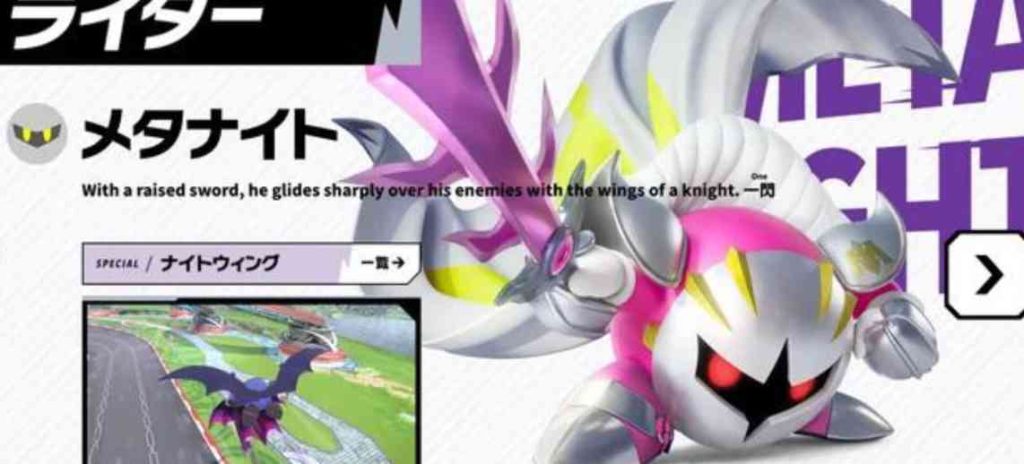
If you’ve seen people flying around as pink Meta Knight and you’re stuck on the default armor, you’ve hit one of the first real “how does this actually work?” mysteries in Kirby Air Riders.
The short version:
- Pink Meta Knight is an alternate color / skin, not a separate character.
- Meta Knight himself is already playable for everyone.
- Alternate colors unlock through duplicates from Checklist rewards and other cosmetic unlock systems, not from a simple shop purchase.
- Current guides list Meta Knight (Pink) as a cosmetic with “TBA” unlock, which basically means the exact trigger isn’t 100% nailed down yet, but the duplicate Rider system is confirmed to be how colors are gained.
1. How Meta Knight and Colors Work in Kirby Air Riders
Before talking about the pink skin, it’s important to understand how Riders and colors are unlocked in this game.
Riders vs. Skins vs. Colors
In Kirby Air Riders you have three layers:
- Riders – main characters like Kirby, King Dedede, Meta Knight, etc.
- Machines – Warp Star, Winged Star, Rex Wheelie, and so on.
- Cosmetics / Skins – color swaps (like Meta Knight Pink), headwear, decals, license cards, and themes.
Meta Knight is a Rider, and Pink Meta Knight is one of his color cosmetics. Color swaps do not change stats – they’re purely visual – but they’re tied to unlock conditions just like machines and Riders are.
The Checklist and Duplicate Rider System
The key mechanic you care about is:
Once you have a Rider unlocked, any extra copies of that Rider you earn from the Checklist are converted into alternate colors for that same Rider.
This is written directly into multiple Rider guides inside the official-style wikis and is repeated for Kirby, Meta Knight, Susie, Magolor, Marx, Rocky and others. It’s the standard rule for alternates:
- First time a Checklist mission gives you a Rider → you unlock the Rider.
- Next time that same Rider is rewarded again (or via an Open Block targeting that square) → you get an alternate color instead of a duplicate character.
- Each new duplicate unlocks another color until you own all of that Rider’s palettes.
That’s where Pink Meta Knight comes from: he is one of these unlocked color palettes given out by the duplicate system.
2. Step 1 – Make Sure Meta Knight Himself Is Unlocked
Good news: Meta Knight is available for everyone by default in Kirby Air Riders. You don’t need to do anything special just to play as him.
However, Meta Knight is also tied to specific Checklist missions in case you somehow didn’t have him, and these same missions matter for duplicates (and thus for colors).
The Meta Knight Checklist missions are:
- Air Ride: Nebula Belt – Laps
- Goal: Finish a lap while crashing into walls no more than two times.
- Top Ride: Nova
- Goal: Complete a lap without attacking another rider.
The first time you clear that Rider unlock tile, you’re guaranteed to have Meta Knight added to your roster. After that, re-clearing it or using Open Blocks on it produces duplicates, which is how you start unlocking his color variants.
So:
- Confirm in your character select that Meta Knight is usable at all.
- If not, clear the Nebula Belt and Nova Checklist objectives once to secure him.
- After you have him, any additional Meta Knight rewards from the Checklist = alt colors.
3. How Pink Meta Knight Actually Unlocks
Here’s what we know clearly right now:
- The Meta Knight guide explicitly lists Meta Knight (Default), Meta Knight (Black), and Meta Knight (Pink) as his available colors.
- It also states that after a Rider is acquired, duplicates from Checklist missions unlock alternate colors.
- The general Cosmetics & Skins overview lists Meta Knight (Pink) as a skin with “TBA” under unlock conditions, which is basically “we know he exists, we’re still pinning down exactly which Checklist or cosmetic trigger awards him”.
Putting these two pieces together:
The best-supported explanation is that Pink Meta Knight is unlocked by obtaining additional Meta Knight copies through Checklist rewards (or Open Blocks) after you already have Meta Knight in your roster.
In other words:
- Get Meta Knight once → Rider unlocked (you already have this).
- Get Meta Knight again from the same Checklist tile → first alternate color (very likely Black).
- Get Meta Knight a third time (another duplicate) → second alternate color (Pink).
The exact order (whether Black comes before Pink or vice versa) is still being tested by the community, because official cosmetic tables just list the colors without specifying unlock sequence. But the mechanism – “duplicates give you colors” – is not in doubt.
4. Practical Farming Route for Pink Meta Knight
Now for the actionable part your readers will care about: how do they most efficiently grind duplicates to get Pink Meta Knight?
There are three main tools:
- Re-clearing the Meta Knight Checklist objectives.
- Using Open Blocks on the Meta Knight tile.
- General cosmetic unlocks (Miles and other Checklist cosmetics), once guides update Meta Knight Pink from TBA.
A. Re-clear the Meta Knight Checklist Tile
Meta Knight is tied to a combined Checklist mission that references both:
- Nebula Belt (Air Ride – Laps)
- Nova (Top Ride)
To target duplicates:
- Go to Air Ride → Nebula Belt – Laps
- Set 1 lap, low CPU, and use a machine you’re comfortable steering (Warp Star or something with decent grip and turning).
- Focus on a safe line through the course where you hug the center of the road and avoid show-off drifting.
- Your only fail condition is hitting walls more than twice. Light grazes count if they count as crashes, so play it safe.
- Go to Top Ride → Nova
- Set 1 lap, low CPU, items allowed or not (your preference).
- The rule is simple: do not attack.
- That means no Quick Spins, no Copy-Ability attacks, nothing that damages another rider.
- Hug an outside line, avoid combat clusters, and just finish the lap.
Once you’ve already unlocked Meta Knight, repeating this combined objective and meeting its conditions again should award you another Meta Knight “copy”, which then turns into a color unlock.
You can recommend a loop:
- Do a short Nebula Belt run → do a short Nova run → back out, check Checklist → repeat.
- Each time the Checklist flags Meta Knight again, you move one step closer to or directly unlock Pink Meta Knight.
B. Using Open Blocks to Speed Up Color Unlocks
Open Blocks are special items that let you instantly complete a Checklist square without actually meeting its objective in a race.
Players are already using Open Blocks to auto-complete annoying Checklist goals like “Finish while sleeping”. You can apply the same logic to the Meta Knight unlock tile:
- If you already own Meta Knight, and you use an Open Block on the Meta Knight Checklist square,
- The game treats that as “you obtained that Rider again”,
- Which should count as a duplicate and feed into the color-unlock system.
This is especially useful if:
- You hate Nebula Belt’s wall-sniping corners,
- Or you’d rather save your concentration for harder challenges.
In your article you can present this as:
Fast-track method:
- Unlock Meta Knight once normally.
- Spend Open Blocks on the Meta Knight Checklist tile.
- Each Open Block completion gives you another “copy” of Meta Knight, which unlocks his alt colors like Meta Knight (Black) and Meta Knight (Pink).
C. Watch for Miles / Cosmetic Shop Updates
The global Cosmetics & Skins page makes it clear that:
- Many skins can be bought with Miles, the in-game currency.
- Others are Checklist-only unlocks.
- Meta Knight (Pink) currently appears under the list with its unlock method set to “TBA”.
Because that guide is still tagged as a work-in-progress, future patches or datamining might reveal:
- A specific Miles cost for Meta Knight Pink,
- Or a special Checklist objective (like “Glide for X seconds as Meta Knight”) that awards his pink palette directly.
5. How to Check if You’ve Unlocked Pink Meta Knight
To help players verify quickly:
- Go to Rider Select.
- Highlight Meta Knight.
- Look for color options cycling on the character:
- Default armor (classic Meta Knight),
- A darker/black version,
- And a pink-tinted version with pinkish armor accents and hue on his body.
If Meta Knight (Pink) is available, it’ll show up as one of the selectable color slots. There’s no stat difference; the only change is his color and how he looks in intros / results.
You can also mention:
- Colors are usable in all modes where that Rider is allowed: Air Ride, Road Trip events, City Trial, and Top Ride where applicable.
- Pink Meta Knight still uses the same Special, Night Wing – spread dark wings and burst forward with huge speed – so he’s meta-viable in exactly the same way as default Meta Knight.
6. FAQ Section
Q: Does Pink Meta Knight have different stats?
No. Pink Meta Knight is purely cosmetic. All Meta Knight colors share the exact same stats and Special.
Q: Can I just buy Pink Meta Knight with Miles from the start?
Right now, there’s no confirmed shop-only method for Pink Meta Knight. The only clearly documented system for Rider color unlocks is the duplicate Rider system from the Checklist, plus whatever Open Blocks you use on those tiles.
Q: Do I need to unlock Black Meta Knight first?
The game doesn’t clearly state the order, only that duplicates unlock colors and that Meta Knight has Default / Black / Pink palettes. Most likely, your first duplicate gives one alt color and the second gives the other. Push for multiple Meta Knight duplicates to be safe if you specifically want the pink version.
Q: Can I lose access to Pink Meta Knight later?
No. Once you unlock a color, it’s tied to your profile permanently. You don’t have to maintain any rank or clear any seasonal challenge to keep it.