
Dude, you know that moment in Anno 117 when everything is going fine… and then suddenly the traders lose their minds? Specialists that used to be, like, 10k suddenly jump to 100k+, and basic items from NPC traders start costing stupid amounts—like somebody slapped an extra zero on everything.
It feels completely random, and it totally messes up your economy. One minute you’re balancing your settlement, and the next you’re getting wiped out by a single purchase because the game decided to multiply all the prices out of nowhere.
Quick Answer
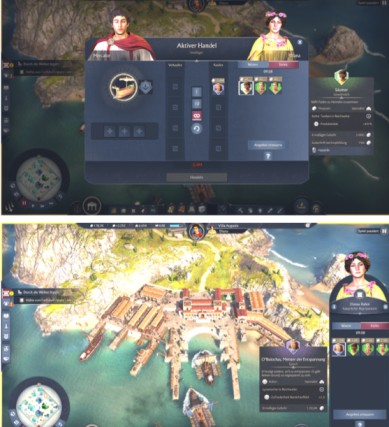
Yeah, the price spike isn’t you messing up your economy — it’s a bug. The game randomly freaks out and starts multiplying the prices of specialists and goods, especially when you’re playing the Campaign in places like Albion.
It’s not a hidden mechanic, not difficulty scaling, and not diplomacy punishing you. It’s literally the game slapping a 10× multiplier on stuff or charging way more than the price you actually see in the UI.
Read more: Anno 117 Deity Bug: Why Ceres Is Missing and How To Fix Deity Selection Issue
Key Symptoms
If your save is bugged, you’ll usually notice one or more of these things happening:
10× Price Explosion
This is the big one.
Specialists that should be around 10–40k suddenly jump to 100–400k+, and even basic stuff like timber or soap gets hit with a clean 10× price hike.
Extra Zero in Trading Posts
Some trading posts start showing prices that look like someone just added a zero for fun.
So you’ll see things like:
- 72 → 720
- 1,200 → 12,000
And it’s not just one item — everything at that post is overpriced.
Tooltip vs Actual Charge Mismatch
This one feels extra nasty.
The UI tells you a specialist costs 12,000, you buy it… and suddenly you’ve lost 120,000–300,000.
The game charges the inflated amount even though the tooltip looks normal.
Campaign-Specific Behavior
Pretty much everyone reports this happening in Campaign mode, especially in Albion.
If you jump into Endless mode, prices usually go back to normal.
Why It Happens
From what players have figured out, the game basically glitches out behind the scenes.
It seems like:
- Some hidden price modifier gets applied when it shouldn’t
- The UI shows one price, but the game secretly uses a different (much higher) one when you actually buy
- A trading post or region can get stuck in a bad state after certain campaign steps or after buying specialists
No one has pinned down the exact trigger yet, but the pattern is obvious: the game accidentally flips on some kind of internal multiplier, which is why everything suddenly costs 10× more. It’s a bug, not an intentional difficulty mechanic.
Quick Diagnostic Checklist
You can tell your save has the trading bug if:
- One trader or region suddenly has prices that are exactly 10× higher than before.
- You buy a specialist and the game takes way more money than the tooltip said.
- You start a quick Endless game and prices look totally normal there, but your Campaign save is still broken.
- Everything was fine earlier, and then out of nowhere the prices just spiked for no reason.
Tips: Fast, Actionable Workarounds
Avoid Bugged Traders
If a trader or post is showing crazy prices, just stop buying from them. Don’t even test it — they’ll drain your entire economy.
Use Passive Trade
Let passive import/export handle things. It usually sticks to the correct prices even when manual trading is broken.
Produce Key Goods Internally
If something suddenly becomes overpriced, just make it yourself. Expanding your production lines keeps you from relying on bugged traders.
Save Before Every Specialist Purchase
Before you buy any specialist, drop a quick save. After buying, check how much money you actually lost so the bug doesn’t blindside you.
Test in Endless Mode
Hop into a fresh Endless save. If prices look normal there, that confirms your Campaign save is the one that’s glitched.
Report the Save
Grab screenshots or a short clip and send in the save file. The devs need real examples to track down exactly why this bug triggers.
Read more: How to Retake Islands in Anno 117 When the Capture Bar Does Not Appear
Comparison Table: Normal Economy vs Trading Bug Behavior
| Category | Normal Behavior | Bug-Affected Behavior |
|---|---|---|
| Specialist Prices | Gradual cost increases; typical range 10k–40k | Abrupt rise to 100k–400k+ (commonly ×10) |
| Basic Goods Prices | Stable, predictable costs | Values inflated exactly tenfold |
| Tooltip Accuracy | Displayed price equals charged amount | Tooltip shows normal price; charged price is significantly higher |
| Affected Modes | Applies uniformly across modes | Primarily Campaign, especially Albion |
| Player Impact | Manageable economic growth | Sudden economic collapse; impossible trading decisions |
| Trading Post Behavior | Consistent pricing | All items at a post inflated by a clean multiplier |

Status Summary
Yeah, the price spike is a known bug at this point.
There isn’t a confirmed patch that fully fixes it yet, so players basically have to work around it for now. The safest move is to avoid any trader that looks busted and keep notes or saves handy so you can report it if it happens again.
Conclusion
Basically, this Anno 117 trading bug is what causes those sudden, ridiculous price jumps — the weird 10× spikes, the tooltip lies, all of it. None of this is meant to happen, and it’s not some hidden late-game economy curve. Until the devs patch it properly, the best move is just to keep an eye on your prices, avoid any trader acting weird, and lean more on your own production so the bug can’t wreck your economy.
FAQ – Anno 117 Trading Bug & Specialist Price Explosion
1. Why did specialist prices suddenly increase in Anno 117?
Specialist prices increase due to a known trading bug that applies an unintended 10× multiplier or charges more than the displayed value. This is not an intended mechanic or difficulty feature.
Read more: How to Turn Off Pirates in Anno 117: Complete Guide to Disable Raiders and Prevent Pirate Attacks
2. Is the Anno 117 trading price spike intended?
No. Sudden or extreme jumps in specialist and goods prices are caused by the trading price bug, not by diplomacy penalties, region modifiers, or late-game balancing.
3. What is the “extra zero” bug at trading posts?
This issue occurs when a trading post lists values that appear ten times higher than normal (e.g., 72 → 720). All goods and specialists at that trader reflect the inflated values.
4. Why does the tooltip show one price but the game charges more?
This is the tooltip mismatch bug. The UI previews a normal cost, but the backend transaction price applies a hidden multiplier, resulting in a much larger deduction when completing the purchase.
5. Does this trading bug only happen in Campaign mode?
Most reports occur in Campaign, especially in Albion. Endless mode typically shows correct pricing, indicating the issue is campaign-state dependent.
6. Can trading posts cause crashes or desyncs in co-op?
Yes. Bugged trading posts with inflated prices may also trigger co-op desynchronization or unstable behavior when players interact with them.
7. How can I check whether my game has the trading bug?
Your save is likely affected if:
- Prices increase exactly tenfold
- The charged amount does not match the displayed price
- Only certain regions or traders show inflated values
- Endless mode shows normal pricing while Campaign does not
8. Can the trading bug be fixed in my current save?
There is no guaranteed in-game fix. However, players can:
- Avoid affected traders
- Restart the game and reload an earlier save
- Verify game files
- Shift reliance to internal production
The issue typically requires an official patch for a full resolution.
9. Is there a way to prevent losing money to the bug?
Yes.
- Save immediately before buying specialists
- Check money before and after each transaction
- Stop trading at the affected post as soon as any mismatch appears
10. Should I switch to Endless mode to avoid the issue?
If the bug disrupts Campaign progression, Endless mode is currently the more stable option, as it rarely shows the trading price spike.
11. When will this bug be patched?
As of the latest available updates, the bug is acknowledged and under review, but not explicitly listed as resolved. Players are encouraged to report screenshots and saves to assist developers.