
So you’ve booted up Anno 117, gone to settle a new island… and suddenly Ceres is gone.
No Mars. No Neptune. Just a short list of gods that definitely wasn’t this small before.
Meanwhile, Juliana’s over there happily worshipping Ceres like nothing’s wrong, as if your game didn’t just quietly break its own rules.
Yeah — you’re not imagining things. This is a real and fairly common bug, and a lot of players run into it without any warning. It usually shows up out of nowhere, right when you’re expanding and expect everything to work normally. The good news? It’s not a permanent lockout, and in most cases, it’s completely fixable with a few simple steps.
Let’s break it down and get you back on track.
Why Roman Gods Disappear in Anno 117
This isn’t a progression issue or something you “missed” during normal gameplay. You didn’t choose the wrong option, and you didn’t lock yourself out of content. The problem almost always comes from connectivity or sync issues, especially involving Hall of Fame and how the game communicates with online services.
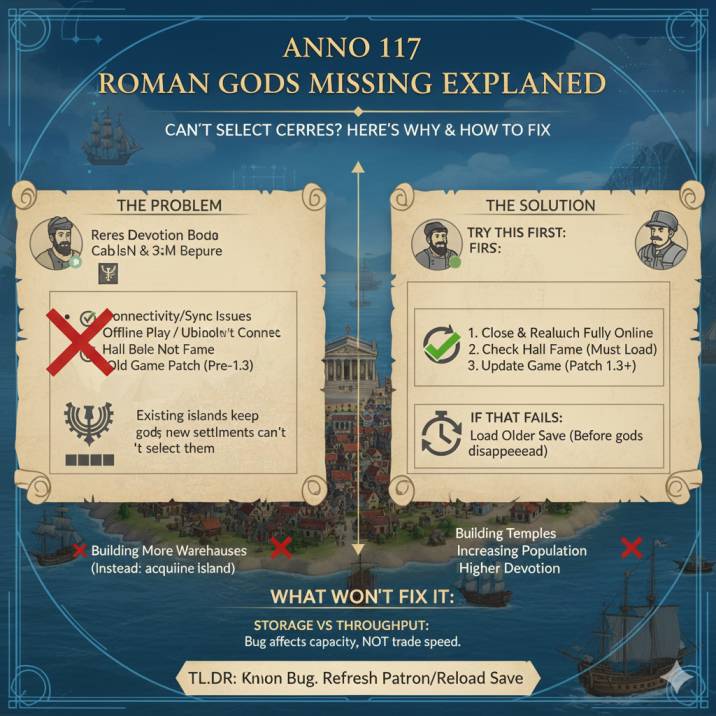
Here’s what usually causes it:
- You went offline, even briefly
- Ubisoft Connect lost connection in the background
- Hall of Fame failed to load or sync properly
- You loaded or saved the game while that happened
- You’re playing on an older or partially updated patch
When any of this occurs, the game can temporarily “forget” that Ceres, Mars, and Neptune are supposed to be selectable. Existing islands may still show them as active, but the selection menu breaks, which makes the issue feel confusing and inconsistent — even though it’s actually a backend sync problem rather than a gameplay one.
Read also:
How to Fix the “Ceres Missing” Bug or Roman Gods Missing
Try these in order — most players fix it within the first couple of steps, so don’t panic if it looks broken at first.
Start by fully closing the game and making sure you’re actually online. This bug is heavily tied to connection issues, so even a brief disconnect can cause the game to stop loading Roman gods properly. Once you’re sure your connection is stable, relaunch the game and check if Ceres, Mars, or Neptune have returned.
Next, open the Hall of Fame and confirm it loads correctly. If it fails to load or appears blank, that’s often the root of the problem. Restarting while connected usually fixes it.
If the issue persists, check that your game is fully updated. Older patches are far more prone to this bug. Finally, if you have an older save from before the issue appeared, load it and create a new manual save right away.
✅ 1. Make Sure You’re Fully Online
This sounds basic, but it’s easily the most important step — and the one that fixes the issue for a lot of players. The Roman gods disappearing is very often tied to the game losing connection, even briefly, while you’re playing.
Start by completely closing the game, not just backing out to the menu. Then double-check that Ubisoft Connect, Steam, or Epic is fully online and logged in. If your launcher is offline or reconnecting in the background, Anno 117 may fail to load certain systems correctly.
Once you’ve confirmed everything is online, relaunch the game and load your save again. Many players report that Ceres, Mars, and Neptune reappear immediately after a clean restart with a stable connection. It’s simple, but surprisingly effective.
✅ 2. Check That Hall of Fame Is Working
The Roman gods are partially tied to Hall of Fame data, which means if Hall of Fame isn’t loading correctly, deity selection can quietly break along with it. This is one of the most common reasons Ceres and the other Roman gods disappear.
Open the Hall of Fame menu and make sure it actually loads properly. If it’s stuck loading, completely blank, or fails to connect, that’s a clear sign something’s wrong. In that case, close the game entirely and restart it while you’re fully online.
A lot of players don’t realize the two systems are connected, but if Hall of Fame isn’t accessible, the game often can’t validate which gods should be available — and that’s when the selection menu starts acting up. Once Hall of Fame loads normally again, the missing gods usually return right away.
✅ 3. Update the Game (Patch 1.3+ Matters)
Ubisoft officially addressed this issue in Patch 1.3, making it one of the most important fixes tied to missing Roman gods. If you’re still playing on an older version, there’s a much higher chance the game will lose access to Ceres, Mars, or Neptune — especially after connection hiccups or save reloads.
If you haven’t already, make sure your game is fully updated. On PC, this means checking for updates through Steam, Epic Games, or Ubisoft Connect. It’s also a good idea to verify your game files, as corrupted or incomplete updates can cause the bug to persist even after patching.
Older builds are far more unstable when it comes to deity selection, so updating to Patch 1.3 or later is one of the most reliable long-term fixes.
✅ 4. Load an Older Save (If You Have One)
If you have a save from before Ceres disappeared, this can be one of the most reliable fixes. Load that older save and check the religion menu to see if Ceres, Mars, or Neptune are available again. If they are, make a new manual save immediately to lock in the restored state.
It’s important to note that saves created after the bug triggers can sometimes stay broken, even if everything else is working correctly. That’s why catching it early matters. If you’ve been rotating manual saves, this step often solves the problem quickly without needing to restart your entire campaign.
✅ 5. Temporary Workaround (If You’re Stuck)
If none of the previous fixes work right away, you can still keep your campaign going by using a temporary workaround. Instead of Ceres, choose another deity that you’ve unlocked through research, such as Minerva or any other available option. This won’t fix the underlying issue, but it does let you continue expanding, managing production, and progressing through the game without being completely blocked.
Many players have used this approach while waiting for the issue to resolve itself through a reconnect, patch update, or future session. It’s not ideal, and it’s definitely not how the system is meant to work, but it’s a practical short-term solution. Once the bug clears or the gods reappear, you can switch back without losing your progress.
Why Other Islands Still Worship Ceres
This part confuses a lot of people, and honestly, it’s one of the most misleading aspects of the bug.
Each island in Anno 117 stores its own chosen god independently. That means once an island has selected Ceres, Mars, or Neptune, that choice is saved locally for that island. Even if the game later breaks or loses sync, the island doesn’t suddenly forget who it’s worshipping.
So when the selection menu bugs out, existing islands continue to function normally, while new ones lose access to those gods entirely. That’s why:
- Juliana can still worship Ceres
- Your older island still shows her as active
- But new settlements can’t select her at all
It feels inconsistent, but it’s actually a UI and synchronization issue, not a gameplay rule or intentional restriction. The game still “knows” the god exists — it just can’t properly present the option when the system breaks.
Is This a Known Bug?
Yep — very much so. This isn’t a rare edge case or something caused by playing “wrong.” Players have been reporting this issue across Reddit, community forums, and support threads since early versions of the game. It’s widely recognized as a real bug, not a user error.
You’ll often see it referred to by different names, including:
- “Anno 117 Ceres missing”
- “Roman gods not showing”
- “Religion menu bug”
Ubisoft has acknowledged the issue in patch notes and updates, confirming that it’s tied to connectivity, Hall of Fame syncing, and certain save-state problems. So if you’re running into this, you’re definitely not alone — and you didn’t break anything. It’s a known problem that many players have experienced, and in most cases, it’s fixable with the steps outlined above.
Quick FAQ
Can I get Ceres back?
Yes — in most cases, you can. Reconnecting to the internet, making sure Hall of Fame loads properly, or updating the game usually restores her. Many players see the gods return immediately after a clean restart while online.
Is my save ruined?
Not usually. Most saves recover once the sync issue is fixed. Only in rare cases — typically when the game was saved multiple times after the bug triggered — does the problem become permanent.
Do I need to restart my campaign?
Only as a last resort. Most players never need to start over if they catch the issue early and follow the fixes above.
Does this affect all Roman gods?
Yes. Ceres, Mars, and Neptune can all disappear when the bug hits, even though existing islands may still show them.
Wrapping up
- This is a known Anno 117 bug, not user error
- It’s usually caused by offline play or Hall of Fame sync issues
- Reconnecting, updating, or loading an older save fixes it for most players
- Your game isn’t broken — it’s just temporarily desynced