
Trying to enjoy Where Winds Meet solo, but the game keeps throwing NPC helpers, random players, or “helpful” systems at you?
You’re not alone—and no, you’re not missing some obvious toggle hidden deep in the settings menu.
A lot of players hit this exact frustration early on. You load in expecting a clean, single-player experience, only to find AI helpers showing up in fights, other players wandering into your world, or systems kicking in that make it feel like the game refuses to let you play alone. It’s confusing, especially when the game doesn’t clearly explain what’s optional and what isn’t.
The short version: there’s no single “turn off AI companions” button. Instead, different systems create the illusion of forced help. The good news is that you can play fully solo once you understand what’s actually causing these companions to appear. This guide breaks everything down clearly and shows you how to fix it fast, without overcomplicating things.
Quick Answer (If You Just Want to Play Solo)
In Where Winds Meet, AI companions don’t appear randomly. They only show up when you trigger specific systems, which is why solo play can feel inconsistent if you don’t know what to avoid.
To keep your run fully solo, do the following:
- Switch to Lone Wanderer / Solo Mode using the Mode Switch, not Online or Shared modes
- Don’t summon Companion Assist NPCs before boss fights (they’re always optional)
- Fully exit any co-op session you joined earlier, then reload the game to reset your world state
- Avoid bounty or crime mechanics, which can allow player invasions even in solo mode
If you follow those steps, the game stops pushing helpers or other players into your experience. There’s no hidden setting you’re missing—just a few systems you need to sidestep. Do that, and you’ll get a clean, distraction-free solo experience focused on exploration, combat, and story.
Why “AI Companions” Keep Showing Up
Part of the confusion is that players use the term “AI companions” to describe a bunch of different things. In reality, Where Winds Meet doesn’t have traditional, always-on AI followers at all. Instead, it has multiple separate systems that can feel like forced help if you don’t realize what’s triggering them.
Some of these systems are tied to boss fights, some are linked to online or co-op features, and others kick in as a response to your actions in the world. Because the game doesn’t clearly label or explain them upfront, it’s easy to assume the game is automatically assigning companions or refusing to let you play solo.
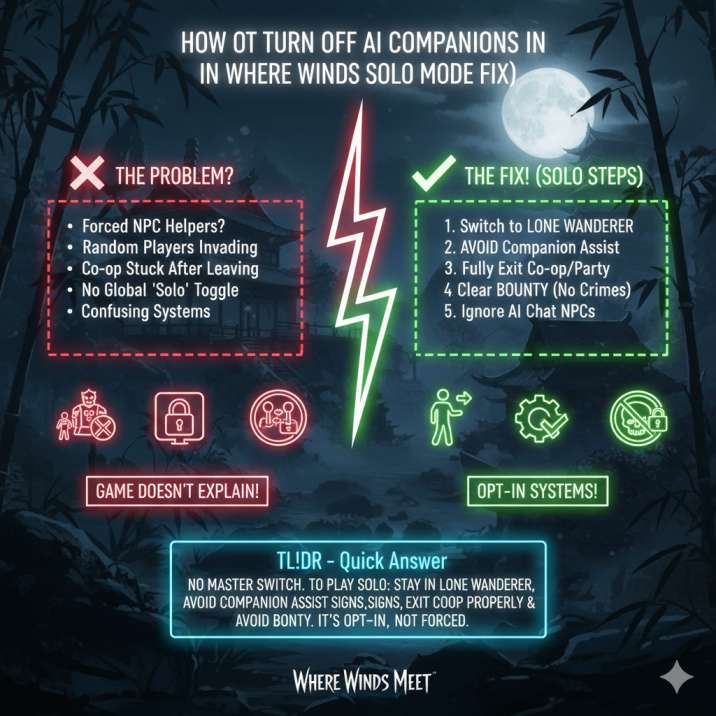
The important thing to know is that most of these systems are optional or conditional, not permanent. Once you understand which ones create that “unwanted help” feeling, it becomes much easier to avoid them and keep your experience fully solo. Let’s break them down one by one and clear up what’s actually happening behind the scenes.
How to Disable Companion Assist (Boss NPC Helpers)
These are easily the most common “AI companions” players complain about, mostly because the game doesn’t do a great job explaining how they work.
What’s actually happening
Before certain boss fights, you’ll see a Companion Assist signpost placed just outside the arena. Interacting with this signpost gives you the option to hire an NPC helper for the upcoming fight.
Here’s the key detail a lot of players miss:
👉 These NPCs never appear automatically. They only show up if you choose to summon them.
How to fight bosses completely solo
If you want to take on bosses alone in Where Winds Meet, just follow these rules:
- Don’t interact with the Companion Assist signpost at all
- If you click it by accident, back out or cancel before confirming
- If the signpost isn’t available, that fight is already locked to solo-only
There’s no setting to toggle here because the system is entirely opt-in.
No summon = no AI companion.
Solo Mode Fix – Stop Co-Op and Online Players
If it feels like other players keep popping into your world, there’s a good chance you’re not actually in solo mode, even if you thought you were. This is one of the most common causes of “forced multiplayer” confusion in Where Winds Meet.
Make sure you’re in the right mode
Open the Mode Switch and select:
Lone Wanderer / Solo
This is the story-focused, single-player experience. Random players, shared-world events, and co-op features only appear if you switch out of this mode.
Solo mode not working? Try this reset
There’s a known issue where the game still thinks you’re in co-op after leaving a session, even if no one is in your party.
To fix it:
- Leave any party or lobby completely
- Return to the title screen or character select
- Re-enter the game directly in Solo mode
This forces the game to rebuild your world state and fixes most “stuck in co-op” or “solo mode not working” problems.
Read also: How to Get Jade Pipa in Where Winds Meet ?
What About AI Chat NPCs?
Some NPCs in Where Winds Meet use AI-driven dialogue, which can definitely throw players off—especially if you’re trying to keep things strictly solo.
Here’s the good news:
- They don’t follow you around the world
- They don’t fight alongside you or assist in combat
- They don’t affect difficulty or progression in any way
And the not-so-great news:
- There’s no global option to disable them
If you’re aiming for a quieter, more traditional solo experience, the best approach is simply to ignore these NPCs unless a quest explicitly requires interaction. Skipping optional conversations won’t penalize you, and it won’t interfere with story progression or gameplay balance.
Why Solo Mode Still Isn’t 100% Solo (Bounty System)
This is the part that catches a lot of players off guard.
Even in Where Winds Meet Solo mode, player invasions can still happen if you commit crimes or build up a bounty. This isn’t co-op matchmaking and it isn’t AI companions—it’s a punishment system tied to your actions in the world.
Can you turn this off?
No. There’s currently no setting or toggle to disable bounty-related invasions.
How to avoid it
If you want uninterrupted solo play, your best option is prevention:
- Don’t commit crimes in the open world
- Clear your bounty quickly if one triggers
- Surrender or pay fines when the option is available
As long as you stay bounty-free, Solo mode behaves exactly how most players expect—quiet, isolated, and focused entirely on your own journey.
Read also: How to Complete Swallow’s Bond in Where Winds Meet (Fast & Easy)
Common Mistakes That Cause Confusion
If solo play feels broken, it’s usually not a bug—it’s one of these easy-to-miss issues in Where Winds Meet:
- Summoning Companion Assist by accident, then assuming the game forced an NPC on you
- Forgetting to switch back to Lone Wanderer mode after playing online or co-op
- Leaving a co-op session without restarting, which can keep your world flagged as multiplayer
- Triggering bounty invasions by committing crimes and mistaking them for co-op or AI systems
- Assuming AI dialogue NPCs are companions, even though they don’t follow or help you
Fix any one of these, and the game usually snaps back into behaving like a proper solo experience. Fix all of them, and you’ll get the quiet, single-player-style run most people are looking for.
Final Verdict
There’s no master switch to turn off AI companions in Where Winds Meet, but the game also doesn’t force them on you once you understand how its systems work.
As long as you:
- Stay in Solo / Lone Wanderer mode
- Avoid Companion Assist signposts before boss fights
- Exit co-op sessions properly and reload into solo
- Keep bounties in check to prevent invasions
You’ll get exactly what you’re looking for—a clean, mostly uninterrupted solo run that feels genuinely single-player.
If you’re still running into unexpected helpers or players after doing all of that, it’s likely a bug or a mode-state issue, not intended design. At that point, a quick restart or mode reset usually does the trick.
Read also: