
Ever open your hub menu, stare at the protocol capacity number, and think, “There is no way I built that much stuff”? Yeah — you’re not alone.
If your regional protocol capacity in Arknights: Endfield is sitting way higher than your math says it should be (like 105 when you’re expecting 70–90), the game hasn’t bugged out… it’s just not very good at explaining itself.
Let’s break down what’s actually eating your protocol capacity, why so many players miss it, and how to find the missing points fast — no fluff, no theorycrafting rabbit holes.
This is one of those systems that looks simple on the surface but quietly tracks more than you think behind the scenes. Small deployables, early-game placements, and region-wide limits all stack together, which is why the numbers can feel wildly off if you’re only counting major structures.
Once you understand what the game is counting — and where to look — the confusion clears up fast, and your protocol math finally starts making sense again.
What protocol capacity actually counts (the part the game never spells out)
In Arknights: Endfield, protocol capacity isn’t just about the big, obvious buildings you remember placing. It’s a region-wide limit, and it quietly includes a lot of small, easy-to-forget stuff that most players don’t even think about after the early game.
Things like power pylons and relay towers, mining rigs and depots, outposts you dropped outside your main hub, zipline connectors, and basically any AIC deployable tied to that region all count. On their own, each one feels harmless — a point here, a couple points there — so you don’t notice the impact right away.
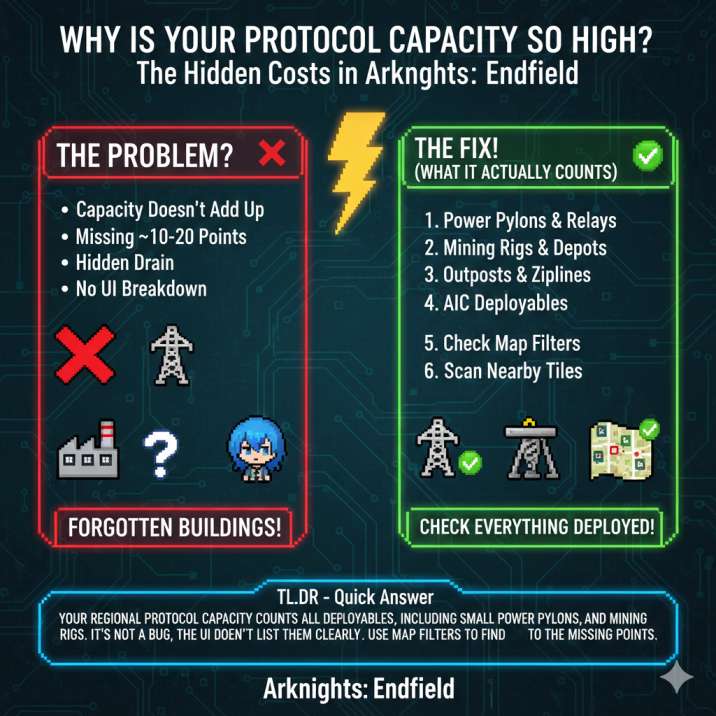
But once you’ve expanded a bit, those tiny costs start stacking. Suddenly you’re missing 10–20 protocol capacity and staring at the number wondering what went wrong. Nothing’s broken — the game just doesn’t clearly show you where those points are going.
That’s why so many people searching “why is my Endfield protocol capacity so high” hit a wall. The system works, but the UI never gives you a simple, human-readable breakdown of what’s actually eating your capacity.
The #1 reason your protocol capacity is higher than expected
Forgotten pylons. Full stop.
Power pylons and relay towers are almost always the main culprit, and it’s easy to see why. They’re small, you place them early when you’re just trying to get power online, and they blend into the terrain so well that your brain stops registering them as “real” structures. On top of that, they’re usually spread out across multiple tiles instead of sitting neatly in your hub, which makes them even easier to forget about.
The important thing to know is that distance doesn’t matter. Even if a pylon is way off in the middle of nowhere, it still counts toward the same regional protocol capacity as your main base.
So if you’re asking “what uses protocol capacity in Endfield?” and the numbers don’t add up, this is almost always the answer. A handful of forgotten pylons is all it takes to explain that missing 10–15 capacity.
Other common reasons you’re “missing” 15 capacity
If pylons aren’t the whole story, these are the next things you should check — because they mess with the numbers in ways that aren’t obvious at a glance.
1. AIC research quietly changed your limits
Some AIC Plan unlocks do more than just give you new toys. They can increase your total protocol capacity, unlock new structures that cost more capacity than older ones, or even change how much certain buildings consume. If you’re still doing the math in your head based on an earlier setup, your numbers might simply be outdated.
2. Hub / Authority progression
Authority levels and hub upgrades can also shift the math behind the scenes. They might add bonus capacity, reserve capacity for region-related mechanics, or change how the cap is calculated altogether. So even if you’re thinking, “I didn’t build anything new,” progressing your hub still changes the equation.
3. Nearby tiles count as the same region
Built something just outside your main base and forgot about it? If it’s in the same region, it’s pulling from the same protocol pool. This catches a lot of players who expand mining operations or power lines and assume those builds are “separate” — they usually aren’t.
How to find the missing protocol capacity
If the numbers still don’t add up, run through this in order. It sounds simple, but it works almost every time.
First, open the Protocol Terminal / AIC overview and check the deployed facilities list. This screen often shows structures that are easy to miss on the map, especially smaller deployables you placed hours ago and forgot about.
Next, turn on all map filters. Zoom all the way out, then slowly zoom back in. Pay close attention to power pylons, relay towers, and mining devices — these are the most common things hiding in plain sight.
After that, scan nearby tiles, not just your main hub. If a structure is in the same region, it counts toward the same protocol pool, even if it feels “separate” from your base.
Finally, check your recent AIC research and Authority upgrades. If you unlocked something recently, assume the math changed.
Nine times out of ten, this is where the “mystery” 10–15 protocol capacity reveals itself.
What it is not (despite rumors)
Let’s clear up some bad info that keeps floating around, because it causes way more confusion than it should:
- ❌ Inventory items do not consume protocol capacity
- ❌ Blueprints on their own don’t count toward the cap
- ❌ This usually isn’t a bug or a broken save
If your protocol usage looks higher than expected, it’s almost never some hidden system quietly eating capacity in the background. In nearly every case, the answer is much simpler: placed deployables. Things you physically built in the region — especially small stuff like pylons, relays, and outposts — are what’s pushing the number up, not anything sitting in your inventory or locked behind a menu.
The real takeaway
If your Endfield regional protocol capacity feels wrong, it’s because the game is tracking everything you’ve deployed, not just your big, obvious buildings — and it does a pretty poor job of making that clear to the player.
Once you take a few minutes to hunt down stray pylons, relay towers, and forgotten outposts scattered around the region, the numbers usually snap back into place. What felt like a bug or broken system suddenly makes sense, and your protocol capacity starts lining up with your expectations instead of fighting them.