
A Best Gaming Desks for Dual Monitors needs more than a flashy gamer look. The real priorities are enough width for two screens, a stable frame, decent depth for comfortable viewing distance, and useful extras like cable management, monitor shelves, or height adjustment.
If you are searching for the best gaming desk for dual monitor setups, the sweet spot is usually a desk around 55 to 63 inches wide for two standard monitors, while bigger ultrawide or mixed setups often benefit from 60 inches or more. L-shaped desks are also popular because they give you extra room for a PC, speakers, accessories, or a second work zone.
Best 8 Gaming Desks for Dual Monitors to buy
The best options usually fall into a few clear categories: straight desks for clean dual-monitor layouts, L-shaped desks for maximum surface area, and height-adjustable desks for people who want a more ergonomic gaming and work setup.
1. AODK L-Shaped Gaming Desk for Dual Monitors
The AODK 53-inch L-shaped gaming desk is a strong pick for a dual-monitor setup if you want corner-friendly space, built-in storage, and extra gaming features without spending a fortune.
At 53.15 inches wide and 18.9 inches deep, it gives enough room for a typical two-monitor gaming setup, especially if you are using standard 24-inch or 27-inch displays. The reversible L-shape is the real selling point here, since it gives you more flexibility than a basic straight desk and lets you choose the layout that fits your room best.
This desk also leans hard into the all-in-one gaming style.
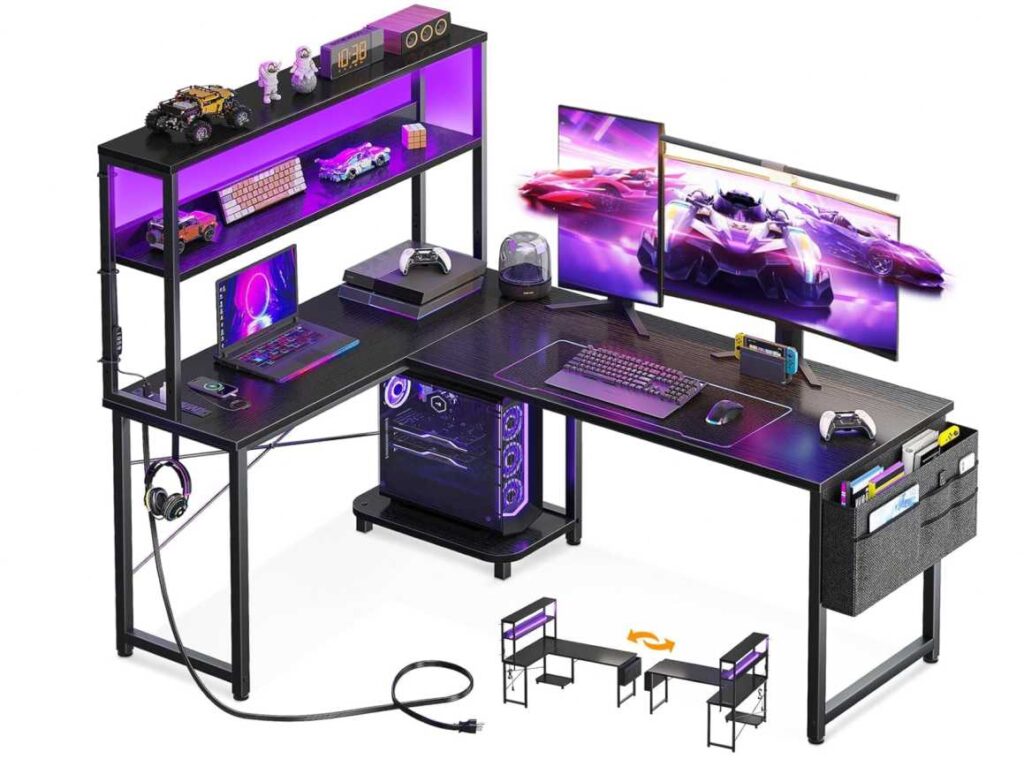
You get LED lighting, 3 power outlets, 2 USB charging ports, shelves, a CPU stand, a headphone hook, and a storage bag, so it is trying to be more than just a surface for monitors. For a lot of buyers, that bundled convenience is a big plus.
The storage setup is useful too.
The upper shelf can work as a display shelf or monitor stand, and the side shelving helps keep accessories, controllers, books, or small tech off the main desktop. That can matter a lot on a dual-monitor desk, because once two screens are in place, free surface area disappears fast.
Pros:
- Good shape for a dual-monitor corner setup
- 53-inch width works for many two-monitor layouts
- Reversible design gives more room-planning flexibility
- Built-in power outlets and USB ports
- LED lights add gaming-style appeal
- Extra storage with shelves, hook, CPU stand, and bag
Cons:
- 18.9-inch depth is a bit tighter than some people may want
- Better for standard dual monitors than very large ultrawide screens
- Features are great, but some buyers may prefer a cleaner, simpler desk
Verdict
The AODK L-shaped gaming desk is a very solid choice for a dual-monitor gaming setup, especially if you want a desk that mixes workspace, storage, and gaming extras in one affordable package.
2. SEDETA 55-Inch Gaming Desk for Dual Monitors
The SEDETA 55-inch gaming desk is a feature-packed option for a dual-monitor setup, especially if you want more storage and organization than a typical gaming desk gives you.
With a 55-inch width and 17.8-inch depth, it can handle a standard two-monitor layout, particularly with 24-inch or 27-inch screens. The big draw here is not just the desktop space, though — it is everything built around it.
This desk is basically trying to be a workstation and gaming station at the same time.
You get 6 drawers, open shelves, a monitor stand, power outlets, USB charging, LED lighting, and a side hook, which makes it a strong fit for someone who has a lot of accessories, controllers, cables, notebooks, or small tech clutter to manage.
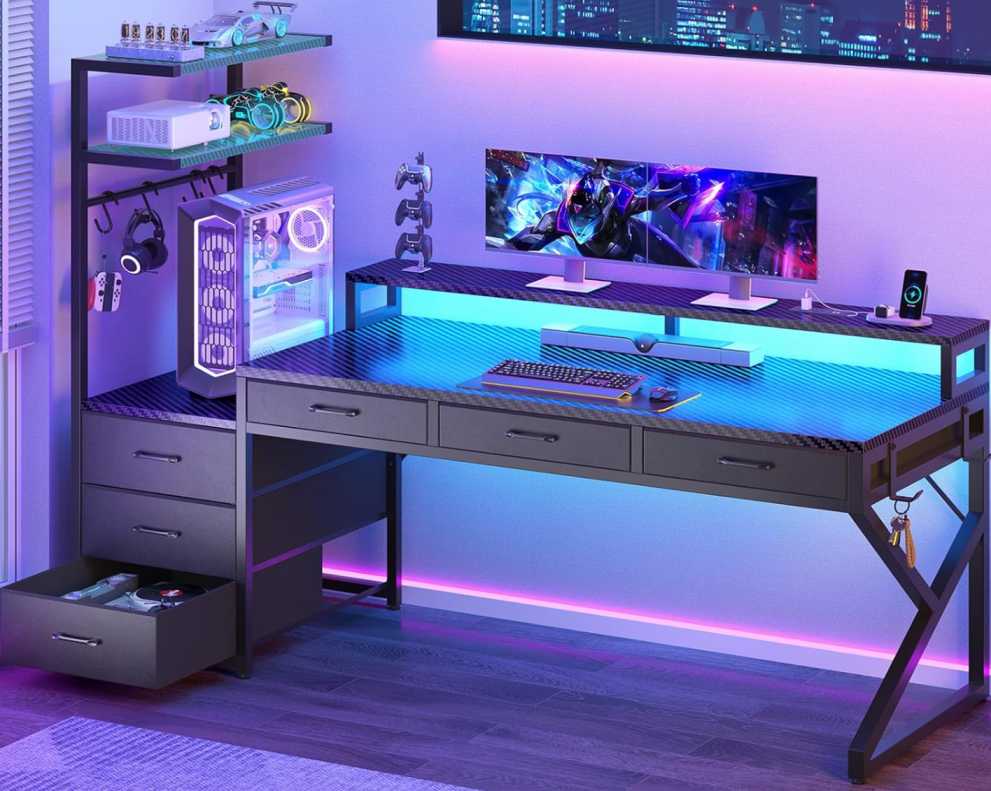
The monitor stand is especially useful in a dual-monitor setup.
It can help lift the screens to a more comfortable level and free up part of the main desk surface, which matters when two monitors start eating into your space. The reversible design also helps if you need the desk to fit a specific room layout.
Pros:
- 55-inch width works for many dual-monitor setups
- Excellent storage with 6 drawers plus shelves
- Includes monitor stand
- Built-in power outlets and USB ports
- LED lights add extra gaming appeal
- Reversible design adds placement flexibility
Cons:
- 17.8-inch depth is a little shallow for some users
- Better for standard dual monitors than very large displays
- More feature-heavy than minimalist buyers may want
Verdict
The SEDETA 55-inch gaming desk is a great choice for a dual-monitor gaming setup if you want a desk that does more than just hold your screens. Its biggest advantage is the combination of storage, monitor support, and built-in power features at a budget-friendly price.
3. EUREKA ERGONOMIC Aero 72-Inch Gaming Desk for Dual Monitors
The EUREKA ERGONOMIC Aero 72-inch desk is the premium big-space option for a dual-monitor gaming setup, especially if you want a desk that feels more like a full battle station than a basic computer table.
With a 71.93-inch width and 29.92-inch depth, this desk gives you a lot more breathing room than the smaller 53-inch and 55-inch options. That extra size is a huge advantage for dual monitors, especially if you use larger screens, add speakers, a mic, a console, or streaming gear.
This desk is built for people with a full setup, not just a keyboard and two displays.
The wing-shaped surface, dual monitor shelves, keyboard tray, RGB lighting, cup holder, dual headphone hangers, device grooves, and cable management grommets all push it toward the gamer-streamer crowd. It is clearly meant for someone who wants their setup to look organized and feel purpose-built.
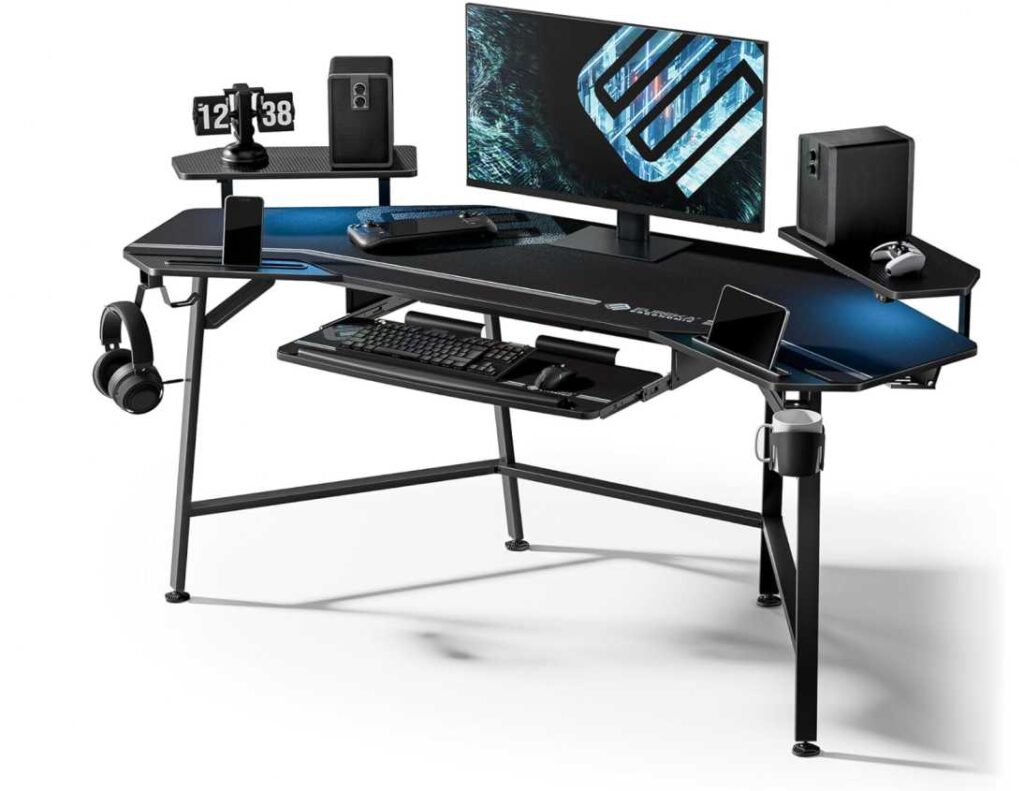
The depth is one of the best things here.
At nearly 30 inches deep, it gives you more comfortable viewing distance for dual monitors than shallower desks. That matters a lot because many budget gaming desks are wide enough, but not deep enough, so the screens can end up feeling too close.
Pros:
- Huge 72-inch width is excellent for dual monitors
- Deep desktop gives better viewing distance
- Great for larger screens and more accessories
- Dual monitor shelves help organize the setup
- Includes keyboard tray, cable management, cup holder, and headphone hooks
- Feels more premium and workstation-like than budget desks
Cons:
- Much more expensive than budget gaming desks
- Larger footprint needs more room
- Extra features may be unnecessary for simple setups
Verdict
The EUREKA ERGONOMIC Aero 72-inch gaming desk is one of the best choices here for a dual-monitor gaming setup if you want lots of space, better depth, and a more premium desk experience. It is the kind of desk that makes the whole setup feel bigger, cleaner, and more serious.
4. Huuger Electric Standing Desk for Dual Monitors
The Huuger 55 x 28 standing desk is one of the better picks here if you want a dual-monitor gaming desk with a cleaner, more practical style instead of the usual LED-heavy gamer look.
With a 55-inch width and 27.6-inch depth, it gives a more comfortable amount of front-to-back space than many budget gaming desks. That extra depth matters for a dual-monitor setup because it helps keep the screens at a better viewing distance and leaves more room for a keyboard, mouse, and accessories without everything feeling cramped.
The biggest advantage is the sit-stand feature.
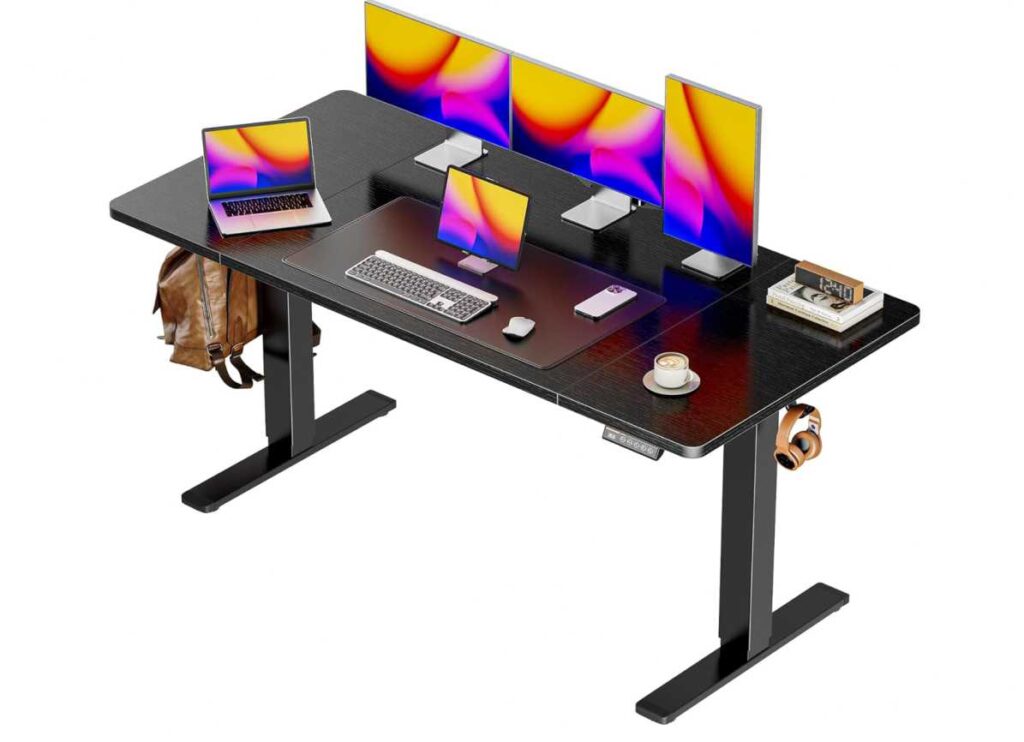
This is an electric height-adjustable desk with 3 preset heights and a range from 28.3 inches to 46.5 inches, so it works well for someone who wants both gaming and work flexibility. For dual-monitor users, being able to raise or lower the whole setup can make a real difference in comfort during long sessions.
It also sounds better built than a lot of cheaper desks.
The steel frame, T-shaped design, and 220 lb weight capacity suggest solid support for two monitors, a PC setup, and other accessories. That is reassuring, especially compared with lighter desks that may start to feel shaky once you load them up.
Pros:
- 55-inch width works for many dual-monitor setups
- 27.6-inch depth is better than many shallow gaming desks
- Electric sit-stand adjustment adds major flexibility
- 3 preset heights make switching easy
- 220 lb capacity gives strong support
- Cleaner look for gaming + office use
- Cable management and side hooks add convenience
Cons:
- Less gaming-style flair than desks with shelves, LEDs, or monitor stands
- 55 inches is good, but still not as roomy as a 63-inch or 72-inch desk
- Better for clean dual-monitor setups than huge multi-device battlestations
Verdict
The Huuger 55 x 28 electric standing desk is a really smart option for a dual-monitor setup if you want a desk that feels more ergonomic, spacious, and versatile than a typical budget gaming desk. For gaming plus work, it is one of the most balanced choices.
5. Aheaplus L-Shaped Gaming Desk for Dual Monitors
The Aheaplus L-shaped gaming desk is a nice pick for a compact dual-monitor setup, especially if you want a desk that squeezes a lot of features into a smaller corner-friendly footprint.
With a desktop listed at 48.82 inches wide and 18.9 inches deep, it is a bit tighter than some of the larger desks you shared, so this one makes the most sense for two smaller monitors or a cleaner dual-screen layout. The real advantage is how much it packs into that smaller size.
This desk is built for people who want storage and extras without going huge.
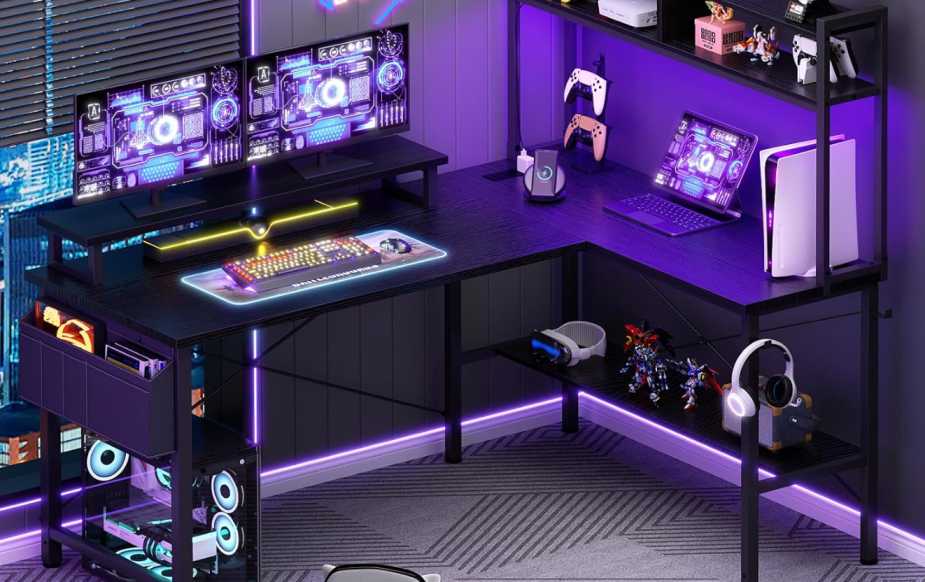
You get 3 power outlets, 2 USB ports, LED lights, 4 tiers of open shelving, a storage bag, a headphone hook, and a moveable monitor stand. So even though the main desktop is not massive, the desk tries to make up for it with vertical organization and built-in convenience.
The reversible L-shape helps a lot too.
That makes it easier to fit into different room layouts, and the corner design can feel more spacious than a standard straight desk in smaller rooms. The monitor stand is also useful because it can lift your displays and free up some surface space underneath, which matters more on a desk this size.
Pros:
- Good for small-space dual-monitor setups
- Reversible L-shape fits corners well
- Includes monitor stand
- Built-in power outlets and USB charging
- Lots of storage for a compact desk
- LED lighting adds gaming vibe
Cons:
- 48.82-inch width is tighter than ideal for large dual monitors
- 18.9-inch depth is on the shallow side
- Better for compact setups than bigger battlestations
Verdict
The Aheaplus L-shaped gaming desk is a solid choice for a dual-monitor setup in a smaller room, especially if you want storage, power features, and a monitor stand without moving up to a much larger desk.
6. Casaottima 98-Inch Gaming Desk for Dual Monitors
The Casaottima 98-inch 2-person gaming desk is the giant value pick here. For a dual-monitor setup, it is honestly overqualified in the best way.
With a massive 97.6-inch width and 19.7-inch depth, this desk gives you way more horizontal room than a standard single-user gaming desk. Even though it is marketed as a 2-person desk, that extra-long layout can be amazing for one person running a dual-monitor battlestation with speakers, a PC, consoles, chargers, and all the random desk junk that somehow appears every week.
The best part is the flexibility.
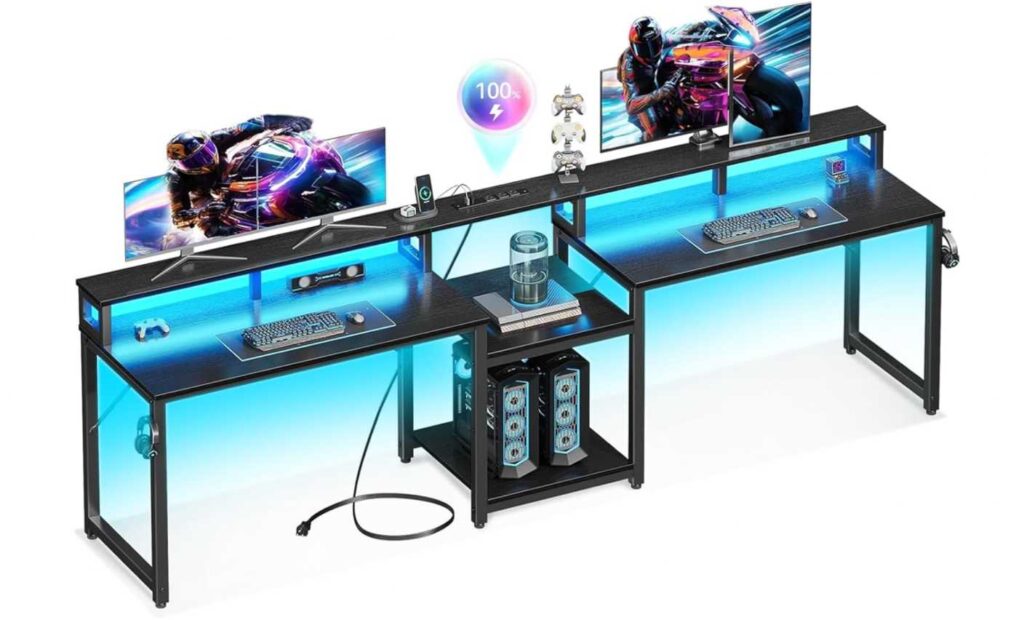
You can use one side for the main gaming setup and the other side for streaming gear, a laptop, notebooks, or a second work zone. That kind of extra space is hard to beat at this price. For someone comparing the best gaming desks for dual monitors, this desk stands out because it gives you room to grow instead of forcing everything into a tight setup.
It also comes with useful built-ins.
You get a full monitor stand, storage shelves, 3 power outlets, 2 USB charging ports, and LED lighting, so it still has the gaming-desk extras people like. The monitor stand is especially nice because it can lift your displays while freeing up desktop space underneath.
Pros:
- Huge 97.6-inch width is excellent for dual monitors
- Great for one large setup or split-zone use
- Built-in monitor stand helps with ergonomics and space
- Includes shelves, USB ports, power outlets, and LED lights
- Strong value for the amount of desk space
- Good option for gaming + work in one desk
Cons:
- 19.7-inch depth is decent, but not as deep as some premium desks
- Large footprint needs a lot of room
- Can feel excessive if you only want a simple compact setup
Verdict
The Casaottima 98-inch gaming desk is one of the strongest options for a dual-monitor setup if your priority is maximum space for the money. It is ideal for someone who wants a roomy setup that feels open, organized, and ready for both gaming and work.
7. SEDETA Convertible L-Shaped Gaming Desk for Dual Monitors
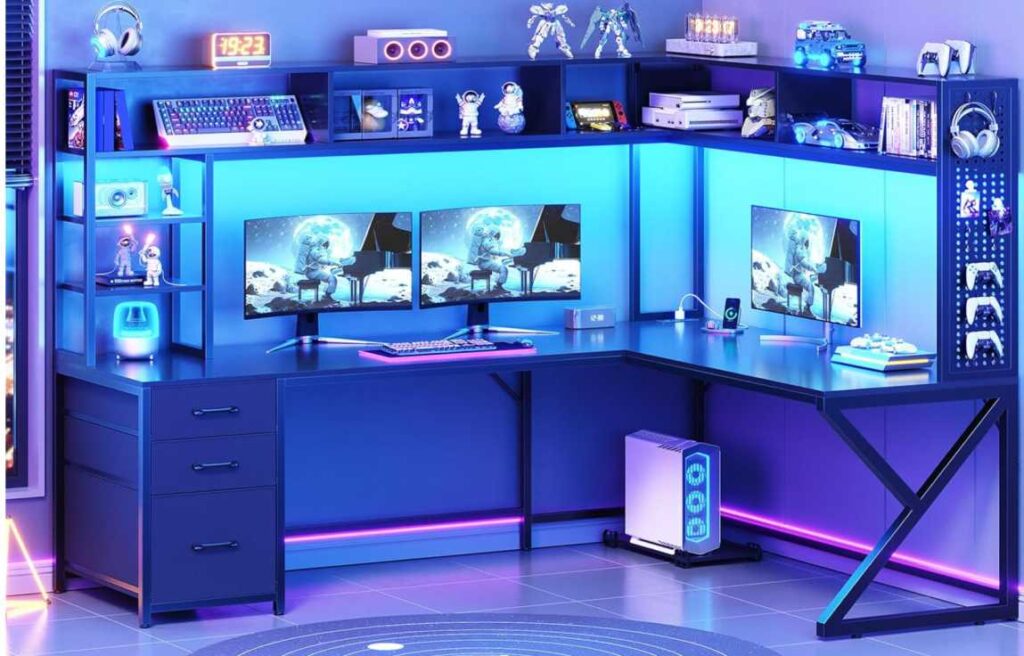
The SEDETA L-shaped gaming desk is one of the most versatile options here because it can work as either a corner desk or a long 94.5-inch straight desk, which makes it especially attractive for a dual-monitor setup.
In its normal L-shape, you get a roomy workstation with a listed desktop size of 66.1″ x 47.2″, which is plenty for two monitors, a keyboard, mouse, and extra gear. But the real hook is the convertible design. If you ever want a wider straight layout instead of a corner setup, it can switch into a 94.5-inch desk, giving you a lot more flexibility than most gaming desks in this price range.
This one is clearly built for people who want storage as much as desk space.
You get 7 open shelves, 3 fabric drawers, 1 pegboard, 1 CPU stand, built-in power outlets, USB ports, and RGB LED lights. So it is not just a place to park two monitors — it is more like a full command center for gaming, work, and storage.
The shelving and pegboard are the standout extras.
For dual-monitor users, desktop clutter builds up fast, so having places for controllers, accessories, files, decorations, or small devices can make the whole setup feel a lot cleaner. That helps this desk feel more functional than a lot of simpler gaming desks.
Pros:
- Great for dual-monitor setups
- Convertible design adds real flexibility
- Can become a 94.5-inch straight desk
- Tons of storage with shelves, drawers, and pegboard
- Built-in power outlets and USB ports
- Good choice for gaming + office use
Cons:
- 18.9-inch depth is still a bit shallow
- More complex design may mean longer assembly
- Feature-heavy look may not suit minimalist setups
Verdict
The SEDETA convertible L-shaped gaming desk is a strong recommendation for a dual-monitor setup if you want a desk that offers flexibility, lots of storage, and a more complete workstation feel. It is one of the better all-in-one options from the desks you shared.
8. DUMOS L-Shaped Gaming Desk for Dual Monitors
The DUMOS 52-inch L-shaped gaming desk is a budget-friendly option that punches above its price if you want a dual-monitor setup with useful extras built in.
With 52 inches of width and 19.7 inches of depth, it has enough room for a typical two-monitor layout, especially with 24-inch or 27-inch displays. The L-shaped design helps a lot here because it makes the desk feel more spacious than a plain straight desk, while also giving you a better corner setup for gaming, streaming, or work.
What makes this one stand out is how complete it feels for the money.
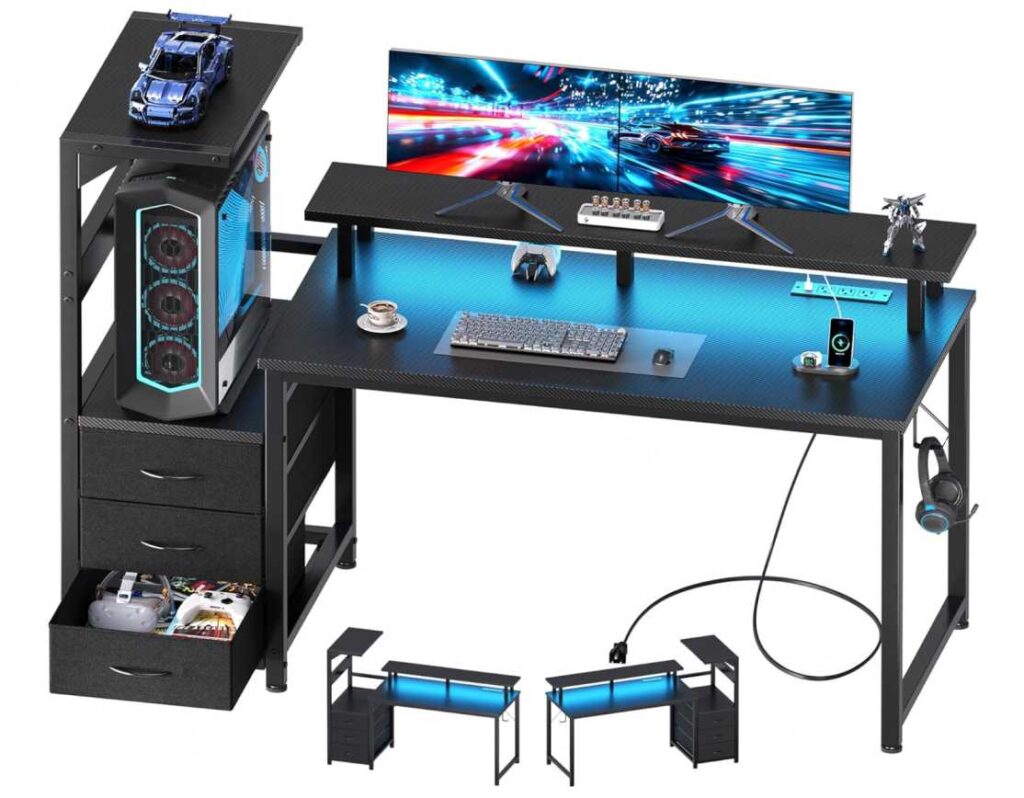
You get 3 AC outlets, 2 USB charging ports, 3 fabric drawers, an open shelf, a PC stand, a side hook, cable management, LED lighting, and a built-in monitor stand. That is a lot packed into a desk at this price point, and it makes the setup feel more organized right away.
The monitor stand is especially useful for a dual-monitor layout.
It helps raise your screens to a more comfortable level and opens up usable space underneath, which can make the desktop feel less cramped. The reversible layout is another nice touch because it gives you more flexibility when fitting the desk into a room.
Pros:
- Good value for a dual-monitor desk
- 52-inch width works for many two-screen setups
- Built-in monitor stand
- Includes drawers, shelf, PC stand, and cable management
- Built-in power outlets and USB ports
- Reversible L-shape works well in smaller rooms
Cons:
- Still better for standard monitors than oversized ultrawides
- 19.7-inch depth is decent, but not especially deep
- Feature-heavy design may feel busy for minimalist setups
Verdict
The DUMOS L-shaped gaming desk is a strong budget recommendation for a dual-monitor setup if you want a desk that combines storage, power features, and gaming extras without spending too much.
My Suggestions for the Best Gaming Desks for Dual Monitors
The best gaming desk for dual monitors really depends on how much space you want, whether you care more about storage, ergonomics, or just getting the biggest setup possible for the money.
My top overall pick would be the EUREKA ERGONOMIC Aero 72-Inch Gaming Desk because it gives you the kind of width and depth that makes a dual-monitor setup feel comfortable instead of crowded. It is the strongest choice for a serious battlestation, especially if you also have speakers, a mic, or other gear.
If you want the best value for maximum space, the Casaottima 98-Inch 2 Person Gaming Desk is a standout. It gives you a huge amount of room for a dual-monitor setup, and honestly even more than most people need. It is a great pick if you like having extra space for work and gaming on the same desk.
If you want the best ergonomic option, I would go with the Huuger 55 x 28 Electric Standing Desk. It is not the flashiest gaming desk, but the sit-stand feature, deep desktop, and strong weight support make it one of the smartest choices for comfort during long gaming or work sessions.
If you want the best L-shaped desk, the SEDETA Convertible L-Shaped Gaming Desk is probably the strongest option. The fact that it can work as both an L-shaped desk and a long 94.5-inch straight desk makes it more flexible than most corner desks, and it gives you tons of storage too.
If your budget is tighter, the DUMOS L-Shaped Gaming Desk is one of the better lower-cost picks. It still gives you a monitor stand, storage, outlets, USB ports, and LED lights, so it feels much more complete than a basic cheap desk.
Best picks by type
Best overall: EUREKA ERGONOMIC Aero 72-Inch Gaming Desk
Best for maximum space: Casaottima 98-Inch 2 Person Desk
Best standing desk: Huuger 55 x 28 Electric Standing Desk
Best L-shaped option: SEDETA Convertible L-Shaped Gaming Desk
Best budget pick: DUMOS L-Shaped Gaming Desk
Best for storage: SEDETA 55-Inch Gaming Desk with 6 Drawers
Final recommendation
If I had to narrow it down fast:
- Go with EUREKA if you want the best premium dual-monitor gaming desk
- Go with Casaottima if you want huge desk space for the price
- Go with Huuger if comfort and ergonomics matter most
- Go with DUMOS if you want the best budget-friendly choice