
Trying to drive the Tadpole in Subnautica 2 only for it to instantly launch forward and smash into a wall?
Yeah, players are running into that bug a lot right now, especially in multiplayer sessions. What starts as an exciting moment after finally building your first vehicle can quickly turn frustrating when the Tadpole suddenly becomes impossible to control.
The Subnautica 2 Tadpole speed glitch has become one of the more annoying co-op issues in Early Access so far.
In many cases, one player can pilot the vehicle normally while the other immediately experiences uncontrollable acceleration, broken steering, or constant crashes into terrain. Some players have even reported the Tadpole behaving differently every time they reconnect to a session.
The good news is that players across Reddit, Steam forums, and Discord communities have already found a few fixes and workarounds that can temporarily solve the problem. While there’s no official permanent patch yet, several methods are helping players get their vehicles working again.
Here’s what causes the Tadpole speed bug in Subnautica 2 and the best ways to fix it.
Quick Answer: How to Fix the Tadpole Speed Glitch in Subnautica 2
If your Tadpole keeps accelerating uncontrollably or crashing into walls, try these fixes:
- Damage the Tadpole slightly
- Fully repair it using the Repair Tool
- Restart the entire co-op session
- Build a second Tadpole if the first stays bugged
- Remove vehicle upgrade modules
- Avoid entering the vehicle while it’s moving
The repair method currently appears to be the most reliable community-tested fix.
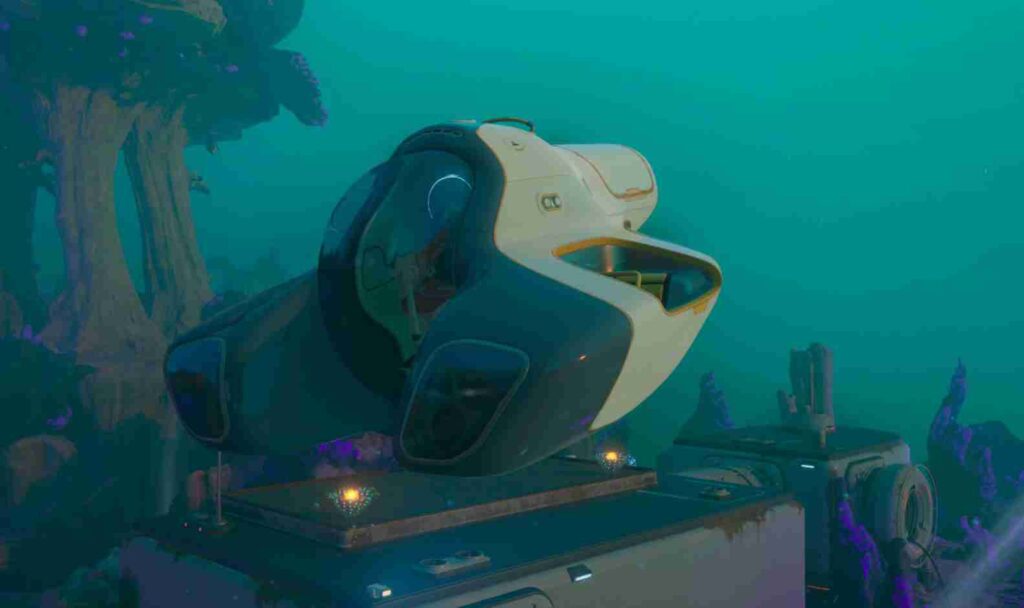
What Is the Tadpole Speed Glitch?
The Tadpole speed glitch is a multiplayer vehicle physics bug in Subnautica 2 that mainly affects co-op players. The issue has become increasingly common in Early Access, especially during longer multiplayer sessions where vehicle synchronization starts breaking between players.
When the glitch happens, the Tadpole may:
- instantly accelerate forward,
- become impossible to steer,
- slam into terrain or walls,
- continue moving uncontrollably,
- or behave differently for each player in the lobby.
In many reported cases, one player can drive the Tadpole completely normally while another immediately loses control the moment they enter the vehicle. That’s why many players believe the issue is tied directly to multiplayer desync rather than the Tadpole itself.
Most community reports suggest the bug is connected to broken vehicle physics synchronization in co-op mode. Players have noticed the problem happening more frequently after reconnecting to sessions, entering moving vehicles, or playing in the same lobby for several hours without restarting.
Some players also experience related physics bugs at the same time, including:
- flying after leaving the water,
- ascender launch glitches,
- broken swimming momentum,
- and strange vehicle collision problems.
Since Subnautica 2 is still in Early Access, these multiplayer physics bugs are currently pretty common while the co-op systems continue to be updated and stabilized.
Read also: How To Get The Sonic Resonator And Feedback Resonator In Subnautica 2
Best Fix for the Subnautica 2 Tadpole Speed Bug
Right now, the most successful fix for the Subnautica 2 Tadpole speed glitch is damaging and repairing the vehicle. While there’s still no official patch specifically targeting the issue, this workaround has helped a surprisingly large number of co-op players restore normal vehicle controls.
Damage and Repair the Tadpole
Players across Reddit, Steam forums, and multiplayer Discord servers report that repairing the Tadpole can sometimes reset its broken physics behavior.
Here’s exactly how to do it:
- Drive the Tadpole gently into terrain or rocks
- Cause a small amount of vehicle damage
- Exit the vehicle completely
- Use the Repair Tool
- Fully repair the Tadpole
- Re-enter the vehicle and test movement
For many players, this immediately fixes the uncontrollable acceleration bug and restores proper steering. Some players believe the repair process forces the game to refresh the Tadpole’s physics state, which may temporarily solve multiplayer desync problems.
It doesn’t work 100% of the time, but right now it’s the closest thing the community has found to a reliable Tadpole speed bug fix.
Restart the Entire Co-Op Lobby
A simple reconnect usually does not fix the Subnautica 2 Tadpole glitch. In most cases, players need to completely restart the multiplayer session.
Instead, try doing a full co-op reset:
- Both players leave the vehicle
- The host manually saves the game
- Everyone returns to the main menu
- Restart the multiplayer lobby completely
- Rejoin the session before entering the Tadpole again
Several players report this helps resync multiplayer vehicle physics, especially after long sessions where desync becomes more noticeable.
Build a New Tadpole
Another strange part of the bug is that some saves appear to corrupt a specific Tadpole rather than every vehicle in the world.
If one Tadpole remains permanently bugged:
- build a second vehicle,
- test it without upgrades,
- and let the affected player pilot it first.
Surprisingly, many co-op players say a freshly crafted Tadpole works normally even when the original vehicle remains broken. Because of this, some players believe the issue may sometimes attach itself to a single vehicle instance rather than the entire save.
Remove Upgrade Modules
Another community workaround involves removing installed vehicle modules before testing the Tadpole again.
Try removing:
- storage upgrades,
- efficiency modules,
- speed upgrades,
- or experimental attachments.
While this isn’t a guaranteed solution, several players noticed fewer multiplayer desync issues after stripping the vehicle back to its default setup. Since Early Access vehicle systems are still being updated, certain upgrades may currently interact poorly with co-op synchronization.
What Causes the Tadpole Glitch?
There’s no official explanation for the Subnautica 2 Tadpole speed glitch yet, but most community reports point toward multiplayer synchronization problems and broken vehicle physics in co-op sessions.
Right now, the bug appears to happen most often during:
- long co-op sessions,
- reconnecting to hosted games,
- entering moving vehicles,
- or interacting with vehicles after lag spikes.
Many players report the Tadpole working perfectly fine at first, only for the vehicle to suddenly become uncontrollable later in the session.
In some cases, only one player experiences the issue while everyone else in the lobby can still use the vehicle normally. That’s one of the biggest reasons the community believes the bug is tied to multiplayer desync rather than a permanent vehicle failure.
Players also say the problem becomes more common after several hours of gameplay without restarting the session. The longer a co-op lobby stays active, the more likely physics-related issues seem to appear, including broken momentum, strange collisions, and vehicle movement glitches.
Another possible trigger involves entering the Tadpole while it’s still drifting or moving through water currents. Some players noticed the bug starting immediately after boarding a moving vehicle or exiting and re-entering rapidly during multiplayer exploration.
Because Subnautica 2 is still in Early Access, co-op systems and vehicle synchronization are actively being updated. At the moment, the Tadpole speed glitch appears to be one of several multiplayer physics bugs affecting vehicles and player movement.
Is There an Official Patch Yet?
No official Subnautica 2 patch has fully fixed the Tadpole speed glitch yet. While the developers have continued releasing Early Access updates and multiplayer improvements, players are still actively reporting the bug across multiple community platforms.
The issue is currently being discussed throughout:
- Reddit threads,
- Steam community discussions,
- multiplayer Discord servers,
- and Early Access bug report channels.
Most player reports suggest the Tadpole speed bug is tied to larger multiplayer synchronization and vehicle physics problems rather than a simple isolated issue. Because of that, many players believe the glitch will likely require a broader co-op stability update instead of a quick standalone hotfix.
At the moment, community workarounds like repairing the Tadpole, restarting multiplayer sessions, or building a new vehicle remain the most reliable temporary fixes available. Some players report the issue disappearing after updates, while others still encounter it regularly during longer co-op sessions.
Since Subnautica 2 is still deep in Early Access development, bugs involving vehicles, physics, and multiplayer desync are expected to keep changing as new patches roll out. Until a dedicated fix arrives, the Tadpole speed glitch remains one of the more common co-op vehicle bugs affecting players online.
How to Prevent the Tadpole Speed Bug
While there’s currently no guaranteed way to completely prevent the Subnautica 2 Tadpole speed glitch, players have noticed a few habits that seem to reduce the chances of triggering the bug during co-op sessions.
Because the issue appears connected to multiplayer desync and vehicle physics synchronization, keeping sessions stable can help avoid some of the more extreme Tadpole movement problems.
Stop the Vehicle Before Entering
One of the most common community recommendations is to avoid boarding the Tadpole while it’s still drifting or moving through water currents.
Some players report the bug starting immediately after entering a moving vehicle, especially during laggy multiplayer sessions. Letting the Tadpole come to a full stop before entering may help reduce physics synchronization problems.
Avoid Rapid Entering and Exiting
Repeatedly jumping in and out of the vehicle can sometimes worsen multiplayer desync issues.
While testing fixes or swapping drivers in co-op, try to avoid rapidly entering and exiting the Tadpole multiple times in a row. Slower interactions seem to reduce the chance of vehicle physics breaking unexpectedly.
Restart Long Multiplayer Sessions
Long co-op sessions appear far more likely to create physics-related bugs over time.
Many players notice the Tadpole speed glitch after several hours of continuous gameplay without restarting the lobby. Occasionally restarting the multiplayer session may help refresh synchronization and improve overall stability.
Save Frequently
Since the Tadpole glitch can sometimes happen without warning, keeping recent saves is extremely important.
Frequent manual saves help reduce frustration if vehicle bugs become severe or if the multiplayer session starts behaving unpredictably. Early Access games can still produce random physics problems, so having backup saves is always a good idea.
Final Thoughts
The Subnautica 2 Tadpole speed glitch is currently one of the most frustrating co-op vehicle bugs affecting multiplayer players in Early Access. Losing control of the Tadpole, crashing into walls, or dealing with uncontrollable acceleration can make exploration incredibly annoying, especially during longer sessions with friends.
If your Tadpole keeps behaving unpredictably, the best fixes right now are:
- damaging and repairing the vehicle,
- restarting the multiplayer lobby,
- or building a completely new Tadpole.
While none of these solutions are perfect permanent fixes, they’re currently the most effective community-tested workarounds available. Until Unknown Worlds releases a proper multiplayer stability update, co-op players will likely continue relying on these temporary methods to keep their vehicles functioning normally.
FAQ
How do you fix the Tadpole speed glitch in Subnautica 2?
The best current fix for the Subnautica 2 Tadpole speed glitch is slightly damaging the vehicle and then fully repairing it with the Repair Tool. Many co-op players report this resets the Tadpole’s physics and restores normal steering.
Why does the Tadpole keep crashing into walls?
The Tadpole crashing into walls bug appears to be connected to multiplayer desync and broken vehicle physics synchronization in co-op sessions. In most cases, the vehicle suddenly accelerates uncontrollably and becomes impossible to steer properly.
Does restarting the lobby fix the Tadpole bug?
Sometimes. A full multiplayer lobby restart works much better than simply disconnecting and reconnecting. Many players report the issue temporarily disappears after fully restarting the co-op session.
Can building a new Tadpole solve the glitch?
Yes. Some players believe the bug only affects one specific vehicle instance rather than every Tadpole in the save. Building a brand-new Tadpole has fixed the issue for several multiplayer groups.
Is the Tadpole speed glitch an Early Access bug?
Yes. The Tadpole speed bug is currently considered one of the more common Early Access multiplayer bugs in Subnautica 2, especially during longer co-op sessions.
Are other vehicle physics bugs happening too?
Yes. Players are also reporting several other multiplayer physics issues, including flying glitches, broken swimming momentum, ascender launch bugs, collision problems, and strange vehicle movement behavior.
Is there an official fix coming soon?
There’s currently no confirmed release date for an official fix. However, because the issue is widely reported across Reddit, Steam forums, and Discord communities, many players expect future multiplayer stability patches to address the bug.
Can the Tadpole glitch corrupt your save?
There’s no strong evidence that the Tadpole speed glitch permanently corrupts saves, but some multiplayer sessions may repeatedly trigger the bug until the lobby is restarted or a new vehicle is built.