
Trying to organize your base in Subnautica 2 gets frustrating fast when every locker suddenly turns into a mystery box. If your storage container names aren’t showing up anymore, you’re not alone.
A growing number of players are reporting invisible locker labels, missing storage text, and container rename bugs across both solo and multiplayer saves.
The good news is this Subnautica 2 storage labels bug usually doesn’t delete your items. In most cases, the containers still work normally — the text just stops appearing because of a UI rendering issue tied to the current Early Access build.
The issue seems especially common during longer multiplayer sessions where UI synchronization starts acting up. Some players say the locker labels disappear randomly after reconnecting to a server, while others notice the bug after moving or rebuilding storage containers inside their base.
Since Subnautica 2 is still in Early Access, smaller interface problems like missing text, broken prompts, and disappearing UI elements are happening fairly often right now.
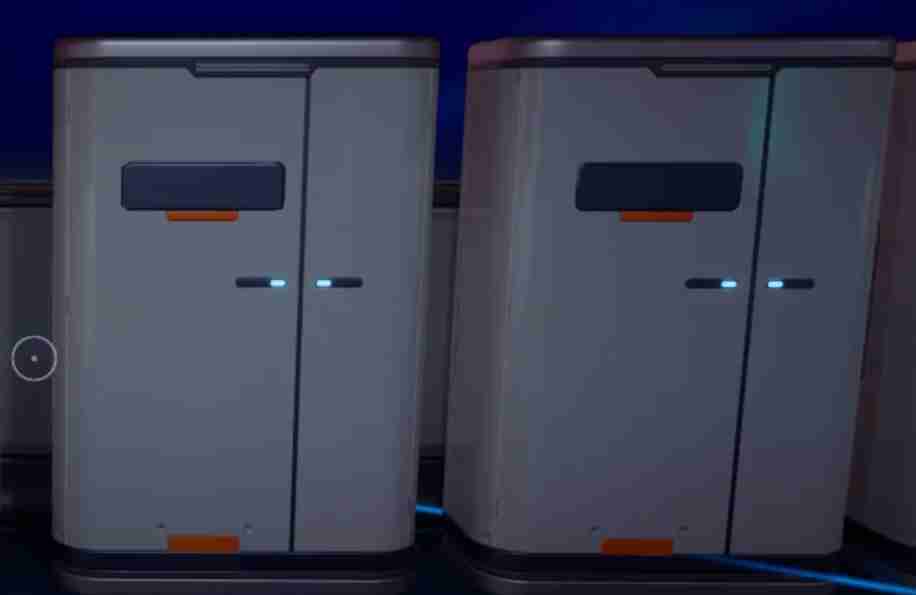
Thankfully, the invisible locker label bug usually has a few simple workarounds. Most players have been able to restore their storage container names by rebuilding the affected lockers, restarting the entire multiplayer session, or refreshing their UI settings.
Here are the best fixes players have found so far.
Read also: Subnautica 2 Angry Face Location Guide: How to Find the Hidden Purple Face Easter Egg
Best Fix for the Subnautica 2 Storage Labels Bug
Right now, the most reliable solution is to rebuild the affected storage container. According to multiple player reports across Reddit, Discord, and Steam forums, the invisible locker label bug usually only affects certain containers rather than the entire save file. That’s good news, because it means you typically won’t need to rebuild your entire base or start a new world just to fix the problem.
The issue appears tied to a UI rendering or synchronization bug where the game stops displaying storage container names correctly, even though the lockers themselves continue functioning normally. Players can still open containers, move resources, and rename storage, but the label text simply disappears from view.
How to Fix Invisible Locker Labels
- Empty the storage container
- Deconstruct the locker
- Rebuild it nearby
- Rename the container again
For many players, the storage container names immediately start showing up again after rebuilding the locker. Some users also report better results when placing the rebuilt container slightly farther away from walls or other storage units to avoid clipping issues.
If you’re playing multiplayer, the host should rebuild the locker instead of a client player. Several co-op players say the bug is more common during longer sessions where multiplayer desync starts affecting UI elements and base interactions.
Why Storage Container Names Are Missing in Subnautica 2
At the moment, the issue appears connected to Subnautica 2’s Early Access UI bugs and multiplayer synchronization problems.
Players have reported:
- storage container names not showing up,
- invisible locker labels,
- missing storage text,
- locker names disappearing,
- and storage rename bugs after long sessions.
The issue seems especially common in co-op worlds where desync starts affecting UI elements.
Thankfully, the bug is usually visual only. Most players can still:
- access storage,
- transfer items,
- rename lockers,
- and use containers normally.
Restart the Entire Multiplayer Session
A normal reconnect often isn’t enough to fix the problem.
Instead, try:
- having every player leave the session,
- fully closing the game,
- restarting the lobby,
- then loading the world again.
Some players say the invisible storage label bug only appears after several hours of multiplayer gameplay, suggesting it may be related to memory leaks or UI desync.
Change Your UI Scale Settings
Another community workaround involves refreshing the game’s HUD settings.
Go to:
- Settings
- Interface
- UI Scale
Then:
- slightly increase or decrease the scale,
- apply the changes,
- and restart the game.
Subnautica 2 currently has several known UI rendering bugs involving:
- missing text,
- broken prompts,
- disappearing interface elements,
- and resolution scaling issues.
Refreshing the UI can sometimes force locker labels to render properly again.
Move Storage Containers Away From Walls
This sounds weird, but older Subnautica games had similar locker text issues caused by placement collisions.
If your lockers are:
- clipping into walls,
- stacked tightly together,
- or placed in narrow corners,
the container label rendering may fail.
Try rebuilding storage with:
- slightly more spacing,
- cleaner alignment,
- and less overlap between objects.
Several players report this helping with invisible container names.
Verify Your Game Files
If the Subnautica 2 storage text bug keeps returning, verifying your files may help repair broken UI assets.
Steam File Verification
- Open Steam Library
- Right-click Subnautica 2
- Select Properties
- Open Installed Files
- Click Verify Integrity of Game Files
This won’t remove your save data.
Read also: Room Blueprint in Subnautica 2 : Complete Guide
Does the Storage Label Bug Delete Items?
Thankfully, most reports suggest the answer is no. Even though the invisible locker label bug can make your base feel completely disorganized, players generally aren’t losing the actual items stored inside their containers.
In most reported cases, the storage units continue functioning normally even after the container names disappear. Players can still:
- open lockers,
- move resources,
- access inventory,
- and rename storage normally.
The problem appears to be tied to Subnautica 2’s current UI rendering and multiplayer synchronization issues rather than storage corruption. Essentially, the game stops displaying the locker text properly, but the container itself still exists and keeps all stored materials intact.
That said, the bug can still become frustrating during longer survival sessions, especially if you rely on labeled storage systems to organize crafting materials, upgrades, and resources. Once multiple locker names disappear at the same time, it becomes much harder to quickly find important items inside larger bases.
So far, the issue mainly affects organization and readability rather than the containers themselves. Most players who rebuild the affected lockers or restart their multiplayer session report that their storage contents remain completely safe.
Is the Invisible Locker Label Bug Related to Multiplayer?
Most likely, yes. While some solo players have encountered the issue, a large percentage of reports are coming from multiplayer sessions where players are already dealing with several other Early Access synchronization problems.
Many affected players are also reporting:
- vehicle desync,
- PDA synchronization bugs,
- interaction glitches,
- disappearing prompts,
- and broken UI elements during co-op gameplay.
Because of that, many players believe the Subnautica 2 storage container names not showing bug is connected to the game’s current networking and UI synchronization issues. In longer multiplayer sessions, the game sometimes struggles to properly update interface elements between the host and connected players, which may explain why locker labels randomly disappear even though the containers themselves still function normally.
Some players have also noticed the bug appearing after:
- reconnecting to a multiplayer server,
- moving storage containers,
- or spending several hours in the same co-op session without restarting.
Interestingly, several community reports mention that rebuilding the affected locker as the host player works more consistently than rebuilding it as a client. That further suggests the invisible locker label bug may be tied to server-side synchronization problems rather than the storage system itself.
Since Subnautica 2 is still in Early Access, networking stability and UI rendering are both areas that are likely to receive major fixes in future patches.
Will Unknown Worlds Fix the Storage Text Bug?
Probably.
Since the issue is becoming more widely reported, it’s exactly the kind of Early Access UI bug that typically gets patched in future hotfixes.
Until then, the best workaround is still:
- rebuilding affected lockers,
- restarting multiplayer sessions regularly,
- and avoiding overcrowded storage layouts.
If you’re deep into base building right now, it’s also a good idea to keep your most important resources organized in fewer containers until the UI bugs become more stable.
FAQ
Why are my storage container names not showing up in Subnautica 2?
The issue appears tied to Subnautica 2’s current Early Access UI rendering and multiplayer desync problems. Players can still use storage containers normally, but the locker label text sometimes disappears due to interface synchronization bugs. The problem is being widely reported across Reddit, Discord, and Steam forums, especially in co-op sessions.
What is the best fix for invisible locker labels?
Right now, the most reliable fix is deconstructing and rebuilding the affected storage container, then renaming it again afterward. Many players report that the storage container names immediately reappear once the locker has been rebuilt. In multiplayer worlds, it’s usually better if the host player performs the rebuild instead of a client.
Does restarting the server fix the storage text bug?
Sometimes, yes. However, a full multiplayer restart works much better than simply reconnecting to the session. Most successful fixes involve:
- every player leaving the game,
- the host restarting the lobby,
- and then loading the world again fresh.
Long multiplayer sessions seem to increase the chances of UI synchronization issues appearing.
Can this bug delete items inside storage containers?
Most players report that their items remain completely safe. The invisible locker label issue is usually visual only and doesn’t appear to corrupt the actual storage container. Players can still open lockers, move resources, and access inventory normally even when the names disappear.
Is this a known Subnautica 2 UI bug?
Yes. Multiple players across Reddit, Steam forums, and Discord communities are reporting similar storage label bugs, missing UI text, and other interface issues in the current Early Access version of Subnautica 2. The bug appears to be fairly widespread, especially in multiplayer saves.