
So you did the right thing.
You handed out coins, helped the beggars, got the gutted fish… and then Arliss turns around and says you stole the money.
Yeah — that’s not on you.
If you’re stuck with the Arliss Charity Quest bug in Of Ash and Steel, you’ve hit a known quest issue that’s tripping up a lot of players. It’s confusing, frustrating, and makes it feel like you missed a step — even when you didn’t. The game doesn’t explain what went wrong, and Arliss’s dialogue makes it seem like you failed the quest outright.
The good news? Your save isn’t broken, you didn’t accidentally soft-lock anything, and you don’t need to restart your playthrough. This is a bug, plain and simple, and there are a few reliable ways to work around it.
Let’s break down what’s happening and how to get past it.
What’s Going Wrong With the Arliss Charity Quest?
Here’s how the quest is supposed to go:
Arliss gives you coins
You give them to the beggars
Each beggar gives you a gutted fish
You return the fish to Arliss
Quest completes — done and dusted
Simple, right? On paper, everything about this quest is straightforward and clearly communicated by the game. You’re helping people, doing a good deed, and expecting a clean hand-in at the end.
But when the bug hits, this happens instead:
The quest journal looks fine
You have the gutted fish
You return to Arliss
He accuses you of stealing and invalidates the quest
At this point, it feels like the game suddenly rewrote history. You didn’t miss a step, skip an interaction, or do anything out of order. What’s actually happening is that the quest trigger fails to update properly, causing Arliss’s dialogue to pull the wrong outcome and flag the quest as failed when it shouldn’t.
Quick Checks Before You Panic
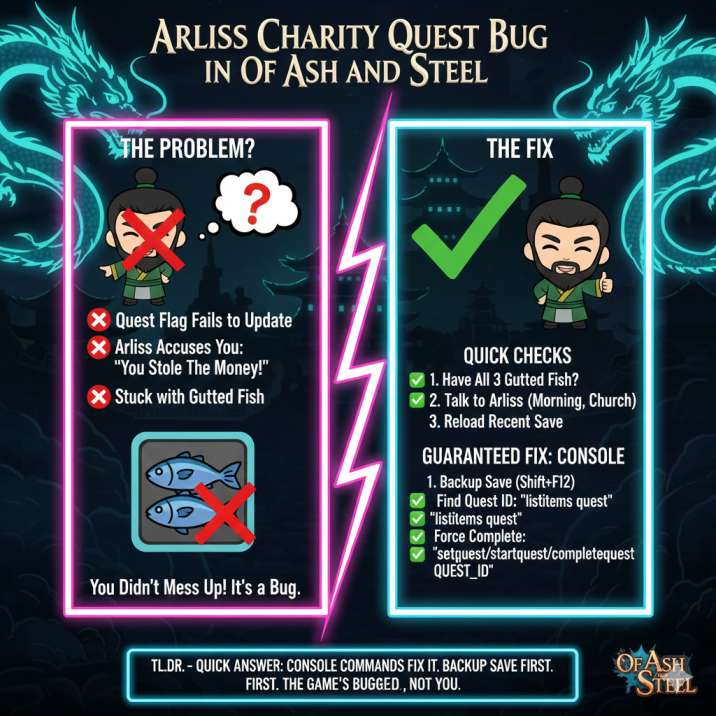
Before messing with saves or the console, try these first — they do work for some players, and they only take a minute to check. In a lot of cases, the issue turns out to be something simple that’s easy to miss during normal play.
1. Make Sure You Still Have All 3 Gutted Fish
This sounds obvious, but it’s the most common issue by far.
Open your inventory
Confirm you have three separate gutted fish items
Don’t cook, sell, or drop them
It’s easy to accidentally interact with quest items without realizing it, especially if you’re managing inventory or crafting at the same time. If even one gutted fish is missing, Arliss will always think something’s wrong and trigger the “you stole the money” dialogue, no matter how perfectly you completed the rest of the quest.
2. Talk to Arliss at the Right Time and Place
Arliss doesn’t stay put, and this matters more than the game lets on.
Players have found him:
Near the church or poorhouse during the day
Inside the tavern or inn at night
If you run into him at the wrong time, the game can pull the incorrect dialogue option and treat the quest as if it failed. Try waiting until morning and speaking to him again without fast traveling, as fast travel can sometimes mess with NPC schedules and quest triggers. Simply approaching him naturally at the right time of day is enough to fix the issue for some players.
3. Reload a Recent Save (If You Have One)
If you’ve got a save from:
Before turning the fish in
Or before giving coins to the last beggar
Reload it and finish the quest in one clean run from start to finish. Try to complete the remaining steps without interruptions, and avoid fast travel, long menu browsing, or other side activities until the quest is fully handed in.
There are no guarantees this will work every time, but for some players it’s enough to let the quest trigger correctly and move past the bug. It’s definitely worth a shot before jumping to more advanced fixes.
Read also: Of Ash and Steel Continue Not Loading Your Latest Save? Here’s What’s Going On
The Guaranteed Fix: Using the Console
If Arliss has already invalidated the quest, this is the reliable solution that works every time. It’s a bit more hands-on, but it won’t break your game and lets you move on without restarting hours of progress.
⚠️ Back up your save first, just in case. It’s always a good habit before using any console commands.
Step 1: Open the Console
Press:
Shift + F12
This opens the in-game console where you can manually manage quest states.
Step 2: Find the Quest ID
Type:
listitems quest
This will display a list of active and inactive quests.
Look for something named:
Alms
Handout
Charity
Arliss
Once you find the correct entry, note the quest ID it shows — you’ll need it for the next step.
Step 3: Force-Complete the Quest
Replace QUEST_ID with the actual ID you found:
setquest QUEST_ID
startquest QUEST_ID
completequest QUEST_ID
Running these commands manually updates the quest state and tells the game, “Yes, this quest was completed correctly — move on.” Once the quest is force-completed, Arliss’s dialogue should reset to its normal state, and the invalidated quest will no longer block your progress.
Missing the Gutted Fish?
If the fish are gone, you can respawn them using the console.
Type:
listitems any
spawnitem item GUTTED_FISH_ID
Use listitems to locate the correct item ID for the gutted fish, then spawn three of them so they match the original quest requirement. Once they’re in your inventory, talk to Arliss again if needed, and the quest should proceed or remain completed without further issues.
Will This Break Anything Later?
Nope.
This bug only affects this specific quest and doesn’t spill over into other parts of the game. Using the console to fix it won’t lock you out of future content, side quests, or story progression. Once the quest is completed or cleared, Arliss behaves normally afterward, with no lingering dialogue issues or reputation problems.
It’s a clean fix, and you can keep playing without worrying about long-term consequences.
Common Questions Players Have
Did I actually steal the money?
No. You didn’t steal anything, and you didn’t make a wrong choice during the quest. The accusation comes from a bugged dialogue check that fires when the quest trigger fails to update properly. Even if you followed every step exactly as intended, the game can still flag the quest incorrectly and treat it like a failure.
Is this a rare issue?
Not really. Plenty of players have run into the same problem, especially on first playthroughs. It’s a known quest bug that pops up under specific conditions, such as NPC timing, save/loading mid-quest, or the quest state not refreshing after receiving the gutted fish.
Can I fix it without the console?
Sometimes, yes. Reloading a save, checking your inventory, or talking to Arliss at the correct time and location can work for some players. However, once the quest is fully invalidated and Arliss is locked into the “you stole the money” dialogue, the console becomes the safest and most reliable way to resolve it without restarting or losing progress.
Bottom Line
If Arliss says you stole the money after finishing his charity quest, don’t overthink it:
You didn’t mess up
The quest is bugged
Your save is fine
The console fix works
It’s frustrating in the moment, but it’s not a reflection of how you played the quest. Fix it, move on, and enjoy the rest of Of Ash and Steel without second-guessing every “good deed” quest or worrying that one broken interaction is going to ruin your run.
Read more articles for ash and steel: