

Many players have recently noticed that the Battlefield 6 Engineer Specialist 3 challenge is not progressing, even after performing the correct in-game actions. The issue appears to affect players attempting to complete vehicle repair tasks and unlock specialist rewards tied to the Engineer class.
Battlefield 6 Engineer Specialist 3 Challenge Not Progressing – What’s Going On?
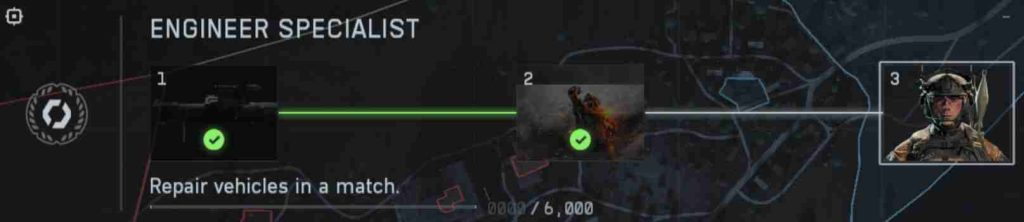
According to community posts, players successfully repair tanks, IFVs, and aircraft, yet their Engineer Specialist 3 challenge progress remains stuck at 0%. This issue seems linked to the same backend tracking bug responsible for unregistered mission data in other challenges.
The problem is most likely server-side, meaning it isn’t caused by the player’s local files or platform. Restarting or reinstalling the game typically doesn’t resolve it. EA’s support forums have acknowledged the issue, suggesting that a fix may arrive in a future update. Until then, the Engineer Specialist challenge not progressing continues to frustrate Battlefield 6 fans trying to reach full mastery.
Why Vehicle Repair Challenges Are Not Counting in Battlefield 6
One of the biggest complaints from the Battlefield community involves the vehicle repair challenges not counting toward the Engineer Specialist 3 objective. The cause lies in how the game’s tracking system registers interactions.
In Battlefield 6, a repair must occur on an actively controlled vehicle that belongs to a squadmate or ally. However, the system sometimes fails to recognize these repairs when multiple engineers are present or when the vehicle despawns immediately after repair. This leads to repair progress not tracking correctly, even though the player performed the right actions.
Players also report that using certain tools, such as upgraded repair kits or attachments, can confuse the progress tracker. If your Engineer Specialist challenge remains frozen, try switching to the base repair tool and repairing vehicles in active combat situations.
Until EA introduces a patch to fix the Battlefield 6 repair challenges not counting bug, consistency and tool choice may improve your odds of registering progress correctly.
Understanding How the Engineer Specialist 3 Challenge Works
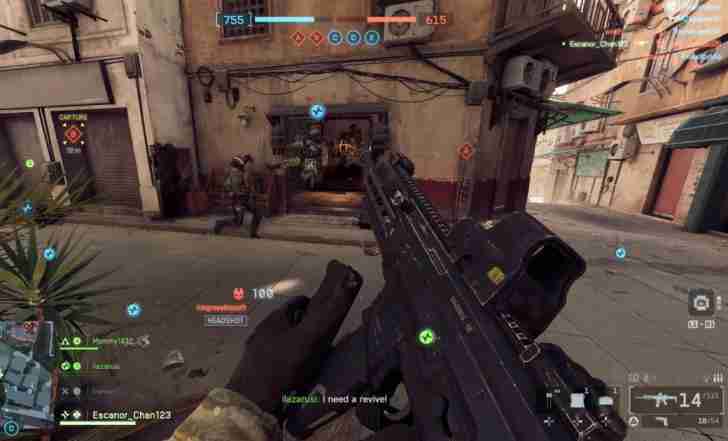
The Engineer Specialist 3 challenge in Battlefield 6 requires players to demonstrate mastery in the vehicle repair and support role. To complete it, you must perform a specific number of repairs, assists, and vehicle saves while using the Engineer class.
Each repair action contributes incremental progress toward the challenge, but the system is highly sensitive to conditions. For instance, repairing destroyed or abandoned vehicles does not count. The vehicle must be operational and belong to an active ally. Similarly, progress may only register when the repair occurs in multiplayer modes, not in AI or solo matches.
Understanding these parameters is crucial for avoiding wasted efforts. Players experiencing the Engineer Specialist challenge bug should focus on repairing during live engagements, preferably while near teammates. Even though the challenge not progressing issue persists for many users, maintaining accurate conditions ensures you’re following the intended tracking rules once EA’s fix rolls out.
Common Reasons Why Repair Progress Isn’t Tracking Correctly
There are several underlying reasons why Battlefield 6 Engineer Specialist 3 repair progress isn’t tracking properly. The most common is server desynchronization, which prevents the system from recording in-match events like repairs or assists.
Another frequent cause is damage timing — if the vehicle hasn’t taken legitimate damage (for example, environmental or self-inflicted damage), the repair won’t count toward progress. Additionally, repairing enemy vehicles captured mid-match may register inconsistently across servers.

Platform-specific issues also play a role: console players have reported higher failure rates than PC users, possibly due to latency or controller-based repair targeting errors. EA’s recent updates mention backend logging inconsistencies that affect Engineer Specialist challenges, suggesting that the issue spans all platforms.
Until a confirmed patch arrives, players can improve results by repairing teammate vehicles in active combat, staying in range for several seconds, and avoiding repeated repairs on the same vehicle within short intervals. These steps sometimes help Battlefield 6 vehicle repair challenges register progress more consistently.
Step-by-Step Fix: How to Trigger Vehicle Repair Progress Manually
If your Battlefield 6 Engineer Specialist 3 challenge is not progressing, you’re not alone. Many players have noticed that vehicle repair challenges aren’t counting despite successful repair actions in-game. While EA works on an official patch, these manual methods can sometimes help trigger progress and temporarily fix the bug.
1. Use the Standard Repair Tool Only
Avoid any upgraded or modified repair gadgets for now. The Battlefield 6 repair progress bug often occurs when players use specialized tools added in later updates. The base Engineer repair tool seems to sync better with the challenge tracker. Equip it before entering a match and repair friendly vehicles actively under attack.
2. Repair Actively Controlled Squad Vehicles
Repairs done on abandoned or AI-controlled vehicles may not register. To manually trigger the Engineer Specialist 3 challenge progress, target vehicles driven by real teammates. You can verify this by looking for your squad icon above the vehicle. Repairs to these vehicles are the most reliable way to make progress count.

3. Stay in Proximity After Repairing
Players report that leaving the area too quickly after performing repairs can cause vehicle repair challenges not counting. Wait near the vehicle for several seconds to allow the server to sync your repair action. This helps ensure that the progress bar updates correctly once the match data is processed.
4. Avoid Repeated Repairs on the Same Vehicle
If you repair a single vehicle multiple times in quick succession, the tracking system may ignore duplicate actions. To manually trigger progress, focus on repairing multiple damaged vehicles during a single match instead of repeatedly fixing one. This variety seems to reset the progress counter and improve tracking.
5. Try a Different Game Mode
Certain players found that Breakthrough and Conquest modes record repair actions differently. If your Engineer Specialist 3 challenge is not progressing in one mode, try switching to another. Larger-scale modes often have better backend logging and may help your repair stats sync properly with EA’s servers.
6. Repair After Taking Real Combat Damage
Repairs only count if the vehicle has taken legitimate combat damage. Environmental or fall damage often doesn’t register. Before attempting a fix, ensure that the vehicle was damaged by enemy fire. This small distinction helps prevent the Battlefield 6 repair progress bug from invalidating your efforts.
7. Stay in a Match Until It Fully Ends
Leaving matches early can prevent your repair data from being uploaded. Always stay until the post-game results screen. Many users report that their vehicle repair challenges not counting issue improved once they stopped quitting mid-match. The game only finalizes your progression once the full session data is received by EA’s servers.
8. Restart After Every Two Matches
Because Battlefield 6 caches progression data locally, small bugs can pile up. Restarting the game after two matches can clear temporary tracking glitches. This simple step has been effective for players whose Engineer Specialist 3 repair progress freezes after partial completion. It forces a fresh sync with the online database.
9. Monitor the “Assignments” Tab Manually
To confirm your repairs are counting, open the “Assignments” tab after each game. If progress increments even slightly, you’re on the right track. If not, change your conditions — try repairing a different vehicle type or class. Manual observation helps detect when the Engineer Specialist challenge starts tracking again.

10. Log Out and Back Into Your EA Account
In rare cases, progress isn’t tied to gameplay at all but to account session errors. Logging out and then signing back in can reset progression tracking. Doing this before your next session may help trigger Battlefield 6 repair progress updates that were previously stuck in the background.
11. Switch to a Different Squad
Sometimes repair actions fail to register if multiple Engineers are repairing the same vehicle simultaneously. Join a different squad or create a new one and repair a squadmate’s vehicle there. This often bypasses the Battlefield 6 Engineer Specialist 3 challenge not progressing glitch caused by overlapping repair actions.
12. Repair Vehicles in Different Locations
The game’s backend sometimes fails to track repairs if done in high-traffic zones or congested maps. Move to a quieter section of the battlefield, repair an allied vehicle, and see if the vehicle repair challenges not counting start registering. This can trigger server recognition of your actions.
13. Avoid Overlapping With Other Objectives
If multiple in-game objectives are completed simultaneously, repair progress may fail to count. Focus solely on the Engineer Specialist 3 repair tasks during a match. Ignoring secondary challenges increases the likelihood that your repair progress bug resolves.
14. Use Only Compatible Vehicle Types
Some players report that repairing certain vehicles like aircraft or specialty tanks doesn’t register toward the Engineer Specialist 3 challenge. Stick to main ground vehicles such as IFVs and tanks, which consistently sync with the backend system.
15. Repair During Active Combat
Passive repairs performed outside combat sometimes do not count. Ensure the vehicle is under fire or has recently taken damage from enemies. Repairing during active engagements often triggers progress where previous repairs didn’t, addressing the repair progress not tracking correctly issue.
16. Coordinate With Teammates
Having teammates nearby while repairing can improve recognition. The server sometimes needs multiple confirmations to log an Engineer’s action. Coordinate with friends or squadmates to repair vehicles together, which often resolves the vehicle repair challenges not counting problem.
17. Avoid Abandoned Vehicles
Repairs on vehicles that are unattended or stationary in spawn points may not count. Target vehicles that are actively being used by allies. This small adjustment can manually trigger the Engineer Specialist challenge bug and help your progress update correctly.
18. Repair Multiple Vehicles Per Match
Instead of focusing on one vehicle, repair two or three in a single match. Multiple successful repairs increase the chance that at least one action syncs with EA’s servers, helping to bypass the Battlefield 6 repair progress bug. This technique has helped many players finally register challenge progress.
19. Record Your Sessions
If progress still doesn’t appear, record your matches using a capture tool. When reporting the Engineer Specialist 3 challenge not progressing to EA Support, video evidence of your repairs provides proof. EA can manually credit repairs you completed, bypassing the glitch temporarily.
20. Update Game and Verify Files
Make sure your Battlefield 6 client is up to date. Outdated game versions or corrupted files can trigger multiple progression issues, including the vehicle repair challenges not counting problem. On PC, verify game files via Origin or Steam. Console users should check for patches and restart the system.
Bonus Tip: Report Persistent Progress Bugs to EA
If none of these steps work, the bug may be entirely server-side. Submit a detailed ticket through EA Support, including the game mode, map, and vehicles repaired. Mention that your Battlefield 6 Engineer Specialist 3 challenge is not progressing despite valid repairs. The more reports EA receives, the faster the issue will get prioritized for patching.
Why These Manual Fixes Work
Each of these fixes helps the game better recognize legitimate repair actions. The Battlefield 6 tracking system occasionally desynchronizes from the server, especially when network latency spikes or when multiple Engineers repair the same vehicle simultaneously. By following structured conditions — repairing active squad vehicles, staying nearby, and finishing full matches — you increase the odds that your actions sync with EA’s challenge database.
What EA Has Said So Far
EA hasn’t officially confirmed a fix yet but acknowledged that Engineer Specialist 3 challenge not progressing is under investigation. Developers are reviewing backend telemetry to determine why vehicle repair challenges aren’t counting consistently. Based on similar bugs in earlier Battlefield titles, expect an update in a future stability patch.
Final Thoughts – Keep Repairing, But Track Carefully
Until EA releases a permanent solution, the best way to handle the Battlefield 6 repair progress bug is to play smartly and track manually. Stick to the base repair tool, focus on active squad vehicles, and complete each match entirely. These methods have helped many players trigger incremental progress where automation fails.
While the process may feel repetitive, consistent reporting and careful in-game testing will help the community identify what reliably triggers Engineer Specialist 3 challenge progression. Stay patient — EA’s fix will eventually normalize tracking, ensuring your hard-earned repairs count toward the rewards you deserve.
Testing Different Vehicles and Tools to Complete the Challenge
Players experiencing the Battlefield 6 Engineer Specialist 3 challenge not progressing should experiment with different vehicles and repair tools. Some reports indicate that repairing IFVs and standard tanks is more reliably tracked than aircraft or specialty vehicles. Similarly, using the base repair tool instead of upgraded kits often improves recognition.
By testing multiple vehicles and tools, you can determine which actions register properly with the challenge tracker. This method is especially helpful if vehicle repair challenges aren’t counting despite repeated attempts. Keep notes on which vehicles and tools trigger progress to maximize your efficiency in completing the Engineer Specialist 3 objective.
Even though the repair progress bug remains unresolved for many, experimenting with different in-game setups allows players to bypass certain inconsistencies. For now, focusing on standard ground vehicles and the default repair tool offers the highest likelihood of manually advancing your Engineer Specialist challenge while waiting for an official patch from DICE or EA.
Do Engineer Challenges Work in All Game Modes or Just Specific Ones?
Not all game modes in Battlefield 6 reliably track Engineer Specialist 3 challenge progress. Some players find that repairing vehicles in large-scale multiplayer modes like Conquest and Breakthrough consistently updates progress. Meanwhile, smaller modes or single-player experiences often fail to register vehicle repair challenges.
Understanding which modes work helps you avoid wasted effort. If your Engineer Specialist 3 challenge is not progressing, switch to a mode that actively logs combat repairs. The repair progress bug seems tied to how the backend system syncs player actions, and larger matches tend to have better recognition of repair events.
Players should focus on repairing squad vehicles in modes with high server accuracy. While this doesn’t fix the bug entirely, it increases the chance that completed repairs contribute toward your Engineer Specialist challenge, helping you make measurable progress despite ongoing issues.
Community Reports: Battlefield 6 Repair Challenge Bug Affecting Players Globally
The Battlefield 6 repair challenge bug has generated extensive discussion across Reddit, EA forums, and Discord. Players worldwide report that Engineer Specialist 3 challenges are not progressing even after repairing multiple vehicles in a single match.
Common complaints include vehicle repair challenges not counting, progress freezing mid-match, or XP not syncing correctly. Some users have tried different tools, vehicles, and game modes, yet the challenge still fails to register. Community threads indicate that the issue affects both PC and console players.
While frustrating, these reports help DICE and EA identify patterns for an eventual fix. By sharing exact conditions under which the repair progress bug occurs, players contribute to faster troubleshooting and patch prioritization. Until an official update, global feedback remains one of the most effective ways to highlight persistent issues with the Engineer Specialist 3 challenge.
Temporary Workarounds Until DICE or EA Fix the Engineer Challenge
While waiting for an official patch, there are temporary workarounds to help your Engineer Specialist 3 challenge progress. Focus on repairing active squad vehicles, staying in proximity after each repair, and completing repairs during combat. Using the base repair tool also improves recognition.
Switching game modes can help, as some modes track repair actions more reliably than others. Logging out and back into your EA account occasionally forces progress syncs, and avoiding repeated repairs on the same vehicle reduces the risk of vehicle repair challenges not counting.
These temporary methods don’t guarantee success every time, but they can increase the likelihood that completed repairs are recorded until DICE or EA deploy a server-side fix. Consistent reporting of issues via official channels also helps prioritize patches for the repair progress bug affecting Battlefield 6 players globally.
Checking if XP or Progress Syncs Properly During Matches
Monitoring your XP and challenge progress in real time is essential when dealing with the Battlefield 6 Engineer Specialist 3 challenge not progressing. Open the “Assignments” or “Progress” tab during or immediately after matches to confirm that repairs are being tracked.
If progress doesn’t increment, try switching vehicles, repair tools, or game modes to see what triggers the repair progress bug to resolve temporarily. Logging out and back into your EA account can also refresh XP syncing.
Keeping a record of your actions and verifying progress each match ensures that you don’t waste time on repairs that won’t count. This proactive approach helps you stay on top of the Engineer Specialist challenge, minimizing frustration until EA releases a permanent fix for the ongoing vehicle repair challenges not counting issue.
How to Report the Engineer Challenge Bug to EA Support
If your Battlefield 6 Engineer Specialist 3 challenge is not progressing, reporting the issue to EA Support is crucial. Start by logging into your EA account and navigating to the “Help” or “Contact Us” section. Select the platform you play on, then choose the Engineer Specialist challenge bug as your issue type.
Include essential details such as your Player ID, EA account email, the match or map where the problem occurred, and screenshots or video captures of repair actions. Be specific: mention which vehicles you repaired, the repair tool used, and whether the vehicle repair challenges were not counting despite repeated attempts.
Providing detailed information helps EA technicians verify the bug in the backend. They can sometimes manually credit progress or prioritize the issue in upcoming patches. Regularly check the response portal for updates. Reporting multiple occurrences across players also ensures that EA recognizes the repair progress bug as a widespread problem rather than isolated incidents.
Past Battlefield Titles Faced Similar Challenge Tracking Issues – What We Learned
Battlefield has a history of challenge tracking bugs. Previous titles saw challenges like vehicle repair or specialist assignments not counting properly, particularly in multiplayer modes. These issues often arose from server desynchronization or backend logging errors, similar to the current Engineer Specialist 3 challenge bug in Battlefield 6.
From past fixes, we learned that manual workarounds — like repairing active squad vehicles, staying near them after repairs, and using specific game modes — often help trigger progress. EA typically responds with server-side updates rather than forcing players to reinstall or reset their game.
Understanding this pattern gives players confidence that the vehicle repair challenges not counting problem will eventually be resolved. While the bug can be frustrating, history shows that consistent reporting, verified match evidence, and proper syncing usually lead to a permanent Engineer Specialist challenge fix within a few updates.
Expected Fix or Patch Timeline for Battlefield 6 Challenge Tracking Bugs
Currently, EA and DICE have acknowledged that the Battlefield 6 Engineer Specialist 3 challenge is not progressing correctly. While an exact date isn’t confirmed, historical patterns suggest that server-side patches addressing vehicle repair challenges not counting typically roll out within weeks after widespread reports.
Players can expect updates to focus on backend tracking improvements and better synchronization between matches and the challenge system. The patch should ensure that completed repairs are recorded reliably, and XP or progression increments correctly.
Until then, continue using manual methods to trigger progress — repairing squad vehicles in active combat, using the base repair tool, and avoiding repeated actions on the same vehicle. EA may also provide temporary compensation or manual credits for affected players once the patch is live.
Final Thoughts – When Will the Engineer Specialist 3 Challenge Be Fixed?
While frustrating, the Battlefield 6 repair progress bug affecting the Engineer Specialist 3 challenge is temporary. EA and DICE have a strong track record of resolving similar issues in past Battlefield titles, often through server-side patches rather than requiring manual fixes from players.
Until a patch is released, manual workarounds such as repairing active squad vehicles, verifying XP tracking, and playing specific game modes can help register some progress. Reporting the issue with detailed evidence ensures EA prioritizes the bug for resolution.
Most likely, within a few updates, the vehicle repair challenges not counting problem will be fixed, and players will be able to complete the Engineer Specialist 3 challenge as intended. Patience, careful tracking, and community reporting remain the best strategies for navigating this temporary issue.