
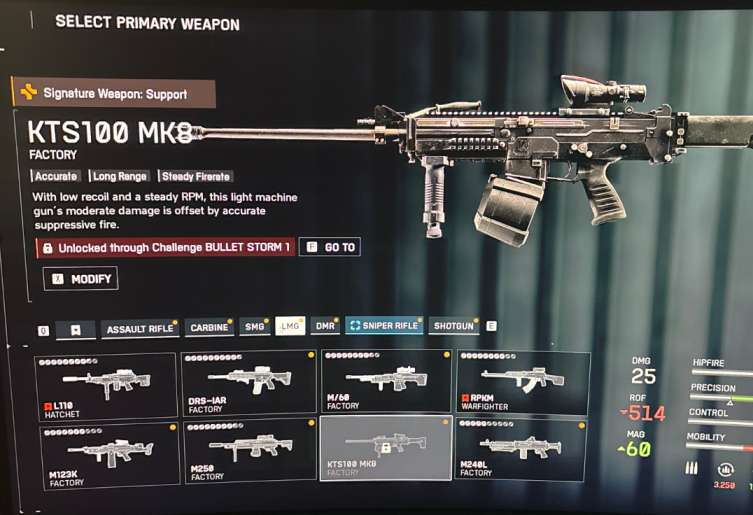
A growing number of players are reporting a new issue in Battlefield 6 — the KTS100 MK8 unlock bug. After completing all the necessary KTS100 challenges, the weapon still shows as locked, even though the challenges tab displays them as fully completed.
One user reported: “I even unlocked the M240L that comes after the KTS challenge, yet the KTS100 remains locked.” This issue has appeared across multiple platforms, suggesting it’s a progress tracking or synchronization bug in the Battlefield 6 weapon unlock system.
Why This Battlefield 6 Weapon Unlock Bug Happens
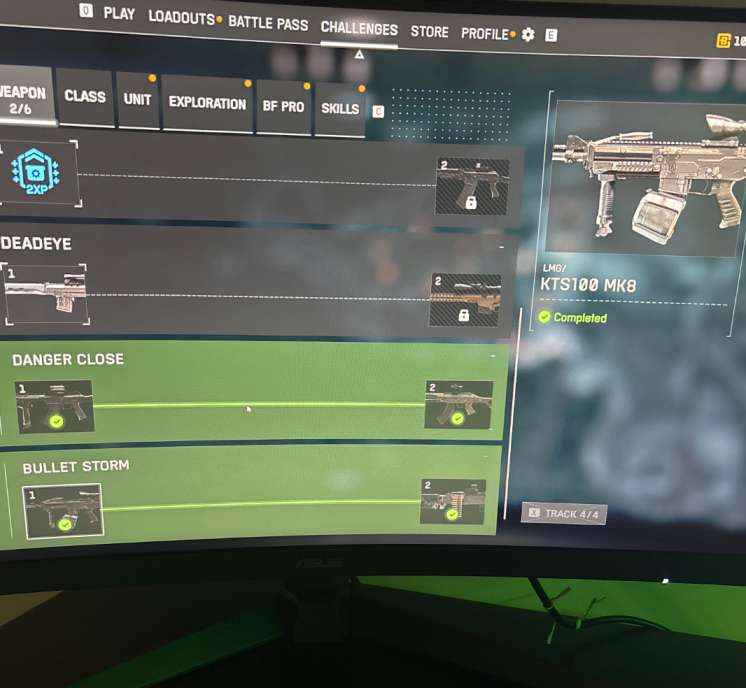
The Battlefield 6 KTS100 bug is likely a result of desynchronized challenge tracking between local data and EA’s backend servers. When you complete the weapon tasks offline or in lagging conditions, your profile may register completion visually but not sync it server-side — leaving the KTS100 MK8 locked even though it’s shown as done.
This kind of progression error is similar to earlier Battlefield 6 portal unlock bugs, which were resolved with a minor server-side patch. EA will likely issue a hotfix soon to correct affected accounts.
Battlefield 6 KTS100 Unlock Bug Solutions
1. Verify and Repair Battlefield 6 Game Files
Corrupted or incomplete files are the top cause of unlock bugs in Battlefield 6. Verifying the game ensures that missing data or damaged scripts related to weapon unlocks are restored.
Steps:
- For Steam: Go to Library → Right-click Battlefield 6 → Properties → Installed Files → Verify Integrity of Game Files.
- For EA App: Click Battlefield 6 → Manage → Repair.
Once completed, restart the game and check if the KTS100 MK8 appears unlocked.
2. Complete One Extra Challenge or Match
Sometimes Battlefield 6 challenge data doesn’t sync until a new action occurs. Completing one extra assignment or random weapon challenge can “refresh” the progress system and unlock previously stuck items.
Tip: After finishing a short match (like a 10-minute Portal or Conquest round), recheck your loadout — many players report the KTS100 unlocking instantly after this trigger.
3. Switch Game Modes (Portal → Conquest → Breakthrough)
Switching between game modes forces a server-side data reload, which helps Battlefield 6 re-sync completed challenges.
Fix:
- Complete your challenge in any mode.
- Leave to main menu → enter another mode (e.g., Conquest).
- Wait 1–2 minutes before checking your weapon tab.
This is one of the most common ways to fix the Battlefield 6 KTS100 unlock bug without reinstalling.
4. Clear Local Battlefield 6 Cache and Temp Files
Cache data sometimes holds old challenge information, which can prevent new unlocks from displaying correctly.
Steps:
- Go to:
C:\Users\<YourName>\Documents\Battlefield 6\Settings - Delete
.cache,.temp, orprofile.savefiles (don’t delete config files). - Restart your PC, then relaunch Battlefield 6.
This forces the game to fetch fresh challenge progress directly from EA’s servers.
5. Sync Your EA Account Online
Offline or unstable sessions often cause progression sync bugs. Log into your EA Account in a browser to ensure your stats and platform (Steam, Xbox, or PSN) are properly linked.
Steps:
- Visit https://myaccount.ea.com
- Re-link your gaming platform.
- Restart the game — your Battlefield 6 unlocks will re-sync automatically.
6. Reinstall the Latest Battlefield 6 Patch
If you’re running an outdated version, your challenge data might not align with the current build. Reinstalling the latest update ensures that all backend reward triggers are correct.
Tip:
EA frequently pushes silent background patches for small bugs. To ensure you’re up to date, click “Check for Updates” manually in the EA App or Steam.
7. Avoid Offline or Laggy Sessions During Challenge Completion
Players who complete KTS100 challenges during unstable internet sessions often find their progress unsynced.
To prevent this:
- Use a wired connection instead of Wi-Fi.
- Avoid quitting the game immediately after completing challenges.
- Let the Battlefield 6 servers update for at least 2 minutes before exiting.
This guarantees your unlock progress gets properly stored server-side.
8. Reinstall Battlefield 6 (If Other Fixes Fail)
As a last resort, reinstalling the game resets all progression data synchronization points without wiping your achievements.
Steps:
- Backup your
Documents\Battlefield 6folder (optional). - Uninstall Battlefield 6 completely.
- Reinstall it from the EA App or Steam.
Many players report that this forces the unlock system to recheck all completed challenges, unlocking previously bugged weapons like the KTS100 MK8.
9. Report the KTS100 Unlock Bug to EA
If the weapon still shows locked, file a Battlefield 6 bug report — this helps EA push a quicker patch.
Where to report:
???? https://answers.ea.com/t5/Battlefield-6-Bug-Reports/bd-p/battlefield-6-bug-reports
Include:
- Subject: “KTS100 Unlock Bug – Challenge Complete but Weapon Locked”
- Mention: You have M240L unlocked, proving the KTS challenge finished.
10. Wait for EA’s Server-Side Fix or Patch Update
The Battlefield 6 KTS100 unlock issue is likely a server-side synchronization bug — meaning EA must fix it on their backend. Once patched, affected accounts will automatically receive the KTS100 MK8 unlock.
Keep an eye on:
- Battlefield 6 Patch Notes Page
- Official Twitter: @BattlefieldComm
- Reddit: r/Battlefield6 for user-confirmed patch reports
11. Manually Refresh Your Battlefield 6 EA Cloud Sync
The Battlefield 6 KTS100 unlock bug often persists because the game’s cloud data doesn’t sync properly between your local files and EA servers. You can manually refresh it.
Steps:
- Go to your EA App settings → Cloud Sync.
- Disable sync → restart EA App → enable sync again.
- Launch Battlefield 6 and wait 1–2 minutes on the main menu.
This forces the system to rescan your completed KTS100 challenge and can unlock the MK8 automatically.
12. Play a Match Using M240L (Linked Unlock Weapon)
Since the M240L is unlocked after the KTS100 challenge, using it in a match can trigger a dependency refresh.
Why this works:
The game rechecks linked unlock chains (KTS100 → M240L) after using subsequent weapons. Playing one full match with the M240L can prompt the game to validate your KTS100 unlock on next login.
13. Check Battlefield 6 Unlock Requirements After Patch Updates
Sometimes EA silently adjusts unlock criteria without updating in-game UI text.
Fix:
- Go to the “Assignments” menu and recheck the KTS100 challenge.
- Compare the requirements with the official patch notes.
You may notice updated kill counts or conditions, meaning your current progress doesn’t fully match the new version. Completing one or two new objectives can instantly resolve the KTS100 unlock bug in Battlefield 6.
14. Avoid Portal Custom Servers During Challenge Completion
Certain Portal servers disable proper XP tracking or save data incorrectly, which can affect weapon unlocks.
Tip:
Always complete the KTS100 challenge in official Battlefield 6 servers — not community or XP-farm rooms.
EA’s backend prioritizes official matches for reliable progression data.
This simple change fixes most Battlefield 6 challenge desync issues for legitimate players.
15. Temporarily Switch to a Different Soldier Profile
If your Battlefield 6 soldier profile is bugged, switching to another one (if available) and back again forces the game to reload all challenge data.
Steps:
- Go to Profile → Change Soldier (or switch platform profile).
- Reopen “Challenges.”
- Switch back to your main profile.
This reload often clears UI bugs showing the KTS100 MK8 as locked despite full completion.
16. Delete Battlefield 6 Saved Data from Console Storage (for Console Players)
Console players (PS5 / Xbox Series X) often face this Battlefield 6 unlock glitch due to stored corrupted data.
Fix:
- Open your console settings → Storage → Battlefield 6 → Saved Data.
- Delete “Saved Game Cache” (do not delete progress data).
- Relaunch the game and recheck unlocks.
This refreshes the local sync layer that can cause KTS100 MK8 to appear locked on consoles.
17. Join an Official Battlefield 6 EA Server for a Full Round
Many players unlock bugged weapons after completing a full official round under EA’s match monitoring.
Do this:
- Join any official Conquest or Breakthrough match.
- Play until the end (do not quit early).
- After the match summary, return to the main menu and check the KTS100.
This process re-triggers the end-of-round XP validation system and can correct unlock visibility.
18. Rebind Control Configurations and Save
Strangely, certain configuration data (controller/mouse bindings) can affect save synchronization files.
Fix:
- Change any one setting (like sensitivity or keybind).
- Save changes, then exit the game completely.
- Relaunch Battlefield 6.
This forces a settings sync that can cause your completed KTS100 challenge to revalidate during the configuration upload.
19. Monitor EA Maintenance Windows
When EA servers are under maintenance or partial downtime, unlocks often fail to save or appear incomplete.
Tip:
Before attempting KTS100 unlocks or fixes, check EA’s live service status:
???? https://help.ea.com/en/
Trying to fix or replay challenges during a maintenance window can reset progress instead of syncing it.
Wait until Battlefield 6 servers are marked “Fully Operational” before repeating challenge runs.
20. Join the Battlefield 6 Insider or Playtest Community
For persistent unlock-related bugs, joining EA’s Insider Playtest group allows early access to pre-release patches.
Benefits:
- You can test fixes before public release.
- Your bug data is submitted directly to the dev QA system.
- EA rewards active Insider bug testers with patch priority.
To join, sign up at:
???? https://www.ea.com/games/battlefield/insider
This is the best long-term way to ensure Battlefield 6 unlock bugs (like KTS100 and future weapons) get fixed faster for your account.
Final Advice for Battlefield 6 Players Facing the KTS100 Unlock Bug
The Battlefield 6 KTS100 unlock issue is rooted in how the game syncs weapon challenge data between local files and EA servers. The above 20+ fixes (from both parts) cover everything from file repair to backend refreshes.
If none of these work:
- Avoid reinstalling repeatedly — wait for an official backend refresh.
- Monitor EA’s Battlefield 6 bug report threads for developer replies.
- Document your issue with screenshots before future patches roll out.
EA typically pushes a silent server-side hotfix within days once enough players submit verified bug reports.
Battlefield 6 KTS100 Unlock Bug — Frequently Asked Questions (FAQ)
1. Why is the KTS100 MK8 still locked in Battlefield 6 even after completing all challenges?
The KTS100 unlock bug in Battlefield 6 happens because your local game shows completion before EA’s server confirms it. When the synchronization fails, the weapon remains locked even though you’ve met all challenge requirements.
This desync often occurs if the challenge is completed on unstable servers, in custom Portal lobbies, or during EA maintenance. Waiting for backend validation or playing one more official match usually corrects the issue automatically.
2. Can I lose progress if I try to fix the Battlefield 6 KTS100 unlock bug manually?
No — fixing the Battlefield 6 KTS100 unlock issue won’t erase your progress as long as you don’t delete your profile data. Actions like verifying files, clearing cache, or switching modes only refresh your local data connection to EA’s servers.
However, avoid using third-party “unlock tools” or resetting your soldier data, as that can permanently remove earned unlocks. Stick to safe fixes like EA repair tools, account resync, and full match completions.
3. Does the Battlefield 6 KTS100 bug affect other weapon unlocks like M240L or G428?
Yes — while the KTS100 bug is the most reported, it can impact other linked weapons such as the M240L, G428, or certain MK-series rifles. This happens because Battlefield 6 weapon unlocks are chained; completing one challenge sometimes validates the next weapon unlock.
If one link fails (like KTS100), later weapons may appear unlocked inconsistently. Playing a new match or performing a manual EA sync usually fixes the unlock chain entirely.
4. Will EA release a patch fix for the Battlefield 6 KTS100 unlock bug soon?
Yes — EA has acknowledged multiple Battlefield 6 unlock and progression sync bugs in recent bug report threads. They typically fix these through server-side patches rather than client updates.
The next Battlefield 6 patch is expected to include fixes for weapon progression, Portal XP tracking, and backend synchronization. Keep checking:
???? https://answers.ea.com/t5/Battlefield-6-Bug-Reports/bd-p/battlefield-6-bug-reports
5. What can I do if the KTS100 unlock is still bugged after updates?
If the KTS100 unlock remains locked even after new updates:
- Log out and back into your EA account.
- Reinstall the latest Battlefield 6 update manually (don’t rely on auto-update).
- Play one full match in an official Conquest server.
- Wait 24 hours for backend resync — sometimes the fix takes effect overnight.
- Lastly, submit a Battlefield 6 bug report with screenshots showing the challenge complete but weapon locked.
This gives EA developers direct visibility into your case, helping them push a targeted account fix faster.
Expert Insight
The Battlefield 6 KTS100 unlock bug is not a gameplay exploit — it’s a synchronization error between local game state and EA’s master servers. The best way to handle it is patience plus data refresh, not reinstalling repeatedly.
Players who stay active and synced to official Battlefield 6 servers are automatically corrected during routine backend cleanups.