
If you’ve ever cleared an event, seen a pile of obols and keys on the ground, thought “I’ll grab those in a second” — and then watched them vanish after a quick trip to town… yeah, you’re not imagining things. That sinking feeling when you come back and the ground is completely empty is something a lot of players know all too well.
Diablo 4 obols disappearing off the ground is a real issue, and it’s been driving PC players up the wall.
Obols, dungeon keys, and sometimes even full gear drops can straight-up disappear after teleporting, hearthing out, or briefly leaving an area. It doesn’t matter if you were gone for minutes or seconds — once you return, the loot can be gone for good.
Let’s break down what’s actually happening, why this bug keeps popping up, and what you can do right now to avoid losing your hard-earned loot.
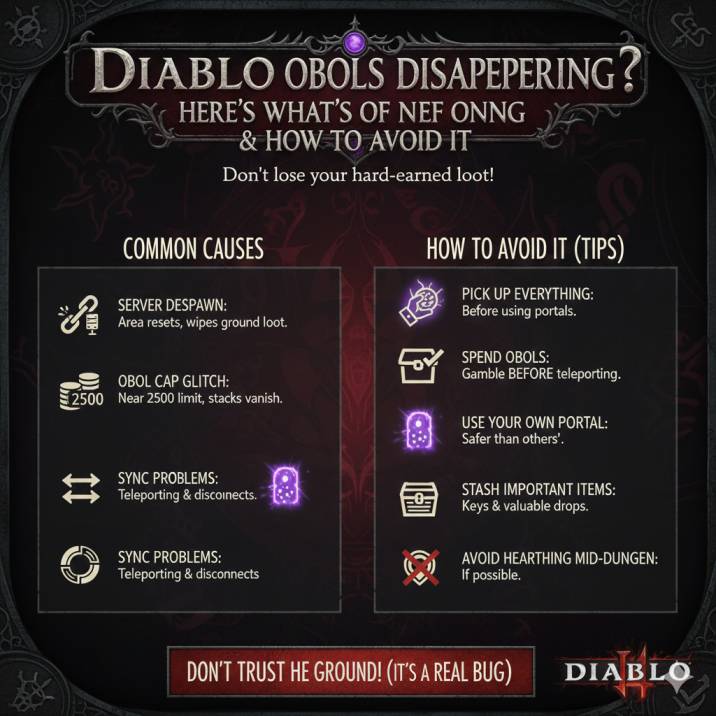
So… Is This Actually a Bug?
Short answer: yes.
Longer answer: this has been reported by a ton of players across multiple seasons, and the reports are remarkably consistent. Whether you’re running events, dungeons, or open-world activities, the same problems keep popping up again and again. The most common complaints all sound almost identical from player to player:
- Obols disappear after using a Town Portal
- Dungeon keys vanish after hearting out
- Loot is gone when you return to the same spot seconds later
- The problem shows up more when you’re near the 2500 obol cap
That consistency is the key thing here. These aren’t isolated incidents or rare edge cases — they’re happening often enough that players across the community recognize the pattern immediately. It’s not user error, and it’s not some strange one-time glitch tied to a specific build or activity. This is a recurring Diablo 4 issue that continues to resurface, even for players who know exactly what they’re doing.
When Does This Happen Most Often?
Based on community reports, the bug usually shows up during very normal, everyday gameplay — which is part of what makes it so frustrating. You don’t have to do anything unusual or risky for it to trigger. In most cases, it happens when you do one of the following:
- Teleport to town and come back to an event
- Hearth out of a dungeon
- Leave loot on the ground during Helltides or Legion events
- Hit (or get close to) the obol cap
- Use another player’s portal instead of your own
What really stands out is how fast it can happen. In some cases, players say they came back almost immediately, expecting everything to still be there, only to find the ground completely empty.
That quick turnaround makes it clear this isn’t about long despawn timers — the loot can vanish almost instantly once the game decides the area has reset.
Read also: Diablo 4 +2 Passive Shroud Bug (Explained)
Why Are Obols and Keys Disappearing?
Blizzard hasn’t given a clear, official explanation for this yet, but based on player reports and how the game behaves, a few likely causes keep coming up again and again.
Server Despawn Issues
When you leave an area, Diablo 4 may treat it as abandoned and automatically clean up ground loot to prevent item duplication. If the instance resets, refreshes, or re-shards while you’re gone, anything left on the ground — including obols, keys, or gear — can be wiped out entirely before you return.
Obol Cap Weirdness
If you’re sitting at or near the 2500 obol limit, the game seems to struggle with tracking leftover obols on the ground. Once you leave the zone, those extra stacks may simply fail to persist, especially after spending obols and coming back.
Sync Problems
Teleporting, hearthing out, or even brief disconnects can cause client-server sync hiccups, where the game effectively forgets you ever owned that loot in the first place.
None of this has been officially confirmed by Blizzard — but it lines up perfectly with how the bug behaves in real gameplay.

How to Avoid Losing Obols (For Now)
Until there’s a proper fix in place, these tips can help you avoid a lot of unnecessary frustration. None of them are perfect solutions, but together they can seriously reduce the chances of your loot vanishing.
✅ Pick Everything Up Before You Leave
If you’re about to teleport or hearth, grab the loot first. Leaving obols, keys, or gear on the ground “for later” is risky, even if you plan to come back immediately.
✅ Spend Obols Before Teleporting
If you’re close to the obol cap, it’s safer to gamble first and lower your total before heading back to events or dungeons.
✅ Use Your Own Portal
Some players swear that using your own Town Portal is safer than taking someone else’s, especially in busy events.
✅ Stash Important Items ASAP
Dungeon keys and valuable drops should go straight into your stash before you move on or change zones.
❌ Don’t Hearth Mid-Dungeon If You Can Help It
If you absolutely have to leave, make sure you pick up everything first — especially keys, which seem especially prone to disappearing.
Lost Loot Already? Here’s What You Can Do
If your obols, keys, or gear have already disappeared, there are still a few steps worth taking. While it’s not guaranteed, Blizzard support can sometimes help if they’re able to verify what happened on their end.
Start by submitting a Blizzard Support ticket and be as detailed as possible. When you do, make sure to include the following information:
- Your platform (PC)
- The date and time the loot disappeared (include your timezone)
- What you were doing right before the items vanished
- Whether you teleported to town or hearthed out
The more specific you are, the better the chances that support can locate the relevant server logs. Just keep expectations realistic — if Blizzard can confirm the loss, they may be able to help, but results can vary depending on the situation.
Is Blizzard Fixing This?
Blizzard has acknowledged similar loot and inventory issues in the past, but so far there’s been no confirmed patch note that fully fixes Diablo 4 obols disappearing off the ground. While some updates appear to reduce how often the bug shows up, they haven’t eliminated it entirely.
That’s the frustrating part — if the issue were truly fixed, players wouldn’t still be running into the same problem across different seasons and activities. The fact that new reports keep surfacing suggests the underlying cause hasn’t been fully addressed yet, leaving players to rely on workarounds instead of a permanent solution.
Read also: Where to Find Purified Essence in Diablo 4 Season 11
Bottom Line
You’re not crazy — this is a real Diablo 4 bug, and plenty of players are running into it. It mostly hits PC players, but regardless of how experienced you are, it can still catch you off guard. Right now, there’s no guaranteed fix, and no clear indication of when a permanent solution will arrive.
For the moment, playing cautiously is your best defense. Pick up your loot before leaving an area, avoid unnecessary teleports when items are on the ground, and don’t assume anything will still be there when you come back. Until Blizzard fully sorts it out, it’s best not to trust the ground — because Diablo 4 absolutely can’t be trusted with your loot right now.