
So you’re running Engineer, doing your job like a good teammate — repairing tanks under fire, fixing transports between pushes, holding the repair tool until it overheats — and then you check your Specialist challenge…
Zero progress.
Annoying? Yep.
Broken? Also yes — but not in the way you think.
This isn’t a skill issue. You didn’t miss a hidden requirement, and you’re not repairing the “wrong” way. What you’re dealing with is a known Battlefield 6 challenge-tracking bug, and it’s been frustrating players on every platform. The game applies the repair just fine, the vehicle gets fixed, you even earn XP — but the backend tracker sometimes fails to record it toward your Specialist progress.
That’s why it feels so confusing. You’re clearly doing everything right, yet the counter refuses to move. Let’s break down what’s actually happening behind the scenes and, more importantly, what you can do right now to make those repairs finally count.
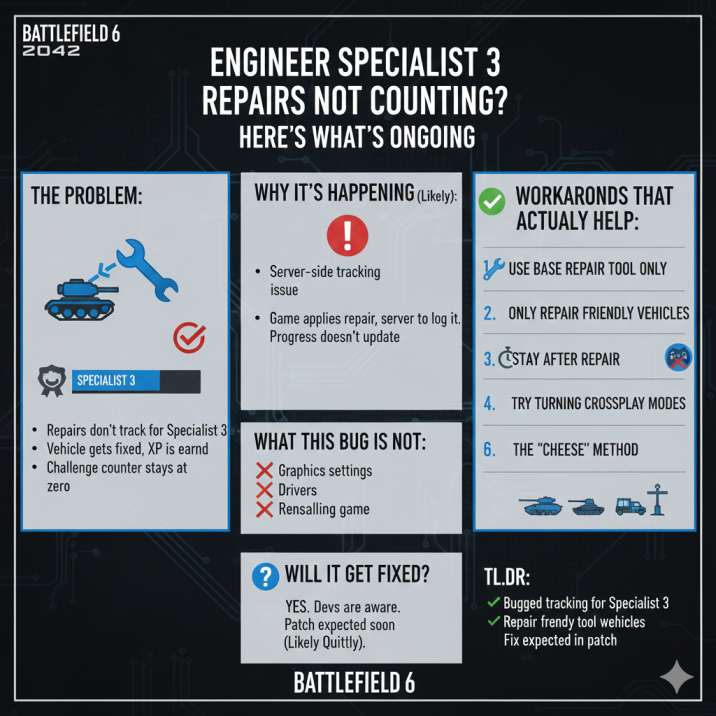
The Short Version (If You’re Already Tilted)
Sometimes, Engineer Specialist 3 repairs just don’t register at all. You can repair multiple vehicles in a match, see the animations, hear the tool working, and even get XP — but when you check your Specialist challenge, nothing has changed.
That’s because the vehicle repair itself isn’t broken. The problem is the challenge tracker, which fails to log those repairs on the backend.
Right now, there’s no permanent, official fix you can apply on your end. Restarting, changing settings, or reinstalling won’t magically make it work. The good news is that you’re not stuck waiting around either.
There are a handful of workarounds that players have tested and confirmed to reliably push the counter forward, even while the bug is still active.
Now let’s get into the details and walk through what actually helps.
Read also: BF6 Assault 3 Tier Stuck Why Assault Expert Won’t Unlock & How to Fix It
What This Bug Looks Like
You’re probably affected if any of this sounds familiar:
- Repairs counted once early on, then never again after that
- Your progress showed up during a match, only to reset back to zero afterward
- You repaired multiple vehicles in a single game and didn’t get credit for any of it
- Restarting the game, rejoining matches, or switching modes didn’t change anything
If you’re nodding along while reading this, congrats — you’ve run into the exact same issue a ton of other players are dealing with. It’s one of those bugs that’s especially frustrating because everything looks like it’s working, right up until you check your Specialist progress and realize the game completely ignored your repairs.
Why Engineer Repairs Aren’t Counting
Under the hood, this looks like a server-side tracking issue, not a problem with how repairs actually work in-game.
In simple terms:
- The game applies the repair correctly
- The server fails to log that repair toward the challenge
- As a result, your Engineer Specialist progress never updates
That’s why this bug feels so misleading. Your vehicle survives the fight, you see the repair animation, and you even earn XP for doing the work — but when you check the challenge, the counter hasn’t moved at all. The action happened, but the tracker never acknowledged it.
Because of that, nothing you tweak in the settings will fix this. Graphics options, performance changes, or restarts don’t affect how the server records challenge progress.
Things That Will NOT Fix It (Save Yourself the Time)
Before you start going down every troubleshooting rabbit hole, here’s what you can skip entirely. None of the following will fix the Engineer repair tracking issue:
- Changing graphics or visual settings
- Updating GPU or console drivers
- Reinstalling the game
- Switching server regions
- Tweaking ping, FPS, or performance options
If your repairs aren’t counting, it’s not your setup or hardware. The problem sits on the game’s tracking side, not on your end.
Read also: BF6 Battle Royale Initiation Challenge Level 5 Bugged Max Training Level Not Tracking
Quick Test: Is Your Repair Tracking Broken?
Before you try every workaround, it’s worth doing a quick check to see if the tracker is actually working in your current match.
- Equip the default repair tool (no upgrades)
- Repair a friendly vehicle (look for a blue or green icon)
- Stay next to the vehicle for 5–10 seconds after the repair finishes
- Open your Engineer Specialist 3 challenge and check the progress
If the number doesn’t increase after that, repair tracking is broken for that match or server, and you’ll need to rely on the workarounds to make progress.
Workarounds That Actually Help (In Order)
These aren’t random guesses or theorycrafting. They’re based on what players consistently report actually working while the tracking bug is active. None of them are guaranteed, but if repairs are going to count at all, it’s usually by using one (or a combination) of the methods below.
1. Use the Base Repair Tool Only
This is the most important workaround and the one that helps the most players.
Avoid using any upgraded or alternate repair gadgets. For whatever reason, the challenge tracker is far more reliable when you’re using the default repair tool. Upgraded tools can still repair vehicles in gameplay, but they often fail to trigger progress toward Engineer Specialist 3.
If you recently switched repair tools and noticed your progress stop entirely, switch back to the base tool and try again in a fresh match.
2. Only Repair Friendly Vehicles
Repairs only seem to count when the vehicle is clearly marked as friendly. That means it needs to show a blue icon for your team or a green icon for your squad. Repairs done on neutral, unclaimed, or recently spawned vehicles often don’t register at all, even though the repair itself works in gameplay.
This is where things get unintuitive. In some cases, damaging a neutral vehicle and allowing it to fully convert into a friendly vehicle before repairing it makes the challenge more likely to count.
It’s not how repairs should work, but until the tracker behaves properly, sticking strictly to friendly vehicles gives you the best chance of seeing progress.
3. Don’t Run Away Immediately After Repairing
This one sounds minor, but it actually matters more than you’d expect.
After finishing a repair, don’t sprint off right away. Stay close to the vehicle for a few seconds and give the game time to sync the action with the server. Several players report that leaving instantly — especially in combat — causes the repair to apply visually but never get logged toward the challenge.
Think of it as letting the server “confirm” the repair. Waiting those extra few seconds can be the difference between zero progress and the counter finally moving.
4. Try Turning Crossplay OFF
This one won’t help everyone, but it’s been effective for enough players that it’s absolutely worth testing. Turning crossplay off seems to improve challenge tracking for some people, especially on console. The theory is that mixed-platform lobbies may introduce extra syncing issues, which can make the repair tracker even more unreliable.
If you’ve been playing with crossplay enabled, try disabling it, queue into a fresh match, and test a few repairs using the base repair tool. It’s not a guaranteed fix, but for some players, it’s the first time they’ve seen progress move in hours.
Read also: BF6 Battle Royale Initiation Challenge Level 5 Bugged Max Training Level Not Tracking
5. Play Vehicle-Heavy Modes
Mode choice matters more than you’d expect when dealing with this bug.
Your best options are:
- Conquest on large maps
- Breakthrough with lots of armor
These modes keep vehicles alive longer and give you repeated, low-pressure repair opportunities. More vehicles on the field means more chances for at least one repair to successfully register, which is often all you need to confirm the tracker is working again.
6. The “Cheese” Method (Last Resort)
If you’ve tried everything above and your repairs still refuse to count, this is the last-resort option players fall back on.
The idea is simple, even if it’s not exciting. Spawn a vehicle at your base, damage it until the game fully registers it as friendly, then repair it over and over in a safe, low-risk area. Because there’s no combat pressure and no interruptions, the server seems more likely to log each repair properly.
It’s slow and definitely not fun, but for players who are completely stuck at zero progress, this method often forces the counter to move when nothing else will. Use it only if you’re desperate to finish the challenge.

Will This Get Fixed?
Most likely, yes.
Battlefield has a long history of challenge-tracking bugs like this, and they’re usually handled in the same way every time. The issue gets acknowledged, players struggle with it for a while, and then a fix quietly rolls out as part of a regular patch. Often, it’s resolved without much fanfare or even a clear mention in the patch notes.
There’s no official ETA yet, which is frustrating, but problems like this typically don’t stick around forever. At some point, the tracker just starts working again — usually after an update — and progress resumes as normal.
Read also: ForceRevive AI Endless Loop Bug in Portal in BF6: Solved
If You Want to Report It (Helpful, Not Required)
Reporting the bug isn’t required, but if you want to help speed things along, a clear report can actually make a difference. When you submit it, try to include as much specific information as possible so the developers can reproduce the issue on their end.
Make sure to mention:
- The Engineer Specialist 3 repair challenge
- Your platform (Xbox, PlayStation, or PC)
- Whether crossplay was enabled or disabled
- The mode and map where the issue happened
- The repair tool you were using at the time
The clearer the report, the easier it is for the devs to pinpoint where the tracking is breaking.
Final Take
If your Engineer Specialist 3 repairs aren’t counting, here’s the bottom line. You didn’t mess anything up, and there’s nothing wrong with how you’re playing. Your repairs are working exactly as they should in-game — it’s the challenge tracker that’s bugged, not your gameplay.
For now, the most reliable setup is sticking with the base repair tool and focusing only on clearly friendly vehicles. That combination gives you the best chance of seeing progress, even while the issue is still active. A proper fix will almost certainly arrive in a future update.
Until then, use the workarounds above and keep doing your job — your wrench still matters, even if the counter disagrees.