
So… you made it to Etuwa’s Fire – Part 2, headed to Highmost Seat, and—surprise—Etuwa is just… not there.
No quest marker. No dialogue prompt. Just an empty camp and a lot of confusion.
If you’re standing there wondering whether you missed something or broke the quest, don’t worry — you didn’t. This is actually a known issue that many players have run into while playing Avatar: Frontiers of Pandora. The game sometimes fails to properly load Etuwa during this part of the quest, even when everything else seems correct.
The good news is that your save is almost certainly fine, and you’re not locked out permanently. The bad news? This bug can be frustrating and poorly explained by the game itself.
Below, we’ll break down why this happens, what triggers it, and the most reliable ways to fix it without wasting hours retracing your steps or restarting unnecessarily.
What’s Actually Going On?
In Etuwa’s Fire – Part 2, the game expects Etuwa to appear at Highmost Seat so you can continue the quest like normal. That’s the intended flow — walk in, talk to her, move on.
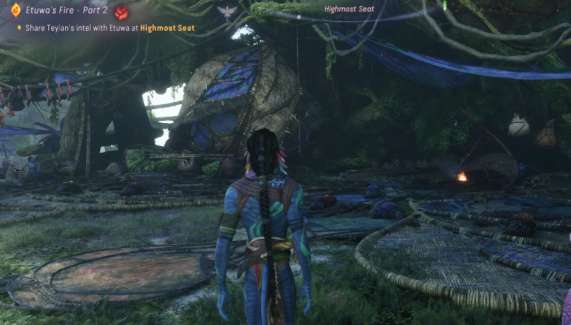
When she doesn’t spawn, it’s usually because something behind the scenes didn’t sync properly. This can happen due to:
- A quest-state desync
- Story progression happening slightly out of order
- Co-op or world-streaming hiccups that interrupt NPC loading
Basically, the game knows Etuwa should be there, but for some reason it never actually spawns her into the world. The quest stays active, but the NPC never appears to trigger the next step.
The important thing to know is this: you didn’t do anything wrong. You didn’t miss a hidden objective, you didn’t skip dialogue, and you didn’t soft-lock the quest on purpose. This is a technical issue on the game’s side — not player error — and it happens to more people than you’d think.
Read also: Where to Find All Trr’ong Artifacts in Avatar: Frontiers of Pandora
Quick Fixes That Usually Work for Etuwa’s Fire Part 2 Bug (Try These First)
✅ 1. Hard Reset the World (Most Reliable Fix)
This one solves the issue for a lot of players, so it’s always the best place to start.
- Fast travel somewhere far away from Highmost Seat
- Quit to the main menu
- Fully close the game (don’t just suspend or minimize it)
- Relaunch the game and load your save
- Fast travel back to Highmost Seat
What this does is force the game to completely reload the world, NPCs, and quest states. If Etuwa failed to spawn due to a streaming or sync issue, this usually kicks everything back into place.
It’s simple, it’s quick, and it fixes the problem more often than you’d expect.
✅ 2. Reset the Quest Tracking
Sometimes the quest is technically active, but the game just… forgets to show it properly. When that happens, it can look like Etuwa has vanished even though the quest is still running in the background.
To reset it:
- Untrack Etuwa’s Fire – Part 2
- Track a completely different quest
- Then switch back and re-select Etuwa’s Fire – Part 2
After doing this, open your map and check again to see if the objective marker or NPC appears. This quick refresh often forces the game to properly reload the quest state and bring Etuwa back where she’s supposed to be.
✅ 3. Progress Another Mission Briefly
If you’re currently partway through another story or side mission, that can sometimes interfere with NPC spawns.
Try this:
- Advance that other mission by at least one objective
- Once it updates, head back to Highmost Seat
Doing this can force the game to refresh its internal quest logic. In a lot of cases, that’s enough to unstick Etuwa and get her to appear like she’s supposed to.
✅ 4. Rest or Leave the Area
If the camp gives you the option to rest, use it.
- Rest once to advance time
- Walk or fast travel away from the area
- Then come back to Highmost Seat
Some NPCs are tied to time or world-state updates, and those don’t always trigger properly unless time actually moves forward. A quick rest or short trip away can be enough to force the game to refresh the area and load Etuwa correctly.
✅ 5. Try a Quick Co-op Reset
Even if you normally play solo, this one’s worth trying.
- Join a friend’s world (or any available co-op session)
- Let the world fully load in
- Leave the session and return to your own game
This forces the game to rebuild its world state and re-sync NPCs. It sounds simple, but it fixes a surprising number of bugs just like this — especially ones tied to missing characters or broken quest triggers.
Read also: Missing Colossus Quest Not Starting in Avatar: Frontiers of Pandora
If You’ve Already Finished a Lot of the Story…
This is where the bug tends to show up most often.
Several players have reported that completing Etuwa’s Fire – Part 2 too late—after hitting major story milestones—can cause Etuwa to stop spawning entirely. At that point, the game’s quest logic gets confused and never properly loads her back in.
If that sounds like your situation:
- Loading an earlier save (if you still have one) usually fixes it
- Otherwise, you may need to rely on world resets or contact support
It’s frustrating, but the important thing to know is this: you didn’t do anything wrong. This is a scripting issue on the game’s side, not a mistake on yours.
How to Tell If You’re Actually Stuck
You’re probably dealing with a real bug — not a missed step — if all of the following are true:
- The quest is active, but there’s no objective marker anywhere
- Etuwa is completely missing from Highmost Seat
- Reloading, fast travel, or switching areas doesn’t change anything
At that point, it’s no longer a puzzle you need to figure out. It’s a technical issue with the game itself, not something you did wrong.
Final Word
Etuwa’s Fire – Part 2 isn’t permanently broken — it’s just poorly scripted.
In most cases, players fix it by:
✔ Reloading the world
✔ Resetting quest tracking
✔ Or briefly jumping into co-op
If Etuwa isn’t spawning, you didn’t miss a step or do anything wrong. The game simply failed to load her correctly. Once the world refreshes and the quest state syncs properly, everything usually snaps back into place.
Annoying? Definitely.
Game-breaking? Thankfully, no.
Read more articles: