
Many FC Mobile players are reporting a new issue where the Footyverse Chapter 111 player reward does not open when tapped. The reward screen either freezes, does nothing, or loads indefinitely. With the event ending soon, it’s understandable that players want this fixed quickly so they don’t miss their player pull.
This FC Mobile Footyverse player reward bug is affecting both Android and iOS users and appears to be tied to server-side event handling, not your device.
Here’s why the reward isn’t opening and what you can do to fix it before the Footyverse event expires.
Why the Footyverse Chapter 111 Player Reward Won’t Open
This bug usually occurs when the Supply Depot 111 reward script fails to load from EA’s servers.
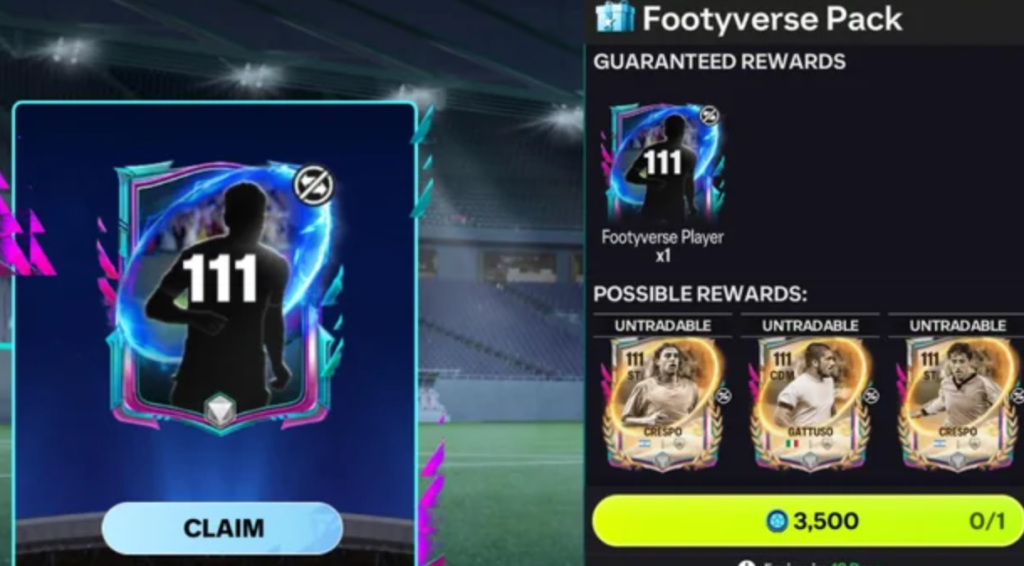
The player reward is not stored inside the app — it is loaded from EA’s event server, similar to the Claw Machine, Login Rewards, and Milestone Unlocks.
When the reward script fails to load, you see:
- Reward screen not opening
- No animation
- Black or empty screen
- Tapping does nothing
- Event UI stuck
This is a server event loading bug, not a device issue.
???? Quick Fix
Restart the game and switch your network (Wi-Fi → Data or vice-versa), then reopen Footyverse Chapter 111.
If the reward still doesn’t open, contact EA Help with your User ID so they manually refresh your event progress.
Fix #1: Close FC Mobile Completely & Reopen the Event
Force-close the app, not just minimize it.
This clears temporary event data and reloads Footyverse scripts.
Many players report the chapter unlocks properly after a hard restart.
Fix #2: Switch Between Wi-Fi and Mobile Data
The player reward needs to fetch data from the Footyverse event server.
Switching networks forces a fresh server request and often makes the Chapter 111 player reward load correctly.
Fix #3: Clear FC Mobile App Cache (Android)
Android often caches event screens.
Clearing the app cache fixes most reward loading issues.
Go to:
Settings → Apps → FC Mobile → Storage → Clear Cache
Do NOT clear data — only cache.
Fix #4: Disable VPN, Private DNS, or Ad-Blocker DNS
VPNs and custom DNS can block EA event servers.
This results in the reward screen not loading.
Turn off:
- VPN
- AdGuard DNS
- Private DNS
- Firewall apps
Then try opening the reward again.
Fix #5: Restart Your Router (For Wi-Fi Users)
Sometimes only your network’s DNS fails to connect to EA’s Footyverse server.
Restarting your router resets DNS routing and fixes the player reward not opening bug for many players.
Fix #6: Update FC Mobile From the Play Store or App Store
Older versions sometimes fail to load newly-added Footyverse chapters.
Updating ensures you’re using the latest event engine.
Fix #7: Log Out and Log Back In to Refresh Event Sync
Go to:
Settings → Log Out → Restart Game → Log In Again
This refreshes your progress and forces the game to check Footyverse Chapter 111 again.
Fix #8: Try Claiming the Reward on Another Device
If you have a second device:
- Log in
- Open Footyverse
- Try claiming Chapter 111 reward
Some users successfully open rewards when switching devices because the second device loads fresh event files.
Fix #9: Use In-Game Support to Submit the Issue Quickly
Go to:
Menu → Settings → Help → Contact Support
This auto-attaches device logs showing the event failure.
EA generally responds quickly for time-sensitive event bugs.
Fix #10: Ask EA to Manually Refresh Footyverse Chapter 111 for Your Account
If the reward still won’t open, EA can manually refresh the chapter for your account.
Provide:
- Your User ID
- Screenshot of Chapter 111
- Time of the error
Players often receive their reward or a manual correction within 24–48 hours.
Fix #11: Change Game Language to Force a Fresh Event Reload
Switching the game language forces FC Mobile to reload all UI and event files.
This is known to fix many Footyverse chapter loading bugs.
Try:
Settings → Language → Switch to another → Restart → Switch back.
This refresh forces the game to pull the Chapter 111 reward script again.
Fix #12: Remove Background Apps That Interfere With WebView Rendering
Apps like screen recorders, floating overlays, boosters, or GFX tools can block the embedded event engine.
Footyverse chapters use WebView-like elements, so overlays can break event loading.
Close:
- Messenger bubbles
- WhatsApp bubbles
- Game booster overlays
- Screen enhancement tools
Then reopen the Chapter 111 reward.
Fix #13: Free Up At Least 1GB Storage to Load Event Assets Properly
If your device is low on storage, the game cannot unpack temporary event files.
This causes Footyverse player rewards to freeze or not open at all.
Clear 1–2 GB of internal space, restart the device, then open the reward again.
Fix #14: Disable Power Saving Mode to Prevent Event Script Blocking
Power Saving Mode can throttle network traffic, animations, and WebView performance.
Turn off:
- Battery Saver
- Ultra Power Mode
- Background app limits
Then refresh the Footyverse event.
Fix #15: Update Android System WebView (Android Only)
Footyverse rewards depend on WebView to load interactive event content.
If WebView is outdated or corrupted, the reward won’t open.
Update through:
Google Play Store → Android System WebView → Update
Then reopen FC Mobile.
Fix #16: Clear Only “Browser” Cache If Using Samsung or Oppo Devices
Some brands route in-app event content through their built-in browser engine.
Clearing browser cache fixes many Footyverse reward not loading errors.
Open your device browser → Clear Cache (NOT data).
Then retry the Chapter 111 reward.
Fix #17: Try Using a Mobile Hotspot Instead of Wi-Fi
Some Wi-Fi networks block CDN files used by Footyverse events.
Using a mobile hotspot forces a clean server request.
Players often report Chapter 111 opens instantly on mobile data.
Fix #18: Change DNS to Google DNS (8.8.8.8) for Better CDN Access
Footyverse rewards may fail to load if your ISP DNS can’t reach EA’s servers.
Change DNS to:
8.8.8.8
8.8.4.4
This improves CDN resolution and fixes the player reward not opening bug.
Fix #19: Complete Another Footyverse Task to Refresh Event State
Sometimes a nearby chapter, mini-game, or daily objective refreshes your event session.
Complete:
- Any Footyverse quest
- A login milestone
- A daily task
Then go back to Chapter 111 — the reward often opens afterward.
Fix #20: Wait 10–20 Minutes for EA’s Server to Refresh the Chapter
Footyverse event chapters occasionally freeze when too many players claim rewards at once.
Waiting a short time allows EA’s server to reset the chapter state.
Many players report Chapter 111 opens after a short cooldown window.
How to fix the Footyverse Chapter 111 player reward not opening in FC Mobile?
The fastest way to fix the Footyverse Chapter 111 player reward not opening is to refresh the event script by restarting the game and switching networks.
The Chapter 111 reward uses an external script loaded from EA’s event server, so when that script fails to load, the button becomes unresponsive and the reward never opens.
Start by force-closing the FC Mobile app, then reconnect using a different network (Wi-Fi → mobile data or the reverse).
If you’re on Android, clear the FC Mobile cache only, not data. This forces your device to request a fresh event file and often repairs the broken Chapter 111 reward.
If the reward still refuses to open, the issue is server-side, and you must contact EA Help with your User ID so they manually refresh your Footyverse progress.
This is the only guaranteed fix when the supply depot script fails completely.
Can restarting or clearing cache fix the Footyverse reward issue?
Yes — restarting or clearing cache can fix the Footyverse reward issue, especially on Android devices.
Footyverse chapters rely heavily on cached event files, so when those cached versions become outdated or corrupted, the Chapter 111 reward won’t load.
Force-closing the app clears temporary scripts, and switching networks forces FC Mobile to ping the Footyverse server again.
On Android, clearing the FC Mobile cache removes corrupted WebView data that may be blocking the Chapter 111 reward window.
However, this fix only works if the issue is caused by device-side caching.
If the problem originates from EA’s server — which is common — restarting and clearing cache will not fix the missing reward.
In that case, you must contact EA so they can refresh your Footyverse chapter manually.
Still, restarting and clearing cache remains the best first step before contacting support.
Will EA refund or auto-grant the missing 111 player rewards?
EA typically does not auto-grant Footyverse rewards, but they will refund or manually grant the Chapter 111 player reward once you submit a support request.
Because the reward is tied to a server-side event script, FC Mobile cannot automatically compensate players when the script fails.
Players must contact EA Help and provide:
- Their User ID
- A screenshot of Chapter 111 failing to open
- The time the issue occurred
Once a support agent verifies the bug, they can either:
✔ Refresh your Footyverse progress
✔ Unblock the reward
✔ Or manually add the missing player to your account
This process usually takes 24–48 hours.
Since the event is time-limited, it’s important to open a ticket quickly so you don’t lose access before Footyverse ends.
Why does the Footyverse reward button do nothing when clicked?
When the Footyverse reward button does nothing, it’s because the chapter is trying to load a reward script that never fully loads.
Footyverse rewards are not coded inside the app; they pull an external file from EA’s CDN.
If that file doesn’t load, the button becomes non-functional.
Common causes include:
- Corrupted cached event files
- Slow or unstable network
- WebView errors (Android)
- Broken Footyverse script on EA’s end
- Blocked CDN responses (VPN, DNS filters, ad blockers)
Because the script never initializes, tapping the button results in no animation, no pop-up, and no reward.
Switching networks or clearing cache can sometimes force the script to re-download.
If not, EA must manually refresh your Footyverse event state using your User ID.
When will EA release a fix or update for the Footyverse reward bug?
EA typically patches Footyverse reward bugs through silent server updates rather than full app updates.
Since the Chapter 111 issue is caused by the Footyverse event script failing to load, EA can fix it without pushing a new version to the Play Store or App Store.
Most Footyverse-related bugs are resolved within 24–72 hours, depending on severity and how many players are affected.
If a widespread script failure occurs, EA usually deploys a server-side fix immediately and begins manually restoring rewards for affected players.
However, individual accounts stuck on Chapter 111 must still contact EA support to receive their reward.
A global fix does not automatically repair all broken event states.
Players should monitor the official FC Mobile X/Twitter account or the in-game news section, as EA usually acknowledges Footyverse issues once enough players report them.
Is the Footyverse reward bug linked to server sync or claim timing issues?
Yes — the Footyverse reward bug is heavily linked to server sync failures and claim timing issues in FC Mobile.
Footyverse rewards aren’t stored locally on your device; they rely on a server request that validates your chapter progress, loads a reward script, and then triggers the animation.
If the server is slow, overloaded, or temporarily out of sync, the request stalls.
When the sync fails, the reward button appears clickable but does nothing because the script never fully loads.
This often happens during high-traffic hours when many players are claiming Chapter 111 at the same time.
The server briefly fails to confirm the claim, causing the Footyverse Chapter 111 reward not opening bug.
So yes — claim timing and server sync issues are major factors.
This is why switching networks, restarting the app, or waiting 5–10 minutes can sometimes make the reward load normally.
Does this issue affect Android users more than iOS?
Yes — Android users experience the Footyverse reward not opening bug far more often than iOS players because FC Mobile relies on Android System WebView to load Footyverse event interfaces.
When WebView uses cached or outdated event files, the reward popup cannot load at all.
Android devices also tend to have:
- Aggressive cache storage
- Battery optimization that suspends scripts
- DNS filters blocking CDN files
- Heavier reliance on local WebView rendering
All of these increase the chance of seeing a blank screen or unresponsive reward button.
iOS handles web components differently and refreshes cached files more cleanly, so the issue occurs less frequently but still exists.
Android is not the only affected platform, but it is statistically the most impacted due to how FC Mobile loads Footyverse events on the OS level.
Is the Footyverse Chapter 111 reward locked due to backend validation errors?
Yes — one of the main causes of the Footyverse Chapter 111 reward being locked is a backend validation error.
When you tap the reward, the server must check:
- That you completed the chapter
- That you are eligible for the reward
- That the reward hasn’t been claimed
- That the event is still active
If any validation step fails, the server blocks the reward from opening.
Instead of displaying an error, FC Mobile simply does nothing — making the reward button appear broken.
This happens frequently when Footyverse chapters fail to update properly on EA’s server.
If validation data is out of sync, the game won’t trigger the reward animation.
This is why only EA support can refresh your account if it becomes stuck — the issue is server-side, not a device bug.
Can event expiry timers prevent claiming Footyverse rewards?
Yes — if the event is close to expiring or the claim window is nearly over, the Footyverse reward script may fail to load, especially during the final days of the Footyverse event.
When the event timer is low, the backend prioritizes time-based restrictions, which can accidentally block certain rewards from initializing.
Additionally, the server experiences heavy traffic near the end of Footyverse events.
When too many players attempt to claim Chapter 111 simultaneously, server validation slows down or crashes, causing the reward button to freeze or stop responding.
The reward isn’t deleted, but the event timer can interfere with the script loading properly.
This is why FC Mobile players often report more bugs, freezes, and black screens in the final 48 hours of major events.
Is this part of the ongoing FC Mobile Footyverse event server instability?
Yes — the Footyverse Chapter 111 reward not opening bug is part of the larger Footyverse event instability currently affecting FC Mobile servers.
Over the past few days, multiple players reported:
- Broken chapter rewards
- Claw machine ERR_CACHE errors
- Supply Depot openings failing
- Event pages loading blank
- Rewards not triggering after tapping
These are all symptoms of the same underlying problem: Footyverse server instability.
When the event servers struggle, anything that relies on external scripts — like Chapter 111 rewards — becomes glitchy or non-responsive.
This is entirely on EA’s side and not caused by your device.
Players often regain access once EA refreshes the event server or pushes a silent backend fix.
Final Thoughts
The FC Mobile Footyverse Chapter 111 player reward not opening is almost always caused by a temporary server or script-loading issue on EA’s side.
To avoid missing the reward before the event ends:
✔ Restart and switch networks
✔ Clear cache (Android)
✔ Turn off VPN/Private DNS
✔ Contact EA with your User ID if it still doesn’t open
EA typically fixes these event-specific bugs quickly, especially near event deadlines.