
You’re not imagining it — the snow in Anno 117 can be brutal.
It looks festive for about five minutes, then suddenly you’re squinting at white-on-white buildings wondering if your monitor brightness broke.
So if you’re here asking:
“How do I enable snow in Anno 117?”
“How do I turn this snow off before it nukes my eyes?”
You’re in the right place. Let’s clear this up properly.
A lot of players hit this moment at the same time: you load into your save, everything is covered in blinding white, and there’s absolutely nothing in the settings menu that explains what’s going on.
You tweak brightness, contrast, even graphics presets — and nothing changes. That’s because this isn’t a normal weather setting or visual filter you accidentally turned on.
It’s a game-wide effect that works very differently from what most people expect. Once you understand why the snow appears and how the game handles it, fixing (or triggering) it becomes much easier.
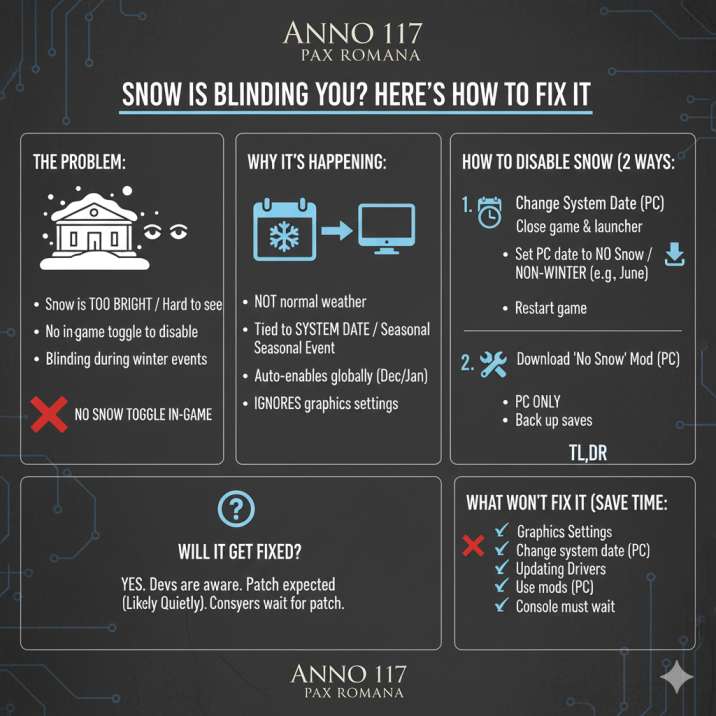
Is There a Snow Toggle in Anno 117: Pax Romana?
Short answer: nope.
There is no setting, checkbox, or graphics option that lets you manually turn snow on or off in Anno 117. Not under visuals. Not tied to gameplay settings. Not hidden away in some obscure “advanced” menu you somehow skipped past at 2 a.m.
If you’ve been scrolling through every menu, tweaking brightness, effects, or post-processing, hoping you just missed one simple toggle — you didn’t. The game genuinely doesn’t offer one.
Snow isn’t treated like a standard visual effect you can control; it’s handled separately and kicks in automatically under certain conditions. Annoying? For some players, absolutely. But at least now you know you’re not overlooking anything obvious.
So Why Is There Snow at All?
Snow in Anno 117: Pax Romana isn’t normal, dynamic weather. It’s part of a seasonal visual event the game applies automatically.
What that means in practice is pretty simple, even if the game never explains it clearly:
- The game checks your system date, not your save file or map settings
- During certain periods — especially the winter and holiday season — snow turns on by default
- The effect is applied globally across your cities and regions
- It completely ignores graphics and visual sliders, which is why tweaking settings doesn’t help
That’s also why snow can suddenly appear mid-save without warning. You didn’t trigger an event, change a setting, or break anything — the game just decided it was “snow season” and flipped the switch for you.
How to Disable Snow in Anno 117: Pax Romana (The Two Ways That Actually Work)
If the snow is hurting your eyes, washing out your cities, or just making everything harder to read, you’re not being dramatic — it’s a common complaint. Unfortunately, because there’s no in-game toggle, you’re limited to a couple of workaround solutions. The good news is that both of these methods are already being used by players and actually work, depending on whether you want a quick fix or a more permanent one.
Option 1: Change Your System Date (Fastest Fix)
This is the quickest way to get rid of snow without touching mods, and it’s the method most players try first because it’s simple and completely reversible.
What to do
Save your game and fully close Anno 117 (including the launcher). This step matters, because the game checks the system date when it starts, not while it’s already running. Next, turn off automatic time on your PC so the date doesn’t immediately reset itself.
Change the date to a non-winter month — June works well for most people — and then restart the game as normal.
For most players, the snow is gone instantly, and the world goes back to normal lighting and visibility.
Good to know
Always close the launcher before changing the date. Once you’re done playing, switch your system date back to the correct time. Keep in mind that online features or other apps may act a little weird while the date is changed, so this is best used as a quick fix rather than a permanent setup.
Read also: Anno 117 Lily Buy in Achievement Not Unlocking (Complete Fix Guide)
Option 2: Use a “No Snow” or “Less Snow” Mod (Best Long-Term Fix)
If you don’t want to mess with your system clock every single time you boot up the game, mods are easily the better long-term option. This is the route most PC players end up taking once they’re tired of dealing with seasonal snow altogether.
What these mods do
Depending on which one you install, mods can either remove snow entirely or tone it way down by reducing brightness and particle density. That means clearer cities, better contrast, and far less eye strain during long sessions. Everything else in the game stays the same — you’re just getting rid of the blinding white overlay.
Things to keep in mind
This option is PC only, so console players are unfortunately out of luck here. You should always back up your saves before installing any mods, just to be safe. Also, mods sometimes need updates after major patches, so you may need to recheck compatibility from time to time. If snow consistently hurts your eyes, though, this is by far the most comfortable solution.
How to Enable Snow in Anno 117: Pax Romana (If You Actually Want It)
There’s no manual “enable snow” button or hidden setting you can flip on. Just like disabling it, snow in Anno 117 isn’t something you control directly through the menus.
Snow usually appears when a couple of conditions line up. The game checks your system date, and if it falls within the winter or holiday window, the seasonal visual effect activates automatically. When that event is active, snow is applied across the entire game world.
If you want snow on demand, most players use the same workaround in reverse. They change their system date to late December, fully restart the game, and let the seasonal check do its thing. Once the game reloads, the snow kicks in on its own.
It’s not a true toggle, but for now, that’s as close as it gets to “turning snow on” in Anno 117.
Does Snow Affect Gameplay or Performance?
No mechanical changes — the snow in Anno 117: Pax Romana is purely a visual effect. It doesn’t impact production chains, population happiness, resource output, or any underlying gameplay systems. Nothing under the hood changes just because the map is covered in white.
That said, there are still some downsides players regularly notice. Visibility definitely takes a hit, especially when buildings, roads, and terrain all start blending together.
Some players also report minor performance drops, likely due to the extra particle effects and lighting, particularly on lower-end systems. On top of that, longer play sessions can cause real eye fatigue because of the high contrast and brightness.
If the snow bothers you, you’re not giving anything up by disabling it — you’re just making the game easier and more comfortable to look at.
How to Protect Trade Routes in Anno 117 (And Why Escorts Keep Failing)Read also:
What About Console Players?
Unfortunately, console players don’t have many good options right now. Mods aren’t available on console at all, which immediately rules out the most comfortable long-term fix. Changing the system date can sometimes work, but it’s inconsistent and not always reliable depending on the platform and system restrictions.
On top of that, there’s currently no official accessibility or visual toggle that lets you disable seasonal snow effects. No brightness override, no reduced-effects option, and no way to turn it off directly from the settings menu.
Because of that, console players are mostly stuck waiting for a future patch or a quality-of-life update that adds better visual controls. Until then, there isn’t a clean, guaranteed solution the way there is on PC.
Quick Takeaway
- ❌ There is no snow toggle in Anno 117: Pax Romana
- ✅ Snow is tied to seasonal events and your system date
- ✅ You can remove it by changing your system date or using mods on PC
- ❌ Console options are very limited right now
If the snow is killing your vibe — or straight-up hurting your eyes — you’re not missing some secret setting or hidden menu. This is simply how the game handles seasonal visuals at the moment. Until an official toggle or accessibility option is added, workarounds are the only way to deal with it.