
A lot of Where Winds Meet co-op problems come down to timing. The co-op boss lockout usually happens when you join your friend’s world while they’re already partway through a boss quest, especially fights like Dalang. The game doesn’t fully sync both players into the same quest instance, so things break in weird ways.
What actually happens is this: one player triggers the boss cutscene, and the other player doesn’t.
Once that cutscene plays, the game thinks the fight has already started, so it throws up an invisible arena barrier.
One player gets pulled inside the boss arena, while the other is treated like a late joiner and gets stuck outside with no way in.
This isn’t you doing anything wrong — it’s a Where Winds Meet multiplayer desync bug tied to how co-op handles quest progression and cutscenes.
It’s most noticeable in story bosses like Dalang, where the arena locks as soon as the fight starts.
The good news? If you start the boss the right way in co-op, you can completely avoid this issue.
What Is the Co-Op Boss Arena Lockout Bug in Where Winds Meet?
The co-op boss arena lockout bug in Where Winds Meet is exactly that annoying moment where the game splits you and your friend during a boss fight.
One of you gets pulled into the boss arena, while the other is left standing outside, blocked by an invisible barrier with no way in.
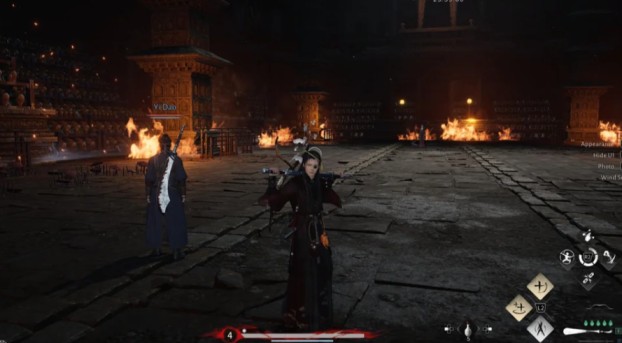
Usually, only one player sees the boss cutscene, which is where everything goes wrong. As soon as that cutscene finishes, the game flags the fight as already started, but it never properly syncs both players into the same instance. So the boss activates, the arena locks, and co-op completely breaks for the second player.
You’ll notice this bug most often during the Dalang boss fight, but it can also happen with other main story bosses in Where Winds Meet. If you joined your friend’s world late or entered the fight at slightly different times, the game sometimes treats one of you like a spectator instead of an active participant — and that’s what causes the lockout.
Read also: Where Winds Meet Gear Farming Guide
Why Does the Co-Op Boss Lockout Happen in Where Winds Meet?
The co-op boss lockout bug almost always comes down to how and when a second player joins the fight.
1. Joining a Friend Mid-Quest (Main Cause)
If you jump into your friend’s world while they’re already partway through a boss quest, Where Winds Meet co-op sometimes fails to sync both players into the same quest instance. One player triggers the boss sequence, while the other is treated like they showed up late to the party.
This leads to:
- One player starting the boss cutscene
- The second player being flagged as a spectator
- Boss arena barriers not opening for both players
2. Cutscene Desynchronization
Boss cutscenes are the real troublemakers here. If only one player loads the cutscene, the game assumes the fight has officially started. One player gets teleported into the arena, while the other gets locked outside the boss arena behind an invisible wall.
3. Incorrect Co-Op Entry Method
Joining through free-roam world join instead of starting the fight from the quest or co-op menu often triggers this bug. The game simply isn’t built to handle late joins during story boss fights like Dalang.
Correct Way to Start Co-Op Boss Fights in Where Winds Meet
Alright, this is the part that actually prevents the co-op boss arena lockout — and yeah, it matters more than it should. If you want Where Winds Meet co-op bosses to work properly, you have to start the fight the right way.
First, make sure both of you leave the boss area completely. Don’t stand near the arena, don’t half-trigger anything. Just back out and head to a safe hub or town together.
Next, open the Social / Co-Op / Wandering Paths menu — this is key. From there, start the boss quest directly from the quest menu, not by walking up to the arena in free roam. Once the quest instance is active, invite your friend through that menu and then go in at the same time.
Doing it this way forces the game to:
- Put both players in the same quest state
- Load the boss cutscene for everyone
- Remove the invisible boss arena barrier completely
If you skip this and try to free-roam join, Where Winds Meet co-op can bug out fast — especially on story bosses like Dalang.
Read also: How to Complete Sentient Beings (14/15 Chests Missing) Where Winds Meet
How to Fix the Co-Op Boss Lockout If You’re Already Stuck Outside
Alright, if the damage is already done and you’re locked outside the boss arena in Where Winds Meet co-op, don’t panic. You can usually fix it without giving up on the fight — just do these in order.
Fix 1: Reset the Quest Instance
Have the host player leave the boss area completely. Both of you should head back to a hub or safe town, then restart the boss through the co-op quest menu, not free roam. This refreshes the quest instance and fixes most arena barrier bugs.
Fix 2: Re-Invite the Right Way
If that didn’t work, make sure you’re not rejoining via free-roam world join. The host should send a quest-specific co-op invite so the game knows you’re part of the boss instance from the start.
Fix 3: Full Session Restart
Still broken? Do a clean reset. Both players exit to the main menu, reload the game, and start the co-op boss again using the correct quest menu method. It’s annoying, but it usually clears stubborn desync issues.
Follow these steps and Where Winds Meet co-op bosses should behave normally again — no invisible walls, no lockouts.
Does Where Winds Meet Allow Co-Op for All Bosses?
Short answer? Not always. And yeah, that can be confusing.
While Where Winds Meet co-op works great for exploration and many fights, some main story bosses come with extra rules behind the scenes. Certain bosses seem to have co-op restrictions, meaning the game only allows them under specific conditions.
In some cases, both players need to be at the exact same quest stage for the co-op boss fight to work properly. Other times, the boss may only support co-op after it’s been cleared once, or it might be solo-only by design to protect story progression.
So if you’re doing everything right — starting the fight from the quest menu, joining together, syncing cutscenes — and the co-op boss lockout still happens, it’s probably not a bug. It’s just Where Winds Meet enforcing quest-state requirements. When that happens, the safest move is to clear the boss solo once, then try co-op on future encounters.
Read also: How to Make Johnny Depp in Where Winds Meet ?
Frequently Asked Questions (FAQ)
Why does one player stay outside the boss arena in Where Winds Meet co-op?
This usually happens when someone joins mid-quest or mid-cutscene. The game doesn’t sync both players into the same quest instance, so one person gets pulled into the fight while the other is stuck outside behind an invisible boss arena barrier.
What’s the best way to start co-op boss fights in Where Winds Meet?
Always start the fight from the co-op or quest menu. Don’t join a friend who’s already inside the boss area. Starting together makes sure both players get the cutscene and enter the arena at the same time.
Is the Dalang boss fight bugged in co-op?
Dalang isn’t completely broken, but it’s one of the most common bosses where this co-op lockout happens — especially if someone joins late or free-roams into the fight.
Can this co-op boss lockout be fixed permanently?
For the most part, yes. If you always launch boss fights through the quest menu in Where Winds Meet co-op, the lockout issue almost never shows up again.