
How to Remove Blueprint in Where Winds Meet : The cancel blueprint question is one of the most common building-related issues in Where Winds Meet because the game allows players to place Cradle Blueprint zones instantly but does not clearly explain how to remove them.
Many players drop a cancel blueprint zone in the middle of a city by accident, only to discover there is no obvious delete button in normal gameplay mode. Understanding how to cancel blueprint areas is important because misplaced zones block terrain, interfere with city layout, and clutter the construction interface.
The cancel blueprint system sits inside the Cradle Building menu, not the main UI. Because of this, players often think the cancel blueprint option is hidden or unavailable.
Once you understand how to enter construction mode correctly, any placed zone becomes editable and removable. The cancel blueprint function is consistent across platforms, and the process works the same for small blueprint squares, large foundation grids, and misplaced construction plans.
Cancel Blueprint Overview with a Direct Solution Hint
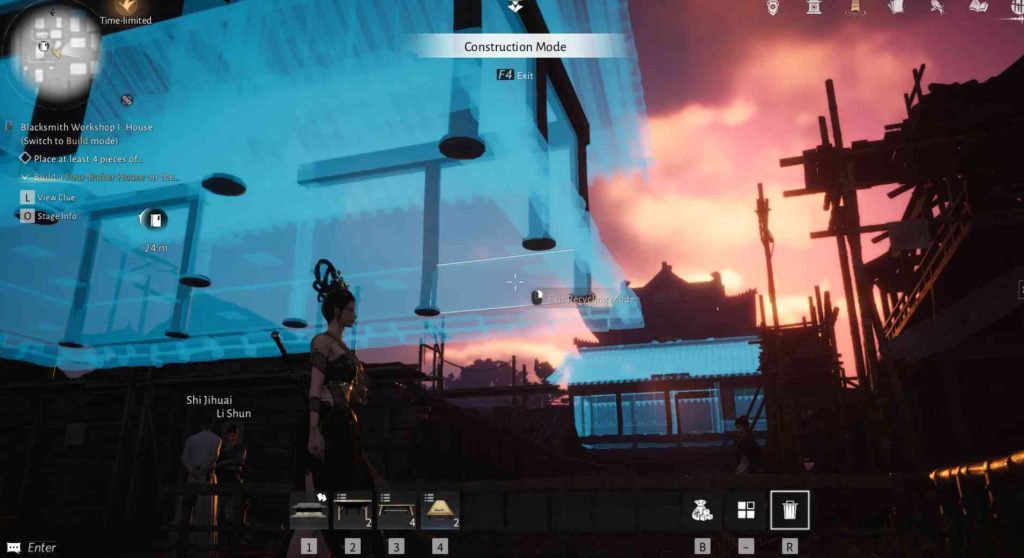
The cancel blueprint system is found inside Construction Mode, where the game gives players options to move, adjust, inspect, or remove blueprint zones. The cancel blueprint option appears in the same panel that lists blueprint details and zone size. As soon as a player highlights the placed blueprint zone, the cancel blueprint option becomes visible in the interface.
Reference Table: Cancel Blueprint Breakdown
| Action | Location | Input | Result |
|---|---|---|---|
| Enter Construction Mode | Cradle Building interface | Keyboard, controller, or touchpad | Opens blueprint controls |
| Highlight Blueprint Area | Placed grid zone | Cursor selection | Shows Clear/Cancel option |
| Clear Blueprint | Blueprint action panel | Confirm Clear | Removes blueprint completely |
| Place New Blueprint | Construction Mode | Select structure | Adds new zone |
| Confirm Move | Blueprint mode | Move icon | Repositions blueprint |
| Cancel Without Deleting | Construction Mode | Leave command | Closes interface |
Cancel Blueprint Visibility and Why Players Cannot Find It
The cancel blueprint option only becomes visible inside Construction Mode, which leads to confusion.
The game does not allow cancel blueprint actions from the general UI, so interacting directly with the blueprint on the ground without entering building mode does nothing. To remove it, players must enter the same interface they used to create it. This consistency ensures that cancel blueprint actions cannot occur by accident.
1. Fix Missing Cancel Blueprint Option
The cancel blueprint function does not appear in normal gameplay mode. Players must enter Construction Mode first. Once inside the building interface, every placed blueprint tile will show an action panel that includes the Clear option. This is where the cancel blueprint command is located.
2. Fix Cancel Blueprint Not Showing While Standing Far Away
The cancel blueprint command only appears when the player stands close enough to the placed zone. If the blueprint is far away, the system does not show Clear. Moving closer to the edge of the blueprint grid makes the cancel blueprint option appear.
3. Fix Cancel Blueprint Confusion Across Platforms
The cancel blueprint action appears in the same top-right location for PC and console. The input button may differ, but the action panel always displays Clear, which performs the cancel blueprint function.
How to Cancel Blueprint Using Construction Mode
The cancel blueprint process begins with entering Construction Mode. This is the primary menu for all Cradle Building interactions. Once activated, the cancel blueprint option becomes accessible by targeting any existing blueprint zone. Because the game stores blueprint actions inside this interface, cancel blueprint cannot be performed outside of it.
1. Fix Incorrect Construction Mode Input
The cancel blueprint process requires players to use the correct input to open Construction Mode. On PC, the default key opens the building menu and enables blueprint editing. On console, the building interface activates through the touchpad and building button combination. Using the wrong input prevents access to cancel blueprint.
2. Fix Difficulty Highlighting the Blueprint
The cancel blueprint command depends on selecting the blueprint area. If the cursor is not correctly positioned on the zone, the Clear button will not appear. Adjusting camera angle and moving the character closer makes the cancel blueprint highlight register properly.
3. Fix Cancel Blueprint Not Responding
The cancel blueprint removal requires confirming the Clear option after selecting the zone. If the button is not pressed or the confirm step is skipped, the blueprint remains in place. Verifying controller buttons or keyboard bindings ensures the cancel blueprint command proceeds correctly.
How Cancel Blueprint Works for Foundation Grids
The cancel blueprint function also applies to multipanel foundation grids. Large construction plots can span wide areas, and players can accidentally drop multiple grids while exploring. Even in these cases, the cancel blueprint option works identically. Each grid square counts as part of one blueprint object, and clearing it removes the entire structure plan.
1. Fix Cancel Blueprint Only Removing Half the Grid
The cancel blueprint process removes the entire plotted object, regardless of size. If only part of the grid disappears, the wrong blueprint was selected. Targeting the actual blueprint root node ensures the entire grid clears at once.
2. Fix Foundation Blueprint Remaining Invisible
The cancel blueprint option removes foundation visuals instantly. If a faint outline remains, the blueprint mode may still be active. Leaving Construction Mode resets the visual layer and confirms the blueprint was removed.
3. Fix Cancel Blueprint Leaving a Shadow on the Ground
The cancel blueprint sometimes leaves a visual shadow where the grid was placed. This is a temporary rendering glitch. Reentering Construction Mode and exiting again forces the environment to refresh and removes the visual remnant.
How to Cancel Blueprint When Multiple Zones Overlap
The cancel blueprint function becomes important when multiple blueprint grids overlap due to spam-placement or experimenting with layouts. Players who place multiple blueprint areas in a city sometimes find it difficult to distinguish one from another. The cancel blueprint function allows clearing each zone individually.
1. Fix Cancel Blueprint Selecting the Wrong Grid
The cancel blueprint system selects the highlighted zone. If the wrong zone is highlighted, adjusting position or rotating the camera allows precise targeting. Removing grids one by one prevents accidental clears.
2. Fix Cancel Blueprint Overlapping Hitboxes
The cancel blueprint highlight prioritizes the zone closest to the player’s camera. Stepping slightly to the side adjusts hitbox priority and makes the cancel blueprint action select the intended grid.
3. Fix Inability to Access the Buried Blueprint
The cancel blueprint option can still target a blueprint partly buried in terrain. Tilting the camera downward, zooming in, or standing on top of the blueprint usually reveals the Clear option.
Cancel Blueprint on Console and Controller Adjustments
The console version of the cancel blueprint process mirrors the PC version but uses different buttons. The building interface shows the Clear command in the corner with the corresponding button icon. Because players sometimes misinterpret the icon, removing a blueprint requires locating the displayed button associated with Clear.
1. Fix Console Players Not Seeing Cancel Blueprint
The cancel blueprint action appears visibly in the interface. Ensuring the player has entered Construction Mode and highlighted the zone always reveals the Clear button.
2. Fix Cancel Blueprint Not Confirming on Controller
The cancel blueprint removal requires the confirm button after selecting Clear. Pressing the wrong button returns to the building menu without deletion. Using the correct confirm input completes the removal.
3. Fix Cancel Blueprint Input Delay
The cancel blueprint selection sometimes has a slight delay on console. Pressing the Clear button once and waiting for UI response prevents double inputs that can reopen menus.
Cancel Blueprint When Stuck in Temporary or Event Areas
Some players place the cancel blueprint zone in an area affected by temporary events or moving NPCs. Even in these cases, the cancel blueprint option works normally. Event areas do not disable blueprint controls, and NPC collisions do not interfere with the Clear function.
1. Fix Cancel Blueprint Blocked by NPCs
The cancel blueprint targeting works through NPCs. If visibility is blocked, repositioning the camera shows the grid again, enabling the Clear option.
2. Fix Cancel Blueprint Not Working in a Restricted Zone
The cancel blueprint works even near city walls or narrow streets. These areas sometimes cause visual obstruction, but the building panel still supports clearing the blueprint.
3. Fix Cancel Blueprint Ignored in an Event Area
The cancel blueprint option remains active during most events. If the UI fails to display properly, leaving the event zone and returning usually refreshes the blueprint panel.
Why Cancel Blueprint Must Be Done Manually
The game requires players to manually use the cancel blueprint function to remove unwanted structures. Because blueprint placement is fast and easy, requiring manual deletion prevents accidental loss of construction progress. Blueprint areas remain until the Clear option is selected in Construction Mode, ensuring players do not delete projects unintentionally.
1. Fix Expectation That Cancel Blueprint Happens Automatically
The cancel blueprint action never triggers automatically. The player must always use Clear manually. This design preserves player control over building.
2. Fix Confusion About Blueprint Expiring
The cancel blueprint zones do not expire or vanish on their own. Any unwanted blueprint must be cleared by the player.
3. Fix Misconception That Cancel Blueprint Happens on Reload
The cancel blueprint state persists across sessions. Reloading the game will not remove blueprint areas.
Conclusion
The cancel blueprint function in Where Winds Meet requires entering Construction Mode, highlighting the placed zone, and using the Clear option to remove it.