
If you’ve hit the Lost Melody quest in Wuthering Waves and are now staring at an empty area wondering where the lemmings went… yeah, you’re not alone.
This is a known bug, and it’s been tripping up a lot of players lately. The good news? You didn’t miss anything, and your save isn’t broken. There are ways to fix it — or at least force the quest to behave again.
Let’s break it down.
This issue usually happens when the quest’s trigger fails to load correctly, often after fast traveling, leaving co-op, or entering the area too early. The game thinks the event already happened, even though nothing actually spawned. Because of that, you can end up stuck in an empty zone with no clear way forward.
Thankfully, this isn’t permanent. Most players fix it by fully restarting the game, teleporting away from the area, or re-entering the zone slowly to force the trigger to reset. It’s annoying, but it’s a known hiccup — not a progression lock.
What’s Going Wrong in the Lost Melody Quest?
During the Lost Melody quest, you’re supposed to trigger a short encounter where lemmings pop out of the ground and kick off the next step. For some players, that moment just… never happens.
No enemies. No interaction. Just an empty area and a lot of confusion.
This usually happens because the quest trigger doesn’t fire correctly. Common reasons include:
- The quest trigger failing to load properly
- Entering the area too early before the script activates
- Recently playing in co-op, which can desync quest states
- The game not fully refreshing after a patch or update
In short, the quest logic breaks before it can start. The good news? It’s not something you did wrong — it’s a scripting issue on the game’s side, and it’s already affecting plenty of other players too.
Read also: How to Get Kagura Bells in Persona 5: The Phantom X
Quick Fix for Wuthering Waves “Lost Melody” Quest (Works for Most Players)
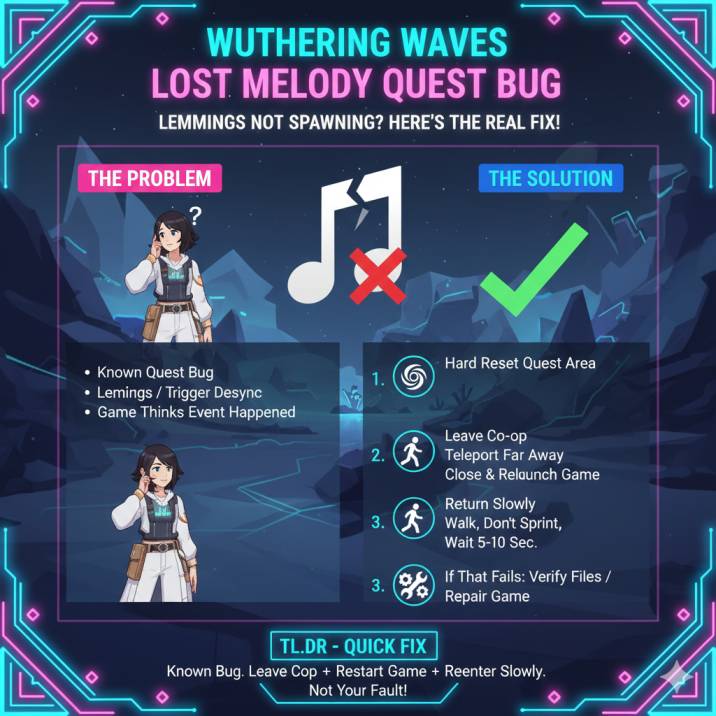
Try this first — it’s the most reliable solution and fixes the issue for a lot of players.
Hard Reset the Quest Area
- Leave co-op completely (even if you’re pretty sure you’re not in one — double-check).
- Teleport far away, preferably to a different region, not just a nearby waypoint.
- Fully close the game (don’t just return to the menu).
- Relaunch the game and load back in.
- Teleport back to the Lost Melody quest marker.
- Walk into the area slowly and give it a few seconds to trigger.
This process forces the game to fully reload the quest state and reinitialize the event trigger. In most cases, that’s enough to make the lemmings finally spawn and allow the quest to progress normally.
It might feel a bit clunky, but this reset clears out the desync that causes the quest to stall in the first place — and for many players, it works immediately.
Why This Bug Happens
The Lost Melody quest relies on a proximity-based trigger to start the encounter. If the game thinks you’ve already entered the area — even if the event never actually played — it won’t try to trigger it again.
That’s where things break.
Common causes include:
- Co-op desync, where your world state doesn’t fully sync back after playing with others
- Entering the area too early, before the quest properly updates
- Partial asset loading after a patch or hotfix
- Fast traveling too quickly between quest steps, skipping the trigger window
In short, the game believes the event already happened, so it never tries to fire it again — even though nothing actually occurred on your screen.
Still Not Working? Try These
If the quick fix didn’t do the trick, here are a few extra things that can help force the quest to behave properly.
✅ Step Back and Re-Enter
Walk about 50–100 meters away from the quest area, then slowly walk back in.
Don’t sprint, and don’t teleport directly on top of the marker — you want the game to naturally re-detect your presence.
✅ Repair Game Files
If you’re on PC or mobile:
- Run the repair / verify files option from the launcher or in-game menu
- Restart the game once it finishes
This helps if the quest data didn’t download or load correctly.
✅ Double-Check the Quest Step
Make sure:
- The Lost Melody quest is actively tracked
- You’re at the correct location (usually near the Mawburrow Desert photo spot)
- You didn’t accidentally skip a dialogue or interaction earlier
Sometimes the quest won’t advance if a small trigger was missed earlier in the chain.
Is This a Known Bug?
Yes — this is a well-known issue, and you’re definitely not the only one running into it. Multiple players have reported the exact same problem across Reddit threads, YouTube comments, and community discussions. The pattern is consistent: the Lost Melody quest reaches the lemming section, but nothing spawns and progression completely stalls.
The important thing to know is that this isn’t a skill issue or user error. It’s a quest scripting problem that seems to pop up under specific conditions, usually tied to co-op syncing, fast travel, or incomplete asset loading after an update.
In most cases, the issue resolves itself after a reset, a patch, or a proper quest reload. While it’s frustrating, your save isn’t broken — and you’re not alone in dealing with it.
When to Contact Support
If none of the fixes above work, it’s time to reach out to support directly. When you submit a ticket, include the following details to help them identify the issue faster:
- Your platform (PC or mobile)
- Your server or region
- The quest name: Lost Melody
- The exact step you’re stuck on (for example: lemmings not spawning)
Providing this information helps the support team recognize it as a quest scripting issue rather than a user-side problem, which increases the chances of a faster fix or backend correction.
Wrapping up
- The Lost Melody lemmings not spawning is a known bug
- It’s usually caused by a quest trigger or co-op desync
- Fix it by leaving co-op → teleporting away → restarting the game → returning to the quest area
- It’s not your fault, and your save file isn’t broken
If it still doesn’t work, a future patch or support ticket should clear it up.