
So… you finally get to the Incense Burner, ready to progress — and Qinghe Memories is just gone.
No prompt. No item. Nothing.
Yeah, you’re not the only one. This is one of those classic “the game doesn’t explain itself at all” moments that makes you question whether you missed something obvious or the game just decided to mess with you.
The good news? In almost every case, the item isn’t actually lost. It’s still there somewhere — the game just does a terrible job communicating what’s happening or what you’re supposed to do next.
Between unclear UI, hidden progression checks, and time-based NPC behavior, it’s easy to think you’re soft-locked when you’re really not.
Let’s break it down and get you unstuck without wasting hours second-guessing yourself.
First — the quick fix (try this before anything else)
Before you start worrying about bugs or broken progress, run through this quick checklist. In most cases, this is all it takes to fix the issue and get things moving again.
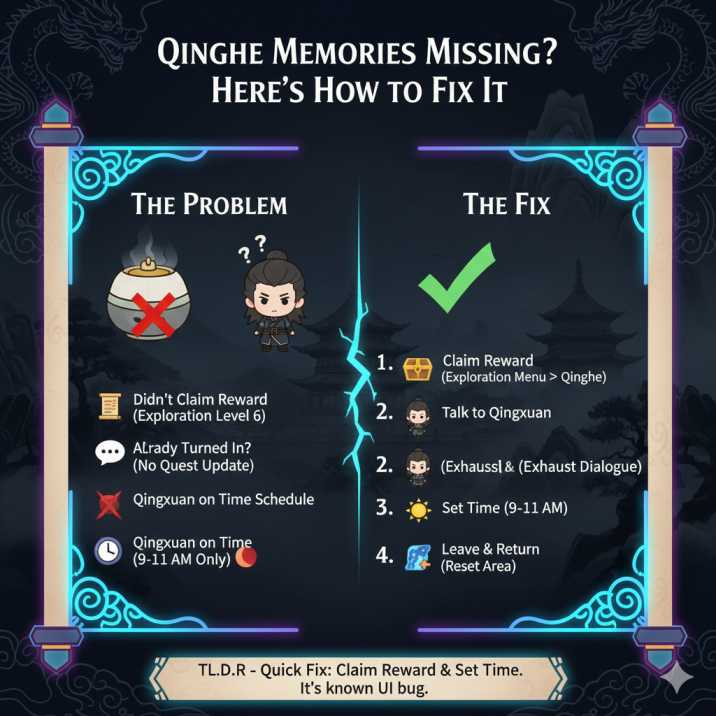
Start by opening your Exploration menu and heading to Qinghe. Double-check that you’ve actually claimed the Level 6 reward — reaching the level alone isn’t enough. A lot of players assume it auto-claims, but it doesn’t, and that’s where the confusion usually starts.
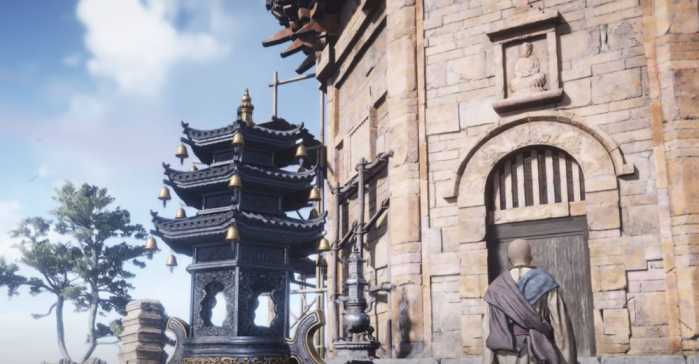
Next, go talk to Qingxuan and make sure you fully exhaust every dialogue option. Don’t stop after the first response — keep talking until the dialogue clearly loops or ends. Some progression triggers only after multiple interactions.
After that, open the time menu and set the in-game time to between 9–11 AM. This part matters more than the game lets on. Qingxuan’s availability and interaction logic can break outside that window.
Finally, leave the area completely, then return and talk to him again.
For most players, doing these steps in order immediately fixes the issue and makes Qinghe Memories progress properly.
Why Qinghe Memories Feels “Missing”
There are a few common reasons this happens, and the good news is that none of them mean your save is broken or bugged beyond repair. In most cases, it’s just the game being unclear about how progression actually works.
1. You didn’t actually claim the reward
Even if you’ve reached Exploration Level 6, the game does not automatically give you Qinghe Memories. You still need to manually claim it from the Exploration screen. This is one of the most common reasons players think the item vanished — the game never clearly tells you that claiming the reward is a separate step.
If you haven’t clicked that reward yet, Qinghe Memories won’t exist in your inventory at all, even though you technically met the requirement.
2. You already turned it in (but the game didn’t tell you)
This one catches a lot of players off guard.
If you already handed Qinghe Memories to Qingxuan, the item will disappear from your inventory — but the game often fails to update the quest text or give any clear confirmation that you’ve progressed. It ends up feeling like nothing happened, even though it actually did.
If the Incense Burner reacts at all, lights up, or lets you interact with it in any way, that’s usually a sign you’re already past the hand-in step. The same goes if Qingxuan suddenly has different dialogue options.
Try talking to him again — and then talk to him again. Some players only trigger the next stage after exhausting his dialogue multiple times. It’s clunky, but it works.
3. Qingxuan Is on a Time Schedule
This one trips a lot of people up, and the game never properly explains it.
Qingxuan doesn’t always appear — or accept the item — unless it’s the right time of day. If you show up outside that window, he might ignore the interaction entirely or act like nothing is supposed to happen.
To fix it, do the following:
✅ Set the in-game time to between 9:00 and 11:00 AM
✅ Leave the area completely
✅ Come back and talk to him again
For a lot of players, this instantly unlocks the interaction and lets the quest move forward. It’s one of those hidden timing checks the game never tells you about, but once you know it, the problem usually disappears.
4. Using the Item ≠ Handing It In
This one’s easy to miss, and the game does a poor job explaining the difference.
Using Qinghe Memories directly from your inventory does not complete the objective. All it does is mark or highlight the relevant location — it doesn’t count as actually progressing the quest.
To move things forward, you must hand the item to Qingxuan through dialogue. If you only used the item and walked away, the game still considers the task unfinished, even though it looks like something happened.
So if you’ve already “used” Qinghe Memories and nothing changed, don’t worry — just go back to Qingxuan and talk to him directly to complete the step.
Is Qinghe Memories Missing This a Bug?
Short answer: yeah, kind of.
This is a known progression and UI issue that a lot of players run into. The game sometimes fails to properly sync your progress, which leads to confusing situations like:
- The item not appearing in your inventory
- The quest not updating after you interact with the NPC
- The game acting like you’ve already completed the step when you haven’t
It’s less of a hard bug and more of a logic hiccup — the systems are working, just not communicating clearly with each other.
The good news? It doesn’t lock your save and it won’t block 100% completion. Once the game re-syncs (usually after dialogue resets, time changes, or reloading the area), everything progresses normally again.
If It Still Won’t Work
If you’ve tried everything above and it’s still not cooperating, don’t panic yet. Before reaching out to support, run through this quick reset checklist — it fixes the issue for most remaining cases.
Try this in order:
- Recheck Qinghe Exploration Level 6 and confirm the reward is claimed
- Talk to Qingxuan until his dialogue fully loops
- Change the in-game time to morning (around 9–11 AM)
- Fast travel to another location, then come back
- Fully restart the game
If it still refuses to progress after that, grab a few screenshots before contacting support:
- Your Qinghe exploration progress
- The Incense Burner
- Qingxuan’s dialogue screen
Support usually resolves it quickly once they can see where the progression stalled.
Read also: Bamboocut Build – Mystic Artes Explained (Where Winds Meet)
Final Word
If Qinghe Memories seems missing, it almost never actually is. In most cases, it’s just the game being unclear — a dialogue trigger not firing, a time-of-day condition not being met, or a UI hiccup that makes it look like something’s broken when it isn’t.
Take a breath, walk through the steps above one by one, and give the game a moment to catch up. Once the dialogue syncs or the timing lines up, everything usually clicks back into place.
It’s frustrating, sure — but you’re not stuck, and your progress isn’t ruined. A few minutes of cleanup and you’ll be right back on track.