
Dude, this happens to a ton of players in Where Winds Meet.
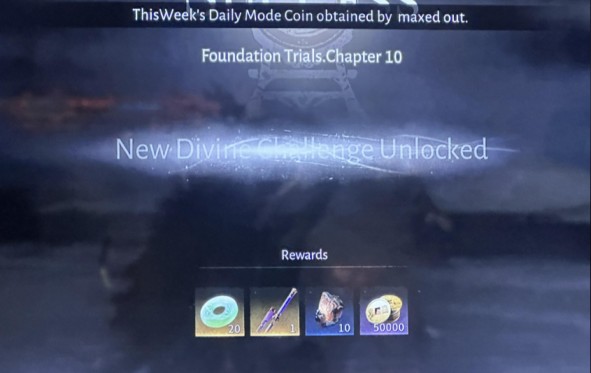
You get that shiny Gold Weapon reward, the popup flashes on your screen, and then—nothing. It’s not in your Bag, it’s not in Equipment, and it feels like the game just ate your loot.
This usually hits after things like Foundation Trials Chapter 10, the Taiping Mausoleum: Path Trial, or even those Daily Mode Coin rewards.
It’s confusing because the game clearly shows the Gold Weapon reward, but when you go to check your inventory, it’s missing. Don’t worry—this guide breaks down exactly why the Gold Weapon isn’t showing, where it actually goes, and how to fix every known cause of the “Gold Weapon not in bag” bug.
Quick Answer
Honestly, most of the time your “missing Gold Weapon” in Where Winds Meet isn’t actually gone — it’s just hiding somewhere the game doesn’t make obvious. Nine times out of ten, it ends up in a different inventory tab, stuck in the Mail → System inbox, or buried behind weapon filters you forgot were on.
Sometimes the game even tosses it into Arsenal/Collection instead of your Bag, or it delays the item because of a small UI sync bug after the reward popup.
Bottom line: check those spots first, reset your filters, and you’ll usually find the Gold Weapon instantly. The steps below walk through every fix for the “Gold Weapon not in bag” problem.
Read more: How to Unlock Murong Yuan’s Boss Talent in Where Winds Meet
Causes of a Missing Gold Weapon in Where Winds Meet
1. Inventory or Weapon Bag Full
If your bag is full, the game won’t drop the Gold Weapon into your inventory.
It shoves it straight into Mail → System, which is why the Gold Weapon not in bag problem happens so often.
2. Filtered Weapon Tab
Sometimes the weapon is in your Bag, but you can’t see it because of:
- Rarity filters
- Weapon-type filters
- Sort settings that hide newer items
Switching everything to All usually makes the missing Gold Weapon pop right up.
3. Arsenal / Collection Placement
Certain rewards—especially from big activities like trials and chapters—get placed in Arsenal or Collection instead of the standard Bag.
It feels weird, but it’s normal in Where Winds Meet.
4. Auto-Equip Assignment
The game may auto-equip the Gold Weapon to your current character or even a different character slot.
Worth checking your gear tabs before assuming it disappeared.
5. UI / Claim Sync Delay
Sometimes the reward popup shows first, and the server updates second.
This small UI sync delay makes it look like the Gold Weapon is missing when it’s just late. A quick restart usually fixes it.
6. Wrong Server or Character
Rewards only show up on the exact server and character where you earned them.
If you swap servers or log into the wrong character, the Gold Weapon won’t appear at all.
Step-By-Step Fix Guide (find your missing Gold Weapon fast)
Step 1 — Check Mail (most common fix)
Open Menu → Mail → System/Rewards and claim everything. If your bag was full when the drop happened, the game often sends a Gold Weapon to Mail instead of the Bag.
Step 2 — Check the Weapons tab with filters off
Go to Bag → Weapons and set: Filter = All, Sort = Date Acquired, Weapon Type = All Weapons. Hidden filters are the usual reason a Gold Weapon not in bag looks “missing.”
Step 3 — Check Arsenal / Collection
Open Menu → Arsenal or Menu → Collection. Some chapter and trial rewards get routed here rather than the main Bag.
Step 4 — Check every character’s equipment
Switch through characters and check their Equipment screens — the game can auto-equip the reward to a character, making it look like the item vanished.
Step 5 — Fully restart the game
Completely close the client (force-quit if needed) and relaunch. Most UI sync issues clear after a restart.
Step 6 — Free space, then recheck Mail
If the Weapon Bag was full, salvage a low-tier weapon or two, then reopen Mail → System. The missing Gold Weapon often appears once there’s room.
Step 7 — Confirm server and character
Double-check you’re on the same server & character where the reward was earned — rewards do not transfer between profiles.
Step 8 — Submit a support ticket if it’s still missing
If none of the above finds the item, file a Support request. Include:
- Player name & Player ID
- Server / region
- Screenshot of the reward popup (if you took one)
- Screenshots of Bag, Mail, Arsenal/Collection
- Activity name (e.g., Foundation Trials Chapter 10 / Taiping Mausoleum: Path Trial) and exact time
make only this section perfect. write like you are explaining to your gaming friend sitting next to you on the couch. add keywords naturally.
Quick Tips
• Keep 2–3 weapon slots open before you claim big rewards. It stops most “Gold Weapon not in bag” issues before they even happen.
• After finishing a chapter or trial, check Mail → System right away. The game loves sending rewards there when your bag is tight.
• If something looks missing, reset every filter to All in the Weapons tab. Half the time the Gold Weapon is there, just hiding.
• Screenshot rare rewards when they drop. If something bugs out, it makes support way easier.
• Don’t switch servers or characters until you confirm the reward is in your inventory. Rewards only show up where you earned them.
Read more: How to Complete Sentient Beings (14/15 Chests Missing) Where Winds Meet
Comparison Table: Causes vs. Fixes
| Cause | Where the Weapon Actually Is | How to Fix It |
|---|---|---|
| Bag full | Mail → System | Claim from Mail; free inventory space |
| Filters enabled | Hidden in Weapons tab | Set filters to All; sort by newest |
| Arsenal placement | Arsenal / Collection | Check Arsenal menu |
| Auto-equip | Character Equipment | Inspect equipment on all characters |
| UI sync delay | Not yet synced to client | Restart the game |
| Wrong server/character | Different profile | Switch to correct server/character |
| Actual claim bug | No location | Contact Support |
Conclusion
So yeah, in Where Winds Meet, a “missing Gold Weapon” is almost never actually gone — it’s usually just the game tossing it into Mail, hiding it behind filters, auto-equipping it, or sending it to Arsenal instead of your Bag.
Once you walk through the steps, you can solve almost every Gold Weapon not in bag situation in a couple of minutes. And if the reward really didn’t sync, Support can pull up the logs and restore it for you.
FAQ: Missing Gold Weapon in Where Winds Meet
1. Why is my Gold Weapon not showing in my Bag?
Most Gold Weapons fail to appear because they are routed to Mail → System, hidden behind inventory filters, or placed in the Arsenal/Collection instead of the Bag.
2. Does the Gold Weapon go to Mail if my inventory is full?
Yes. When the Weapon Bag is full, rewards are automatically delivered to the Mail (System) tab rather than the inventory.
3. Can filters hide my Gold Weapon?
Yes. The Weapons tab can hide items based on rarity, weapon type, or sort order. Setting filters to All usually reveals missing items.
4. Are Gold Weapons sometimes added to the Arsenal instead of the Bag?
Certain chapter and trial rewards—such as Foundation Trials Chapter 10 or Taiping Mausoleum: Path Trial—may be placed in the Arsenal or Collection menu.
5. Can the Gold Weapon auto-equip to my character?
Yes. Some rewards automatically equip to the active character or another saved build. Checking Character Equipment is recommended.
6. What if the reward popup appeared but the Gold Weapon is not in my inventory?
This often indicates a UI sync delay. Restarting the game usually forces the inventory to update.
7. Could the reward be on another character or server?
Yes. Rewards only appear on the same character and server where the activity was completed.
8. What should I do if the Gold Weapon is still missing after all checks?
If the item is still not visible in Bag, Mail, Arsenal, Collection, or Equipment, submit a support ticket with:
- Player ID
- Server
- Reward popup screenshot
- Activity name/time
- Inventory screenshots
9. How can I prevent missing rewards in the future?
Maintain free weapon slots, verify Mail after major rewards, and check all inventory filters before recycling equipment.