
So you boot up Where Winds Meet, walk up to someone ready to throw hands… and nothing happens.
No spar option. No prompt. Maybe there’s also this weird wind or whooshing sound following you around since the fireworks event. You try moving closer, backing away, even reloading the area — still nothing.
Yeah — you’re not crazy. And no, it’s not just you.
A lot of players are running into this exact issue, especially after recent events. The game doesn’t really explain what’s going on, which makes it feel like something’s broken or you’re missing a step.
Let’s break down what’s actually happening, why it occurs, and how to fix it without wasting your time or endlessly restarting for no reason.
Why Sparring Isn’t Working in Where Winds Meet
Sparring in Where Winds Meet is more fragile than it looks. It isn’t a universal interaction that works everywhere — it depends heavily on the game’s current state, your active mode, and what the world thinks your character is doing at that moment. Because of this, it can feel random or broken even when you’re doing everything “right.”
Here are the most common reasons it breaks:
1️⃣ You’re Not in the Right Mode
Sparring works most reliably in Online Mode.
If you’re playing in Solo mode, the game may still show spar-related UI elements, which makes it feel like it should work — but the interaction often fails silently.
Fix:
Switch to Online Mode, wait a few seconds for the world to sync, then try sparring again. In many cases, this alone fixes the issue immediately.
2️⃣ The NPC or Player Is “State-Locked”
Some NPCs in Where Winds Meet can only spar during very specific quest phases. If that character is tied to an active quest, a limited-time event, or a phased version of the world, the game may quietly block the interaction without giving you any feedback. This makes it feel like sparring is broken when it’s really just restricted by the current state of the world.
This can also happen if you’ve partially progressed a quest or triggered a nearby event that temporarily changes NPC behavior. In those cases, the game won’t always update the interaction menu correctly.
Fix:
Leave the area completely — preferably by fast traveling to another region — then return after a short wait. This often forces the NPC to reload in the correct state and restores the spar option.
3️⃣ The Fireworks Event Broke Something (Yes, Really)
This is the big one — and it’s the issue most players are running into right now.
After the fireworks event, a lot of people start noticing two things almost immediately: a constant wind or rushing sound that never goes away, and sparring suddenly becoming unreliable or completely unresponsive. These two problems are actually connected.
The fireworks event uses temporary ambient audio layers and special world-state flags to create atmosphere. Sometimes, when the event ends or you leave the area too quickly, those systems don’t unload properly. When that happens, the game still thinks you’re inside the event, even though visually everything looks normal.
Because of that, interactions like sparring can quietly break, since the game believes you’re in a restricted or scripted state.
The Wind Sound Bug Explained
That weird wind or rushing noise you’re hearing isn’t coming from your headset, audio settings, or hardware — it’s almost always a stuck ambient sound loop caused by the game itself. This usually happens when the fireworks event doesn’t cleanly finish unloading in the background.
The most common triggers include leaving the event area mid-transition, fast traveling too quickly after the event ends, or loading into another zone right as the fireworks sequence finishes. When that happens, the game fails to properly shut down the event’s ambient audio layer.
Once the sound gets stuck, it can do more than just annoy you. It can interfere with NPC interactions, prevent sparring prompts from appearing, and even block certain world triggers from activating correctly. Essentially, the game still thinks you’re partially inside the event, even though visually everything looks normal.
This is why the wind sound and sparring issues so often show up together.
Read also: How to Trigger the “Hidden Ugliness” Encounter in Where Winds Meet
✅ How to Fix It (Fastest to Slowest)
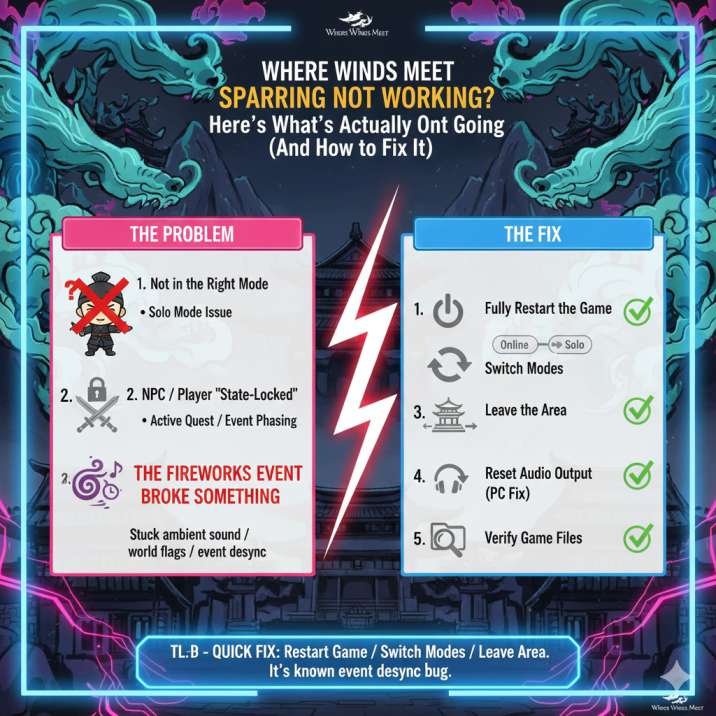
Try these in order — most players won’t need to go past step two or three before things start working again.
1️⃣ Fully Restart the Game
This is the most important step, and simply returning to the main menu usually isn’t enough. You’ll want to fully exit the game to desktop, then launch it again from scratch.
Doing a full restart forces the game to completely reset its audio systems, reload world states, and clear any stuck event flags left behind by the fireworks event. In many cases, this alone fixes both the missing sparring option and the lingering wind sound.
Once you load back in, give the game a few seconds to fully sync before trying to spar again. If it works, you’re good — no further steps needed.
2️⃣ Switch Modes
If restarting didn’t fully fix things, the next best step is to force the game to reload its interaction logic by switching modes.
Go from Online → Solo, wait about 30 seconds, then switch back to Online again.
This process refreshes how the game handles world states, NPC interactions, and player permissions. It’s especially effective if sparring stopped working after an event or if the game still thinks you’re in a restricted phase.
Once you’re back in Online Mode, give the world a moment to stabilize before trying to spar again. In many cases, this clears the issue instantly without needing a full restart.
3️⃣ Leave the Area
If switching modes doesn’t do the trick, the next step is to completely leave the area where the issue started. Fast travel to a different region or city, not just a nearby waypoint, and give it about a full minute before returning.
This forces the game to unload the current zone entirely and reload it from scratch when you come back. If the fireworks event or another world trigger got “stuck,” this usually clears it out.
A lot of players find that simply moving far enough away resets the NPC states, removes the lingering wind sound, and restores sparring functionality. Once you return, give the area a few seconds to fully load before interacting with anyone again.
4️⃣ Reset Audio Output (PC Fix)
If the wind sound is still hanging around, this step can surprisingly fix it fast — especially on PC.
Go into your audio settings and switch your output device (for example, from your headset to speakers). Apply the change, let it sit for a few seconds, then switch back to your original device.
This forces the game’s audio engine to fully reload, which often clears out stuck ambient loops like the fireworks wind effect. You don’t need to restart the game for this step, and in many cases the sound disappears immediately after switching back.
Even if the issue doesn’t seem audio-related, this fix often helps because the stuck sound and broken interactions share the same underlying system.
5️⃣ Verify Game Files
If nothing else works, it’s time to check your game files. Corrupted or partially downloaded event assets can absolutely cause this exact issue, especially after limited-time events like the fireworks celebration.
Use your launcher’s Verify / Repair Game Files option to scan for missing or broken data. This process doesn’t delete your saves — it only re-downloads files that didn’t install or update correctly.
If the fireworks event assets didn’t clean up properly, verification usually fixes it by restoring the correct versions. It takes a few minutes, but it’s often the final step that resolves both the stuck wind sound and the broken sparring interactions for good.
Once verification finishes, launch the game fresh and test sparring again before changing any other settings.
Is This a Known Bug?
Yep — you’re definitely not alone here.
Multiple players have reported the same combination of issues: sparring suddenly not triggering, NPCs losing interaction options, and a persistent wind or ambient sound continuing long after an event ends. These problems tend to show up around limited-time events, especially ones with heavy environmental effects like the fireworks celebration.
The important thing to know is that this usually isn’t caused by your setup, your settings, or anything you did wrong. In most cases, it comes down to event state desynchronization, where the game doesn’t properly reset after an event finishes. When that happens, the world behaves as if you’re still inside an event phase, even though visually everything looks normal.
Because it’s tied to backend state logic rather than player error, the issue can appear randomly and affect different players in different ways — but the fixes above generally resolve it.
Wrapping up
Problem:
Sparring doesn’t work, and there’s a weird wind or rushing sound after the fireworks event.
Cause:
The event state didn’t unload properly, leaving the game thinking you’re still inside an active event.
Fix:
Restart the game → switch between Online and Solo modes → change locations → reset your audio output if needed.
Most players only need one or two of these steps to fix it completely.