
Top Multi-Port USB-C Adapters for MacBook Neo: If you’re using a modern MacBook, especially something like the MacBook Neo with limited ports, a USB-C hub quickly becomes an essential accessory. When choosing the Best Multi-Port USB-C Adapters for MacBook Neo, you’re not just adding ports—you’re transforming your laptop into a full workstation.
Today’s USB-C adapters come in various configurations, offering combinations of HDMI for external displays, USB-A for legacy devices, SD card readers, Ethernet ports, and power delivery (PD) charging. The right hub can let you connect multiple devices simultaneously while still charging your MacBook through a single cable.
However, not all hubs are equal. Key factors to consider include port selection, data transfer speed (5Gbps vs 10Gbps or higher), power delivery support, and build quality. Some compact hubs are ideal for travel, while larger multiport adapters or docking stations are better suited for desk setups with multiple monitors and peripherals.
In this guide, we’ll break down the Best Multi-Port USB-C Adapters for MacBook Neo, helping you find the perfect balance between performance, portability, and value—whether you’re a student, creator, or professional building a complete setup.
But before that,
Top 6 Multi-Port USB-C Adapters for MacBook Neo
1. LENTION 4-in-1 USB-C Hub (100W PD)
If you’re looking for a simple, compact, and affordable solution, the LENTION 4-in-1 Hub is a great entry point among the Best Multi-Port USB-C Adapters for MacBook Neo. It’s designed for everyday users who need essential ports without carrying a bulky dock.
This hub keeps things minimal with a 4-in-1 setup—including USB-C Power Delivery (up to 100W), one USB 3.0 port, and two USB 2.0 ports. That means you can charge your MacBook Neo while connecting accessories like a mouse, keyboard, or USB drive at the same time.
One of its biggest strengths is portability. The lightweight design and compact size make it an excellent travel-friendly USB-C hub for MacBook Neo, perfect for students or remote workers who move between locations.
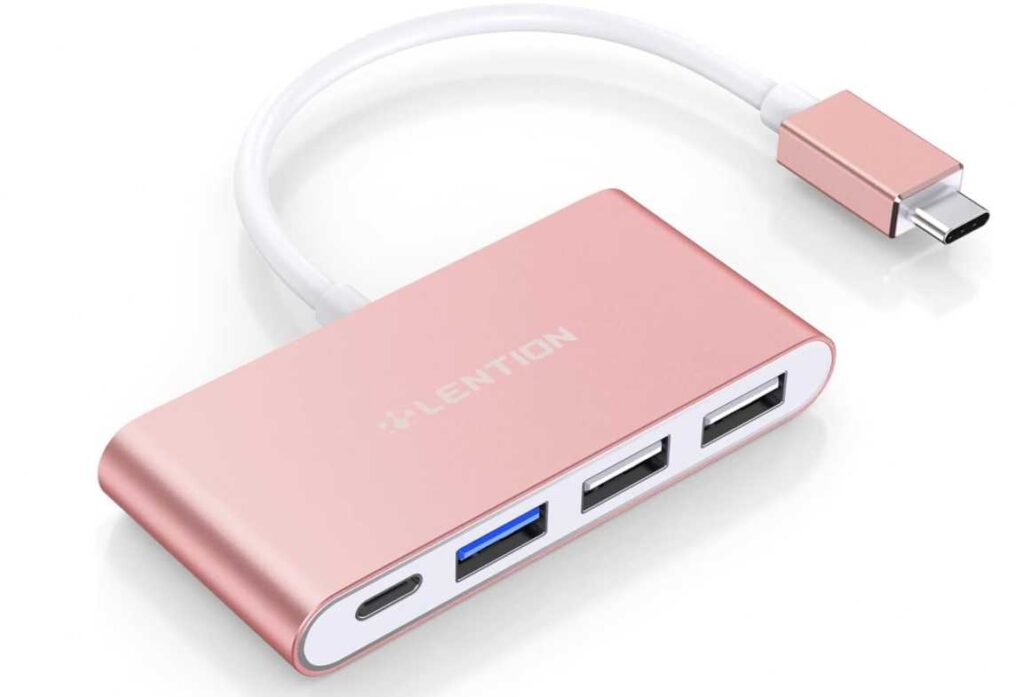
The aluminum build matches the MacBook aesthetic, while also helping with heat dissipation and durability. It’s a true plug-and-play USB-C adapter, so there’s no need for drivers or setup—just connect and start using it instantly.
However, it’s important to note that this hub does not include HDMI or display output, so it’s not suitable if you need an external monitor connection.
Key Features:
- 4-in-1 design (USB-C PD + USB 3.0 + 2× USB 2.0)
- Up to 100W Power Delivery charging
- 5Gbps data transfer via USB 3.0
- Compact, lightweight, and portable
- Aluminum finish for durability
Pros:
- Very affordable and easy to use
- Supports charging while using peripherals
- Compact and ideal for travel
- Clean, MacBook-style design
Cons:
- No HDMI or display output
- Limited port variety compared to larger hubs
Best For: Users who want a basic USB-C hub for MacBook Neo for everyday tasks like connecting accessories and charging on the go.
2. Kensington UH1510P 11-in-1 USB-C Hub
If you’re building a full desktop-style setup, the Kensington UH1510P is a powerful upgrade in the list of the Best Multi-Port USB-C Adapters for MacBook Neo. This isn’t just a hub—it’s closer to a compact USB-C docking station designed for serious productivity.
The biggest highlight is its 11-in-1 connectivity, giving you everything from multiple USB ports and Ethernet to SD card slots and video outputs. It’s ideal for users who need to connect multiple peripherals at once without constantly plugging and unplugging devices.
For display support, it offers triple video output options (with limitations on macOS), including HDMI and DisplayPort. While MacBook Neo typically supports single external 4K display natively, this hub still provides flexibility for multi-monitor setups depending on configuration—making it a strong multi-display USB-C hub for MacBook Neo.
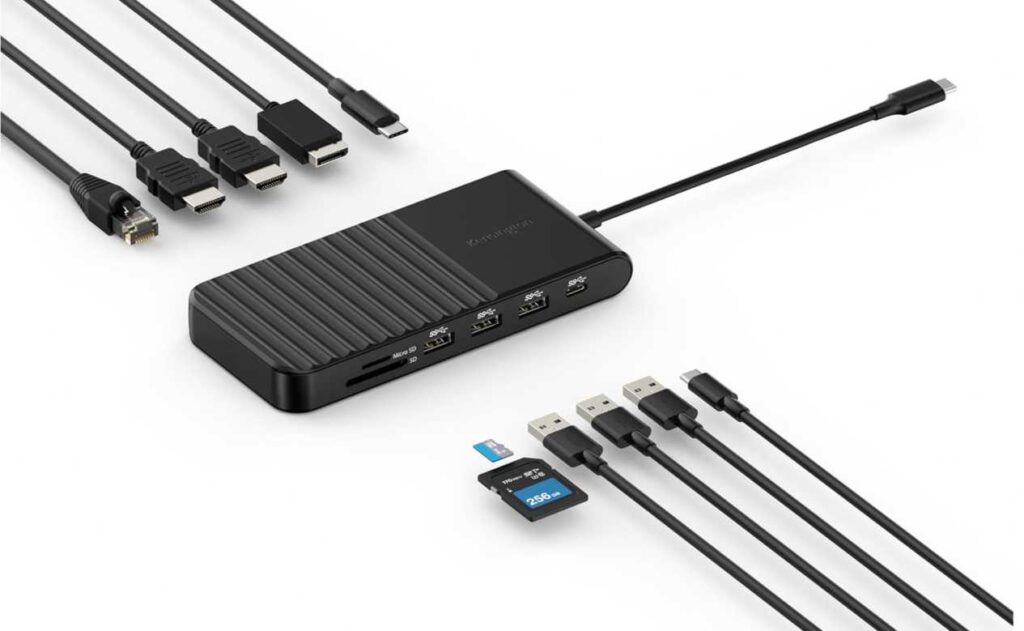
It also supports 85W Power Delivery, allowing you to charge your laptop while powering connected devices. This makes it a reliable USB-C docking hub with charging, especially for long work sessions.
Despite its powerful feature set, it maintains a compact and travel-friendly design, so you can still carry it between workspaces if needed.
Key Features:
- 11-in-1 design with multiple ports
- HDMI + DisplayPort for external displays
- 85W Power Delivery pass-through
- 3× USB-A + 2× USB-C ports
- SD and microSD card slots
- Gigabit Ethernet support
Pros:
- Excellent for full workstation setups
- Wide range of ports and connectivity
- Supports external displays
- Reliable performance and build quality
Cons:
- Higher price compared to basic hubs
- Limited multi-display support on macOS
Best For: Users who need a powerful USB-C docking station for MacBook Neo with multiple ports for monitors, accessories, and high productivity workflows.
3. Anker 5-in-1 USB-C Hub with HDMI
Think of this as the “just enough, done right” option in the Best Multi-Port USB-C Adapters for MacBook Neo lineup.
It doesn’t try to do everything—and that’s exactly why it works.
You get the essentials:
- A 4K HDMI port for plugging into a monitor or TV
- Two USB-A ports + one USB-C port for your daily accessories
- Pass-through charging so your MacBook Neo doesn’t run out of juice mid-task
That’s it. No clutter, no unnecessary extras.
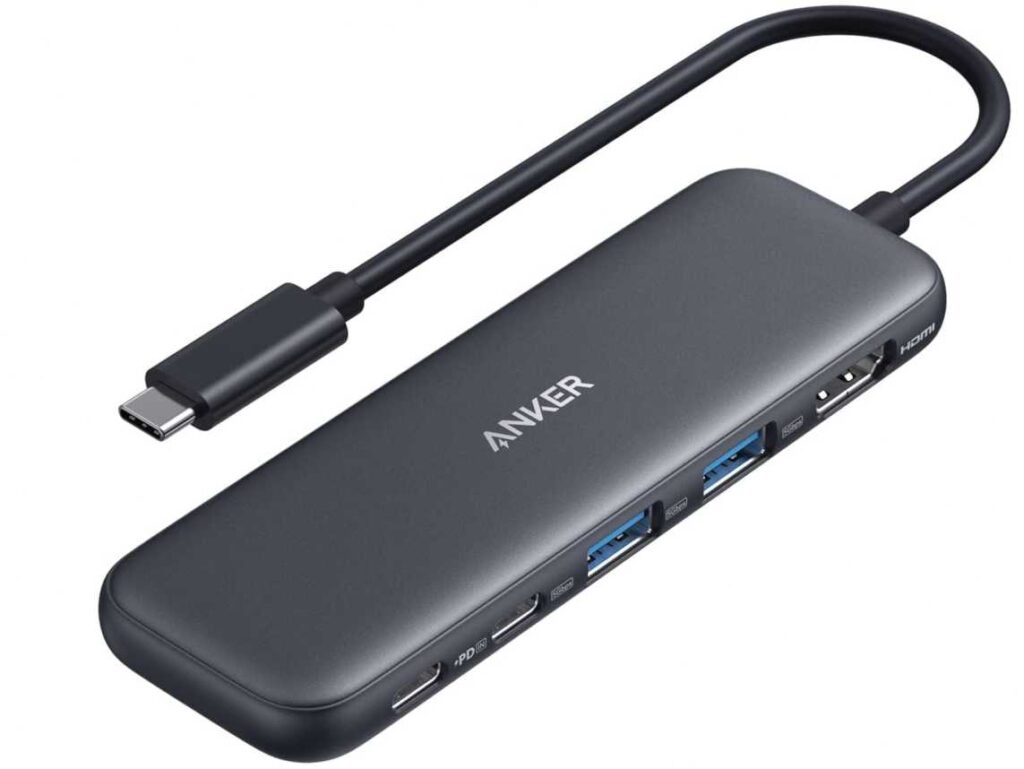
Where this hub shines is simplicity + reliability. Plug it in, and it works—no setup, no confusion. If your workflow is mostly about connecting a display, using a few peripherals, and staying charged, this hits the sweet spot.
It’s also compact enough to disappear into your bag, making it a practical travel USB-C hub for MacBook Neo without sacrificing key functionality.
What You’ll Like:
- Covers the core needs (HDMI + USB + charging)
- Clean, compact design
- Reliable performance from a trusted brand
What to Keep in Mind:
- 4K output is capped at 30Hz
- No extras like SD card or Ethernet
Bottom line: If you don’t need a full docking station and just want a straightforward USB-C hub for MacBook Neo, this is one of the easiest picks.
4. UGREEN 5-in-1 USB-C Hub (Revodok 105)
This one is all about maximum value with zero fluff. The UGREEN Revodok 105 feels like the kind of hub you grab when you want solid performance without overpaying—and it absolutely earns its spot among the Best Multi-Port USB-C Adapters for MacBook Neo.
You’re getting a complete everyday setup in one compact dongle:
- 4K HDMI for external display
- 100W Power Delivery to keep your MacBook Neo charged
- 3 USB-A ports to handle accessories and storage
What makes this stand out is how efficiently it uses those ports. One USB-A runs at 5Gbps for fast transfers, while the other two are perfect for low-power devices like a mouse or keyboard. It’s a smart layout that actually matches real-world usage.
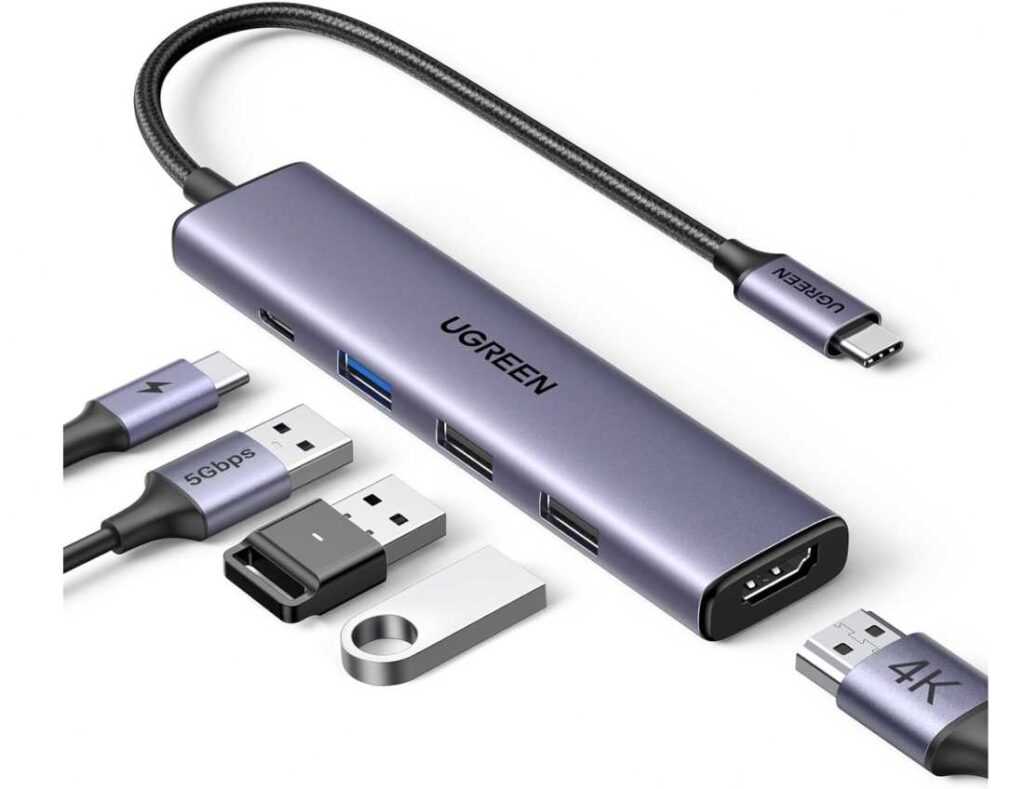
Performance-wise, it’s straightforward—plug it in, connect your monitor, add your peripherals, and you’re good to go. No learning curve, no extra setup. That’s what makes it a great everyday USB-C hub for MacBook Neo.
And for the price? It’s hard to beat. You’re basically getting the same core functionality as pricier hubs, just without the extras you may not even use.
Why It Works:
- Covers display + charging + accessories in one
- Strong price-to-performance ratio
- Simple, no-fuss usability
Where It Falls Short:
- HDMI is limited to 4K@30Hz
- No SD card slot or Ethernet
Bottom line: If you want a budget-friendly USB-C hub for MacBook Neo that handles all the essentials without cutting corners, this is one of the smartest picks.
5. VANGREE 7-in-1 USB-C Hub (10Gbps + 4K@60Hz)
Now this is where things step up.
The VANGREE hub isn’t trying to be “basic”—it’s built for users who actually push their setup. If you’re moving large files, using high-res displays, or juggling multiple devices, this easily earns its place among the Best Multi-Port USB-C Adapters for MacBook Neo.
Here’s what makes it different 👇
You get serious speed + serious display output:
- 3× USB-C data ports (10Gbps) → fast enough for SSDs and heavy file transfers
- 3× USB-A ports (5Gbps) → perfect for accessories and storage
- 4K@60Hz HDMI → smooth, lag-free external display (big upgrade over 30Hz hubs)
- 100W Power Delivery → keeps your MacBook Neo charged while everything runs
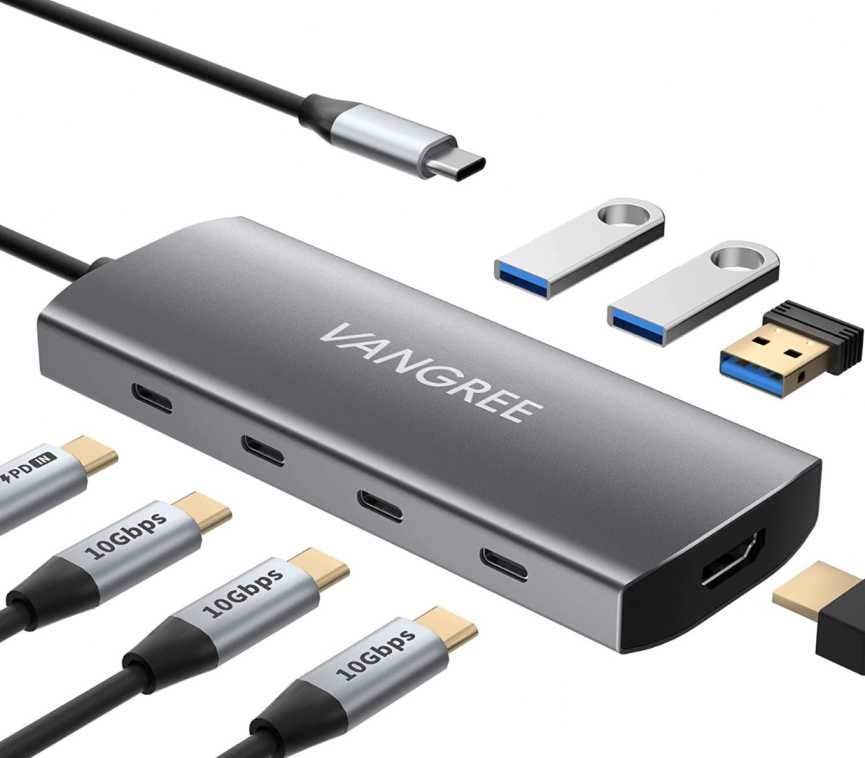
This is the kind of high-performance USB-C hub for MacBook Neo that actually keeps up with demanding workflows—think video editing, large file backups, or multitasking across devices.
Another big plus is the 10Gbps bandwidth, which is noticeably faster than standard 5Gbps hubs. If you’re transferring large files regularly, you’ll feel the difference.
Where It Stands Out:
- True 4K@60Hz output (not the usual 30Hz limitation)
- Multiple high-speed USB-C ports (rare at this price)
- Built for heavier, pro-level usage
Trade-offs:
- No USB-C video output (HDMI only for display)
- Slightly bulkier than compact travel hubs
Bottom line: If you want a powerful USB-C hub for MacBook Neo with faster data speeds and smoother display output, this is a clear upgrade over entry-level options.
6. MOKiN 9-in-1 USB-C Hub
This one is for people who hate carrying multiple adapters.
The MOKiN 9-in-1 feels less like a hub and more like a complete expansion kit for your MacBook Neo. Plug it in once—and suddenly, your laptop has pretty much every port you’ve been missing.
Here’s the real appeal: versatility over minimalism.
You’re getting:
- HDMI for an external display
- Ethernet when Wi-Fi isn’t reliable
- USB ports for everyday accessories
- SD + microSD slots for quick file access
- 100W charging support so nothing slows down
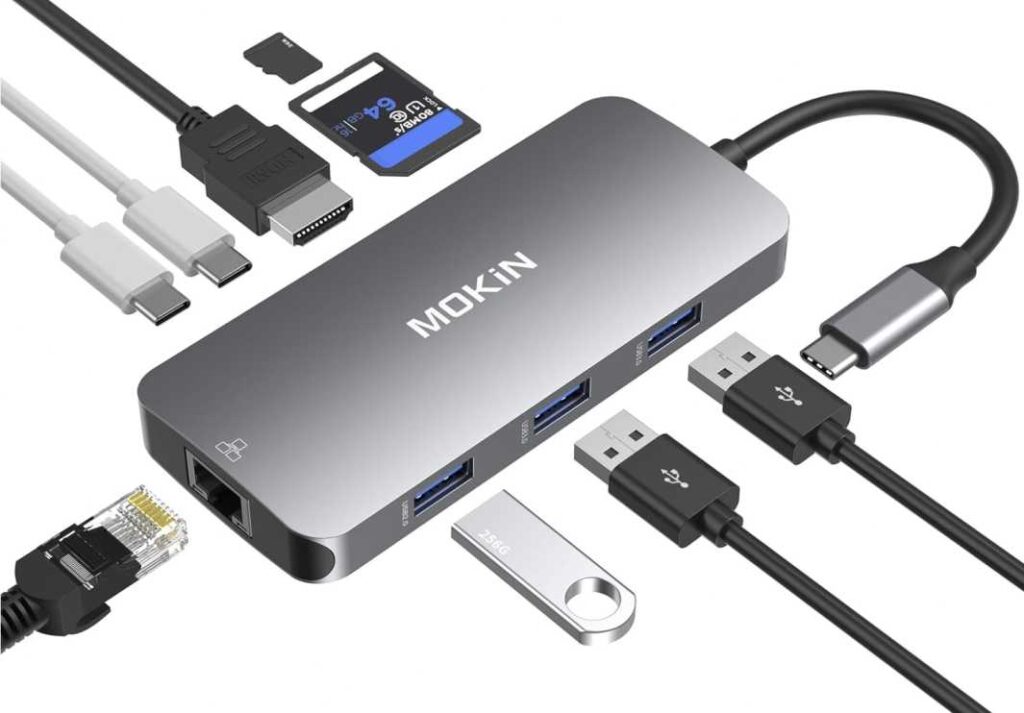
It’s the kind of all-in-one USB-C adapter for MacBook Neo that fits messy, real-world setups—not just clean desk aesthetics.
Where it really shines is in situations where you’re juggling different tasks. Editing photos? Using SD cards. On a call? Stable Ethernet helps. Need multiple accessories? You’ve got the ports. It adapts without forcing you to compromise.
The Good Stuff:
- Covers almost every common port in one hub
- Great for mixed workflows (work + media + browsing)
- No need to carry extra adapters
The Trade-offs:
- Not the most compact option
- Display output capped at 4K@30Hz
Bottom line: If your workflow is unpredictable and you want a do-it-all USB-C hub for MacBook Neo, this is the kind of adapter that quietly solves problems before they even show up.
Final Thoughts
Picking the Best Multi-Port USB-C Adapters for MacBook Neo isn’t really about finding the “most powerful” hub—it’s about finding the one that fits how you actually use your laptop.
If your needs are simple, a compact USB-C hub with a few ports and charging support is more than enough. For most users, that sweet spot is a 5-in-1 adapter with HDMI + USB + Power Delivery—easy, portable, and reliable.
But if your setup is more demanding—external monitors, wired internet, SD cards, multiple devices—then stepping up to a full-featured USB-C docking hub makes a huge difference. You’ll spend less time plugging and unplugging, and more time actually getting work done.
And then there are users who fall somewhere in between—needing a mix of performance, portability, and versatility. That’s where mid-range hubs shine, offering just enough expansion without turning your desk into a cable mess.
One key takeaway:
👉 Always prioritize port selection + compatibility over just price or brand
At the end of the day, the right USB-C adapter turns your MacBook Neo from a limited-port laptop into a complete, flexible workstation—whether you’re working, creating, or just keeping things organized.