
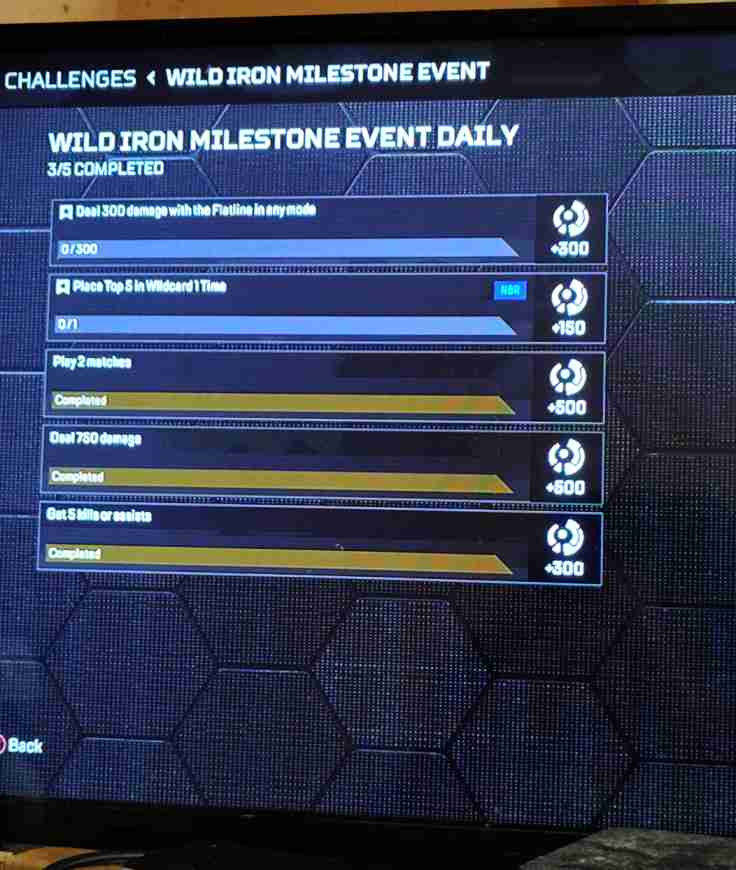
One of the most common frustrations players are facing right now is the Apex Legends Wildcard daily not counting top 5 finishes. You jump into a match, grind your way to the endgame, and secure that much-needed top 5 placement—only to find that the Apex daily challenge is not completing Wildcard objectives. For many players, this isn’t just a small inconvenience. When your challenge progression is locked due to an Apex Legends bug, it stops you from collecting stars, completing milestones, and progressing through the event rewards.
Apex Legends Wildcard Daily Not Counting Top 5 – Why It Happens
The problem usually stems from tracking and registration bugs within the current Wildcard or event system. Challenges in Apex are tied to the server’s tracking system, and when there’s a sync issue between your game client and the servers, your progress may fail to register. In this case, even though you’ve technically finished in the top 5, the challenge backend doesn’t credit it. This leads to confusion—especially for players who keep replaying matches without seeing any challenge completion.
So, what’s causing the issue?
Another potential reason is that the daily challenge may be misconfigured. For example, it might specifically require Battle Royale placements, but some players report that completing Mixtape or LTM modes doesn’t count toward it. This detail is often buried in the event description and easy to overlook.
There’s also a timing issue. If you complete the placement but exit too quickly after the match ends (skipping the summary screen), the server might not log the completion properly. This is a common reason behind the Apex Legends Wildcard daily not counting top 5 bug.
Finally, bugs like these are sometimes widespread, tied to updates or seasonal patches. Respawn has acknowledged similar problems in the past, especially during limited-time events when new milestones are introduced.
For now, the best workaround is to:
- Make sure you’re playing in the correct mode for the challenge.
- Stay in the match until the final scoreboard is displayed.
- Check for ongoing updates from Respawn on their official channels.
While this doesn’t eliminate the bug entirely, it reduces the risk of wasted matches. Until Respawn issues a patch, many players will continue to face the Apex daily challenge not completing Wildcard milestones, but knowing the causes helps you adapt your play and avoid frustration.
Understanding the Wild Iron Milestone Not Crediting Top 5 Finishes
Many players grinding through the event have run into a frustrating issue: the Apex Wild Iron milestone giving no credit for top 5 finishes. You may finish multiple matches in the top 5, but when you check your progress, the milestone bar remains unchanged. This feels especially punishing since milestones are the key to unlocking premium rewards.
So, why is there no credit for the challenge after a match? The answer lies in how Apex tracks event progress. Milestones like the Wild Iron rely on the game’s stat tracking system, which records placements, eliminations, or damage across matches. When a wildcard stat tracking bug occurs, the data either doesn’t sync correctly to the milestone tracker or gets dropped entirely before updating the server.
Several player reports suggest this is not isolated to one mode. Some who complete top 5 finishes in standard Battle Royale see no credit, while others note that playing Ranked sometimes registers progress inconsistently. It’s possible the milestone is coded to only recognize certain playlists, leaving players confused when their legitimate top 5 runs don’t count.
Another common factor is server load. During peak play hours or after new patch drops, Apex servers struggle with event challenge registration, leading to delays—or missed credit altogether. In some cases, progress updates after several hours, but in others, it never appears.
Unfortunately, there’s no guaranteed fix yet. The most reliable workaround is sticking to standard Battle Royale matches, staying through the results screen, and checking Respawn’s Trello board or Twitter for acknowledgment of the bug. Until an official patch lands, many players will continue facing the Apex Wild Iron milestone not crediting top 5 finishes, leaving the community waiting for clarity.
Common Reasons Your Apex Daily Challenges Are Not Completing
If you’ve noticed your Apex daily challenges bug not registering, you’re not alone. Many players have reported issues where their progress doesn’t count after matches, leaving dailies stuck at 0% or resetting entirely. This can be frustrating, especially when challenges are tied to XP boosts, Battle Pass tiers, or event rewards.
One frequent cause is the Apex Legends challenge reset bug. Sometimes, after a patch or mid-season update, the system resets your challenges or fails to update them properly. This often happens when servers are under strain, causing progress data to desync. Another common reason is playing in a mode not intended for the challenge—for example, some Wildcard or limited-time event dailies only track in standard Battle Royale, not Arenas or Mixtape.
Finally, in rare cases, a mission bug stops playing game progression entirely, meaning your account isn’t recording match stats at all. This typically requires server maintenance or a patch fix from Respawn.
The best temporary solution is to re-log, wait for server sync, and keep an eye on official bug trackers. If the issue persists, submitting a bug report through EA Help ensures your problem is flagged for resolution.
How Apex Legends Tracks Wildcard and Event Challenges
Apex Legends relies on a stat-tracking system to record match performance and apply progress toward dailies, milestones, and limited-time events. Normally, your placement (Top 5, Top 10, wins) and gameplay actions (damage, kills, assists) are logged by the server and then synced with your account. However, many players have reported the Apex wildcard stat tracking bug, where progress simply doesn’t update even after completing the requirement.
This becomes especially frustrating during events like Wild Iron, where missing credit means lost rewards. Reports of Wild Iron event challenges not completing often stem from mismatches between the challenge’s requirements and the game mode played. For example, some challenges may only count in standard Battle Royale, while Ranked, Mixtape, or LTMs won’t register progress. If the challenge isn’t tied to the correct playlist, your match won’t contribute.
Another cause is the challenge progression locked Apex Legends bug, which happens when the servers fail to sync after a match. In these cases, stats like Top 5 finishes, damage thresholds, or milestone completions are delayed or not recorded at all.
Until Respawn deploys fixes, players can try re-logging, switching modes, or monitoring official channels for event-specific tracking updates.
Step-by-Step Fixes for Daily and Event Challenges Not Progressing in Apex Legends
Many players are running into a frustrating issue in Apex Legends where daily or event challenges don’t seem to progress. Whether it’s the Apex Legends wildcard daily not counting Top 5, the Apex daily challenge not completing wildcard, or simply Apex no credit for challenge after match, this bug can ruin the grind for rewards in the Wild Iron event or general Battle Pass progression. Below is a comprehensive step-by-step troubleshooting guide to help you fix or at least minimize the problem.
1. Double-Check the Challenge Requirements
Before assuming it’s a bug, confirm the challenge’s exact wording. Some Wildcard dailies only count in Battle Royale and not Ranked or Mixtape. If the challenge says “Place Top 5 in Battle Royale,” playing Ranked won’t count. Misreading the mode requirement is one of the most common reasons challenges appear “broken.”
2. Stick to the Correct Playlist
Respawn often ties event challenges to specific modes. If you’re playing Arenas, Mixtape, or an LTM, your stats may not apply. For Wild Iron milestones, queue directly into Battle Royale (non-Ranked) to test if progress tracks. Many reports of the wildcard daily not counting Top 5 are solved by simply switching playlists.
3. Restart Apex Legends After Every Few Matches
Sometimes the server fails to sync your match stats to your account. Restarting forces a refresh and can trigger retroactive challenge updates. Players on Reddit have confirmed that progress occasionally appears after a relog.
4. Check Your Internet Stability
A weak or inconsistent connection can prevent your match results from fully uploading. If you leave a match before the end-of-game screen or your connection cuts out, the game may not credit your stats. Use wired internet if possible and avoid background downloads while playing.
5. Play Full Matches Without Disconnecting
Exiting mid-game—even if you’ve already secured a Top 5 finish—can sometimes result in no credit for challenge after match. To maximize tracking success, remain in the match until the results screen appears, even if your squad has been eliminated.
6. Avoid Switching Legends or Loadouts Mid-Event
Some players report that swapping Legends during a match or experimenting with loadouts in Mixtape confuses the stat tracker. For event-specific dailies like the Wildcard Top 5, pick a single Legend and stick with them throughout.
7. Clear Cache or Restart Your Platform
Console and PC players alike can fix corrupted temporary files by clearing cache. On Xbox/PlayStation, fully power down, unplug for 30 seconds, then restart. On PC, close Apex, restart your launcher (Steam/Origin), and try again. This often helps the wildcard daily not counting Top 5 issue.
8. Test Progress in a Fresh Session
If your daily won’t complete, log out and come back later. Sometimes Apex’s servers lag behind and update challenges hours after the match. Checking again after a break can confirm whether it’s a temporary sync problem or a persistent bug.
9. Verify That It’s Not a Known Bug
Check Respawn’s official Trello board or EA Answers HQ for updates on Apex Legends challenge progression bugs. If the issue is widespread, it may already be on their fix list, meaning nothing you do locally will work until they patch it.
10. Report Your Case to EA Support
If none of the above steps resolve your problem, contact EA Support with the following details:
- Your platform (PC, Xbox, PlayStation)
- The challenge name and description
- Screenshots showing completed matches (e.g., Top 5 placement)
- Date/time of matches where credit wasn’t applied
The more detail you provide, the higher chance EA can replicate and fix the bug.
11. Try Playing in Duos or Trios Separately
Some Wildcard dailies track differently depending on squad size. If your Top 5 isn’t counting in Trios, test in Duos. This may seem inconsistent, but challenge tracking has historically glitched depending on team configuration.
12. Avoid Custom Matches or LTMs During Events
If you’re grinding Wild Iron milestones, stick to standard public lobbies. Custom matches, private lobbies, or limited modes may not apply to event challenges—even if you meet the stated conditions.
13. Keep Apex Updated With Patches
Respawn frequently rolls out small hotfixes to address stat tracking issues. If your platform hasn’t auto-updated, manually check for updates. Outdated clients are more likely to suffer from Apex challenges bug not registering.
14. Link Accounts Correctly Across Platforms
If you play Apex with cross-progression enabled, make sure your EA Account, Steam/Origin, and console accounts are properly linked. Incorrect linking sometimes causes Apex no credit for challenge after match issues because progress may sync to the wrong account.
15. Be Patient During Server Strain
Peak hours or new event launches often overload servers, causing delayed tracking. If you notice progress isn’t updating, wait a few hours and check again. Sometimes your Top 5 finishes are queued for sync and will update retroactively.
Workarounds for Wild Iron Event Milestones and Daily Challenge Bugs
Many Apex players have reported Wild Iron event challenges not completing even after hitting the required milestones. For example, players reaching Top 5 multiple times still get Apex Wild Iron milestone no credit top 5 messages, or dailies simply stall out. Until Respawn fixes this fully, you can try a few proven community workarounds.
First, stick to Battle Royale public lobbies instead of Ranked or Mixtape. Most event milestones only track in BR, and playing other playlists often leads to progress not registering. If your Apex challenges bug not registering, double-check the mode requirement in the challenge description.
Second, play entire matches through to the final results screen. Some players leave once eliminated, assuming their Top 5 will still count. Unfortunately, Apex often doesn’t credit placements until the end-of-match screen is fully processed.
Third, restart your game after every two to three matches. This forces the server to resync your account stats, sometimes updating delayed challenge progress. On console, consider a full cache clear (powering down, unplugging for 30 seconds).
Fourth, swap squad types. If Trios isn’t crediting Top 5 milestones, try Duos. Some bugs seem tied to specific squad sizes during Wild Iron events.
Finally, remember that Respawn’s servers often delay progress updates during new events. Check back a few hours later—your missing Top 5s or kills may show up retroactively.
Workarounds aren’t permanent fixes, but they can keep you moving forward until Respawn rolls out an official patch.
Reporting Apex Legends Challenge Bugs to EA / Respawn
If your challenge progression is locked in Apex Legends, simply retrying won’t fix it—you’ll need to report the bug so Respawn can investigate. Players stuck with Apex mission bug stops playing game or the dreaded Apex Legends challenge reset bug can follow these steps.
- Gather evidence. Take screenshots or clips of your completed matches showing Top 5 finishes or kills, and screenshots of your challenge screen not updating. This helps prove your case.
- Submit to EA Help. Go to help.ea.com, log into your account, and create a case. Include your platform, gamertag, match times, and evidence.
- Post on EA Answers HQ. Many Apex bugs are confirmed and prioritized when enough players report them on the Answers HQ forums. Use descriptive titles like “Wild Iron Top 5 Challenge Not Counting on PS5.”
- Tag Respawn on social channels. The developers often respond faster when a bug gains traction on Twitter (X) or Reddit.
Reporting may not give you instant progress, but it ensures your case is logged, and widespread reports usually push Respawn to issue hotfixes quicker.
Preventing Future Challenge Progression Issues
While some bugs are out of your control, players can take steps to minimize the risk of Apex daily challenge not completing wildcard or Apex wildcard stat tracking bug problems.
Always play the mode the challenge specifies. If the Wild Iron event says “Top 5 in Battle Royale,” avoid Ranked or limited modes. Mode mismatches are one of the biggest causes of Wild Iron event challenges not completing.
Keep your game updated. Respawn often pushes background updates to fix stat-tracking issues. Manually check for updates if your client hasn’t refreshed.
Maintain a stable connection. Many players lose challenge credit because they disconnect before the match result uploads. Using wired internet reduces the risk of your progress being lost mid-sync.
Stay in the match until the final results screen. Even if you’ve hit Top 5, quitting early can prevent the stat from logging.
Finally, clear cache periodically. Console players can restart fully by unplugging; PC users can restart their launchers. This clears corrupt temp files that sometimes block challenges from saving properly.
These steps don’t eliminate bugs, but they reduce the frequency of progression issues and save you from wasted matches.
Community Solutions and Player-Shared Workarounds
The Apex community has always been quick to share fixes when Apex challenges bug not registering. Players on Reddit and EA forums have tested different methods for when Apex Legends wildcard daily not counting top 5 or Apex no credit for challenge after match keeps occurring.
One popular fix is to complete challenges in Duos, which seems to track better than Trios for certain Wild Iron milestones. Others recommend sticking exclusively to pubs, since Ranked progression sometimes doesn’t register.
Another common workaround is to relog after every match. While tedious, many players have reported delayed progress showing up immediately after restarting the game.
Some have suggested that playing with consistent teammates rather than randoms improves stat syncing, possibly because server strain is reduced when data is stable across the squad.
Lastly, players recommend tracking Respawn’s official Trello board, where developers confirm active bugs and upcoming fixes. If the bug is listed there, you know you’re not alone and that a solution is on the way.
Community fixes may not work for everyone, but they can buy time until Respawn’s official patch.
FAQ – Common Questions About Apex Legends Challenge Bugs
Q: Why is my Apex daily challenge not completing wildcard even after finishing it?
A: Check if you played the correct mode. Wildcard dailies usually only count in BR pubs, not Ranked or Mixtape.
Q: What causes the Apex Legends challenge reset bug?
A: This typically happens when the server fails to sync properly, forcing challenges to roll back to a previous state.
Q: I placed Top 5, but the Apex Wild Iron milestone gave me no credit—why?
A: Respawn has confirmed stat-tracking inconsistencies. Ensure you stayed until the end-of-match screen and played in the right mode.
Q: Do these bugs affect Battle Pass progress too?
A: Yes. If a challenge doesn’t track, you lose the XP tied to it, slowing down your Battle Pass.
Q: Will Respawn compensate for missed progress?
A: Sometimes. In past seasons, Respawn has granted retroactive XP or free levels to affected players, but it’s not guaranteed.
Conclusion – How to Manage and Fix Challenge Bugs in Apex Legends
Bugs like Apex Legends wildcard daily not counting top 5, Apex Wild Iron milestone no credit top 5, and Apex challenges bug not registering can seriously disrupt player progression during events. For those grinding the Wild Iron milestones or chasing daily challenges, these issues are both frustrating and time-consuming.
The best way to manage them is through a mix of prevention and proactive fixes: always play the correct mode, stay until results screens, clear cache, and relog often. If the problem persists, lean on community workarounds like switching playlists or squad sizes.
For long-term resolution, reporting the bug to EA/Respawn is essential. When the community floods forums with consistent reports, Respawn prioritizes hotfixes. Until then, patience is key—progress sometimes updates hours later once servers stabilize.
While no player should have to jump through hoops for basic challenge credit, staying informed and using these workarounds ensures you waste fewer matches. Apex remains rewarding, but only if your milestones track properly—and now you know how to keep them on track.