
Many Skate players are frustrated when the Hedge Bustler mission bug prevents them from completing the challenge. You might have finished the mission, but the game keeps prompting you to retry, blocking progression in career mode or preventing new missions from appearing. Understanding why this happens can save you time and frustration.
The primary reason for this issue is that the game sometimes fails to register mission completion. Even though you successfully complete the Hedge Bustler challenge, the backend system may not mark it as finished. This can be due to temporary server sync problems, corrupted local save files, or minor glitches in the mission tracking system.
Another common cause is related to the “Own the Spot” objective within the Hedge Bustler mission. If the game doesn’t detect that you’ve claimed the spot correctly, it won’t trigger the next mission or unlock subsequent challenges. Players often report that the Hedge Bustler challenge won’t disappear from the map, making it impossible to continue career progression.
Stuck on Hedge Bustler in Skate? Here’s Why Your Mission Won’t Complete
Additionally, the problem could be linked to cache or configuration errors. If your game data becomes slightly corrupted during a session, it can prevent proper mission recognition. This is why restarting the game or clearing temporary data often temporarily resolves the issue.
While it may feel like a major bug, most instances of Hedge Bustler not completing are caused by game data or sync issues, not permanent faults. Being aware of these underlying causes can help you approach fixes more efficiently, whether it’s restarting the game, reloading your save, or checking online for any temporary server problems.
In short, if your Hedge Bustler mission won’t complete, the root causes are usually mission registration errors, Own the Spot detection issues, or corrupted local data, and the game is designed to progress only when these are resolved.
Own the Spot Hedge Bustler Not Registering? Solutions Inside – Stop the Glitch from Blocking Your Progress
Many Skate players report that the Own the Spot objective in the Hedge Bustler mission fails to register, leaving them stuck and unable to continue their career progression. You may have completed the challenge successfully, but the game doesn’t recognize your completion. This issue can be incredibly frustrating, especially when it prevents new missions from appearing or blocks other objectives in your career mode. Understanding the causes and applying targeted solutions can help you get back on track.
Why Own the Spot Might Not Register
- Mission Tracking Errors: The game may fail to update the status of Hedge Bustler because of temporary mission tracking bugs. This is often due to a desync between your local save files and the game’s internal mission database. Even if the mission visually appears complete, the backend might not have received the completion signal.
- Server Sync Issues: Some players experience this glitch when EA servers or online connectivity are unstable. If your game cannot sync properly with the server after completing the challenge, it won’t mark the mission as complete.
- Corrupted Local Data: Temporary cache or configuration file corruption can prevent the game from recognizing completed objectives. This is especially common after extended play sessions or if the game crashes mid-mission.
- Minor Gameplay Mistakes: Occasionally, the Own the Spot objective requires very precise execution, and the game may fail to detect completion if the final action isn’t fully registered, even if you appear to have finished.
Solutions to Fix Own the Spot Hedge Bustler Not Registering
- Restart the Game: Close Skate completely and relaunch it. Sometimes a simple restart forces the game to recheck mission status and register the completion.
- Clear Cache or Temporary Data: If you are on console or PC, clearing temporary game data can remove corrupted files that may prevent mission registration.
- Reconnect to EA Servers: Ensure a stable internet connection and allow the game to fully sync with EA servers. Disconnects during the mission can block progress recognition.
- Reattempt the Objective: If possible, redo the Own the Spot action carefully, making sure all steps are fully completed. Even minor missed triggers can prevent registration.
- Check for Updates or Patches: EA occasionally releases hotfixes for known mission bugs. Make sure your game is fully updated.
- Backup and Reload Career Save: On platforms that allow save backups, reloading a previous save before the glitch occurred can sometimes bypass the bug.
- Consult EA Forums or Support: Many players have shared workarounds on EA forums, and submitting a support ticket can help escalate persistent issues.
Finished Hedge Bustler but Can’t Unlock Next Mission? Try This Fix – Step-by-Step Guidance to Resume Your Career
Many Skate players encounter a frustrating situation: they’ve completed the Hedge Bustler mission, but the game won’t unlock the next mission in career mode. This issue can halt your progression entirely, leaving your challenge map stuck and preventing new objectives from appearing. Fortunately, there are several practical fixes and workarounds that can help you resume your career smoothly.
Why the Next Mission Won’t Unlock
- Mission Registration Glitch: Even after completing Hedge Bustler, the game may fail to register completion due to a backend mission tracking error. This is a common cause of stuck missions and can occur even if the challenge appears visually finished.
- Server Sync Problems: If you’re playing online or connected to EA servers, temporary server outages or connectivity issues can prevent the game from updating your progress. This desync can stop the next mission from appearing.
- Corrupted Save or Cache Files: Your local save or cache might be corrupted, causing the game to not recognize completed objectives.
- Unregistered Objectives: Certain parts of Hedge Bustler, like the Own the Spot action, must be fully completed for the game to trigger the next mission. Missing even a minor in-game trigger can block progression.
Step-by-Step Fixes
- Restart the Game: Close Skate completely and relaunch it. Sometimes a simple restart forces the game to re-check mission completion and unlock the next objective.
- Reconnect to EA Servers: Ensure you have a stable internet connection. Logging out and back into your EA account can help the game sync your progress.
- Clear Cache or Temporary Data: On consoles or PC, clearing temporary files or cache can resolve corrupted data that prevents mission updates.
- Redo Key Objectives: If the problem persists, replay the Hedge Bustler mission or critical objectives like Own the Spot, ensuring every step is fully completed.
- Backup and Reload Career Save: If your platform allows it, revert to a previous save before the glitch occurred, then replay Hedge Bustler carefully.
- Check for Updates or Patches: EA occasionally releases hotfixes for known mission bugs. Make sure your game is updated to the latest version.
- Contact EA Support: If none of the above solutions work, submit a support ticket including screenshots, platform info, and your save file details. EA may assist in unlocking the next mission.
Temporary Workarounds
- If the game is online-dependent, try playing offline temporarily to trigger mission recognition.
- Complete other available missions or challenges to see if it forces a mission refresh.
Hedge Bustler Challenge Freezing on Your Map? Here’s How to Remove It – Clear the Stuck Challenge Safely
Players often report that after completing the Hedge Bustler mission, the challenge remains stuck on the map, preventing further career progression. This freezing can be caused by the game not properly registering mission completion due to backend glitches, local save issues, or server desynchronization. Even if you visually finished the challenge, it may appear as incomplete because the game hasn’t updated your progress internally.
How to Remove the Stuck Challenge
- Restart the Game: A simple restart can refresh the mission map and force the game to recognize your completed Hedge Bustler challenge.
- Clear Cache and Temporary Files: On consoles or PC, clearing cache often resolves data corruption that prevents challenges from disappearing.
- Reload Your Save: If your platform allows save backups, reload an earlier save just before completing the mission, then replay it to ensure proper registration.
- Check Internet Connection: For online progression, ensure stable connectivity. Server desync can cause completed missions to remain on your map.
- Complete Pending Objectives: Sometimes other minor objectives related to Hedge Bustler, like “Own the Spot,” need completion before the game removes the challenge.
- Update the Game: EA may release hotfixes to fix known mission bugs. Make sure your game is updated to the latest version.
- Community Workarounds: Some players report that performing a different challenge or event triggers the map refresh and clears stuck missions.
By following these steps, most players can safely remove the frozen Hedge Bustler challenge and resume career mode without losing progress.
Skate Mission Bug: Hedge Bustler Stuck on ‘Retry’ Screen – Why It Happens and How to Bypass It
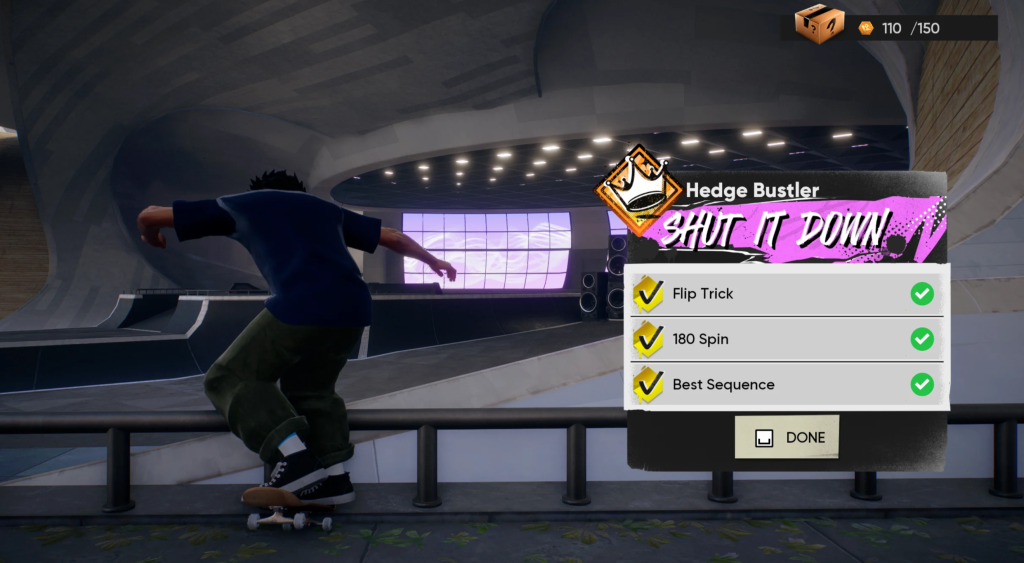
A common Hedge Bustler bug occurs when players are prompted to retry the mission, even after successful completion. This happens because the game fails to register mission completion due to tracking errors or minor glitches in the mission system. The issue can block all future missions until resolved.
Causes
- Mission Tracking Glitch: The backend sometimes fails to mark the Hedge Bustler mission as complete.
- Server Sync Issues: Temporary desynchronization with EA servers can cause the game to loop the retry screen.
- Local Save Corruption: Cached files or corrupted local data may prevent progress recognition.
Bypass Solutions
- Restart the Game: Force a full refresh to allow the game to re-check your mission completion.
- Redo Key Objectives: Replay Own the Spot or critical steps to ensure proper recognition.
- Clear Cache: Removing temporary files can fix minor corruption preventing mission progression.
- Play Offline: Temporarily disconnecting from online servers sometimes bypasses server sync bugs.
- Contact EA Support: Submit screenshots and save info if the bug persists.
Hedge Bustler Won’t Let You Progress? Tips from EA Forums – Proven Community-Reported Workarounds
Many Skate players have shared their experiences on EA forums regarding the Hedge Bustler mission bug, where completing the challenge doesn’t allow progression. Community feedback is invaluable because it highlights workarounds that actually worked for other players before official fixes or patches were released.
Commonly Reported Issues
- Mission Completion Not Registered: Even after successfully finishing Hedge Bustler, the game sometimes does not recognize completion due to mission tracking glitches.
- Stuck Objectives: The Own the Spot task often prevents unlocking future missions if it isn’t properly detected.
- Retry Screen Loops: Players report being trapped on the “Retry” screen repeatedly, blocking career advancement.
Community Solutions
- Restart Game and Console/PC: Many forum members found that fully closing and reopening the game forces it to recheck mission status.
- Clear Cache/Temporary Files: Deleting corrupted local data resolved mission recognition issues for several players.
- Redo Key Steps: Reperforming the Own the Spot objective or any critical mission steps ensures the game triggers completion.
- Play Offline Temporarily: Disconnecting from online servers can bypass server sync bugs that block progression.
- Trigger Another Mission: Some players unlocked stuck Hedge Bustler missions by completing a different available mission to force a map refresh.
- Contact EA Support: Submitting a detailed ticket with screenshots and platform info can help escalate persistent issues.
Tips for Future Prevention
- Always update the game to the latest patch. EA occasionally releases fixes targeting mission bugs.
- Backup your career save to ensure you can revert if a mission freezes or glitches.
- Avoid closing the game mid-mission, as this may corrupt mission tracking files.
By combining these community-reported strategies, players have been able to bypass the Hedge Bustler bug, unlock their next missions, and continue progressing in career mode.
How to Fix Hedge Bustler Own the Spot Mission in Skate – Detailed Instructions to Get the Mission Recognized
The Own the Spot objective within the Hedge Bustler mission is notorious for not registering, preventing progression. This step-by-step guide ensures you complete it successfully.
Step 1: Confirm the Spot Location
- Check the map and locate the Hedge Bustler spot. Make sure you are performing the objective in the exact required location. Misalignment can prevent registration.
Step 2: Perform the Action Precisely
- Complete all steps, such as tricks, grabs, or standing on the correct area, depending on the mission instructions. Minor errors can cause the game to not register the completion.
Step 3: Wait for Visual Confirmation
- Ensure the mission completion indicator appears. Sometimes progress is delayed by a few seconds due to backend tracking.
Step 4: Save Your Game
- After completion, manually save your progress. This prevents mission resets due to crashes or disconnections.
Step 5: Restart Game if Not Registered
- If the mission is still unrecognized, restart Skate to allow the game to re-check mission completion.
Step 6: Clear Cache and Temporary Files
- For persistent issues, clear console or PC cache, as corrupted local files can prevent recognition.
Step 7: Contact EA Support
- If the mission is still blocked, submit screenshots and save details to EA support. They can assist with forced recognition in some cases.
Following these steps ensures the Hedge Bustler Own the Spot objective is properly recognized, letting you unlock the next missions.
Avoid Losing Career Progress from the Hedge Bustler Bug – Prevent Your Other Missions from Being Blocked
The Hedge Bustler mission bug can be more than a single annoyance—it may block other missions and stall your entire career progression in Skate. Players who experience stuck missions risk losing access to upcoming challenges, making it crucial to take proactive steps to protect your progress.
Why Career Progress Can Be Affected
- Mission Chain Dependency: In Skate, career missions are often linked in a sequence. If Hedge Bustler fails to register as completed, subsequent missions remain locked.
- Mission Map Freeze: A stuck challenge can prevent new objectives from appearing on your map, essentially halting career advancement.
- Save File Corruption: Exiting a mission prematurely or crashing during Hedge Bustler may cause local save inconsistencies, further blocking progress.
How to Safeguard Your Career
- Regularly Backup Saves: If your platform supports it, backup career saves frequently. This allows you to revert if a mission glitch occurs.
- Complete Other Available Challenges: To reduce the risk of stagnation, finish any other active missions. Sometimes completing secondary objectives forces the stuck mission to refresh.
- Avoid Mid-Mission Exits: Never quit the game while the Hedge Bustler mission is ongoing, as this can corrupt mission tracking.
- Keep the Game Updated: EA often releases hotfixes for mission bugs. Running the latest version minimizes risk.
- Sync with EA Servers: A stable internet connection ensures mission completion data is correctly recorded online, reducing the chance of blocked missions.
- Temporary Offline Play: If online issues are suspected, temporarily disconnecting can sometimes allow the game to register mission completion locally.
By following these precautions, players can continue career progression even when encountering Hedge Bustler glitches. Proactive management of saves, careful mission completion, and awareness of online sync issues can prevent the bug from affecting other objectives.
Temporary Workarounds for Hedge Bustler Stuck Missions – Quick Fixes Until an Official Patch is Released
While waiting for an official fix from EA, several temporary workarounds can help players bypass the Hedge Bustler mission bug and continue career mode. These are practical, quick solutions that have worked for many in the community.
Quick Workarounds
- Restart the Game: Fully close Skate and relaunch. This can trigger the mission completion check, clearing the stuck status.
- Replay Key Actions: Redo critical steps like Own the Spot to ensure the game recognizes completion.
- Clear Cache and Temporary Files: On PC or console, clearing cached data can remove minor corruption preventing mission recognition.
- Switch Between Online and Offline Modes: Sometimes toggling connectivity allows the game to re-register mission progress.
- Trigger Other Missions: Completing nearby challenges or mini-events can force a map refresh, indirectly fixing Hedge Bustler.
- Use Previous Saves: Load an earlier save before Hedge Bustler, then carefully replay the mission.
These workarounds are not permanent solutions but are effective until EA releases an official patch. They allow players to continue their career and avoid getting stuck indefinitely.
Ultimate Guide to Resolving Hedge Bustler Mission Issues in Skate – All Fixes, Tips, and Troubleshooting in One Place
For players frustrated with Hedge Bustler mission bugs, this ultimate guide compiles all known solutions, community tips, and official recommendations to restore career progression.
Core Fixes
- Mission Step Accuracy: Ensure all actions, especially Own the Spot, are completed precisely.
- Restart and Reload: Restart Skate and reload your save to force mission recognition.
- Clear Cache/Corrupted Files: Removing temporary files often resolves mission registration issues.
- Stable Internet and Server Sync: Ensure connection to EA servers for online progression.
Temporary Workarounds
- Toggle online/offline mode to bypass server desync.
- Complete other missions or challenges to refresh the map.
- Backup and reload previous saves to bypass glitches.
Community Insights
- Many players report that minor replays of the objective often solve the issue.
- EA forums have multiple threads where community-tested solutions successfully unblocked Hedge Bustler missions.
Preventive Tips
- Always update the game to the latest patch.
- Avoid quitting mid-mission.
- Backup career saves regularly.
By combining step-by-step fixes, temporary workarounds, and preventive measures, players can safely navigate Hedge Bustler mission bugs and continue their Skate career without losing progress. This guide serves as a one-stop solution for both temporary and long-term fixes.
FAQ – Common Questions About Hedge Bustler Mission Bugs
1. Why is my Hedge Bustler mission stuck even though I completed it?
The most common reason is that the game failed to register mission completion due to mission tracking errors, server desync, or corrupted local save data. Even if you finish the challenge, the backend may not mark it as complete.
2. What do I do if the Own the Spot objective isn’t recognized?
Ensure you perform the objective precisely in the required location. If it still doesn’t register, try restarting the game, clearing cache, or reconnecting to EA servers. Sometimes replaying the key actions triggers recognition.
3. Can I continue my career if Hedge Bustler is stuck?
Yes. Completing other available missions, reloading previous saves, or using temporary offline play can allow you to continue your career without losing progress.
4. Will EA release a fix for Hedge Bustler mission bugs?
EA occasionally releases hotfixes targeting mission glitches. Make sure your game is updated to the latest version. If the bug persists, submit a support ticket with screenshots and save data.
5. Are there any temporary workarounds?
Yes. Restarting the game, clearing cache, toggling online/offline mode, replaying key objectives, or completing other missions to refresh the map are all effective temporary fixes.
6. How can I prevent this from happening in the future?
- Always update your game.
- Avoid quitting mid-mission.
- Backup career saves frequently.
- Ensure a stable internet connection when playing online.
Conclusion – How to Resolve Hedge Bustler Mission Issues in Skate
The Hedge Bustler mission bug in Skate can be frustrating, blocking career progression and preventing new challenges from appearing. Most issues are caused by mission registration errors, server sync problems, or corrupted local save data.
By following the comprehensive solutions outlined in this guide—precisely completing objectives, restarting and reloading the game, clearing cache, using temporary offline modes, and consulting community-reported workarounds—players can effectively bypass the glitch and resume their career.
Preventive measures, such as updating the game, backing up saves, and ensuring stable connectivity, help avoid future mission freezes. For persistent issues, EA Support remains the ultimate recourse, allowing for escalation and potential mission recognition fixes.
With these strategies, players can navigate the Hedge Bustler bug safely, ensuring that career progression continues smoothly and the challenge map is fully functional. Following the step-by-step guidance and community insights provides a reliable solution to one of Skate’s most notorious mission issues.