

Many players have recently started reporting a new and frustrating issue after the Skate Season 1 update — challenges not completing with friends.
This problem mainly appears during group or co-op trick challenges, where the game suddenly displays a message saying “people aren’t tricking on the spot.”
Because of this glitch, players are unable to complete their objectives, and in most cases, are forced to restart or abandon the challenge, resulting in lost progress and missing out on “all players land trick” points.
According to several reports on EA forums, Reddit, and Discord, this seems to be a brand-new Skate glitch that started right after the Season 1 patch. Many believe the problem might be related to server desync, challenge tracking issues, or a bug introduced with the new update affecting multiplayer synchronization. While solo challenges appear to function normally, cooperative or party-based challenges frequently bug out, preventing completion.
Players have been voicing their frustration and urging EA to release a hotfix or patch update to resolve the Skate challenges not completing glitch as soon as possible. Until then, some users recommend retrying challenges in private lobbies or waiting for future updates.
What Causes the “Challenges not completing with friends” Bug in Skate?
The “Challenges not completing with friends” bug has become a major frustration for Skate players since the release of Season 1. It mainly occurs during co-op or group trick challenges, preventing progress and forcing players to restart. Based on reports from the Skate community, here are the most likely causes behind this issue:
1. Server Desync
The bug is primarily caused by server synchronization problems. When multiple players perform tricks at the same time, the Skate servers sometimes fail to correctly register everyone’s actions. This desync leads the game to think that one or more players are not in the right position, even when they are. High latency, packet loss, or momentary lag can cause these errors, making the system display “people aren’t tricking on the spot.”
2. Trick Zone Misalignment
The game requires players to “trick on the spot,” but after the Season 1 update, trick zones may be misaligned. The invisible area where tricks are supposed to count doesn’t always match the visual spot shown in-game. Due to physics or geometry adjustments, players can appear to land in the right area but still be flagged as outside the zone, which cancels the challenge progress.
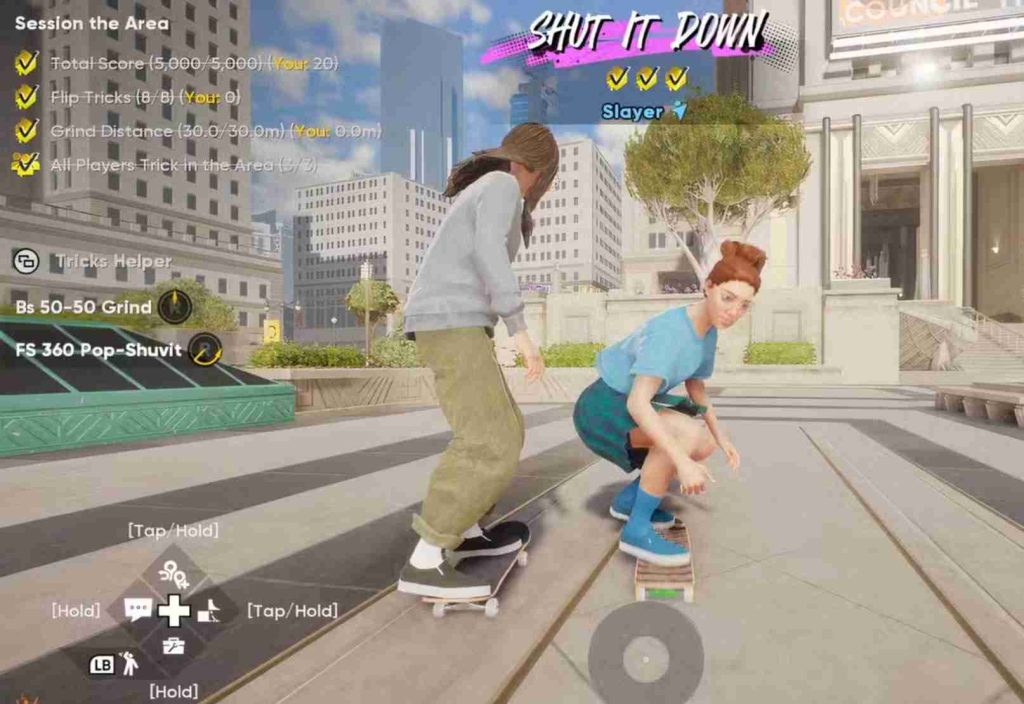
3. Challenge Tracking Delay
Another common cause is a delay in challenge tracking. Progress bars, trick counters, and “all players land trick” meters sometimes freeze or fail to update in real time. This delay makes the system think that players are not landing tricks together. The issue tends to be worse in larger lobbies or cross-platform sessions.
4. New Update Conflict
The glitch appeared immediately after the Season 1 patch, suggesting that a code or server-side conflict was introduced with the update. New backend systems such as leaderboards, event tracking, or team synchronization may have unintentionally interfered with how multiplayer challenges track completion.
5. Animation or Input Lag
Some players also report that animation and input lag contribute to the issue. When the game’s frame rate drops or input timing is delayed, the trick may not fully register with the server. This creates a mismatch between what the player sees and what the game records.
6. Cross-Platform Data Inconsistency
Players in mixed-platform parties (PC, PlayStation, Xbox) often face additional syncing problems. Each platform sends trick and position data slightly differently, which can cause inconsistent recognition when completing co-op objectives.
In short, the “people aren’t tricking on the spot” bug likely stems from a mix of server desync, tracking delay, and trick zone recognition issues introduced by the new update. Until EA releases an official patch or hotfix, players are advised to retry challenges in private lobbies, avoid cross-platform play, and ensure stable internet connections to reduce the chances of triggering this glitch.
Possible Fixes & Temporary Workarounds for the “Challenges not completing with friends” Bug in Skate
The “People aren’t tricking on the spot” error in Skate has been frustrating players since the Season 1 update, especially those playing in co-op or group challenges.
Until EA releases an official patch or hotfix, there are several temporary solutions and player-tested workarounds that may help reduce or completely avoid this issue.
While none of these fixes are guaranteed to work for everyone, they’ve shown positive results for many players across community forums, Reddit threads, and Discord discussions. Below are the most effective methods explained in detail.
1. Restart the Challenge Together
One of the simplest and most effective fixes reported by players is to restart the challenge with your group. Often, the game fails to properly register the challenge session or sync all players’ trick data during the first attempt. Restarting helps reset the internal synchronization between everyone’s client and the server.
How to do it:
- End the current challenge immediately if the “people aren’t tricking on the spot” message appears.
- Have the host reinvite all friends back into the same lobby or group session.
- Once everyone rejoins, make sure all players are standing within the same area before restarting the challenge.
- Try performing a few simple tricks together before activating the challenge again to ensure everyone’s presence is recognized by the server.
This simple restart method often helps reset session data that becomes misaligned during the first run, reducing the likelihood of trick tracking errors.
2. Trick Together in Sync
Timing is crucial in Skate multiplayer challenges. Many players found that performing tricks at the same time and in close proximity significantly improves recognition accuracy. The system seems to rely on simultaneous input to track collective progress, so being out of sync—even by a few seconds—can cause it to think certain players aren’t “on the spot.”
Best practices:
- Before starting, communicate with your group so everyone begins tricking at the same time.
- Stay close to the marked zone or designated spot area. Moving too far outside the radius can cause the server to misinterpret player positions.
- Avoid excessive movement or wandering during the challenge. If one player skates too far away, it can reset progress for the entire team.
- Try performing simple tricks first to test synchronization before attempting complex combinations.
Players have noticed that this approach reduces desyncs, especially when everyone lands their tricks almost simultaneously.
3. Avoid Busy Server Hours
Server congestion is one of the leading triggers for the “people aren’t tricking” message. During peak hours, the Skate servers handle large amounts of data from global multiplayer sessions, which can delay synchronization and cause desyncs. Playing during quieter periods often leads to smoother and more stable gameplay.
Tips for reducing lag-related issues:
- Try playing during off-peak hours, such as late nights or early mornings (based on your region).
- Ask your friends to join sessions when fewer players are online.
- Close any background applications or downloads that might use up bandwidth.
- If possible, switch to a wired (Ethernet) connection instead of Wi-Fi for more stable gameplay.
Several players reported that after switching to low-traffic times, they could complete multiple challenges in a row without encountering the bug.
4. Use the Same Platform if Possible
While Skate supports cross-platform play, many reports suggest that the “people aren’t tricking on the spot” bug happens more often in mixed-platform parties (e.g., one player on PC, another on PlayStation or Xbox). Each platform communicates slightly differently with EA’s servers, and small timing mismatches can disrupt the challenge tracker.
How to minimize crossplay issues:
- If your group has multiple platforms, try hosting the session on one platform consistently instead of switching hosts.
- If possible, play only with friends using the same platform to ensure synchronized inputs and smoother data handling.
- Disable crossplay temporarily in settings (if the option exists) and test whether challenges complete correctly in single-platform lobbies.
Although it limits who you can play with, this workaround is one of the most effective for reducing synchronization bugs until an official fix is deployed.
5. Clear Cache and Restart the Game
Sometimes, the issue isn’t entirely server-related but comes from cached data or temporary session files that have become corrupted or outdated. Restarting Skate or your entire system can help refresh the connection to EA’s servers and clear lingering errors.
Steps to perform a clean restart:
- Exit the Skate application completely.
- Restart your console or PC to clear temporary system cache.
- On PC, you can also clear EA App or Steam cache by navigating to the client’s settings menu.
- Relaunch the game and rejoin your friends’ session.
Doing this helps reinitialize your player profile data and ensures your client is fully in sync with the latest server state. Some players even found that performing this reset between every few challenges prevented the bug from reappearing.
6. Reconnect to Online Servers
A quick reconnect to online services can often refresh the multiplayer state. This helps when the game’s internal session data gets stuck in a glitched condition.
Try this:
- Pause the game and go offline (if the game allows it).
- Wait 30–60 seconds and then reconnect to online mode.
- Re-enter your session with friends and attempt the challenge again.
Players have shared that simply reconnecting to the servers before retrying challenges can sometimes reset tracking errors that cause the glitch.
7. Keep Game and Console Software Updated
It might seem obvious, but outdated game versions or system software can make bugs worse. Skate receives frequent small patches, and sometimes these include silent server-side fixes.
What to do:
- Always check for the latest Skate update before playing.
- Ensure your console firmware or PC drivers (especially network drivers) are fully updated.
- Restart the system after updating to ensure smooth performance.
This helps maintain compatibility with the latest server changes and minimizes old data conflicts.
8. Report the Bug to EA Support
While temporary fixes help, reporting the bug directly to EA is crucial so the developers can track its scope and urgency. The more reports they receive, the faster the issue will be prioritized for a permanent solution.
How to report effectively:
- Visit the EA Skate Bug Report Forum or join the official Skate Discord.
- Include detailed information such as your platform, time of the incident, challenge name, and whether it was a public or private session.
- Upload video clips or screenshots showing the message “people aren’t tricking on the spot.”
- Use search keywords like “Skate challenge not completing multiplayer Season 1”, “Skate trick not registering”, or “Skate co-op challenge glitch” when submitting your report.
This helps the developers identify the trend, replicate the issue internally, and roll out a targeted fix in the next patch.
9. Test Private or Solo Sessions
If none of the above methods work, try testing the challenge in a private session or solo lobby. While this won’t fix multiplayer bugs, it can help confirm whether the issue is caused by online syncing or the challenge itself.
Steps:
- Create a private lobby and invite only one friend.
- Attempt the same challenge that previously failed in a larger group.
- If it works, the problem likely lies in session scaling or server congestion.
Several players reported that smaller lobbies reduce the likelihood of the “not tricking on the spot” error.
Final Thoughts
The “People aren’t tricking on the spot” bug is clearly linked to synchronization and tracking issues introduced in Skate Season 1. While no guaranteed fix exists yet, the methods above — especially restarting challenges, staying in sync, avoiding peak hours, and playing on the same platform — have helped many players complete their co-op challenges successfully. Until EA officially patches the issue, these workarounds remain the best way to keep progressing without losing trick points or group rewards.
If the problem persists, continue reporting it through EA’s official channels — community visibility plays a huge role in speeding up fixes for widespread glitches like this one.
What You Can Do While Waiting for a Fix
While the Skate team works on a permanent solution for the “Challenges not completing with friends” bug, there are several things you can do to make the most of your time in-game. These steps can help you stay productive, enjoy other parts of the game, and reduce frustration while waiting for an official patch or server update.
1. Focus on Solo Challenges and Free Skate Sessions
Since the glitch mostly affects co-op and multiplayer trick challenges, solo gameplay modes still work fine for most players. Use this opportunity to explore Free Skate, complete solo spot challenges, and work on improving your personal trick library. Practicing solo also helps fine-tune your timing and landings, making it easier to perform cleaner tricks once the issue is fixed.
2. Level Up Gear, Boards, and Style
You can continue to progress by unlocking and customizing your skater’s gear, outfits, decks, and cosmetics. Visit the in-game shop or complete easier objectives that still register properly. Customization is a big part of the Skate experience, and this downtime is a great opportunity to refine your personal look and board setup.
3. Experiment with New Tricks and Combos
Even without multiplayer challenges, you can spend time experimenting with new trick combinations and transitions in free roam. Try perfecting manual-to-flip sequences or testing grind combos on different rails and ledges. Many players use these downtime periods to record clips, share highlight reels, or practice advanced lines they can later use in co-op modes.
4. Explore New Maps and Spots
Season 1 added new areas and environmental features that many players haven’t fully explored yet. Take the time to discover hidden locations, smooth ramps, or creative trick lines. Exploring maps helps you get familiar with terrain layouts — useful knowledge when group challenges are working again.
5. Participate in Community Events and Discussions
Join discussions on the EA Skate Forums, Reddit (r/SkateGame), or the official Skate Discord server. Many players share temporary fixes, new tricks, and news about upcoming patches. Staying active in the community helps you stay updated on when EA announces an official solution. It also gives you a chance to share feedback, bug reports, and gameplay clips that can help developers identify and resolve the issue faster.
6. Capture and Share Gameplay Content
If you enjoy recording gameplay, this is a great time to create Skate clips, edit montages, or upload your best runs to social media platforms. The community loves seeing creative lines and stylish trick videos. This keeps you engaged with the game and helps you connect with other players dealing with the same issue.
7. Stay Updated with Patch Notes and EA News
Regularly check the official EA Skate website, X (formerly Twitter) page, and EA Answers HQ for any mention of upcoming updates or hotfixes. Developers usually roll out small patches quietly before major updates, so keeping an eye on announcements ensures you know when a fix is live. You can also enable notifications for patch updates within the EA App or console dashboard.
8. Avoid Frustration — Take Short Breaks
If the glitch keeps occurring despite your best efforts, it’s best to take a short break instead of forcing challenges repeatedly. Playing while frustrated can make the bug feel worse. Switching to other modes or even different games for a bit can make returning to Skate feel fresh and fun once a patch is released.
9. Report and Track Your Bug Submissions
If you’ve already reported the issue, check back occasionally to see if developers have responded or marked it as “acknowledged.” Add any new details you notice — for example, whether the glitch occurs on specific maps or after certain tricks. The more precise your feedback, the faster the dev team can isolate the cause.
10. Coordinate with Friends for Future Sessions
Stay connected with your skating group or friends list and plan future sessions for when the patch arrives. You can use this time to discuss challenge routes, preferred trick spots, or potential competitions. Being ready to jump back in once the fix lands ensures you don’t waste time later setting up.
Frequently Asked Questions (FAQ)
Why are Skate challenges not completing with friends?
This issue is caused by a Season 1 multiplayer glitch where the game fails to detect all players performing tricks in a challenge. The system may show “people aren’t tricking on the spot” even when everyone is participating correctly. It’s likely a server sync or challenge recognition bug introduced in the latest update.
What does “people aren’t tricking on the spot” mean in Skate?
This message appears when the game doesn’t register players as performing tricks in the correct zone or at the right time. It usually happens because of server lag, spot misalignment, or group synchronization errors in co-op mode.
How can I fix Skate challenges not completing with friends?
While there’s no permanent fix yet, try these temporary solutions:
- Restart the challenge and ensure everyone joins the same session.
- Trick together in sync and stay within the marked area.
- Avoid cross-platform lobbies if possible.
- Restart your game or console to refresh your session.
- Report the bug on the EA Skate forums so it gets priority in the next patch.
Is this glitch happening to everyone?
Yes. Multiple players across EA Forums, Reddit, and Discord have reported the same issue since the Season 1 update. It’s not limited to one platform — it affects PC, PlayStation, and Xbox players alike.
When will EA fix the Skate co-op challenge glitch?
EA hasn’t given an official date yet, but developers are aware of the bug and are likely preparing a Season 1.1 patch or hotfix. You can stay updated through the official Skate Twitter or EA Help page.
Do solo challenges work fine?
Yes. Solo challenges and practice spots work normally since they don’t rely on multiplayer synchronization. You can continue progressing solo until the co-op issue is patched.
Will I lose progress or rewards from this glitch?
If a challenge fails to complete, you won’t receive trick points or group rewards. However, your account data and previous progress are safe — only the challenge session is affected.
Can I prevent this glitch from happening again?
There’s no guaranteed prevention, but you can reduce the chances by:
- Ensuring a stable internet connection for all players.
- Avoiding busy server times.
- Playing with friends on the same platform to minimize desync.
- Restarting the game after long play sessions.
Where can I report the Skate “challenge not completing” bug?
You can submit a detailed report to:
- EA Skate Bug Report Forum: answers.ea.com
- Skate Official Discord under the #bug-reports channel
- Include keywords like “Season 1 co-op challenge not completing” and video clips if possible.
Has EA acknowledged the issue?
Yes, community managers and developers have seen multiple threads about it and are investigating. Many players expect a fix in the upcoming patch update.