
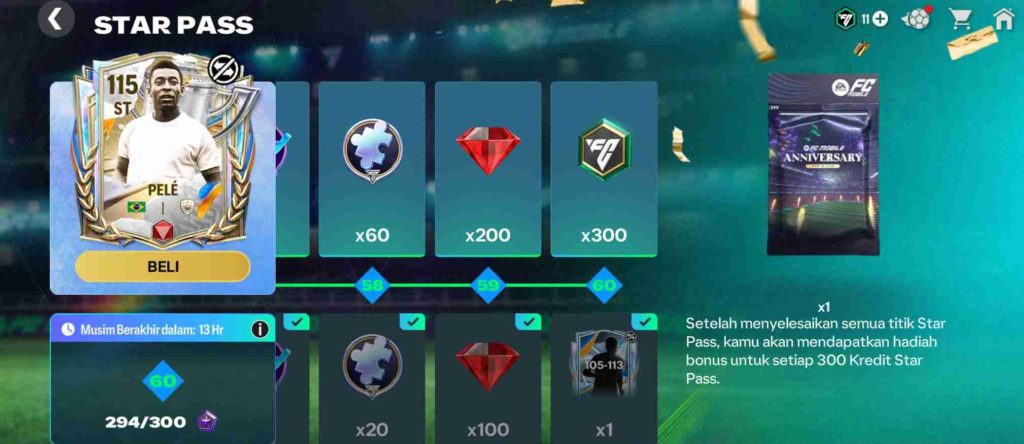
Star Pass Rewards Not Claiming in FC 26: The Star Pass in FC 26 (also known as the Badge System or Season Pass) is a feature that rewards players for completing daily and seasonal challenges. As you play matches and complete objectives, you earn Star Points that unlock different tiers of rewards, such as badges, coins, player packs, and XP boosts.
What is the Star Pass / Badge System in FC 26?
There are two reward tracks — a free pass for all players and a premium pass for those who purchase the upgrade. However, many users have recently reported issues like “FC 26 Star Pass rewards not claiming,” “FC 26 badge not claimed,” or even “Why is my FC 26 pass reward missing?” These bugs can prevent players from receiving earned items.
If you’re affected by the FC 26 Star Pass bug, it’s often due to a temporary glitch or sync issue with EA’s servers. You can try logging out, restarting the game, or checking for updates to fix Star Pass rewards in FC 26. Staying active in the game ensures your progress is tracked, preventing unclaimed rewards in FC 26 and keeping your badge collection up to date.
Common Symptoms of the “Reward Not Claiming” Bug in FC 26
The FC 26 Star Pass reward not claiming bug has frustrated many players across different platforms. Whether you’re grinding daily matches or finishing high-tier milestones, it can be disheartening when your progress doesn’t translate into actual rewards. Below are the most common symptoms players experience when dealing with unclaimed rewards in FC 26 or the Star Pass badge not claimed issue.
1. Reward Badge Shows “Unclaimed” After Requirements Are Met
Players often notice that their FC 26 badge remains unclaimed even after completing all the tasks. The system fails to register your achievement, leaving the badge locked.
2. The “Claim” Button is Greyed Out or Unresponsive
A common glitch causes the claim button to appear but not work. Even after tapping or clicking repeatedly, the FC 26 pass reward doesn’t activate, resulting in frustration and lost progress.
3. Premium Pass Rewards Not Unlocking
Many users report that after purchasing the premium Star Pass, they still only receive free-tier rewards. This FC 26 Star Pass bug may stem from server delays or payment sync errors.
4. Rewards Visible but Unclickable
Some rewards show up in the interface but can’t be claimed. This often happens due to connection timeouts or incomplete milestone tracking.
5. Negative XP or Progress Errors
Players sometimes see negative XP values, incorrect progress bars, or level resets. These bugs can make it look like your Star Pass level dropped unexpectedly.
6. Missing Rewards at Level Milestones
You might hit a milestone—like Level 10 or 20—but find that the FC 26 pass reward is missing. This can occur if the game doesn’t sync properly with EA’s servers during updates or maintenance.
If you notice any of these signs, your game may be affected by the unclaimed rewards FC 26 issue, requiring troubleshooting or a patch update.
Possible Causes of the “Reward Not Claiming” Issue in FC 26
If your FC 26 Star Pass rewards are not claiming or your badges remain unclaimed, you’re not alone. Many players across EA forums and Reddit have reported the same bug, and while EA has yet to confirm one single cause, several common triggers and suspected factors have been identified. Below is a detailed breakdown of what causes the FC 26 Star Pass bug and why rewards may go missing or stay unclaimed.
1. Account Linking or Wrong EA Account
One of the most frequent issues behind unclaimed rewards in FC 26 is linked to account mismatches. If your EA account isn’t properly connected to the correct platform (PlayStation, Xbox, or PC), the system might send your Star Pass rewards to another linked account. Always verify that you’re logged into the same EA ID used for your gameplay and purchases.
2. Server Delays or Sync Issues
Sometimes, the FC 26 Star Pass reward missing issue isn’t caused by the player at all. EA’s servers may experience high load or maintenance downtime, delaying the synchronization of your progress. These server/backend delays can temporarily hide rewards or cause badges to appear “unclaimed.” Some players on the EA forums report that waiting 12–24 hours after completing a milestone allows the rewards to show up later once the servers sync properly.
3. UI Glitches or Client-Side Cache Problems
If you notice rewards that appear “locked” or claim buttons that don’t work, the problem might be local. UI glitches or client cache corruption can make your game show outdated information. Clearing your cache, restarting the app, or reinstalling the game can refresh your data and often fixes FC 26 Star Pass bugs without losing progress.
4. Language or Region Settings Bug
A surprising number of players on Reddit and EA Answers HQ have found that changing their game language or region temporarily fixed their issue. For example, switching from a regional language to English (or vice versa) made the missing rewards appear again. This bug suggests that localization or region-specific versions of the game might sometimes hide reward visibility.
5. Reward Requires Premium Pass
Not all rewards are part of the free Star Pass tier. Some are exclusive to the Premium or Paid Star Pass. If you haven’t purchased the premium version—or if your payment hasn’t been processed yet—certain rewards will remain locked or unclaimable. Always ensure your premium pass is activated and visible in your game.
6. Expired Reward Windows or Deadlines
Certain events in EA SPORTS FC 26 have limited-time rewards. If you meet the milestone after the expiration date or forget to claim in time, the reward might disappear. Keep an eye on the event timer and claim your FC 26 Star Pass rewards promptly to avoid missing out.
7. Misleading Interface or Hidden Claim Locations
Many players report that they simply couldn’t find where to claim rewards. Some items are accessible only through specific tabs—like Star Pass → Rewards, My Packs, or FC Hub. The interface can be confusing, especially after updates, leading players to think rewards are missing when they’re just hidden in another section.
In short, the FC 26 Star Pass bug usually stems from account sync problems, server lag, or UI glitches, but other factors like language settings or missed deadlines can also play a role. Checking these causes one by one is the best way to resolve unclaimed rewards in FC 26 and ensure you don’t miss your next badge or pack.
How to Fix Star Pass Rewards Not Claiming in FC 26

If you’re one of the many players experiencing FC 26 Star Pass rewards not claiming, you’re not alone. From badges stuck on “unclaimed” to missing premium rewards, this bug has affected both console and mobile users. While EA hasn’t released an official patch yet, several proven fixes and workarounds can help resolve the issue.
Below are 20 detailed steps, ordered from the simplest to more advanced solutions, to help you troubleshoot the Star Pass / Badge not claiming issue in FC 26 and recover your missing rewards.
1. Restart the Game or App
The first and simplest step is to fully restart FC 26. Close the app or game completely, not just minimize it. On console or PC, ensure no background process of FC 26 is running. Restarting forces the client to refresh your current session and re-sync with EA’s servers. Many players report that simply restarting allows their unclaimed rewards in FC 26 to appear again.
2. Reboot Your Console, PC, or Mobile Device
If restarting the game doesn’t help, reboot your entire device. This clears background cache, temporary session data, and stuck connections that may prevent the Star Pass reward system from updating properly.
3. Clear App Cache (Mobile Only)
For mobile users, clearing the FC 26 app cache is one of the fastest ways to fix UI glitches. On Android:
- Go to Settings → Apps → EA SPORTS FC 26 → Storage → Clear Cache.
On iPhone: reinstalling the app achieves a similar effect.
Once done, log back in and check your Star Pass progress — this often helps the game reload missing data.
4. Log Out and Log Back In
Sometimes the EA account session token expires or desyncs from the game. Log out of your EA account, restart the app, and then log back in using the correct credentials. This refreshes your profile data and can make FC 26 badge not claimed rewards reappear.
5. Verify You’re Using the Correct EA Account
One common cause of missing FC 26 pass rewards is logging into a secondary EA account by mistake. Many players have multiple accounts from different consoles or devices. Go to Settings → Account Linking and confirm that your game is connected to the account that owns your Star Pass progress and Premium access.
6. Check Premium Pass Ownership
If your reward is premium-tier only, ensure you’ve purchased and activated the Premium Star Pass. Go to the Star Pass / Season Pass screen — if you only see the “Free Rewards” section, your premium access may not be active. In that case, check your purchase history or re-log into the store to verify payment completion.
7. Confirm Your Star Pass Level and Milestone Progress
Go to your Star Pass tab and verify your current level. Sometimes the game fails to display your latest milestone correctly. You may have met all requirements, but your level display hasn’t updated yet due to server lag. Playing a single match can trigger the system to refresh your progress bar.
8. Double-Check Objective Completions
Rewards are tied not just to the number of matches played but to specific objectives — such as assists, goals, or special event wins. Open the Objectives tab and ensure each milestone shows “Completed.” If not, replay the event or challenge to force an update. This is often overlooked by players wondering, “Why is my FC 26 pass reward missing?”
9. Review Language and Region Settings
In rare cases, language localization bugs affect reward visibility. Go to Settings → Language and switch your game’s language to English (US), then restart. Some Reddit users report that this step made the “Claim” button reappear instantly. You can switch back to your original language afterward.
10. Re-Sync by Playing a Quick Match
If you’ve done everything above and the unclaimed rewards FC 26 still persist, try playing a quick match. Completing any match triggers a background sync with EA’s servers. This often helps the game recheck your account data and properly unlock stuck Star Pass rewards.
11. Check for Expired Rewards or Time Windows
Certain events in FC 26 have limited claim windows. If you earned the reward after the deadline or didn’t claim it within the event window, it can expire. Always check the event timer before assuming it’s a bug. In some cases, EA might restore expired rewards through support if it’s a verified issue.
12. Visit All Reward Tabs and Menus
Many players think rewards are missing when they’re simply stored elsewhere. Go through:
- Star Pass → Rewards
- My Packs
- Store → Unopened Packs
- FC Hub → Profile → Rewards
Some items appear in “My Packs” instead of “Star Pass.” Checking all sections ensures you don’t overlook hidden claim locations.
13. Look for “Claim Now” Buttons in Secondary Menus
Some claim prompts only appear when you enter the right tab. For example, a Star Pass badge might need to be claimed through Profile → Achievements instead of the Pass tab. Navigate through all reward-related screens carefully — a hidden “Claim” button could be waiting.
14. Disable Background Downloads or Other EA Games
Running multiple EA games simultaneously or having background downloads can interfere with live data syncing. Exit all other EA titles (like Madden or FIFA Mobile), then relaunch FC 26 to avoid server confusion with your Star Pass progress.
15. Update FC 26 to the Latest Version
Outdated game versions often cause bugs. Go to your platform’s store and check for updates. EA frequently rolls out hotfix patches addressing Star Pass reward bugs and claim glitches. Installing the latest update ensures compatibility with current servers and may instantly fix your issue.
16. Reinstall the Game (As a Last Resort)
If none of the lighter fixes work, uninstalling and reinstalling FC 26 may help. It clears corrupted local files or outdated UI data that block reward claims. Be sure to back up your account before uninstalling, so progress and purchases remain tied to your EA ID.
17. Try a Different Device or Platform
Some players report that logging into their account on another platform (like PC if they usually play on console) made unclaimed rewards appear immediately. This suggests the issue is device-specific. Try logging into another platform using your EA credentials to test if the rewards sync properly.
18. Wait 24 Hours and Check Again
Sometimes, the fix is simply patience. If you recently completed a milestone, EA’s servers may take several hours to process your claim. Waiting 12–24 hours is often enough for rewards to appear once backend syncing is complete. This workaround is supported by multiple player reports on EA Forums and Reddit.
19. Contact EA Help or Submit a Ticket
If you’ve tried all troubleshooting steps and your FC 26 pass reward is still missing, visit help.ea.com and open a case. Include screenshots of your progress, Star Pass level, and missing reward details. EA Support can manually verify your progress and credit the missing items to your account.
20. Follow EA’s Official Bug Reports and Updates
Stay updated through EA’s official forums, X (Twitter), and the EA SPORTS FC subreddit. The development team often acknowledges widespread bugs and announces temporary fixes or server-side updates. Reporting your issue helps EA prioritize the Star Pass reward not claiming bug faster.
Bonus Tip: Prevent the Bug in the Future
To avoid running into unclaimed rewards FC 26 again, always:
- Claim rewards immediately after milestones.
- Avoid changing language/region settings mid-event.
- Keep your game up to date.
- Verify your EA account regularly.
- Check your internet stability before claiming rewards.
Final Thoughts
The FC 26 Star Pass bug can be frustrating, especially when you’ve spent hours grinding through objectives or purchased the Premium Pass expecting exclusive rewards. While EA continues to work on backend fixes, these 20 steps provide effective ways to restore your rewards, claim badges, and keep your Star Pass progress intact.
By methodically following this guide—from restarting your game to syncing accounts and checking hidden tabs—you’ll dramatically increase your chances of recovering your missing FC 26 Star Pass rewards and enjoying the full value of your pass.
If the issue persists, remember that EA Help can manually fix account-based problems. Keep calm, stay patient, and you’ll soon be back to collecting your badges and leveling up your FC 26 Season Pass without interruption.
Real User Cases & What Helped
The FC 26 Star Pass rewards not claiming issue has been widely discussed on platforms like Reddit and EA Forums, where players have shared their personal fixes and experiences. One popular Reddit thread highlighted that several users who purchased the Premium Star Pass but couldn’t see their premium rewards managed to fix the issue by simply changing the in-game language to English. After restarting, their missing rewards and badges reappeared immediately.
Another group of players reported that the fix was even simpler — closing and reopening the game app. This action forced the game to reconnect to EA’s servers, refreshing their Star Pass progress and making previously unclaimable rewards suddenly available.
Additionally, multiple Reddit and EA community users emphasized that account linking played a major role in solving the FC 26 badge not claimed problem. By verifying that their EA accounts were correctly connected to the right gaming platform, they restored access to their missing rewards.
These real-world cases show that while the FC 26 Star Pass bug can be frustrating, many players have resolved it through simple actions like language changes, app restarts, and EA account verification—no advanced fixes required.
When It’s Probably a Server or Bug Issue
If you’ve followed every troubleshooting step — restarted the game, verified your EA account, met all Star Pass milestones, and waited 24 hours — yet your FC 26 Star Pass rewards are still not claiming, it’s safe to assume the problem lies with EA’s servers or a backend bug rather than your device or account.
These large-scale issues typically affect multiple players at once and are often discussed on EA’s official forums, Trello bug trackers, and community platforms like Reddit or FUTFC. When server-side errors occur, even correctly linked accounts and completed objectives fail to sync with EA’s reward database, leading to the “FC 26 badge not claimed” or “unclaimed rewards FC 26” issue.
For example, during the Path to Foundation reward bug, hundreds of players completed the objective expecting an 86-rated TOTW player pick, yet the reward never appeared. EA later acknowledged the issue and confirmed it was a server recognition error, not user fault.
EA has since stated they are aware of “missing content or unclaimed rewards” cases and recommend users double-check account linking and campaign timelines, as fixes are typically deployed in backend patches.
If you’ve met every condition and still see no reward, the issue is almost certainly a confirmed FC 26 Star Pass bug — one only EA can fix.
Pro Tips to Avoid This in Future
- Keep proof of milestone completion (screenshots) in case support asks.
- Before purchasing premium, double-check you actually see Premium status.
- After mission finishes, check all possible menus for claim buttons. Don’t assume reward is auto-delivered.
- Monitor EA’s official channels for known issues (Forums, Twitter / X, EA Support). Sometimes they announce fixes or acknowledge bugs.
- Play and claim rewards earlier rather than leaving many unclaimed — reduces risk of missing deadlines or encountering weird interface bugs.
Conclusion
The issue of rewards or badges from Star Pass / Season Pass in FC 26 not being claimable is unfortunately pretty common. But in most cases, the root causes are one of: wrong account/linking, language/region settings, UI glitches, or simply that the reward requires Premium. By going through the checklist above, many players regain access to their missing rewards.
If after all troubleshooting you still don’t see your reward, it’s very likely a bug that EA will need to address. In that case, documenting it well and sending a support ticket is your best move.