
If you’ve completed all your FC 26 Gauntlet matches and still haven’t received your Cornerstones Kudus reward, you’re not alone. A growing number of players are reporting that despite winning all their games, the Gauntlet objective doesn’t mark as completed, preventing them from claiming the promised rewards.
This issue — widely referred to as the Gauntlet Reward Bug — is currently one of the most frustrating glitches in EA FC 26. Players have noticed that even after achieving the required number of wins, their Gauntlet progress isn’t tracking correctly. In many cases, the objective remains locked, the reward doesn’t appear, and the Gauntlet tickets don’t reset the following day as expected. This means you can’t replay matches or progress further in the event.
What’s Happening — The Gauntlet Reward Bug Explained
Some community members suspect that this bug is caused by server sync delays or account tracking issues, especially when results are recorded locally but not on EA’s backend servers. Others believe the issue could be linked to daily ticket reset errors or backend maintenance delays.
Unfortunately, contacting EA support hasn’t resolved the issue for everyone — many players report slow or no response when submitting missing rewards tickets.
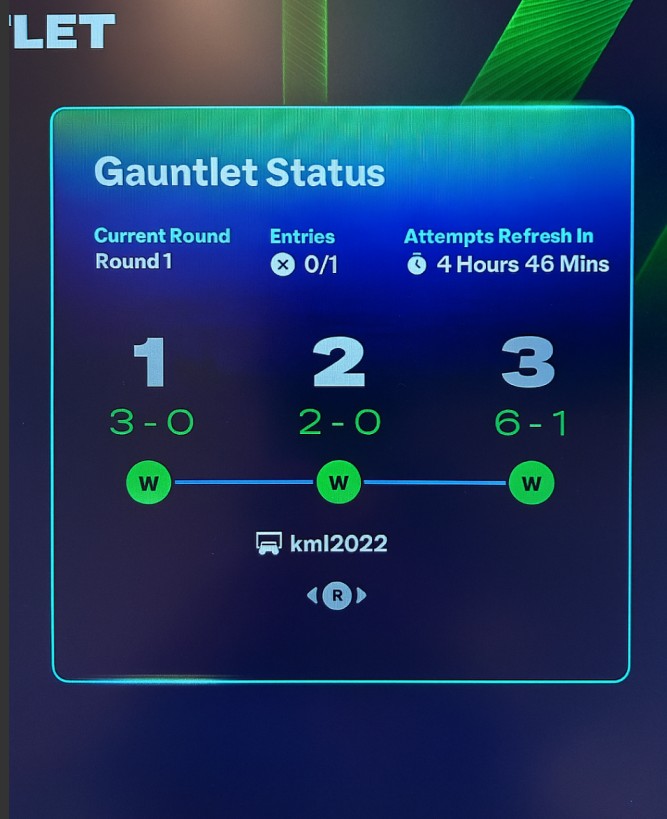
While there’s no official fix yet, EA is reportedly aware of the problem. For now, the best approach is to submit a compensation request via EA Help, attaching screenshots of your wins and incomplete objective. This evidence helps their team manually verify your claim.
Until a patch arrives, avoid replaying or spending tickets until the system resets properly — doing so may cause further progress loss.
???? In short: The Gauntlet reward bug is a server-side issue affecting progress tracking, reward distribution, and ticket resets in EA FC 26.
Common Symptoms Players Are Facing in the EA FC 26 Gauntlet Reward Bug
Players participating in EA FC 26’s Gauntlet mode have reported a variety of frustrating symptoms linked to the ongoing Gauntlet reward bug. While the issue primarily revolves around missing Cornerstones Kudus rewards, it affects multiple aspects of gameplay — from tracking progress to resetting tickets — leaving players feeling stuck and unrewarded despite strong in-game performance.
1. Missing Cornerstones Rewards After Wins
The most common issue is that players win all three Gauntlet matches, yet the Cornerstones Kudus reward doesn’t appear in their club. The Gauntlet objective remains marked as incomplete, even though the victory record clearly shows successful results. This issue gives the false impression that the player hasn’t met the reward conditions.
2. Gauntlet Objective Not Completing or Updating
Another recurring symptom is that the Gauntlet objective doesn’t update after finishing all matches. Even if you complete the necessary milestones, the progress bar remains static. This bug prevents the “claim reward” prompt from triggering, effectively locking your earned items.
3. Ticket Reset Failure
Several players have noticed that their Gauntlet tickets don’t reset daily as they should. Instead of being able to play new rounds each day, their entry limit remains stuck, capping them at fewer than the intended 12 games per week. This has also caused players to lose opportunities to earn more rewards and progress through the event.
4. Wins Not Counting or Disappearing
A major frustration comes when wins simply don’t register. Players see their record update in one session, only to find their victories missing later. This symptom often points to a server-side sync issue, where match results fail to upload properly to EA’s servers, leaving the game unaware of your progress.
5. Delayed or No Reward Delivery
In some cases, the Gauntlet rewards arrive hours or days later, suggesting backend lag in the distribution system. However, many users never receive their rewards at all — even after restarting the game or logging into a different device.
6. Lack of Response from EA Support
Perhaps the most disheartening symptom is slow or absent responses from EA Help. Players who submitted missing reward claims often report no updates, leaving them unsure if compensation is coming.
???? In summary: The EA FC 26 Gauntlet reward bug manifests through missing rewards, non-resetting tickets, untracked wins, and frozen objectives, making progression nearly impossible until EA implements a fix.
Why the EA FC 26 Gauntlet Rewards Are Not Given to Your Account
If you’ve completed your Gauntlet matches in EA FC 26 but didn’t receive your Cornerstones Kudus reward, you’re not alone. Thousands of players are facing the same frustrating issue where the Gauntlet rewards are not being credited to their account despite successfully completing all required matches. Let’s break down what’s actually happening behind the scenes — and why your reward isn’t showing up.
1. Server-Side Tracking Glitch
The most likely reason for the Gauntlet reward bug is a server sync failure. After completing your Gauntlet matches, the game’s backend is supposed to log your wins and trigger the completion of the “Cornerstones Kudus” objective. However, in many cases, this data isn’t syncing properly with EA’s servers. As a result, the system fails to recognize your victories and leaves the reward unclaimed — even though your match record shows all three wins.
2. Objective Progress Not Registering
Another cause is the objective tracking issue. The Gauntlet completion criteria may not be updating because of internal event timer mismatches or errors in the milestone progression system. Many players have reported that even after achieving the required wins, the “Complete the Gauntlet” objective remains incomplete, preventing the game from unlocking the reward.
3. Ticket Reset Timing Error
A linked issue involves Gauntlet ticket resets. Normally, these reset daily, allowing players new entries. However, a timing bug may cause the game to skip or delay the ticket refresh cycle. When this happens, the Gauntlet system may misinterpret your progress as incomplete or expired, blocking reward triggers entirely.
4. Backend Reward Distribution Delay
Sometimes the rewards are delayed, not lost. EA’s servers handle large data loads during peak play periods, especially after events or promotions. Your earned reward may be stuck in a processing queue, which could take hours — or even days — to appear in your club. Unfortunately, this doesn’t always happen automatically.
5. Potential Event Data Corruption
In rare cases, your Gauntlet event data might be partially corrupted due to crashes, disconnects, or patch updates mid-match. If the event state file doesn’t close properly after a win, the system won’t log it as valid, leading to missing rewards or progress loss.
6. No Automatic Compensation Yet
As of now, EA hasn’t confirmed any automatic compensation for players affected by this issue. Many users have reached out to EA Help or Answers HQ, but responses have been slow or generic, suggesting the developers are still investigating the cause.
✅ What You Can Do Now:
- Restart the game and check if your rewards appear after a fresh login.
- Avoid replaying Gauntlet matches until EA releases a patch or statement.
- Submit a support ticket on the EA Help site with screenshots of your completed matches and missing rewards.
- Follow the EA FC 26 forums or Twitter (X) for real-time updates.
In summary: The EA FC 26 Gauntlet rewards not given issue is due to a mix of server sync bugs, unregistered objectives, and reward queue delays. EA is aware of similar cases and is likely working on a fix — but until then, reporting your issue and keeping proof of completion is your best course of action.
Quick checks (do these first )
- Check Inbox / Unassigned / Club Items
- Open Ultimate Team → Inbox, Club items, and Unassigned Items. Cornerstone packs sometimes land there instead of being auto-applied.
- Confirm Objective & Week
- Open the Objectives (Gauntlet) panel and verify you were checking the correct week/event. UI sometimes shows previous week’s objectives.
- Stay on the Post-Match Summary
- If you can reproduce the issue, after your final win stay on the match results and the objective screen until everything fully loads. Don’t close the app immediately.
- Relog (fast)
- Log out of your EA account, fully close the game, then sign back in and check your rewards and objective status.
Deeper troubleshooting
- Restart & Clear Cache
- Console (Xbox/PlayStation): fully power down the console (shutdown, unplug 30s) then restart the console and the game.
- PC (Steam/EA App): exit game, quit launcher, restart PC or restart the EA/Steam client. If on EA App, signing out and deleting the temporary cache folder (if you know where) helps.
- Mobile: force-close the app → clear app cache (Android) or reinstall (iOS/Android) if comfortable.
- Check Network Stability
- Use wired connection if possible or ensure stable Wi-Fi. Interrupted upload of match results can block objective registration.
- Try a Different Device (if available)
- Log into the same account on another platform/device (console ↔ PC ↔ mobile companion) and check the objective — backend state may show differently elsewhere.
- Wait for UTC Daily Reset
- Some progress/ticket resets occur on a fixed UTC cycle. If your tickets didn’t reset, check right after the daily reset time (avoid replaying until then).
- Don’t Replay/Spend Tickets Immediately
- Avoid using remaining tickets or gems to reset Gauntlet until you’ve documented everything — you don’t want to lose further entries or complicate the support case.
If fixes don’t work — collect evidence (do this BEFORE contacting EA)
- Screenshots / Clips to collect
- Match results showing the 3 wins (scoreboard).
- Objective screen showing incomplete despite wins.
- Gauntlet ticket screen showing remaining entries didn’t reset.
- Your club inventory showing Cornerstones not present.
- Date/time visible in screenshots (or note UTC timestamps).
- If possible, a short video clip of the end of a match → results → objective screen.
- Record details
- Platform (PS5/Xbox Series X|S/PC/Mobile), EA Account ID/Gamertag, console/PC name, approximate match times (UTC), server region (if shown), number of tickets used, matchmaking mode (Offline/Online).
How to contact EA (best practices & step-by-step)
- Open an EA Help case (best route)
- Visit help.ea.com → Contact Us → pick EA FC 26 → platform → category: Missing Rewards / In-game items / Gauntlet → choose live chat or email (chat is fastest).
- If chat isn’t available, submit via email/ticket and upload all screenshots and video.
- Use this exact ticket structure (copy/paste)
Subject: Missing Gauntlet Cornerstones reward (Kudus) — 3 wins recorded, objective not completed
Body (copy + fill):
Hi EA Support — I completed the Gauntlet requirement (3 wins) on [date/time UTC] on [platform] with account [EA ID]. The in-game match record shows the wins, but the Gauntlet objective remains incomplete and the Cornerstones reward is not in my club. Also, my Gauntlet tickets did not reset the following day (only [X] of 12 available). I’ve tried relogging, restarting the game, and clearing cache. Please review and credit the reward or advise next steps.
Evidence attached:
- Screenshot 1: match results showing 3 wins (timestamps)
- Screenshot 2: Gauntlet objective showing incomplete
- Screenshot 3: Club/unassigned items showing no Cornerstones pack
- Video clip: end-of-game → objective (if available)
- Ask explicitly for manual credit
- Finish your message: “Please manually credit the Cornerstones Kudus reward or advise if you need any additional logs. Ticket#: [leave blank for EA]. Thanks.”
Escalation & community routes (if EA slow)
- Post the issue (with redacted PII) on EA Answers HQ & Reddit
- Title: “Gauntlet wins not credited — 3 wins on [date], no Cornerstones — requesting manual credit” — include evidence. This helps visibility; EA reps monitor Answers HQ.
- Tag EA/EAFC on Twitter (X)
- Short tweet with screenshot and ticket ID: “@EA Help — Ticket #XXXX — won Gauntlet 3/3 but reward missing. Please advise.” Public attention can speed response.
- Follow up & keep ticket numbers
- If chat → ask for case/ticket number. If email → keep thread. Follow up every 24–48 hours politely with new screenshots if you replayed or ticket updates.
What to request (reasonable asks)
- Manual credit of the Cornerstones Kudus reward (pack or item).
- Ticket reset correction / restore the lost entries if you were prevented from playing additional Gauntlets.
- Compensation (if they admit fault) — many players ask for the missing item + a small apology pack; be polite and factual.
How to Contact EA for Missing Rewards
To report missing Gauntlet rewards in EA FC 26, go to help.ea.com, sign in, and select EA Sports FC 26 → Missing Rewards → In-Game Items. Use chat or email to explain that your Gauntlet wins didn’t complete the objective and include screenshots as proof.
If EA Support doesn’t respond, follow up using your ticket number and post your issue on EA Answers HQ or tag @EAHelp on Twitter.
Stay polite and request a manual reward grant or compensation for your missing Cornerstones Kudus or other Gauntlet rewards.
Will EA Compensate for Missing Gauntlet Rewards?
Many EA FC 26 players have reported that despite winning their Gauntlet matches, the Cornerstones Kudus reward or other milestone prizes were never delivered. Naturally, players are asking whether EA will issue compensation for these missing Gauntlet rewards — and the good news is, yes, EA has a history of compensating players when verified bugs cause missing rewards.
Typically, EA investigates reported cases through EA Help tickets and Answers HQ threads. Once confirmed, they may manually grant the missing reward, such as your Cornerstones Kudus, or issue alternate compensation like Gauntlet tickets, coins, or packs. However, compensation isn’t instant — it often arrives in waves once EA verifies the issue affects multiple accounts.
If your Gauntlet progress didn’t track or rewards weren’t credited, keep your case open with EA Help, provide screenshots of your wins, and monitor @EASFCDirect on Twitter for updates about official fixes.
Players are encouraged not to replay the Gauntlet repeatedly, as that may interfere with data tracking. Instead, wait for EA’s backend update or patch rollout. In previous FIFA and FC titles, EA has restored rewards within 3–7 business days after identifying system-wide glitches.
Final Thoughts — What You Should Expect
If you’re one of the many players experiencing the EA FC 26 Gauntlet rewards not given issue, the most important thing to remember is that you’re not alone — this is a widespread bug acknowledged by the community and increasingly reported to EA. While it’s understandably frustrating to complete your matches and not receive your Cornerstones Kudus reward, EA’s track record suggests that such problems are usually resolved through backend updates or compensation drops.
You should expect EA to review reports, confirm affected accounts, and distribute missing rewards or equivalent compensation once the issue is verified. Until then, make sure you’ve submitted a case via EA Help, posted in the EA Answers HQ forum, and followed @EASFCDirect on Twitter for live status updates.
Avoid replaying Gauntlet matches unnecessarily — it likely won’t fix the bug and could complicate your reward validation. Instead, stay patient, keep documentation of your wins, and wait for EA’s official fix or patch.
In short, the best course of action is to report, wait, and monitor. Once resolved, EA typically ensures that every eligible player receives the proper Gauntlet rewards — even if it takes a few days longer than expected.
FAQ – Common Questions About Missing FC 26 Gauntlet Rewards
Q1: Why didn’t I receive my Cornerstones Kudus after winning the Gauntlet?
A: This is usually caused by a server sync issue or objective progress not registering. Even if your wins appear in your match history, the backend may fail to credit the reward.
Q2: My Gauntlet tickets didn’t reset. Can I play more matches?
A: Ticket reset issues are common during this bug. Avoid replaying until EA resolves it, as doing so may complicate your reward verification.
Q3: How can I claim missing rewards?
A: Submit a ticket via EA Help with screenshots of wins, objectives, and unassigned items. Include timestamps and your EA account details.
Q4: Will EA compensate for missing rewards?
A: Yes. Once verified, EA may manually grant Cornerstones rewards or issue equivalent compensation like packs or tickets.
Q5: How long does it take for EA to fix or credit rewards?
A: Compensation typically arrives within 3–7 business days after verification, but delays can happen depending on server load and event size.
Conclusion – Handling Missing FC 26 Gauntlet Rewards
The EA FC 26 Gauntlet reward bug has affected many players, causing uncredited Cornerstones Kudus, stuck objectives, and non-resetting tickets. While frustrating, the situation can be managed by submitting evidence-based support tickets, monitoring EA forums and social channels, and avoiding unnecessary replaying of affected matches.
EA typically compensates eligible players once the bug is verified, so keeping screenshots, videos, and timestamps is crucial. Patience, proper documentation, and clear communication with EA Help remain the best ways to ensure your rewards are credited.
In short, the missing rewards issue is temporary and fixable, and following these steps gives you the highest chance of receiving your rightful Gauntlet prizes.