

Players across forums and social media are reporting that Skate Event 2 tasks are bugged and rewards cannot be claimed even after full completion. The issue, known as the Skate Event 2 claim bug, appears to affect primarily PC users, especially those playing through the Epic Games version.
Skate. Players Shocked as Event 2 Tasks Won’t Claim on PC
After finishing all objectives, players see the tasks marked as complete but the claim button not working or showing as grayed out. This Skate Event 2 glitch prevents skaters from collecting seasonal rewards, leaving many frustrated after hours of gameplay. Some have even noticed that their Skate event tasks are not saving progress or appear to reset upon restarting the game.
The community has confirmed that reinstalling or verifying files doesn’t fix the issue. Many believe it’s linked to a Skate event tracker bug on the backend servers. Until EA releases a patch, affected players are encouraged to submit bug reports and avoid resetting progress manually.
Why So Many Are Stuck After Completing All Event 2 Challenges
The Skate Event 2 tasks not working problem has become widespread, affecting players who have already completed every challenge. Even after meeting all requirements, the Skate Event 2 tasks completed but not claimable issue prevents them from collecting in-game rewards or advancing in seasonal rankings.
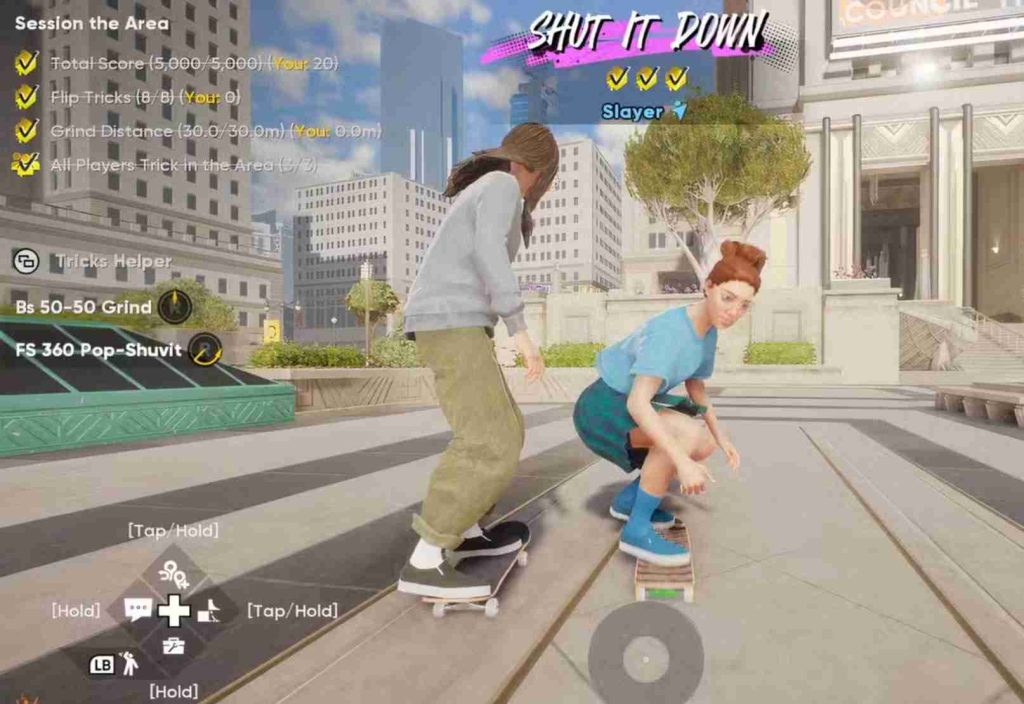
On platforms like Reddit and Discord, users report that event progress doesn’t sync properly between sessions, causing the Skate event progress bug to reappear after login. Some even experienced missing or reset tasks, suggesting a possible Skate Event 2 progress sync glitch related to server communication failures.
The bug seems most active following the 29 October 2025 update, which introduced new seasonal objectives. For now, players have tried temporary fixes like restarting, reconnecting EA accounts, or completing another random challenge to refresh the system. However, until an official fix is deployed, the Skate Event 2 reward claim issue continues to block progression for most users.
How to Fix Skate. Event 2 Tasks Bug and Claim Your Rewards
If you’ve completed all challenges but still can’t claim rewards, you’re not alone. Many players are dealing with the Skate Event 2 tasks bug that stops the claim button from responding or resets progress entirely. The good news? There are several effective ways to work around this issue until an official fix arrives. Below are ten proven methods to restore progress and successfully claim your Skate Event 2 rewards.
1. Restart the Game and Refresh Event Tracking
A simple restart often helps the system resync your Skate Event 2 tasks with the servers. After rebooting, wait a few minutes before opening the event tab again. Some players found that this refresh allowed the Skate Event 2 claim button to appear active after previously being grayed out.
This also helps when the Skate event progress bug prevents newly completed tasks from updating.
2. Check EA Server Status Before Trying Again
The Skate Event 2 claim issue is often linked to temporary EA server downtime. Visit the official EA Help or Skate status page and check if the live service is active.
If servers are under maintenance or congested, progress tracking and claim functions won’t work properly. Waiting for the servers to stabilize can restore your Skate Event 2 task rewards without losing data.
3. Avoid Claiming Rewards Immediately After Completing Tasks
Many players rush to claim rewards as soon as the final task completes, which sometimes triggers the Skate Event 2 glitch. Wait at least 60 seconds before pressing “Claim.” This gives the backend enough time to sync your progress, avoiding the Skate tasks not saving progress issue.
Patience often prevents claim failures or invisible reward errors.
4. Log Out and Back Into Your EA Account
A desync between your local profile and EA account may cause your Skate Event 2 tasks not working properly. Log out, fully close Skate, then log back in.
This refreshes your authentication token, which may fix bugs related to the Skate event reward claim issue and missing progress. Players on Epic Games have found this especially useful after updates.
5. Verify Game Files on Epic Games or EA App
If your Skate event tasks completed but not claimable, corrupted local data might be interfering. Open your Epic Games or EA App launcher, right-click Skate, and choose “Verify Files.”
This process scans for missing or broken files, repairing those linked to event tracking or reward claiming. Many PC players confirmed that verifying files restored Skate Event 2 progress successfully.
6. Avoid Using Quick Resume (Console Users)
Console players using Quick Resume may notice Skate tasks not updating or saving between sessions. Always close Skate completely before returning later. Quick Resume can interrupt the game’s event synchronization, leading to missing or incomplete task logs.
Restarting the game fresh ensures your Skate Event 2 challenge progress is saved correctly.
7. Complete an Additional Challenge to Trigger Sync
If your Skate Event 2 claim button not working, try completing one more random challenge or replaying a previously completed one. This often triggers a background sync with EA servers and makes the reward available again.
This workaround has been one of the most effective player-discovered fixes for Skate Event 2 progress bugs.
8. Avoid Changing Platforms or Devices Mid-Event
Switching from PC to console or vice versa during an event can break tracking. The Skate seasonal tasks not unlocking issue often appears when your EA ID syncs differently across platforms.
Stick to one platform for the entire event, and if you must switch, ensure both devices use the same updated version of Skate.
9. Clear Local Cache and Saved Data (Without Deleting Progress)
Clearing cached data can resolve hidden file conflicts. On PC, delete temporary cache folders in “Documents > Skate.” On console, power down completely and restart.
This clears stuck event trackers without erasing your main save, resolving Skate event tracker bugs that stop progress from saving or rewards from appearing.
10. Reinstall the Game as a Last Resort
If nothing else works, reinstalling Skate may reset the event tracking system. Be sure to back up your settings first. After reinstalling, log in with your EA account and recheck your Skate Event 2 tasks.
Players who faced a persistent Skate Event 2 progress reset after the October 29 patch found this step restored full task functionality.
Bonus Tip: Report the Bug for Direct Developer Fixes
Head to the official Skate bug report page or EA Answers HQ and share details like your platform, date, and event progress. This helps developers identify patterns in the Skate Event 2 claim issue and roll out targeted patches faster.
Providing screenshots or short clips strengthens your report and ensures quicker acknowledgment.
These methods have helped hundreds of players restore missing progress or claim previously locked rewards. While the Skate Event 2 tasks bug remains one of the most frustrating technical issues in recent updates, community-shared solutions and EA’s ongoing investigation give hope that a permanent fix is on the way soon.
11. Switch to a Stable Internet or Wired Connection
Unstable internet often prevents Skate from syncing progress with EA servers, causing the Skate Event 2 claim issue or “tasks not updating” errors. Try switching from Wi-Fi to a wired connection or a more stable hotspot.
Players on unstable networks frequently see the Skate Event 2 tasks bug where progress saves locally but never syncs to the event tracker. A consistent connection ensures data is correctly uploaded, enabling reward claiming without delay.
12. Change DNS Settings for Better Server Sync
If your Skate event progress not saving persists, adjust your DNS settings. Switching to Google DNS (8.8.8.8 / 8.8.4.4) or Cloudflare DNS (1.1.1.1) can improve server handshake reliability.
This fix helps the EA backend recognize your Skate Event 2 challenge completions more quickly, especially if you’re on Epic Games or a console network where routing issues are common.
13. Complete Tasks in Smaller Batches
Instead of doing all event tasks in one session, try completing them in small batches and returning later. Many users found that doing 2–3 challenges at a time reduces the Skate Event 2 progress bug or “claim button not working” issue.
This prevents event data from overloading during synchronization and helps keep your Skate Event 2 tasks visible in the tracker.
14. Avoid Editing or Canceling Challenges Mid-Progress
Interrupting or canceling event challenges midway can lead to the Skate Event 2 glitch that marks tasks as completed but unclaimable. Let each challenge finish fully before switching to another.
If you cancel one, restart the game to prevent it from corrupting your Skate event mission tracker or losing saved progress.
15. Check for Background App Interference
Overlay or recording tools like Discord overlay, Xbox Game Bar, or Nvidia ShadowPlay sometimes cause Skate Event 2 rewards not showing on PC due to interference with the game’s API calls.
Disable overlays while playing or claiming rewards to prevent the Skate event tracker bug Epic Games players often face.
16. Clear EA App Cache (PC Users)
If you’re using the EA App, clearing its cache can fix the Skate Event 2 claim bug. To do this, open the EA App, click on “Help,” then “App Recovery,” and choose “Clear Cache.”
This resets temporary data that might cause syncing failures or Skate tasks not saving progress after completing Event 2 challenges.
17. Avoid Switching Accounts During the Event
Switching between EA or Epic accounts mid-event can confuse the progress tracker, especially if both have partial completion data. Stick to a single account for the entire Skate Event 2 season.
This resolves the common Skate seasonal tasks not unlocking problem caused by overlapping cloud sync data from different profiles.
18. Wait for Background Sync After Each Session
After completing a few challenges, stay in the main menu for 2–3 minutes before closing the game. This gives Skate enough time to upload your event progress data.
Many players who closed the game instantly after finishing tasks found that the Skate Event 2 challenge glitch deleted unsynced progress. Waiting ensures everything saves correctly before logging off.
19. Temporarily Disable Cross-Play
Some users discovered that disabling cross-play temporarily fixed Skate event challenges bug when rewards failed to appear.
Go to settings → online → cross-play → off. Restart the game, and check your event tab again. This workaround isolates your matchmaking and can stabilize Skate Event 2 task syncing for some players.
20. Monitor Patch Notes and Community Updates
The Skate Event 2 reward claim issue may not be fully resolved until EA releases an official patch. Follow the official Skate Twitter/X page or EA Answers HQ to track updates.
Community reports suggest the developers are aware of the Skate event progress bug (October 29, 2025) and are preparing a fix. Keeping an eye on these updates ensures you’ll know exactly when a stable version rolls out.
Final Tip: Keep Your Game Updated and Linked
Always make sure your Skate build is fully updated and properly linked with your EA account. Outdated builds are more prone to Skate Event 2 sync errors, reward claim bugs, and other seasonal glitches.
By following all twenty fixes, you’ll maximize your chances of restoring lost progress, claiming your hard-earned rewards, and avoiding future Skate event glitches.
Skate. Technical Issue: Completed Tasks Still Locked on Epic Games
Many players on Epic Games are experiencing the Skate Event 2 tasks bug where completed challenges stay locked or unclaimable. Even after finishing all the event goals, the Skate Event 2 claim button remains greyed out, leaving progress stuck in limbo.
This Skate event claim issue often occurs when the game fails to sync completed missions to EA’s servers. Players who switch devices or relaunch the game mid-session report that tasks show as done locally but never register globally.
To make matters worse, some users notice that Skate event rewards not showing on PC persists even after updates — suggesting that it’s a synchronization problem between Epic’s save data and EA’s event tracker system.
Event 2 Glitch Continues to Affect Players Across Platforms
The Skate Event 2 glitch isn’t limited to one platform — it’s hitting players across PC, PlayStation, and Xbox. Reports from the community show that both console and Epic users face the same issue: Skate event progress not saving or completed tasks resetting unexpectedly.
EA’s servers seem to struggle under heavy traffic during event periods, which may explain the Skate event tracker bug and why Skate tasks not saving progress occurs more frequently after updates or restarts.
Some users also noticed that the Skate event challenges bug gets worse when completing multiple tasks in one session without returning to the main menu — hinting at a temporary backend desync.
Why Skate. Is Not Registering Completed Seasonal or Event Tasks
Players who have finished their Skate seasonal tasks or Event 2 challenges are puzzled as to why progress isn’t reflected in the tracker. The reason is likely a combination of server synchronization lag, cache corruption, and account linking errors.
When the Skate Event 2 tasks not working bug triggers, the game may show “completed” locally but fail to push that update to the EA cloud. As a result, rewards remain locked, and the Skate event claim bug prevents players from redeeming earned cosmetics or in-game currency.
Reinstalling the game or logging out and back into your EA account has helped some users, but others report the Skate event reward claim issue reappearing after every session. Until an official patch is released, this glitch continues to make Skate Event 2 nearly impossible to finish for many players.
Players Report Ongoing Problems With Skate. Event Rewards System
Across Reddit and EA Answers HQ, frustrated players are voicing their concerns over the Skate Event 2 rewards system. Many claim they’ve completed every objective yet can’t claim a single reward — calling it one of the most disruptive Skate event glitches since launch.
Players have posted screenshots showing their Skate event missions completed but stuck, along with missing cosmetics and event points. This has led to growing tension within the community, as creators and skaters alike lose motivation to participate in new seasonal challenges.
Despite temporary workarounds like clearing cache or verifying files, the Skate event progress bug remains persistent for thousands. The player base now eagerly awaits a fix that restores fairness and functionality to the game’s live events.
EA Community Threads Fill Up With Event 2 Claiming Errors
The EA Answers HQ and Reddit threads are now overflowing with complaints about the Skate Event 2 tasks bug. Players are sharing screenshots of finished challenges showing as incomplete, missing rewards, and the Skate Event 2 claim button not working even after multiple retries.
Many report that the Skate Event 2 tasks completed but not claimable issue began after the latest update, suggesting a backend sync or patch regression. The Skate event tracker bug has turned what should be a fun seasonal grind into a frustrating technical problem.
EA community moderators have acknowledged the posts but haven’t issued a confirmed ETA for a fix. Still, their visibility on the issue gives players hope that the Skate Event 2 glitch is now under internal review by the development team.
Will the Next Skate. Patch Fix the Broken Task Progress Bug?
The big question among players is whether the upcoming patch will finally resolve the Skate event progress bug. Based on previous updates, EA tends to bundle event fixes with seasonal resets — meaning the next patch could address Skate Event 2 rewards not showing on PC and Skate event claim issues together.
Developers have already released small hotfixes for stability and replay systems, so the expectation is that Skate Event 2 challenge glitches and Skate event mission stuck bugs will be tackled next.
Players are encouraged to report detailed feedback through official channels, including event timestamps, platform info, and screenshots. This helps the QA team replicate the Skate Event 2 tasks not working bug more accurately for a permanent resolution.
What Players Can Expect From Upcoming Skate. Updates and Fixes
Looking ahead, EA is expected to roll out a patch addressing multiple ongoing technical issues — from Skate Event 2 claim bugs and task progress not saving to replay and server synchronization glitches.
The next seasonal refresh might also include backend improvements to prevent Skate event challenges bugs from recurring. Developers could introduce better task tracking or live-syncing systems to ensure that completed objectives register instantly.
Community members are hopeful that with growing visibility across platforms, EA will not only fix Skate Event 2 glitch issues but also enhance reward tracking across future events.
For now, players are advised to log in daily, double-check event progress, and keep updated through official EA forums — until the long-awaited Skate Event 2 fix patch restores normal functionality and fair progression for everyone.