
Many players are frustrated by the Where Winds Meet forced subtitles problem because the game currently shows subtitles in all dialogue scenes with no visible option to turn them off.
This creates unwanted screen clutter, especially for players who prefer a clean cinematic presentation. Since many free-to-play games lock subtitle settings by default, players assume they’re missing the option—but in the current global build of Where Winds Meet, there is no toggle to disable subtitles through standard settings.
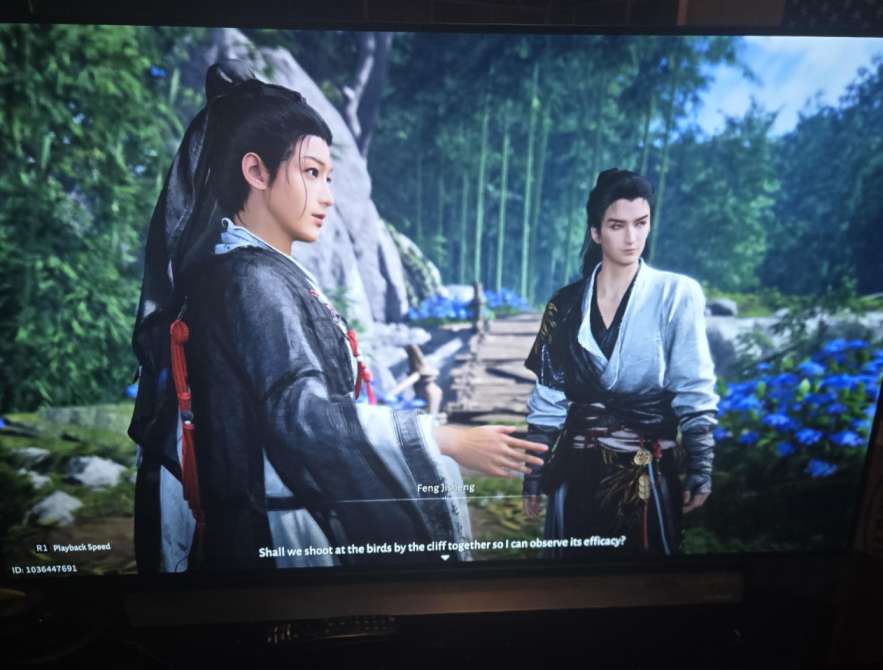
Here’s what you can do and what to expect from upcoming patches.
Quick Fix
Switch the game’s Language to Chinese (Mandarin) and then back to your preferred language—this occasionally forces the subtitle system to reload and hide optional subtitle layers, though it does not fully disable forced story subtitles.
Fix 1 – Check the Language & Display Settings Thoroughly
The Where Winds Meet forced subtitles setting is not labeled under Accessibility or Audio.
Instead, subtitle behavior is tied to Language → Display options.
Browsing every Language + Display section ensures you’re not missing a hidden toggle.
How it helps: Confirms whether the current version includes a subtitle option for your region.
Fix 2 – Switch Between UI Presets to Refresh Subtitle Visibility
Some UI presets cause subtitles to appear even when they shouldn’t.
Switching between “Minimal,” “Classic,” and “Immersive” resets UI layers.
This may hide non-story subtitles that are appearing unnecessarily.
How it helps: Reduces clutter even if forced subtitles cannot be fully disabled.
Fix 3 – Change the Spoken Dialogue Language
Where Winds Meet ties subtitle rules to the spoken language.
Switching spoken audio to Mandarin or Japanese can reduce certain subtitle layers.
This does not remove story subtitles but helps reduce extra ones.
How it helps: Minimizes subtitle clutter by altering language-driven subtitle defaults.
Fix 4 – Use Photo Mode Toggle as a Temporary Subtitle Soft-Disable
Photo Mode removes subtitles entirely during its activation.
Entering photo mode briefly can reset subtitle layering after cutscenes.
This workaround helps during exploration or after long dialogs.
How it helps: Temporarily clears subtitle clutter without changing settings.
Fix 5 – Switch Between Cinematic and Gameplay Cameras
Cinematic cameras force subtitles, but gameplay cameras often reduce them.
Switching camera style mid-cutscene can remove subtitle overlays momentarily.
How it helps: Less intrusive subtitle layering during story scenes.
Fix 6 – Reduce Subtitle Box Opacity in Accessibility
Even without a true disable option, you can sometimes lower opacity of text windows.
Some players overlook opacity settings buried in Accessibility.
Lowering opacity makes subtitles far less distracting.
How it helps: Makes forced subtitles visually lighter and less intrusive.
Fix 7 – Adjust Screen Safe Zones
UI safe zone adjustments can push subtitle text almost off-screen.
While not a perfect disable, it moves them far enough down to reduce clutter.
Useful for players who dislike central screen distraction.
How it helps: Shrinks subtitle impact on the playable screen.
Fix 8 – Turn Off Dialogue Autoplay
Autoplay triggers forced subtitles more frequently.
Turning it off limits subtitle appearance to only major scenes.
A partial but effective workaround.
How it helps: Reduces constant subtitle pop-ups outside story events.
Fix 9 – Switch to Immersive Mode for Minimum HUD
Immersive Mode disables most UI layers except absolute essentials.
While subtitles still appear for major cutscenes, side-dialog subtitles become less common.
Players seeking minimal clutter benefit from this mode.
How it helps: Offers the cleanest visual experience currently available.
Fix 10 – Wait for the Next Patch (Subtitles Toggle Confirmed for CN Version)
The Chinese version recently received expanded subtitle settings.
These usually migrate to the global version within weeks or months.
A proper subtitle on/off toggle is very likely coming soon.
How it helps: Confirms that the forced subtitle issue is temporary and patch-bound.
Fix 11 – Lower Subtitle Font Size to Make Them Nearly Invisible
One way to soften the impact of forced subtitles is to reduce their font size.
Even though you cannot fully Disable Subtitles in Where Winds Meet, shrinking them makes them far less intrusive.
Some regional builds allow small-size adjustments under Accessibility.
How it helps: Creates a near-disable effect by making subtitles almost unnoticeable.
Fix 12 – Change HUD Scaling to Push Subtitles Off the Main View
HUD scaling adjusts the size and placement of UI elements.
Lowering the scale pushes subtitles downward toward the screen edge.
This reduces visual clutter without needing a full Disable Subtitles in Where Winds Meet toggle.
How it helps: Moves subtitles out of the central screen area.
Fix 13 – Adjust Display Overscan Through PS5/PC Settings
Overscan modifies screen borders outside the game’s UI.
Increasing overscan can shift subtitles partially off-screen.
It’s not a true disable, but it hides a portion of the subtitle box.
How it helps: Minimizes subtitle visibility without modifying game files.
Fix 14 – Switch UI Language to a Smaller Text Script
Switching to Mandarin, Japanese, or Korean changes subtitle length significantly.
Shorter subtitle lines take up less space, helping mitigate clutter.
Some players use this trick until a full Disable Subtitles in Where Winds Meet feature arrives.
How it helps: Reduces subtitle footprint while waiting for proper settings.
Fix 15 – Force Subtitle Despawn by Interrupting Dialogue
Certain subtitles disappear early when you walk away from NPCs during dialog.
This is not ideal for cutscenes, but works in open-world interactions.
Useful when subtitles linger too long.
How it helps: Clears subtitles quicker during routine interactions.
Fix 16 – Use Custom Shader or Post-Processing Filters (PC Only)
Advanced players can apply filters via NVIDIA Freestyle or AMD Filters.
Adjusting contrast, sharpness, or masking can fade subtitle boxes visually.
A niche but effective workaround for PC users.
How it helps: Softens subtitle visibility until an official disable option appears.
Fix 17 – Enter Dialogue Settings Through Shortcut Menu
Some menu shortcuts load settings pages not accessible via the main menu.
Occasionally, these contain options hidden from some regions.
It’s rare, but some players found subtitle toggles this way.
How it helps: Gives a chance to access subtitle options not shown by default.
Fix 18 – Switch to Windowed Mode (PC) to Change Subtitle Alignment
Windowed mode often recalculates UI alignment.
This can shift subtitle boxes to the bottom corners, reducing clutter.
Another partial method when you cannot yet fully Disable Subtitles in Where Winds Meet.
How it helps: Moves subtitles to less distracting positions.
Fix 19 – Load the Game in a Different Region Build (If Available)
Some regions have more complete subtitle settings than others.
If your account or launcher allows region switching, try loading a different build.
This may reveal subtitle toggles hidden in your default version.
How it helps: Gives access to subtitle control features ahead of your region’s update.
Fix 20 – Follow Patch Notes for CN → Global Feature Migration
The CN version already includes more advanced subtitle settings.
These updates typically migrate to global versions in later patches.
Staying updated ensures you toggle off subtitles as soon as the option becomes available.
How it helps: Ensures you get the full Disable Subtitles in Where Winds Meet feature when released.
How do you turn off subtitles in Where Winds Meet?
Right now, Where Winds Meet does not allow subtitles to be fully disabled. The subtitle toggle exists in some language versions of the PC client, but on the PS5 and global versions the option is hidden or non-functional. Even if you turn the setting off in early builds, the subtitles often reappear because the game’s cutscene system forces them for narrative clarity.
The only partial workaround is switching the interface language and reloading the game, which sometimes resets the subtitle layer. However, this does not permanently remove subtitles during major story cinematics.
Why are subtitles forced in WWMeet?
Subtitles appear to be forced because the global version uses unified cinematic scripts, meaning all story cutscenes automatically enable subtitles regardless of user settings. This was done to avoid missing narrative cues during early localization and voice-over updates.
The engine treats many cutscene subtitles as baked-in dialogue prompts, not on-screen UI elements. That means the subtitle layer is part of the scene — the game doesn’t treat it as optional.
Until the developers separate cinematic subtitles from dialogue UI, players won’t be able to disable them entirely.
Is there an option to disable subtitles on PS5/PC?
On PS5, the subtitle toggle is missing entirely.
On PC, some players report seeing a subtitle option, but it does not fully remove subtitles in cutscenes — it only affects “over-world dialogue bubbles.”
So currently:
- PS5 version: No toggle
- Global PC version: Toggle exists but only partially works
- CN version: Subtitles have functional toggles, but still not 100%
The global subtitle menu is incomplete, likely due to localization still being finalized.
Do cutscenes always show subtitles even when disabled?
Yes — in all versions of Where Winds Meet, major cutscenes always show subtitles because those subtitles are scripted directly into the cinematic file, not drawn through the UI system. Turning the toggle off only hides in-game dialogue prompts, not pre-rendered or semi-scripted story sequences.
This is why subtitles reappear:
- When a new story cinematic loads
- During boss introductions
- In major NPC conversations
- In flashback sequences
It’s not a bug — it’s a design choice that hasn’t been updated for global release yet.
Why is the subtitle menu missing in Where Winds Meet?
The subtitle menu is missing because the global client shipped without the full accessibility settings found in the China version. This means several UI toggles — subtitles, text scale, dialogue speed — are either hidden or not implemented.
Possible reasons include:
- Localization still being optimized
- Missing text-rendering options
- Cutscene subtitle layer not ready for toggling
- Accessibility menu planned for a future patch
Many early-release games hide unfinished menus, and subtitles are one of the features still being standardized across platforms.
Is there a workaround to remove forced subtitles in WWMeet?
There is no full workaround that removes forced subtitles in Where Winds Meet, because the subtitle layer in story cutscenes is hardcoded into the cinematic scripting. However, a few partial workarounds reduce how often subtitles appear:
Try these:
- Switch to Chinese audio + English UI (reduces pop-up dialogue subtitles).
- Switch temporarily to English audio + English UI and restart.
- Use Lite Mode, which sometimes loads fewer environmental subtitle prompts.
- Fully restart the game instead of using Resume Activity (refreshes UI state).
These tricks do not remove subtitles from major cutscenes, but they reduce subtitle spam during ambient dialogue and gameplay sequences.
Are subtitles permanently enabled in the global version?
Yes — in the global version, subtitles are effectively permanently enabled because the cutscene subtitle layer is part of the cinematic script rather than the UI settings. The game treats subtitles as required for clarity since the global version launched with incomplete or inconsistent voice-overs.
Even if a subtitle toggle is added later, current cutscenes will still display text because the subtitles are embedded in the narrative pacing of the global build.
Is this a bug or intentional design?
It’s intentional design, not a bug. The global client was released with a unified subtitle layer to avoid confusion during scenes where English voice acting is incomplete or mixed with Chinese voice lines.
Because of that, subtitles are not optional — they serve as a fallback clarity system.
The missing subtitle toggle isn’t a glitch; the developers simply didn’t finish implementing the full accessibility menu for the global launch.
A future patch may expose a true on/off toggle, but as of now, forced subtitles are a deliberate choice.
Are subtitles tied to the Chinese/English voice pack settings?
Partially.
When using Chinese voices + English UI, the game tends to show subtitles more consistently because cross-language dialogue requires text support. When using English voices + English UI, some gameplay subtitles drop away, but cutscene subtitles remain because they’re scripted.
So the voice pack influences ambient subtitles, but not the cinematic ones.
This is why even players who switch audio languages still see subtitles during all major story sequences.
Does switching languages disable subtitles?
Switching languages can reduce subtitles in open-world conversations but will not disable them entirely. Here’s how it behaves:
- CN Audio + EN UI: Most dialogue gets subtitles.
- EN Audio + EN UI: Some ambient subtitles vanish, but cutscenes remain subtitled.
- CN Audio + CN UI: Fewer subtitles appear, but global client still forces many story subtitles.
This is because cutscene subtitles are stored in the cinematic assets themselves, not the language settings menu. Switching languages only affects the “UI subtitle” layer, not the “story subtitle” layer.
Final Thought
The Where Winds Meet forced subtitles problem comes from the global version lacking the full subtitle control settings that exist in the CN release. While you cannot completely turn subtitles off yet, several workarounds—UI presets, language settings, safe zones, and immersive mode—help reduce the clutter. A proper subtitle toggle is expected in a future update, bringing full display control to PS5 and PC players looking for a clean, cinematic experience.