
You’re cruising through Pandora, feeling good… and then the game hard-stops you because you’re stuck with stun grenades.
The quest A Blessing wants explosive grenades, the crate is right there, and the game just keeps saying “pouch is full.”
Yeah — frustrating. You’re not doing anything wrong.
Here’s the simple truth and the fix, explained the way the game should have.
This is one of those moments where the game doesn’t clearly explain its own systems, and it ends up feeling like you missed a menu or skipped a tutorial. You didn’t.
The problem isn’t your timing, your loadout, or your progress — it’s how grenade types are handled behind the scenes.
Once you understand what’s actually blocking you, the solution is straightforward and only takes a minute or two to fix.
No obscure settings, no hidden controls, just a small but unintuitive step the game never properly calls out.
First, the important part (read this).
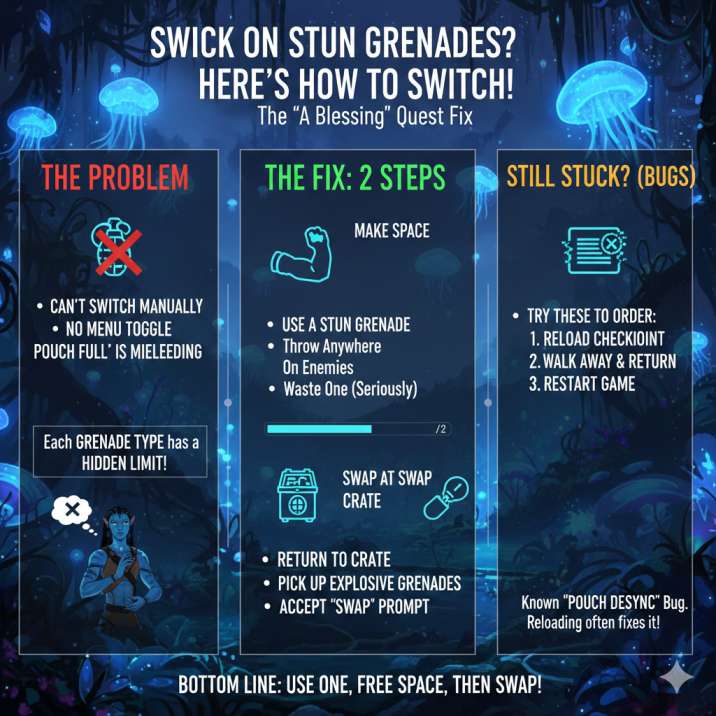
In Avatar: Frontiers of Pandora, you cannot manually switch grenade types from a menu. There simply isn’t an option for it anywhere in the UI, even though it really feels like there should be.
There’s:
- no inventory toggle
- no “change grenade” button
- no weapon mod screen for grenades
Grenade types are controlled only by how much space you have in your pouch and what grenade crates you interact with in the world. The game won’t automatically replace one grenade type with another, and it doesn’t warn you that this is how the system works. Once you understand that grenades are locked behind pouch limits and crate swapping — not menus — the whole issue suddenly makes a lot more sense, even if it’s still pretty annoying.
Read also: Avatar: Frontiers of Pandora Stuck After the Intro?
Why you’re stuck on stun grenades
Even if your pouch looks empty, grenades in Avatar: Frontiers of Pandora have hidden, per-type limits that the game never clearly explains.
So when the game pops up the message:
“Pouch is full”
what it usually means is:
- your stun grenade slot has hit its cap
- the game won’t automatically overwrite one grenade type with another
- the UI does a poor job showing individual grenade limits
Because of that, it feels like the game is bugged or broken when it isn’t — it’s just extremely unclear. This exact issue shows up for a lot of players during the A Blessing quest, since that mission suddenly expects you to switch to explosive grenades without ever explaining how the system works.
Read also: From the Ashes DLC Keeps Crashing? Avatar: Frontiers of Pandora: Solved
How to switch to explosive grenades (the actual fix)
This is the part the game never explains, but once you know it, the solution is simple.
Step 1: Get rid of your stun grenades
You need to force space in the pouch before the game will let you take a different grenade type.
Do any one of the following:
- Throw a stun grenade anywhere
- Use one on enemies
- Waste one on purpose (yes, really)
As soon as at least one stun grenade is gone, the pouch is no longer capped and can accept another grenade type.
Step 2: Go back to the explosive grenade crate
Now return to the grenade crate the quest points you to.
At this point:
- You’ll either be able to pick up explosive grenades normally
- Or you’ll see a “Swap” prompt — accept it
That’s the swap. That’s the whole system. No menus, no hidden settings — just pouch space and crate swapping working exactly as the game expects, even if it doesn’t explain it well at all.
If it still says “pouch is full”
This is where the game gets a little janky.
Try these fixes in order:
- Reload the last checkpoint
- Walk away from the crate and come back
- Restart the game entirely
There’s a known pouch desync bug where grenade counts don’t update properly, and a reload usually clears it.
Quest tip: “A Blessing”
This quest requires explosive grenades to progress — there’s no workaround or alternate solution here.
Stun grenades will not work, no matter how many times you try or how creative you get.
Even though the game places a grenade crate right in front of you, the crate will not auto-replace the grenades you’re currently carrying, which is where most of the confusion comes from.
If your pouch is already capped with stun grenades, the quest will effectively stall without clearly telling you why.
The objective won’t update, enemies won’t react the way you expect, and it can feel like the mission is bugged. In reality, if you don’t manually free space in your grenade pouch first, the quest simply won’t progress — simple as that, and unfortunately not explained by the game at all.
Quick FAQ
Can I switch grenade types from the inventory?
Nope. Grenades don’t work like weapons or ammo, and there’s no inventory option to toggle between them. Even though it feels like there should be a simple switch somewhere, grenade types are completely separate from the usual loadout and weapon systems, which is why so many players go looking for a menu that doesn’t exist.
Why doesn’t the crate override my stun grenades?
Because grenade types are capped individually, not globally. The game treats stun grenades and explosive grenades as separate categories, and it won’t automatically replace one with the other. If your stun grenade slot is full, the crate will refuse to give you explosives until you free up space yourself.
Is this a bug or intended?
Honestly, it’s a bit of both. The system itself seems intended, but the UI and in-game explanations are… not great, which makes it feel broken when it really shouldn’t.
Bottom line
If you’re stuck on stun grenades, the fix is straightforward once you know how the system works.
You don’t need to hunt through menus, respec your gear, or reload an old save because you missed something earlier. Just use one stun grenade, which will free up pouch space, and then go back to the grenade crate and grab or swap for explosive grenades. That’s the entire process.
There’s no hidden option, no advanced mechanic the game forgot to explain, and no special requirement tied to the quest itself.
The game simply doesn’t auto-replace grenade types and doesn’t clearly show per-type limits in the UI. It feels confusing and abrupt, but once you force that bit of space in your pouch, everything clicks and the quest moves forward as intended.