
So you’re sitting there, 200 Lucky Money short, staring at the Face Chest like it personally insulted you.
Yeah — you’re definitely not alone. A lot of players hit this exact wall and start wondering if they missed something obvious or if the quest is just straight-up bugged.
The Social Butterfly quest in Where Winds Meet sounds simple on paper, but the game does a pretty poor job of explaining how it actually works.
Between confusing Velvet Shade requirements, unclear article referral mechanics, and some genuinely messy UI design, it’s easy to think something’s broken when it isn’t.
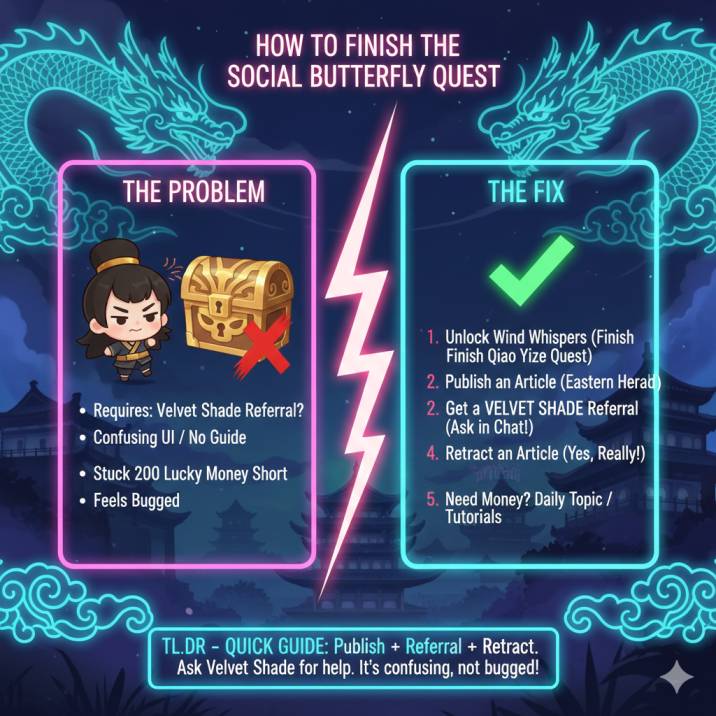
The good news? It’s not bugged at all — it’s just badly explained.
This guide breaks everything down in a clean, no-nonsense way so you can finish the quest quickly, grab that Face Chest, and move on without wasting any more time.
What the Social Butterfly Quest Actually Wants
At its core, the Social Butterfly quest is way simpler than the game makes it seem. Everything boils down to just two objectives, and once you understand them, the whole thing clicks into place.
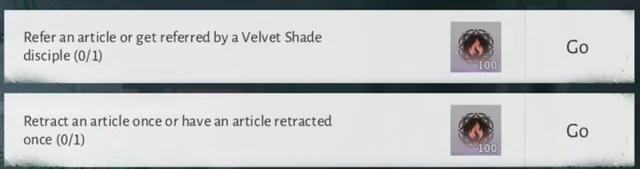
First, you need to get an article referred by a Velvet Shade disciple. That means someone from the Velvet Shade faction has to interact with your published article through the Wind Whispers system. You don’t need to join their faction yourself — you just need their help.
Second, you need to retract an article once. That’s it. No hidden steps, no secret requirements, no extra conditions.
Everything else — unlocking Wind Whispers, publishing an article, navigating the menus — is just setup to make those two actions possible. Once both are done, the quest completes, and your Lucky Money reward is yours.
Step 1: Make Sure Wind Whispers Is Unlocked
Before anything else will work, you need access to Eastern Herald → Wind Whispers. This system is required for every part of the Social Butterfly quest, and nothing will progress without it.
If you’ve already completed the Correspondent / Windpress questline and published at least one article before, you’re all set and can move on to the next step. You don’t need to redo anything.
If not, head over to Kaifeng and start the introductory questline involving Qiao Yize. This series of quests introduces the newspaper system and teaches you how article publishing works. Once that’s finished, Wind Whispers will unlock permanently, and you’ll be able to create, publish, and manage articles — which is essential for completing Social Butterfly.
Step 2: Publish an Article (This Is Required)
You can’t skip this part — publishing an article is mandatory for the Social Butterfly quest to progress. Even if you’ve done similar content before, the game needs an active, published article tied to this step.
Start by opening Eastern Herald → Wind Whispers. From there, choose Create Article and go through the basic setup. You can use any photo at all — it doesn’t matter what it is — and write a short line of text. It doesn’t need to be clever or detailed; a simple sentence works just fine.
The most important part is making sure you actually publish the article. Saving it as a draft does not count and won’t trigger any quest progress. Once it’s published, you’re ready to move on to the next step.
Step 3: Get a Velvet Shade Player to Refer Your Article
This is the step that confuses most players, mostly because the game never explains it clearly. The important thing to know is that you do NOT need to join Velvet Shade yourself. You just need help from someone who already belongs to that faction.
The easiest way to do this is by using world chat or city chat. Just type something simple like:
“Anyone from Velvet Shade able to refer my Wind Whispers article for Social Butterfly? I can refer back.”
Most players are happy to help, especially if you offer to return the favor. Once a Velvet Shade player interacts with or refers your article through Wind Whispers, the objective should complete almost immediately. If it doesn’t update right away, give it a few seconds or reopen the quest tracker — it usually syncs quickly once the interaction goes through.
Step 4: Retract an Article (Yes, Really)
This part sounds strange at first, but it’s actually one of the easiest steps once you know where to look. After publishing your article, head back into Wind Whispers and open My Articles. You’ll see a list of everything you’ve posted so far.
Select the article you published earlier and look for the Retract or Withdraw option. Once you choose it, the objective should complete immediately — no extra confirmation or waiting required.
If you don’t see the retract option at all, don’t panic. This usually happens when the article is older or didn’t properly register. The fix is simple: publish a brand-new article, then check again. Newer posts almost always show the retract option correctly, letting you finish the step without issues.
Read also: How to Check Food Buffs in Where Winds Meet (Buff Icon, Tooltip & Status Effects Explained)
Still 200 Lucky Money Short?
If you’ve completed the main Social Butterfly steps and you’re still just short of the Face Chest, don’t worry — there are a couple of quick and reliable ways to close the gap.
✔ Do the Daily Topic (if available)
Some days rotate into a Prize Quiz instead of a Daily Topic, so if you don’t see it right away, that’s normal. Just wait for the next daily reset and check again. Completing the Daily Topic is one of the fastest ways to grab extra Lucky Money with almost no effort.
✔ Finish the Eastern Herald tutorial steps
If you skipped or rushed through parts of the tutorial earlier, go back and finish them. These steps often reward small amounts of Lucky Money, and those small amounts add up quickly — usually enough to push you over that final 200 mark.
Between these two options, you’ll get what you need without grinding or guessing.
Common Problems (And Fixes)
If something doesn’t seem to be working, don’t panic — most issues with the Social Butterfly quest come down to small UI quirks or timing.
“My article isn’t showing up.”
This usually means it was saved as a draft instead of being published. Go back into Wind Whispers and double-check that the article is actually live. Drafts don’t count for any quest progress.
“The referral didn’t count.”
Make sure the player who interacted with your article is actually part of Velvet Shade. If they are and it still didn’t update, try reopening the quest menu or restarting the game — the update sometimes lags.
“I can’t find the Daily Topic.”
Daily Topic rotates with other activities like Prize Quiz. If it’s missing, just wait until the next daily reset.
“Is this quest bugged?”
No — it’s just poorly explained. Once the steps are done correctly, it works every time.
Quick FAQ
Do I need to join Velvet Shade?
No, you don’t need to switch factions or permanently join Velvet Shade at all. You only need help from one player who is already a member. As long as a Velvet Shade player refers your article, the requirement is satisfied. You can stay in your current sect without any penalties or changes.
Can I do this quest completely solo?
Mostly, yes — with one small exception. Everything else can be done alone, but the article referral step requires interaction with another player from Velvet Shade. Once that part is done, the rest is fully solo-friendly.
How long does the whole thing take?
Once you know what to do, the entire process takes around 10 minutes, sometimes even less. Most of the time spent is just navigating menus or waiting for a quick referral.
Is the Face Chest actually worth it?
Yes. It’s a limited, time-gated reward that isn’t always available. If you care about cosmetics or completion, it’s absolutely worth grabbing while the event is active.
Read more articles on WWM:
- Twin Lions Lantern Mechanic Explained (Where Winds Meet)
- Where Winds Meet Unlock Kaifeng Not Getting Currency – Missing Rewards & Daily Topic Challenge Fix
- Planting Datura Injustice Quest Won’t Complete (Where Winds Meet)