
You die in a cave, rush back to your grave marker… and it’s empty.
No loot. No backpack. Just pain.
If you’re wondering whether you’re supposed to be able to pick up lost items after death in Hytale — yes, you are. Under normal circumstances, the game expects you to return to your death location and recover what you dropped.
However, if your grave marker has nothing there, it’s usually not a bug or glitch.
It’s how Hytale’s death mechanics currently work, and they’re a little harsher than most players expect, especially during early or mid-game exploration.
The grave marker itself does not store your items. It simply shows where you died. Your dropped items exist in the world and follow despawn rules, meaning they can disappear if you take too long, die again, or miss the exact location — particularly in caves with vertical depth.
Let’s break it down clearly so you know what happened — and how to avoid it next time.
How Item Recovery After Death Works in Hytale
When you die in Hytale, several things happen at once, and understanding this sequence is key to knowing why items sometimes feel like they disappear.
- Part of your inventory is dropped on death
- Your equipped gear takes a durability hit
- A grave marker appears on your map to show where you died
Here’s the key detail many players miss:
👉 The grave marker does NOT store your items.
It only shows where you died, not where your items are saved or contained.
Your dropped items exist as world drops, meaning they behave like any other item lying on the ground. They are affected by despawn timers, world loading, and additional deaths. If you take too long to return, die again before recovering them, or miss the exact vertical location—especially in caves—those items can disappear entirely.
This system is intentional and designed to make death recovery time-sensitive rather than guaranteed.
Why Your Grave Marker Is Empty in Hytale
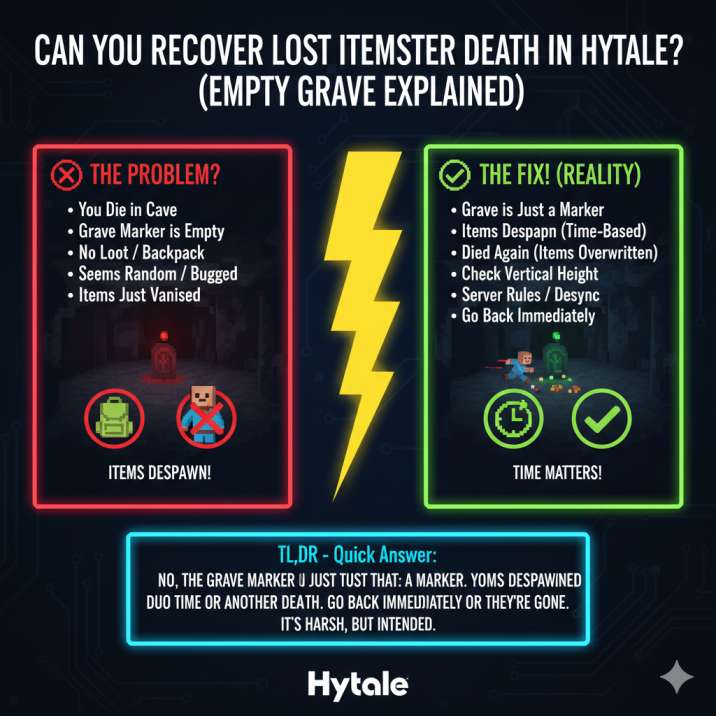
If you went back to your death location and found nothing at your grave marker, one of a few things almost certainly happened. In most cases, the game is behaving as intended, even though it feels punishing in the moment.
1. Your Items Despawned
Dropped items in Hytale don’t last forever. Once they hit the ground, a hidden despawn timer starts. If you take too long to return after dying, those items will despawn automatically and be permanently removed from the world.
This is the most common reason players lose items after death, especially during deep cave exploration or long travel distances. Getting distracted, dying again, or taking a safer but slower route back can easily push you past the despawn window.
Because the grave marker only shows where you died and does not store your loot, it can remain visible even after the dropped items are already gone.
2. You Died Again Before Recovering Them
Multiple deaths in a row are brutal in Hytale, and this is one of the easiest ways to permanently lose your gear.
If you die again before picking up your original loot, the game treats the newer death as the priority event. When this happens:
- The new death can override the previous drop
- Older dropped items may disappear entirely
- The original grave marker may remain visible but lead to nothing
This creates the impression that your grave marker bugged out or failed to load your items. In reality, the system has already cleared or replaced the earlier drops.
This behavior encourages careful recovery instead of reckless corpse runs. Charging back into the same danger without preparation often leads to chained deaths and lost items, especially in caves, hostile biomes, or areas with difficult terrain.
3. You’re at the Right Spot… but the Wrong Height
Caves make death recovery especially confusing in Hytale because vertical depth matters just as much as horizontal position.
The grave icon on your map shows the general location, but it does not tell you the exact height or depth where your items dropped. Because of this:
- Your items could be above you on a ledge
- They could be below you in a lower tunnel
- Digging straight toward the marker can completely miss the actual drop point
This often makes it feel like your items vanished, when in reality they’re just slightly out of reach. This is especially common in tall cave systems, vertical shafts, or multi-layered caverns.
When recovering loot, always check vertically. Dig up and down carefully around the marker, and retrace your original path if possible.
4. World or Server Desync (Rare)
In rare cases, item loss after death in Hytale can be caused by a temporary world or server desynchronization. This happens when the grave marker loads correctly, but the dropped item entities fail to appear or update on your screen.
When this occurs, it can look like your items are gone even though the game hasn’t fully synchronized their state. If you suspect this is happening, there are a couple of quick things worth trying:
- Leave the area and then return to force the chunk to reload
- Reload the world or relog if you’re playing on a server
This doesn’t always fix the issue, especially if the items have already despawned, but it can occasionally cause missing drops to reappear. Because of this, it’s always worth trying once before assuming everything is permanently lost.
5. Multiplayer Server Rules
If this happened while playing on a multiplayer server in Hytale, server rules are very likely the reason your items didn’t appear.
Many servers customize death mechanics to control difficulty, performance, or progression. Because of this:
- Some servers modify how item drops work on death
- Some clear dropped items much faster than the default behavior
- Some don’t allow item recovery at all, especially on harder modes
In these cases, the grave marker may still appear, but it won’t lead to recoverable loot. This can be confusing if you’re expecting single-player behavior.
Always check the server’s rules, documentation, or Discord, or ask an admin directly. If item recovery is disabled or altered, there’s usually nothing wrong with your game — it’s simply how that server is configured.
Read more: How to Fix the “Error Validating Patch 0” Issue in Hytale: Solved
Is This a Bug or Intended Behavior in Hytale?
In most cases, this is intended behavior, not a bug.
Hytale’s current death system is deliberately designed to make dying feel meaningful rather than trivial. The mechanics are built to:
- Punish risky exploration, especially in deep caves or hostile biomes
- Force quick recovery, turning death into a time-sensitive challenge
- Add real danger to mining, combat encounters, and long expeditions
Because of this, an empty grave marker usually means your items were despawned, overwritten by another death, or lost due to recovery timing. It does not typically indicate a broken grave system or a corrupted save.
While bugs can happen occasionally, they are the exception rather than the rule. If your grave is empty, the game is almost always behaving as designed, even if the result feels harsh or unfair in the moment.
What to Do If Your Items Just Disappeared in Hytale
If this just happened and your grave marker is empty, act quickly. There are only a few things that can still help before assuming the items are permanently gone.
First, check above and below the marker. In caves or vertical terrain, your dropped items may be on a ledge or in a lower tunnel rather than at the exact spot you’re standing.
Next, leave the area and come back. Moving far enough away can force the world to reload the area and sometimes causes item drops to appear correctly.
If that doesn’t work, reload the world or relog if you’re playing on a server. This can resolve rare loading or synchronization issues.
Finally, confirm you didn’t die again while returning. If none of these steps work, the items are almost certainly gone.
How to Prevent Losing Items After Death in Hytale
To avoid the frustration of losing your gear after death, it’s important to treat item recovery as a priority, not something you can deal with later.
The most important rule is to go back immediately after dying. Dropped items are time-sensitive, and waiting too long greatly increases the chance they’ll despawn. On your return trip, avoid combat whenever possible. Fighting enemies on the way back often leads to a second death, which can overwrite your original drops.
If you’re exploring dangerous caves or deep underground areas, set respawn points nearby so you can return quickly. Most importantly, don’t chain deaths. Slow down, re-gear if needed, and approach recovery carefully.
If you play on a private server, consider gravestone or death-protection mods, which can store items safely. Always treat death recovery as time-sensitive, not optional.
Quick FAQ – Item Recovery After Death in Hytale
Are you supposed to recover lost items after death in Hytale?
Yes. Under normal circumstances, Hytale allows you to recover dropped items after death as long as you return in time. Item recovery is intended, but it is not guaranteed. If you delay too long or die again before reaching your loot, those items can be permanently lost.
Does the grave marker hold my items?
No. The grave marker does not act as storage or a container. It only marks the location where you died. Your items exist separately as world drops and are affected by despawn timers, terrain, and additional deaths.
Is an empty grave a confirmed bug?
Usually no. In most cases, an empty grave is the result of item despawn timing, multiple deaths, or missing the correct vertical location. While rare bugs can occur, most empty graves are caused by intended death mechanics rather than glitches.
Understanding these mechanics helps avoid confusion — and lost gear — in the future.
Final Take
If your grave marker was empty in Hytale, your items weren’t randomly deleted or erased by some hidden glitch.
They were almost certainly:
- Despawned because too much time passed
- Overwritten by another death before you recovered them
- Or lost due to how Hytale’s death mechanics currently work
The key thing to understand is that the grave marker is only a location indicator. It does not store your inventory, protect your loot, or guarantee recovery. Once dropped, items behave like any other world object and follow strict despawn and overwrite rules.
This system can feel unforgiving, especially during cave exploration or early progression, but it’s intentional. Once you understand that the grave is just a marker — not storage — the death system makes a lot more sense, even if it still punishes mistakes hard.
Read more articles: