
Tracking down decorative blueprints in Subnautica 2 can be surprisingly harder than finding actual survival gear. One minute you’re hunting resources, and the next you’re staring at a random vase wondering if it’s secretly scannable.
If you’re trying to find the Axum Jar blueprint in Subnautica 2, here’s exactly where to look, how to unlock it, and why some players are struggling to find the scan location in Early Access.
How to Unlock the Axum Jar Blueprint in Subnautica 2
To unlock the Axum Jar blueprint, you only need to:
- Equip your Scanner
- Locate an Axum Jar
- Scan it once
That’s it. The blueprint unlock requirement is currently just a single scan.
After scanning the object, the Axum Jar becomes available in your habitat builder menu as a decorative base item.
Players also receive:
- 1x Copper as an extra scan reward
Read also: Black Box Missing in Subnautica 2? Here’s How to Find Your Lost Black Box
Axum Jar Location in Subnautica 2
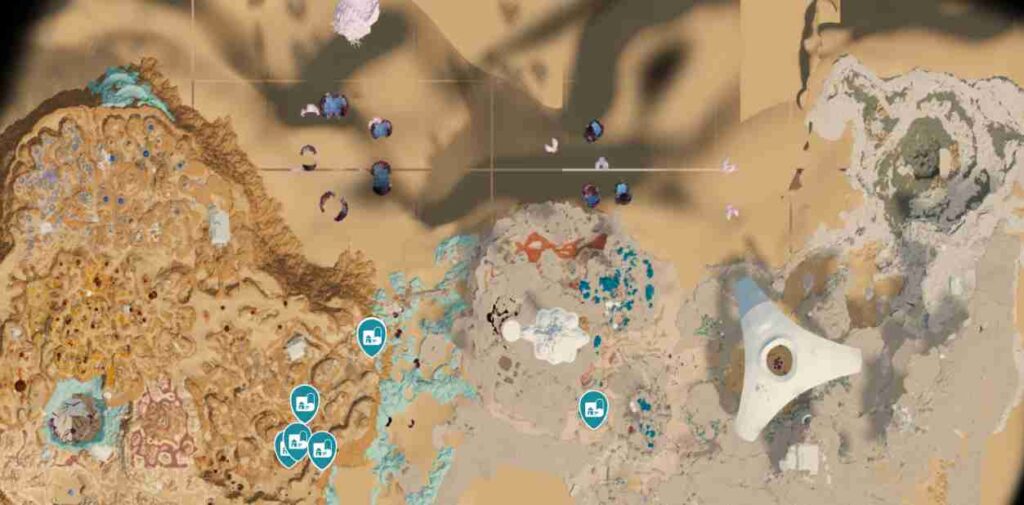
Right now, the most reliable Axum Jar location in Subnautica 2 is inside the Tailing Village biome.
Most players are finding the blueprint object around:
- abandoned habitat interiors
- ruined research rooms
- damaged living quarters
- shelves and tables inside structures
- decorative corners of village ruins
The object itself is fairly small and blends into the environment, which is why many players walk right past it during exploration.
Several community databases and player reports currently mention around seven known spawn points for the Axum Jar scan object, though placements can slightly vary depending on your save and Early Access updates.
What Does the Axum Jar Do?
At the moment, the Axum Jar is mainly a decorative item used for base customization.
Currently, it:
- adds decoration to habitats
- improves interior base design
- can be placed with the Habitat Builder
- has no confirmed gameplay bonus yet
So if you enjoy building detailed underwater bases, it’s mainly a cosmetic unlock for now.
Why Players Cannot Find the Axum Jar Blueprint
A lot of players searching for the Subnautica 2 Axum Jar blueprint location are missing it for a few common reasons.
The Object Blends Into the Environment
The Axum Jar looks like regular environmental clutter, especially in darker ruins.
Decorative Scans Are Easy to Miss
Subnautica 2 hides many decoration blueprints in abandoned structures rather than obvious loot areas.
Early Access Spawn Bugs
Some players report decorative objects occasionally failing to appear properly after loading into a biome.
Multiplayer Desync Issues
In co-op sessions, decorative scans sometimes fail to sync correctly between players.
Best Way to Find the Axum Jar Faster
If you still cannot locate the scan object, these tips usually help.
Search the Tailing Village Slowly
Do not rush through the biome. Most decorative blueprints are hidden indoors.
Scan Every Decorative Object
Even objects that look unimportant may unlock furniture or habitat decorations.
Check Shelves and Tables
The Axum Jar commonly spawns inside living spaces and research interiors.
Reload the Area
Leaving the biome and returning can sometimes fix missing object spawns.
Explore With the Scanner Already Equipped
This makes it much easier to quickly check suspicious objects while looting.
Is the Axum Jar Worth Unlocking?
If you enjoy base building, yes.
While the Axum Jar does not currently provide crafting benefits or survival upgrades, it helps make habitats feel more lived-in and customizable. Decorative blueprints are becoming a bigger part of Subnautica 2’s progression loop, especially for players focused on creative base design.
Final Thoughts
The Axum Jar blueprint in Subnautica 2 is one of the easier decorative unlocks once you know where to search. Your best chance of finding it is inside the Tailing Village ruins, particularly around abandoned interior spaces and damaged habitat structures.
Because Subnautica 2 is still in Early Access, blueprint spawn locations and environmental layouts may change in future patches. If the object does not appear immediately, reloading the area or revisiting the biome later often fixes the issue.