
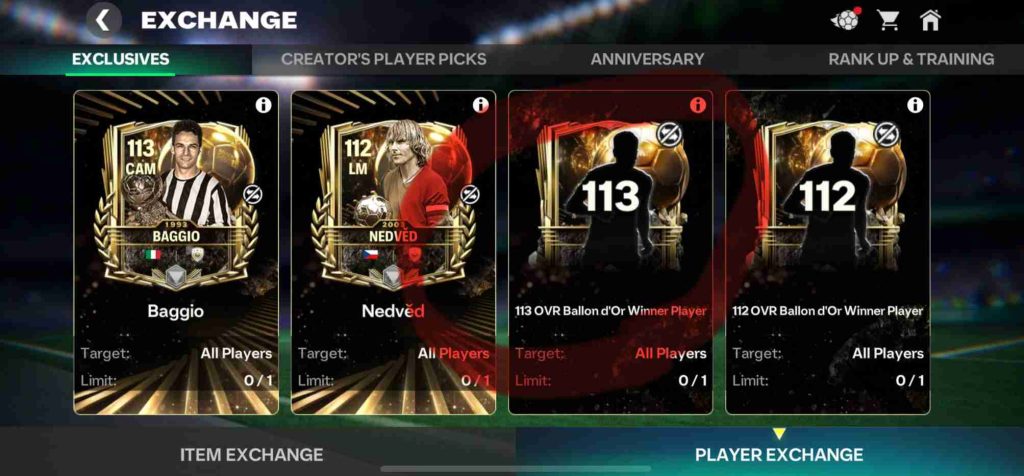
If you’ve tried completing the FC Mobile Ballon d’Or exchange and found that your 113 OVR Zidane isn’t being recognised, you’re not alone. Many players have reported the same Ballon d’Or Exchange Zidane error, where even having a duplicate Zidane card doesn’t make the exchange eligible.
Here’s a common scenario: you own two 113 Zidane cards — one already used in your active squad and another sitting idle in your inventory. Yet, when you open the Ballon d’Or Team A exchange, the game keeps the slot greyed out and says “Ballon d’Or Winner player not recognised in exchange.” This makes it look like a bug, but there’s an important technical explanation.
The Ballon d’Or exchange requirement seems to only accept tradable versions of eligible players — Zidane, Eusebio, or Yashin — and not untradeable duplicates obtained from packs or previous events. If your Zidane is marked as untradeable, it won’t count toward the Ballon d’Or exchange.
This has led many to believe it’s a glitch, but it’s more likely a design oversight in the exchange system. EA FC Mobile sometimes restricts certain exchange events to specific item types, meaning untradeable Zidane cards won’t appear even if you have duplicates.
If the issue persists, try restarting your game, re-syncing your club, or waiting for an EA update to patch the Ballon d’Or exchange not working bug.
What Is the Ballon d’Or Exchange in EA FC Mobile?
The Ballon d’Or Exchange in EA FC Mobile is one of the most exciting limited-time features designed for top-tier players. Found under the “Exclusives” section of the game, this exchange allows you to trade specific Ballon d’Or Winners—such as Zinedine Zidane, Lev Yashin, or Eusébio—for exclusive rewards, upgraded versions, or high-value packs that can significantly boost your Ultimate Team.
The concept behind this exchange is simple: players who already own one of these legendary Ballon d’Or Winners can submit them to receive a unique or enhanced version as a reward. For example, you may be required to exchange a 113 OVR Zidane card to unlock a special-edition Ballon d’Or Zidane with improved stats or custom visuals that are unavailable through regular events or packs.
However, this feature isn’t just a straightforward swap. The Ballon d’Or Exchange often includes specific conditions. Players must submit the correct version and type of the Ballon d’Or Winner—typically a tradable card. If your Zidane, Yashin, or Eusebio is untradeable (earned from past events, SBCs, or login rewards), it might not qualify for the exchange. This is the source of confusion and frustration for many, as the exchange doesn’t always specify these restrictions clearly.
It’s important to note that the Ballon d’Or Exchange is meant to celebrate football’s elite while giving top players meaningful progression opportunities. Yet, due to limited transparency and inconsistent recognition of player cards, many users are encountering issues where the exchange remains greyed out or fails to recognise valid players.
If this happens, don’t worry—it’s a widespread issue that EA is likely aware of. Keep an eye on official FC Mobile updates or EA Help announcements for fixes or clarification regarding Ballon d’Or exchange eligibility rules.
The Issue — Exchange Not Recognising 113 OVR Zidane

Many EA FC Mobile players have reported a frustrating issue with the Ballon d’Or Exchange, specifically when trying to submit a 113 OVR Zidane. Even though they own the required player—sometimes even a duplicate Zidane—the exchange refuses to recognise it, leaving the slot greyed out.
When you open the exchange under the Exclusives section, the slot for “Ballon d’Or Winner Player (Team A)” remains inactive. Tapping on it shows that the exchange accepts Zidane, Yashin, or Eusebio, but when you check your available cards, your 113 OVR Zidane does not appear as a valid option. This happens even if one Zidane is already part of your active squad and the other is sitting unused in your inventory.
The issue appears to affect both base and special versions of Zidane and has led to confusion over whether the card must be tradable or from a specific event release. Many players are finding that untradeable or event-earned versions do not register, even though they meet the overall and player requirements.
This bug effectively blocks progress in the Ballon d’Or Exchange, preventing players from claiming rewards they rightfully qualify for—leaving the exchange unusable until EA resolves the recognition issue.
Possible Causes of the Error — Why the 113 OVR Zidane Isn’t Recognised in the Ballon d’Or Exchange
If your 113 OVR Zidane isn’t appearing in the Ballon d’Or Exchange in EA FC Mobile, you’re not alone. Many players are running into this same frustrating issue where the game simply refuses to detect their eligible card. The good news? There are several logical explanations — and knowing them helps narrow down whether it’s a version mismatch, inventory issue, or a temporary in-game bug. Here’s a full breakdown of what could be causing the problem:
1. Player Version Not Matching the Required Team A Tag
The Ballon d’Or Exchange doesn’t accept any version of Zidane — it specifically looks for players from a particular Team A tag. In this case, even if you own a 113 OVR Ballon d’Or Zidane, it may not match the internal tagging of the exchange requirement. For instance, your version might be a Base Ballon d’Or or Event Zidane, while the exchange only accepts the Team A variant.
EA often releases multiple versions of the same player (e.g., Event Edition, Base, Evolution, or Team A/Team B variant), and only one of them might meet the requirement. This hidden tagging system is what causes the exchange to grey out even though the card appears identical on the surface.
2. Card Is Untradeable or Locked in Your Team
Another common reason your Zidane isn’t showing up is that it’s currently locked or assigned to your active lineup. When a card is either in use — even on your bench — or marked as untradeable, the system restricts it from being used in exchanges.
Untradeable versions, especially those obtained from Ballon d’Or packs or milestone objectives, are often flagged differently by EA’s servers, preventing them from being recognized as valid exchange items. Try removing Zidane from your squad, ensuring he’s fully unlocked, and then checking the exchange again.
3. Card Not Stored in Inventory (Still in Lineup)
Even if your Zidane isn’t marked “locked,” simply being placed in any lineup or formation can block it from appearing as an available exchange item. This is because the system only reads inventory cards, not those assigned to a team setup.
The fix: remove Zidane from all your squads (including reserves), wait a few minutes, and refresh your game. This forces the game to re-scan your collection and might make the card eligible for use.
4. Minor Bug in Exchange Recognition
EA FC Mobile exchanges occasionally fail to sync properly after updates or server maintenance. This can lead to temporary recognition issues, where the game doesn’t detect eligible players even though all requirements are met. Restarting the app, clearing cache, or waiting for a minor patch update can sometimes resolve this automatically.
5. Feature Requires a Specific Variant (Not Base Version)
Lastly, EA may have designed the Ballon d’Or Exchange to accept only a special or upgraded variant — such as an event-specific Team A Zidane — rather than the base version. Many players holding the standard 113 Zidane report that only Team A labeled or pack-earned tradable versions are recognized.
In short, the Ballon d’Or Exchange Zidane error likely stems from a mismatch between your card’s variant or tag and the one the exchange expects. Checking for version type, tradability, and lineup placement are the first steps to troubleshooting — but if all else fails, it’s worth reporting the issue to EA Help for official confirmation or compensation.
Workarounds & Fixes Players Reported for the Ballon d’Or Exchange Zidane Error
If your 113 OVR Zidane isn’t being recognised in the Ballon d’Or Exchange in EA FC Mobile, you’re not alone — hundreds of players across the community have run into the same frustrating glitch. Whether you’re seeing a greyed-out slot, a missing player in the requirement box, or a message saying “no eligible players,” this issue is affecting even those who meet every stated condition.
The good news is that several player-tested fixes and temporary workarounds have been circulating on EA forums, Reddit, and Discord communities. While none of them are officially confirmed by EA yet, many users report that these methods help the exchange recognise Zidane or reset the bug. Let’s go through them step by step so you can try to get your rewards without waiting endlessly for a patch.
1. Remove Zidane from Your Active Lineup and Retry
This is by far the most common and effective workaround.
If your Zidane is currently part of your squad, the game automatically locks it from being used in exchanges — even if it’s not showing as “locked” in your player list. The Ballon d’Or exchange system only detects cards that are in your inventory, not those assigned to any lineup (main team, reserves, or event squads).
Steps:
- Go to your My Team tab.
- Tap on Zidane’s card and remove him from the lineup entirely.
- Make sure he’s not assigned to any other team or active formation.
- Restart the game, then re-open the Ballon d’Or Exchange tab.
Players report that after doing this, the Zidane card finally becomes selectable in the exchange window.
2. Check if the Card Is Untradeable (Untradeables Sometimes Don’t Count)
Another frequent culprit is the card’s tradability status. EA has released different variants of Ballon d’Or Zidane — some tradable, others untradeable (for example, ones obtained from event rewards, login packs, or SBC-like exchanges).
Unfortunately, untradeable versions are often excluded from exchanges that require specific Ballon d’Or winners. This means that even though the card looks identical, the system reads its backend tag as “ineligible.”
What you can do:
- Go to your Zidane card in the player inventory.
- Tap on “Details” and check if it shows Tradable or Untradeable.
- If it’s untradeable, the only current workaround is to wait for EA to patch the exchange or release an update that includes untradeable cards.
Many players have suggested that EA should clearly state these restrictions within the exchange description — but until then, checking the card type is key to understanding why it’s being rejected.
3. Restart the Game and Re-Enter the Exchange Tab
It might sound simple, but it works more often than expected. The EA FC Mobile exchange screen doesn’t always refresh properly after lineup or inventory changes. For instance, if you removed Zidane or made roster updates, the exchange tab might still be showing outdated data.
Here’s what to do:
- Fully close the game (swipe it away from your recent apps).
- Wait a few seconds, then reopen it.
- Navigate back to the Exclusives → Ballon d’Or Exchange section.
- Check if Zidane now appears under the eligible players list.
This quick refresh can force the game to reload your current card data and sometimes resolves temporary detection issues. A few players have even said that doing this after clearing app cache on Android/iOS worked for them immediately.
4. Wait for EA Patch or Official Fix Announcement
As of now, EA has not yet released an official fix, but the issue has been widely reported on EA Answers HQ and across Reddit. Multiple threads titled “Ballon d’Or Exchange Zidane not showing” and “113 Zidane not accepted” are gaining traction, meaning EA is likely aware of the problem.
Here’s why this step matters:
If the issue is on EA’s backend — for example, a mismatch in the Team A tag or an incorrect player ID being referenced by the exchange — then no player-side fix will permanently resolve it. EA will need to patch the exchange requirements or update their tagging system to recognise the correct Zidane variant.
What you can do in the meantime:
- Follow the EA FC Mobile Twitter/X account for patch notes or hotfix updates.
- Check the EA Answers HQ forum daily — mods often pin “known issues” there.
- Avoid attempting the exchange repeatedly to prevent potential bugs or card errors.
If the bug persists beyond a few days, you can submit a support ticket with your in-game ID and screenshot showing your owned Zidane(s). Players who have done this before were later compensated once the issue was fixed.
5. Optional: Reinstall or Update the Game
Some users reported that uninstalling and reinstalling the game helped reset the exchange’s recognition system. This step isn’t guaranteed to work but can clear any local data corruption causing UI or detection issues.
Before doing this, ensure your account is linked (Google, Apple, or Facebook) so your progress isn’t lost.
Community-Proven Tips
A few extra tricks that EA community members shared:
- Switch between Wi-Fi and mobile data before retrying (refreshes server sync).
- Avoid using Zidane from “Favorites” or pinned players — it sometimes locks recognition.
- Try at different times — server loads can affect exchange responsiveness.
Summary
While frustrating, this Ballon d’Or Exchange Zidane error is most likely a backend recognition issue tied to card variants or player tags. Still, you can try the player-reported solutions:
- Remove Zidane from your team and keep him in inventory.
- Check if your Zidane is tradable.
- Restart the game and re-enter the exchange tab.
- Stay updated on EA’s patch announcements.
Until EA officially fixes the bug, these methods remain the most reliable ways to bypass the glitch and potentially complete the exchange.
Community Insights — What Players Are Saying About the 113 Zidane Exchange Bug
Across EA forums, Reddit, and Discord channels, the Ballon d’Or Exchange Zidane issue has sparked a wave of discussion among EA FC Mobile players. Dozens of users have shared screenshots and experiences showing that their 113 OVR Zidane — even when duplicated — isn’t being detected by the Ballon d’Or Exchange requirement screen.
A common trend emerging from community reports is that only tradable versions of Zidane seem to work in the exchange. Players who packed Zidane from transferable sources like market purchases or specific event packs say their card appears as eligible, while those who earned him through untradeable rewards or milestone events find that the exchange doesn’t recognise it at all.
One Reddit user mentioned, “I’ve got two 113 Zidanes — one tradable and one untradeable. The tradable version shows up instantly, but the untradeable one just doesn’t appear, even after removing it from my team.” Others echoed similar experiences, reinforcing the idea that the exchange is coded to detect only tradable cards under the “Ballon d’Or Winner (Team A)” slot.
A few users also pointed out that removing Zidane from all active squads and restarting the game helped in some cases, but this doesn’t seem to work universally. There’s growing frustration among players who feel EA should clarify whether untradeable Ballon d’Or cards are excluded by design or if it’s simply an oversight.
If you’ve faced the same issue, it would help to share your experience — especially whether your Zidane is tradable or untradeable and if the exchange worked for you.
How to Report This Issue to EA
If your 113 OVR Zidane isn’t being recognised in the Ballon d’Or Exchange, it’s important to report it directly to EA so the developers can investigate and resolve it in upcoming updates.
- Go to EA Help and sign in with the account linked to your FC Mobile profile.
- Select EA FC Mobile as your game.
- Under “Category,” choose Exchange Not Recognising Player or Missing Content/Rewards.
- Clearly describe the issue — for example, mention that your 113 OVR Zidane (Ballon d’Or Winner) is not appearing in the exchange slot even though it’s not in your lineup.
- Attach screenshots showing both your owned Zidane card and the greyed-out exchange requirement.
Once submitted, you’ll receive a case number. Keep checking your EA Help account or email for updates or requests for more details from the support team.
Final Thoughts
The issue with the Ballon d’Or Exchange not recognising the 113 OVR Zidane appears to be a minor recognition glitch or a restriction related to tradable versus untradeable cards. Many players facing this problem report that only tradable versions of Zidane, Yashin, or Eusebio are accepted in the exchange, while untradeable duplicates remain locked out.
Until EA releases an official clarification or fix, it’s best to keep checking the “Exclusives” tab after each game update or patch. Small backend updates sometimes resolve exchange-related bugs automatically. If your Zidane still doesn’t appear after future updates, make sure it’s removed from your lineup and stored in your inventory before retrying.
For now, patience and regular checks for EA’s updates are key — this issue is likely temporary and should be addressed in an upcoming patch.