
Some Battlefield 6 players are reporting a frustrating issue where the GGH-22 Suppressor, listed as a Level 15 unlock, simply refuses to unlock even after the weapon reaches the required level. The attachment remains locked, and the game provides no explanation — leaving players confused, stuck, and unable to customize the new pistol properly.
Here’s the quick answer:
This is a progression desync bug where Battlefield 6 fails to sync your local attachment unlocks with EA’s servers. Even hitting level 15 doesn’t trigger the suppressor unlock if your account hasn’t updated correctly.
Before diving into deeper fixes, here’s a simple solution many players say works:
Quick Fix: Restart Battlefield 6, switch to another weapon, return to the GGH-22, and wait 10–20 seconds. Sometimes the suppressor unlock refreshes automatically.
Why the GGH-22 Suppressor Fails to Unlock at Level 15
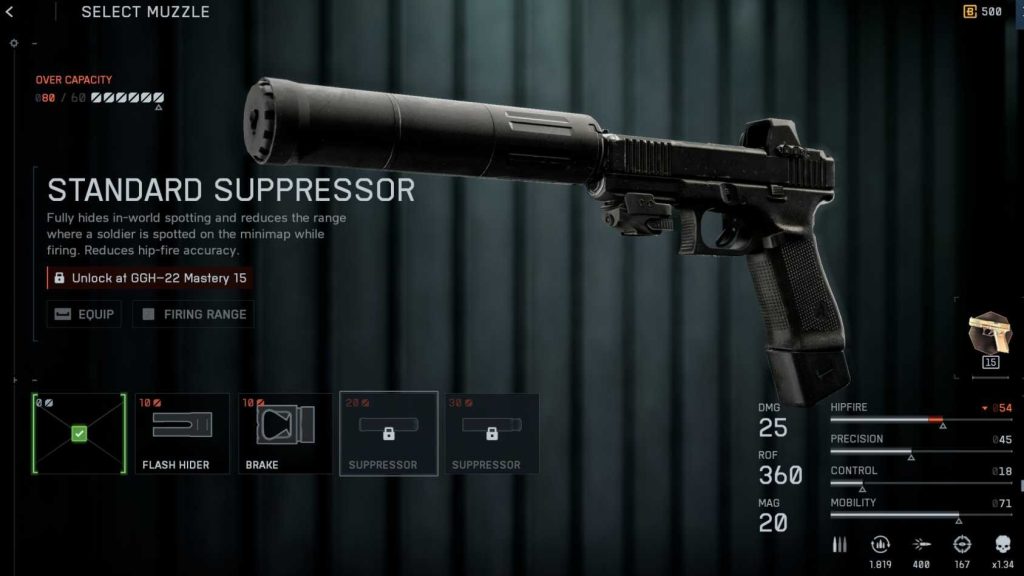
This issue is tied to Battlefield 6’s backend progression system. When the pistol levels up, the game must send an unlock request to the server. If anything interrupts that sync, the suppressor appears locked even though you reached the requirement.
Common causes include:
- Progression syncing delays on EA servers
- Local cache storing outdated weapon data
- UI not refreshing after level-up
- Crossplay desync when switching platforms
- The attachment being incorrectly flagged in the backend database
Because BF6 caches weapon data heavily, the suppressor might remain locked until your game manually refreshes its progression files.
Fix #1: Restart Battlefield 6 and Re-Equip the GGH-22
A simple restart forces the game to reload attachment unlocks.
Try this:
- Close the game fully
- Relaunch BF6
- Select the GGH-22 pistol
- Open the attachment screen again
This refreshes UI data and often makes the suppressor appear.
Fix #2: Clear Console Cache (PS5 / Xbox)
If you’re on console, cached weapon files may be outdated.
PS5 Cache Reset:
- Turn off PS5 completely
- Boot into Safe Mode
- Select Clear Cache and Rebuild Database
This resets UI and progression files that might block the unlock.
Fix #3: Log Out of EA Account and Sign In Again
This forces a fresh sync with Battlefield 6’s servers.
Steps:
- Log out of your EA account on console/PC
- Log back in
- Reopen Battlefield 6 and check the attachment list
Many attachment unlocks suddenly appear after re-syncing.
Fix #4: Switch Weapons, Then Return to the GGH-22
Battlefield 6 sometimes updates unlocks only when switching between weapons.
Try:
- Equip a different pistol
- Back out
- Return to the GGH-22
- Re-open its attachments
This can trigger the UI to reload the suppressor unlock.
Fix #5: Play One More Match to Trigger Sync
Sometimes hitting level 15 doesn’t send the unlock signal immediately.
- Play any match
- Get XP with the GGH-22
- Return to the loadout screen
This additional XP tick often forces Battlefield 6 to sync the missing attachment.
Fix #6: Disable Crossplay Temporarily
Crossplay syncing issues can delay progression unlocks.
Do this:
- Turn Crossplay OFF
- Restart Battlefield 6
- Check the GGH-22 suppressor status
- If fixed, turn crossplay back on
This resets your matchmaking server path, which helps progression updates.
Fix #7: Delete “Reserved Space” (Console Only)
On PS5 and Xbox, “reserved space” holds temporary data. When corrupted, it prevents new unlocks from appearing.
Delete this file from storage (don’t delete save data).
Launch BF6 again and check suppressor unlocks.
Fix #8: Verify or Repair BF6 Game Files (PC)
PC users should repair game files:
Steam: Properties → Installed Files → Verify
EA App: Manage → Repair
Broken weapon data files can block progression from displaying correctly.
Fix #9: Reinstall Battlefield 6 Without Removing Save Data
If none of the above works, reinstalling usually clears the progression bug.
Important: Don’t delete cloud saves.
Only replace the game files.
Once reinstalled, the suppressor typically appears instantly.
Fix #10: Wait for EA’s Patch (Known Battlefield 6 Weapon Unlock Bug)
This issue appears to be affecting many players, especially with new weapons. It may require an EA-side update.
Signs it’s a server bug:
- Multiple attachments stuck
- Level requirements met but not recognized
- Other players reporting identical issues
EA often patches unlock bugs in the next hotfix.
Fix #11: Switch to a Different Class, Then Return to Your Main Loadout
Sometimes Battlefield 6 only refreshes attachment unlocks when the class loadout changes.
Try this:
- Switch from your main class to another (Assault → Recon)
- Back out to the main menu
- Return to the GGH-22 loadout screen
This forces the game to rebuild your class-specific pistol data, often revealing the suppressor unlock.
Fix #12: Equip a Different Muzzle First Before Selecting the Suppressor
Some attachments unlock only after another muzzle is equipped first.
Do this:
- Equip any other muzzle
- Back out
- Re-open the pistol attachments
- The GGH-22 suppressor may now be selectable
This manually refreshes the attachment tree.
Fix #13: Change Soldier Skin or Specialist to Trigger a UI Refresh
Battlefield 6 sometimes updates weapon attachments only when the soldier model reloads.
Steps:
- Change specialist/skin
- Go back to weapons → GGH-22
- Open muzzle attachments again
This triggers a full UI asset refresh, solving display bugs.
Fix #14: Disable All Saved Loadout Presets Temporarily
Loadout presets often store outdated attachment states and override new unlocks.
Try removing or disabling:
- Saved loadouts
- Custom presets
- Old class templates
Then re-select the GGH-22.
Many players see new attachments appear immediately.
Fix #15: Complete One More Objective (Kills, XP, or Ribbons)
Some attachments only finalize after an additional XP sync.
Just do:
- 1–2 kills with the GGH-22
- Or earn a quick ribbon
- Or complete a capture/assist
Then return to the weapon menu.
This forces Battlefield 6 to re-sync unlocks with EA servers.
Fix #16: Switch Regions in the Server Browser
Progression syncing is tied to regional matchmaking servers.
If the current region is unstable, your unlock won’t update.
Try switching to:
- North America
- Europe
- Asia
Play one match, then check the suppressor.
Fix #17: Turn Off HDR or VRR to Fix UI Refresh Bugs
Some PS5 users report UI not updating when HDR or VRR is enabled.
Turn off:
- HDR (Settings > Screen & Video)
- VRR
- 120Hz mode (optional)
Restart the game and re-check the suppressor unlock.
Fix #18: Delete Local Save Data (Without Removing Cloud Progress)
On consoles, local configuration files can block new attachments from appearing.
Steps:
- Delete local save data only
- Keep cloud saves
- Relaunch Battlefield 6
This restores UI, attachment lists, and progression scripts.
Fix #19: Enable “Auto-Equip Attachments” Temporarily
Even if the suppressor unlocks, UI might not show it — but auto-equip forces it.
Enable:
Settings → Gameplay → Auto-Equip Attachments ON
After unlocking:
- Play a match
- Let the game auto-equip
- Then turn the setting off if you prefer manual control
Fix #20: Join a Private Match or Solo Mode to Force Unlock Sync
Some players report missing attachments appear instantly after loading into a non-public environment.
Try:
- Solo/co-op mode
- Private server
- Tutorial / practice range
Load into the session → back out → check the GGH-22 attachments.
This flow forces a full progression reload.
Is the GGH-22 suppressor bug caused by UI desync or backend progression errors?
The GGH-22 suppressor bug in Battlefield 6 is primarily caused by backend progression errors, though UI desync plays a major role in how the bug appears. When players reach level 15 with the pistol, the game is supposed to send an unlock request to EA’s servers. If the backend doesn’t register the level-up event correctly, the suppressor remains locked even though the requirement has been met.
Short explanation:
How backend progression bugs cause the issue:
- The server fails to acknowledge the attachment unlock
- XP or level data is delayed or out of sync
- Progress packets don’t reach the server during matchmaking
- Progression tables for new weapons may not be fully updated
At the same time, UI desync makes the bug more noticeable. The attachment menu relies on cached data, and if it doesn’t refresh, it will continue showing the suppressor as locked — even when the server eventually recognizes the unlock.
Why this happens with new weapons like the GGH-22:
- Recently added weapons often have incomplete backend integration
- Level requirements sometimes mismatch between client and server
- UI caches old data after leveling up mid-match
Both systems interact, but the root cause is almost always server-side progression sync failures.
Does Battlefield 6 count kills or XP incorrectly for the new pistol?
Yes — Battlefield 6 sometimes miscounts kills or XP for newly added weapons like the GGH-22 pistol. This is one of the reasons attachment unlocks fail to trigger. Players often notice that kills registered in the scoreboard don’t match the XP displayed on the weapon, or the pistol levels up slower than expected. This is typically tied to progression syncing issues between the client and EA’s backend.
Short breakdown:
Why XP or kill tracking breaks for new BF6 weapons:
- XP events don’t immediately sync with servers
- Kill tracking becomes delayed when joining mid-match
- Switching weapons quickly can interrupt XP allocation
- Crossplay lobbies sometimes stop updating progression mid-game
- Backend progression tables may not include new weapon modifiers yet
The issue becomes more obvious when the pistol reaches a milestone like level 15. Even if the kills and XP were tracked correctly in-match, Battlefield 6 may not send the final unlock packet to the server until the next round or the next restart.
Players report that additional kills, restarting the game, or refreshing the UI often forces the XP data to sync. This confirms that the system tracks kills correctly but delays updating the unlock state for new attachments like the suppressor.
Is the suppressor locked due to class or weapon assignment issues?
Yes — the GGH-22 suppressor can remain locked due to class or weapon assignment issues, especially if players switch classes rapidly or customize loadouts mid-match. Battlefield 6 ties attachments to specific class loadout slots, and if the game fails to refresh the loadout after leveling the weapon, the suppressor may appear locked even though it’s technically unlocked in the backend.
Short explanation:
How class or loadout systems cause suppressor lock issues:
- Loadout cache doesn’t reload after reaching level 15
- Switching to a different class stops attachments from updating
- Loadout editor fails to refresh weapon unlocks
- Pistol assignment conflicts with class restrictions
- Custom loadouts sometimes use outdated data from before the unlock
In some cases, the suppressor unlocks correctly on the server but the loadout screen displays the old state, making it look locked. This happens most often if players:
- Level up the pistol mid-round
- Switch classes before the match ends
- Use console quick-menu shortcuts that bypass full UI refresh
- Load saved presets before XP sync is complete
Refreshing the loadout, restarting the game, or switching pistols temporarily usually forces the attachment list to update properly.
Are other Battlefield 6 weapons missing attachments after updates?
Yes — many Battlefield 6 players report missing attachments on newly updated weapons after patches. This isn’t limited to the GGH-22 pistol. Rifles, LMGs, SMGs, and marksman weapons have had attachments appear as locked, missing, or incorrectly labeled after updates. These issues typically happen when Battlefield 6 receives a new content drop and progression tables are temporarily mismatched.
Short summary:
Common attachment bugs after BF6 updates:
- Attachments appear locked despite meeting level requirements
- Newly added attachments don’t show up in the customization menu
- Unlock descriptions display the wrong level
- Weapon tiers reset or show incorrect XP values
- Attachments vanish completely after patches
These issues often occur because:
- The game caches old progression data
- Backend unlock values are updated but not synced to the client
- UI fails to refresh attachment lists after patches
- Cross-platform loadout syncing breaks after backend updates
Players also notice that previously unlocked attachments can temporarily disappear after a major patch until cache files rebuild.
Clearing cache, reinstalling, rebuilding the database on PS5, switching weapons, or re-syncing EA account data usually restores missing attachments.
Does the attachment appear as unlocked but remain unequippable in the loadout screen?
Yes — one of the most frustrating Battlefield 6 attachment bugs is when an attachment shows as unlocked but cannot be equipped in the loadout screen. This is often caused by UI corruption or weapon profile desync, where the unlock state is correct on the backend but the in-game loadout editor refuses to apply the attachment.
Short explanation:
Why an unlocked attachment becomes unequippable:
- UI is still referencing cached pre-unlock data
- The loadout editor failed to refresh the weapon configuration
- BF6 hasn’t fully synced the weapon level to EA servers
- The attachment slot is temporarily disabled due to a UI bug
- Loadout presets override the true unlock state
In many cases, players can highlight the suppressor or attachment, but the “Equip” option stays greyed out. This happens most often with newly introduced weapons like the GGH-22, where backend progression updates may lag behind.
Fixes that help force the attachment to equip:
- Switch to another weapon and come back
- Delete and recreate the loadout preset
- Restart the game to refresh cached attachment data
- Log out/in of EA account
- Rebuild database (PS5) or verify files (PC)
After the refresh, the attachment usually becomes selectable again.
Final Thoughts
The Battlefield 6 GGH-22 suppressor not unlocking is almost always caused by progression desync rather than player error. Thankfully, most fixes involve simple steps like clearing cache, re-syncing your EA account, or refreshing weapon loadouts.
The most reliable solutions are:
✔ Restart the game
✔ Clear console cache or rebuild database
✔ Re-sync EA account
✔ Switch weapons to refresh progression