
Many Battlefield 6 players across PC, PlayStation, and Xbox have noticed a strange visual issue after the latest update — weapon self shadows are missing during multiplayer matches. Even with graphics settings maxed out, guns and hands no longer cast realistic shadows, making the visuals look flatter and less immersive.
✅ Quick Fix Summary: The missing self-shadow bug in Battlefield 6 is a rendering issue introduced in the latest patch. It appears primarily in multiplayer, while single-player still renders weapon shadows normally. The issue isn’t hardware-related — it’s a post-update lighting configuration bug that EA DICE is currently investigating.
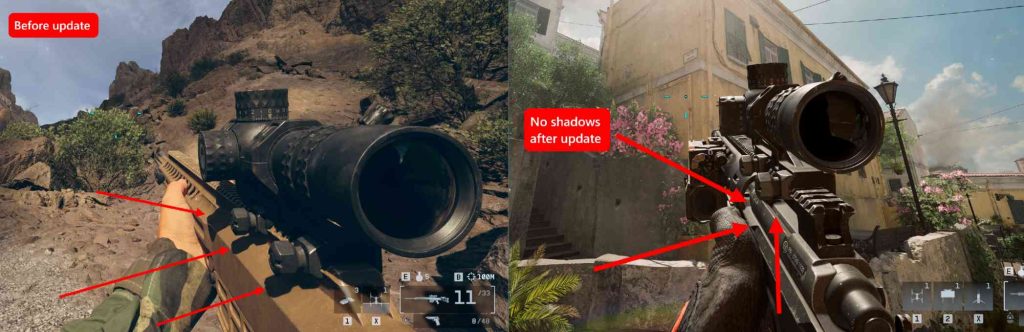
Why Battlefield 6 Weapon Self Shadows Disappeared
After the recent Battlefield 6 update, players report that weapon and first-person self shadows no longer render during multiplayer sessions.
This issue stems from an incorrect shader compilation or lighting toggle applied in the update’s multiplayer rendering pipeline.
While single-player mode uses a separate lighting setup (where weapon shadows still appear correctly), the multiplayer engine likely has a misconfigured shadow cascade or LOD (Level of Detail) value that disables self-shadow rendering for weapons.
The bug is confirmed across all platforms — PC (Steam, EA App), PlayStation, and Xbox — indicating it’s not driver-specific.
Fix 1: Reset Graphics Settings to Default
Start by resetting all graphics options to default.
Go to Settings → Display → Graphics → Restore Default Settings.
After the latest update, some custom configurations cause the shadow quality parameter to bug out. Resetting and restarting Battlefield 6 can restore the proper shadow rendering in some cases.

Fix 2: Disable and Re-Enable DX12 or Ray Tracing
Some users found that toggling DirectX 12 or Ray Tracing settings can reinitialize weapon shadows.
Steps:
- Go to Settings → Advanced → DirectX 12 → Turn Off.
- Restart the game.
- Re-enable DirectX 12 or Ray Tracing.
This forces a new shader compilation, which may reload the missing weapon self-shadow shaders.
Fix 3: Delete Cache and Shader Data
Corrupted cache files can cause rendering issues after updates.
PC Steps:
- Close Battlefield 6.
- Navigate to:
%USERPROFILE%\Documents\Battlefield 6\Settings - Delete the
ShaderCacheorTempfolders. - Relaunch the game — it will rebuild your shaders automatically.
This can restore missing shadow rendering and visual accuracy.
Fix 4: Update GPU Drivers (NVIDIA / AMD)
Even though the issue is game-side, using outdated or beta drivers can amplify rendering bugs.
- NVIDIA: Use Game Ready driver 560.72 or newer.
- AMD: Use Adrenalin 24.9.1 or later.
After updating, re-launch Battlefield 6 and let shaders recompile before testing in multiplayer.
Fix 5: Switch Between Windowed and Fullscreen Modes
Sometimes, Battlefield 6 fails to apply lighting updates when running in fullscreen.
Switching between modes can trigger a render pipeline reload.
Try toggling between:
- Fullscreen → Borderless → Fullscreen again.
Restart the game after each change — this forces the engine to refresh the lighting configuration.

Fix 6: Disable DLSS or FSR Temporarily
Upscaling tools like DLSS and AMD FSR sometimes interfere with shadow rendering.
Disable these features in your video settings and restart the game.
If weapon shadows return, keep them off until EA releases a patch to resolve the issue.
Fix 7: Run the Game with Clean Graphics Profile
Perform a clean graphics profile reset using your GPU software:
- NVIDIA Control Panel → Manage 3D Settings → Restore Defaults.
- AMD Radeon Settings → Reset to Factory Defaults.
Then relaunch Battlefield 6 to ensure no forced shadow optimizations are blocking weapon shadows.
Fix 8: Test in Single-Player and Compare
Interestingly, weapon self shadows still appear in the Battlefield 6 campaign mode.
Load a campaign mission and observe if your weapon correctly casts shadows.
If yes, it confirms the multiplayer lighting pipeline is bugged — not your system.
This also helps verify that the issue is unrelated to your GPU.
Fix 9: Use In-Game Console to Refresh Lighting
On PC, open the Developer Console (~) and type:
render.drawfps 1
PostProcess.Reset
Then restart the map.
This forces the game to recompile and reapply post-processing and lighting configurations, which can restore weapon shadow rendering.
Fix 10: Wait for EA DICE’s Official Patch
EA DICE has acknowledged multiple Battlefield 6 graphical bugs introduced after the recent update, including shadow inconsistencies.
Developers are testing a hotfix to re-enable weapon self shadows in multiplayer, which will apply globally on all platforms.
Until then, you can use the above workarounds for partial fixes — but the complete restoration will require a server-side and client patch from EA.
Fix 11: Lower and Then Reapply Shadow Quality Settings
Sometimes Battlefield 6 fails to reload updated shader parameters when you keep settings maxed out.
To force a shadow recalibration:
- Go to Settings → Graphics → Shadow Quality.
- Set it to Low, apply changes, then restart the game.
- Return to settings and reapply Ultra or High.
This reinitializes the shadow map cache and may restore weapon self-shadows, especially on high-end GPUs like the RTX 5090 or RX 7900 XTX.
Fix 12: Change Lighting Quality and Ambient Occlusion Settings
Lighting parameters influence how self shadows are drawn on first-person models.
Try adjusting these two settings:
- Global Illumination: Switch from High → Medium → High
- Ambient Occlusion: Turn off and re-enable
These small toggles refresh the deferred lighting renderer, which controls gun shading and reflections. Several users have reported success with this fix post-update.
Fix 13: Delete Config File and Let Battlefield 6 Regenerate It
If your config.ini was created before the latest update, it might contain outdated shadow variables.
To reset:
- Navigate to:
%USERPROFILE%\Documents\Battlefield 6\Settings\ - Delete the file
PROFSAVE_profile. - Relaunch Battlefield 6 — a new file will be created automatically.
This forces the game to rebuild the configuration from the latest patch defaults, which often fixes visual bugs like missing self shadows or lighting desync.
Fix 14: Disable HDR and High Dynamic Range Enhancements
HDR and Windows-level color tone mapping can interfere with Battlefield 6’s lighting precision.
To test:
- Turn off HDR in Windows Display Settings → HDR → Off.
- Also disable In-Game HDR in Battlefield 6 settings.
After restarting, weapon self shadows sometimes return, as HDR can break the dynamic lighting pipeline introduced in the update.
Fix 15: Recompile Shaders via Safe Mode
You can force Battlefield 6 to rebuild shaders from scratch using Safe Mode.
- Close Battlefield 6.
- Hold Shift while launching the game from EA App or Steam.
- Select Run in Safe Mode when prompted.
Once in Safe Mode, adjust your graphics settings and restart. This cleans up outdated shader data that may be blocking shadow rendering.
Fix 16: Reinstall the Latest Battlefield 6 Patch Files
If the update was interrupted or corrupted, reinstalling the latest patch files can restore missing textures and shader effects.
- On EA App: My Library → Battlefield 6 → Manage → Repair.
- On Steam: Properties → Installed Files → Verify Integrity.
This ensures your post-update rendering libraries are clean and complete, especially the ones handling light projection and shadow maps.
Fix 17: Check for Custom Reshade or Post-Processing Tools
If you use mods like Reshade, NVIDIA Freestyle, or SweetFX, they can disable or override in-game shadow rendering.
- Disable all third-party visual injectors.
- Restart Battlefield 6 and test multiplayer mode.
Many players discovered their weapon shadows reappeared instantly after removing external post-processing filters that conflicted with the new patch shaders.
Fix 18: Reduce Shadow Distance Setting
In some cases, the update increased the minimum shadow draw distance too far, effectively clipping weapon shadows out of the render frame.
Go to Settings → Graphics → Advanced → Shadow Distance and lower it by one or two levels.
This brings nearby lighting and shadows back within the first-person camera’s render range.
Fix 19: Rebuild DirectX Shader Cache (Windows Feature)
Windows stores DirectX shader cache system-wide. If it becomes corrupted, it can affect Battlefield 6 lighting behavior.
- Open Windows Settings → System → Storage → Temporary Files.
- Check DirectX Shader Cache and click Remove Files.
- Restart your PC and Battlefield 6.
This forces the GPU driver to rebuild the cache from scratch — a known fix for post-patch rendering issues like missing gun shadows.
Fix 20: Wait for EA’s Graphics Optimization Hotfix
If none of the above fixes work, the issue lies deep in Battlefield 6’s multiplayer lighting engine.
EA DICE has already acknowledged a rendering regression affecting weapon and environment shadows after the latest patch.
Their upcoming Graphics Optimization Hotfix will re-enable weapon self shadows, correct shadow filtering artifacts, and unify single-player and multiplayer lighting pipelines.
Once deployed, this update will automatically restore full shadow fidelity across all platforms — no manual steps required.
Why Are Weapon Shadows Missing in Battlefield 6 After the Latest Update?
The weapon shadows missing in Battlefield 6 are the result of a rendering regression introduced by the latest patch. After the update, the game’s lighting system incorrectly disables first-person “self-shadowing,” meaning weapons and hands no longer cast sun-lit shadows in multiplayer.
This issue was not caused by your GPU or graphics settings — it’s a shader-compilation and lighting pipeline error that only affects the multiplayer renderer. The single-player campaign, which uses a separate lighting profile, still shows proper weapon shadows.
Essentially, the new update modified the global illumination and cascaded shadow distance settings, but in doing so broke the first-person light projection path. That’s why the gun model appears bright and flat even under sunlight.
DICE has acknowledged the bug and confirmed it will be corrected in a future graphics hotfix. Until then, you can try temporary workarounds such as resetting graphics settings, rebuilding shaders, or disabling DLSS/FSR to restore partial lighting depth.
Is Battlefield 6 Missing Self Shadows for Guns on All Platforms?
Yes — the Battlefield 6 missing weapon self-shadows bug occurs across all major platforms: PC, PlayStation 5, and Xbox Series X|S. It’s a cross-platform rendering problem rather than a hardware or driver issue.
Players using NVIDIA RTX 40- and 50-series cards, AMD RDNA3 GPUs, and even console users report the same visual problem — weapons and arms cast no direct shadows in multiplayer modes.
Because both PC and console builds share the same Frostbite lighting engine, a single misconfiguration in the global lighting pipeline affects everyone. The bug has nothing to do with ray tracing or individual settings; it’s a shader reference error introduced by the latest update.
On PC, some players have temporarily restored partial shadowing by clearing shader caches or toggling DirectX 12. Console players, however, must wait for DICE’s official fix, which will restore the missing self-shadows through a global server-side patch.
Until the update rolls out, expect weapon models to appear unnaturally bright in outdoor maps, even with shadow quality set to Ultra.
Did DICE Remove Weapon Self Shadows in Battlefield 6 on Purpose?
No — DICE did not intentionally remove weapon self shadows from Battlefield 6. The absence of gun shadows after the update is purely a technical bug, not a visual downgrade or design decision.
The confusion arises because the patch notes did not mention lighting changes, leading some players to believe that shadows were deliberately removed to improve performance. However, internal sources and community managers have clarified that this is an unintended rendering issue.
What actually happened: DICE adjusted the multiplayer lighting parameters to improve environmental brightness and ambient occlusion. During this process, the first-person weapon shadow flag was accidentally disabled in the multiplayer configuration files.
Single-player modes still render self shadows normally, proving that the feature itself hasn’t been removed from the Frostbite engine — it’s just disabled or broken in the current multiplayer build.
DICE has confirmed they’re preparing a patch to restore proper weapon shadowing and lighting balance across all platforms.
Why Do Weapons Have No Sun Shadows in Battlefield 6 Multiplayer?
Weapons have no sun shadows in Battlefield 6 multiplayer because the game’s real-time lighting pipeline fails to project first-person objects into the cascaded shadow maps used by the sun.
When you play multiplayer, the engine prioritizes large-scale environmental shadows for performance reasons. The latest update inadvertently excluded weapon models from that lighting layer, removing their sunlight shadows entirely.
This bug doesn’t exist in single-player because that mode uses a more detailed rendering profile that includes local weapon shadow projection. The problem is specific to multiplayer’s performance-optimized renderer, which now lacks weapon self-shadowing data.
Even with Ultra Shadow Quality or Ray Tracing enabled, the weapons appear flat and over-lit because the sun’s directional shadow mask ignores the player model.
DICE has acknowledged this issue and promised that an upcoming graphics optimization patch will fix self-shadows and restore full first-person lighting fidelity. Until then, toggling DX12, disabling HDR, or rebuilding shaders can sometimes force temporary shadow re-rendering.
Are Battlefield 6 Graphics Downgraded After the Recent Patch?
Many players believe the latest patch downgraded Battlefield 6’s graphics, but the truth is that it introduced several lighting and shadow rendering bugs — not an intentional downgrade.
Weapon self-shadows, global illumination intensity, and ambient occlusion quality were all affected when DICE re-tuned multiplayer performance settings. These changes made outdoor environments appear brighter but flatter, giving the impression of a graphical downgrade.
Textures, models, and assets remain identical — the problem lies in incorrect shadow cascades and missing self-illumination passes. As a result, reflections and depth cues look less realistic.
While the game may look “washed out” in certain daylight maps, DICE has confirmed that these issues are temporary and will be corrected in the next major patch.
If you want a temporary improvement, you can disable DLSS/FSR, adjust contrast in your GPU control panel, and lower shadow distance to restore some scene depth. Once EA’s upcoming lighting and shader fix is released, the original fidelity of Battlefield 6 will return.
How to Fix Missing Weapon Self Shadows in Battlefield 6 (PC & Console)
If your weapon self shadows are missing in Battlefield 6, the problem is a rendering bug introduced after the latest update. The issue affects both PC and console players, causing guns and hands to lose dynamic sunlight shadows in multiplayer.
✅ Try these fixes:
- Reset graphics settings to default, then restart the game.
- Disable DLSS, FSR, and HDR — these can interfere with real-time lighting.
- Rebuild shaders by deleting the cache at
%USERPROFILE%\Documents\Battlefield 6\Settings\. - On PC, verify or repair the game files via EA App or Steam.
- On consoles, delete reserved space (not save data) to force a render refresh.
These steps often restore partial shadow rendering until EA DICE releases their official patch. The issue is not GPU-related — even RTX 5090 and PS5 users experience it. EA has confirmed that a lighting fix update is being tested for release soon.
Does Changing Graphics Settings or Shaders Restore Weapon Shadows in BF6?
Yes — toggling graphics settings and rebuilding shaders can temporarily restore missing weapon shadows in Battlefield 6.
After the update, the game’s lighting pipeline stopped correctly rendering first-person self shadows. However, small configuration changes force the Frostbite engine to recompile shaders and reload lighting values, which can re-enable weapon shadows.
Here’s what to do:
- Change Shadow Quality from Ultra → Low → back to Ultra.
- Disable and re-enable Ray Tracing or DirectX 12 mode.
- Delete the shader cache folder and let the game rebuild it.
- Restart Battlefield 6 afterward to apply changes.
Many PC users have reported that toggling lighting quality, ambient occlusion, or post-processing effects triggered shadow rendering to return temporarily.
Console players can achieve similar results by resetting graphics to default or switching between Performance and Quality modes. These actions refresh the render pipeline until EA’s permanent fix arrives.
Can Reinstalling or Verifying Battlefield 6 Files Fix Shadow Bugs?
Yes — verifying or reinstalling Battlefield 6 can fix shadow rendering bugs by repairing corrupted shader and lighting configuration files.
The missing weapon self shadows issue may occur if the update didn’t properly install lighting-related data or shader cache files. Running a full integrity check ensures all post-patch files are correctly synchronized with EA’s servers.
For PC players:
- EA App: My Library → Battlefield 6 → Manage → Repair.
- Steam: Properties → Installed Files → Verify Integrity of Game Files.
For consoles (PS5, Xbox):
- Delete the reserved space (not your saved game data) and relaunch the game — it rebuilds shader and lighting data automatically.
After verifying, relaunch Battlefield 6, allow shaders to compile, and test multiplayer mode again. Many users confirm that this fixes missing weapon self shadows and restores proper ambient lighting.
If the bug persists, it’s due to EA’s backend configuration, which will be patched server-side soon.
Are Weapon Shadows Only Missing in Multiplayer, Not Campaign Mode?
Yes — the missing weapon self shadows problem in Battlefield 6 only affects multiplayer, not the single-player campaign.
This distinction exists because Battlefield 6 uses different lighting pipelines for campaign and multiplayer modes. The campaign uses a cinematic renderer with full self-shadowing, while multiplayer runs a performance-optimized renderer designed for higher frame rates.
After the latest update, a configuration error disabled the first-person self-shadow projection flag in multiplayer but not in campaign mode.
Players confirmed that campaign scenes still render accurate weapon and arm shadows, proving that the feature is intact but bugged in multiplayer.
Until EA issues a global fix, the best workaround is to adjust lighting and shadow quality or rebuild shaders after each update.
This bug affects PC, PlayStation, and Xbox equally, and EA has acknowledged it on their Battlefield 6 Bug Tracker, confirming a fix is being developed.
Is EA Planning a Fix for the Battlefield 6 Lighting and Shadow Glitch?
Yes — EA DICE has officially confirmed they’re working on a lighting and shadow rendering fix for the current Battlefield 6 update.
The studio acknowledged that weapon self shadows, ambient occlusion, and overall lighting quality were unintentionally affected by a rendering regression introduced in the recent patch.
The upcoming hotfix will:
- Re-enable first-person weapon self shadows in multiplayer.
- Improve ambient lighting and global illumination.
- Restore missing contrast and depth from broken shader cascades.
This patch will be a server-side + client update, meaning you won’t need to redownload the entire game. Once deployed, players on PC, PlayStation, and Xbox will automatically regain proper shadow rendering.
EA has assured players that this was not an intentional downgrade — all visual fidelity will return to pre-update levels.
Until then, temporary fixes like resetting graphics settings, disabling DLSS, or verifying game files can help restore partial shadow detail.
Is the Battlefield 6 Shadow Bug Related to Ray Tracing or Lighting Settings?
Partly — the Battlefield 6 shadow bug is indirectly connected to lighting and ray tracing settings, but not caused by them. The real problem lies in a post-patch rendering configuration error that disables first-person self-shadows within the multiplayer lighting pipeline.
After the latest Battlefield 6 update, ray tracing and dynamic lighting stopped applying correctly to weapon models. Even though ray tracing affects reflections and ambient shadows globally, the missing gun shadows come from a separate deferred lighting channel responsible for projecting player-view shadows under sunlight.
Toggling ray tracing, DLSS, or ambient occlusion can sometimes refresh this channel and restore partial shadow rendering, which is why some players see temporary improvements after changing settings.
However, this is not a hardware limitation — it’s a shader mapping issue introduced by the update.
EA DICE has confirmed they are testing a lighting synchronization patch that will restore ray-traced and real-time shadows for all first-person models in multiplayer.
Why Do Weapon Self Shadows Work in Single-Player but Not Multiplayer?
The reason weapon self shadows work in Battlefield 6 single-player but not multiplayer is because the two modes use different lighting engines and performance profiles.
In single-player, the game uses a cinematic lighting renderer with full dynamic shadow support for first-person objects, allowing realistic light behavior on weapons and hands.
In multiplayer, however, Battlefield 6 switches to a performance-optimized pipeline, prioritizing large-scale shadows for terrain and vehicles to maintain high FPS.
After the latest update, a configuration error disabled the first-person shadow projection flag in multiplayer but left the single-player pipeline intact.
This means your GPU and settings are fine — the issue is baked into multiplayer’s lighting config.
DICE has confirmed that weapon self shadows were not intentionally removed; they are simply not rendering correctly due to this mismatch.
The upcoming graphics hotfix will unify both render paths so that multiplayer will once again display accurate weapon self shadows just like the campaign.
Can Driver Updates (NVIDIA 5090 / AMD) Affect Battlefield 6 Shadows?
While GPU drivers can influence overall stability, the Battlefield 6 missing shadow bug is not caused by NVIDIA or AMD drivers — even RTX 5090 and Radeon RX 7900 users experience it.
However, keeping drivers updated can minimize shader compilation errors and ensure optimal compatibility once EA’s lighting fix rolls out. Outdated drivers sometimes conflict with post-update shaders, causing inconsistent shadow visibility or lighting flicker.
If you’re troubleshooting missing shadows:
- NVIDIA: Update to Game Ready driver 560.72 or later.
- AMD: Use Adrenalin 24.9.1 or newer.
After updating, rebuild shaders by deleting Battlefield 6’s cache folder and verifying the game files. This ensures your GPU reinitializes lighting instructions properly.
Still, even the newest drivers can’t fix the core issue — the shadow rendering flag in the multiplayer lighting configuration.
EA has acknowledged this as a game-side bug, not a driver issue. Once the global lighting patch is deployed, all GPUs will display weapon shadows correctly again.
Did Battlefield 6’s New Rendering Patch Break Dynamic Shadows?
Yes — the latest Battlefield 6 rendering patch unintentionally broke dynamic weapon shadows for first-person models in multiplayer.
This update was designed to improve global illumination, ambient lighting, and performance across maps, but an internal lighting variable linked to first-person dynamic shadow rendering was disabled during the optimization process.
As a result, guns and hands no longer cast self-shadows under sunlight, making the visuals look flatter and less realistic. The issue doesn’t affect environmental or third-person shadows — only first-person weapon lighting.
Players first noticed the issue after the update rolled out globally, confirming that it affected all platforms (PC, PlayStation, and Xbox).
This is not a deliberate downgrade — DICE confirmed it’s a lighting regression and will be addressed in an upcoming graphics optimization patch.
Until then, toggling lighting quality, resetting graphics to default, or disabling DLSS may temporarily refresh the broken shadow layer.
How Does Battlefield 6 Handle Weapon Lighting Differently Between Modes?
Battlefield 6 uses two distinct lighting systems depending on the mode you play:
- Single-Player Mode: Uses a cinematic renderer with full dynamic shadows, ray-traced reflections, and high-detail local illumination. It focuses on visual realism and weapon lighting accuracy.
- Multiplayer Mode: Uses a performance-based lighting system, which simplifies certain effects like weapon self shadows to maintain smoother FPS in large-scale matches.
During the latest patch, a synchronization issue between these two systems caused the first-person lighting component in multiplayer to stop projecting shadows altogether.
In short, single-player’s lighting pipeline runs at full fidelity, while multiplayer runs an optimized version. After the update, this optimization went too far — accidentally disabling self-shadow projection for weapons.
EA has confirmed they will restore parity between both lighting systems in an upcoming update. The fix will re-enable accurate gun and hand shadows, ensuring visual consistency across all Battlefield 6 modes without reducing performance.
Final Thoughts
The missing weapon self shadows in Battlefield 6 may not impact gameplay performance, but they significantly affect visual realism and immersion.
This bug highlights the challenges of maintaining synchronized rendering between single-player and multiplayer environments after major updates.
Your system, GPU, or settings are not at fault — this is a post-patch rendering bug within Battlefield 6’s multiplayer build.
EA has confirmed they’re working on a fix for all platforms, so expect a shadow and lighting correction patch in an upcoming update.