
So you boot up Battlefield 6, ready to flex those sweet veteran rewards… and nothing’s there.
No skins, no bonuses, no loyalty goodies — just disappointment.
You check your loadouts, your inventory, maybe even restart the game once or twice, but still nothing shows up.
If you’re thinking “I own every Battlefield game, what gives?” — you’re definitely not alone. A lot of players are running into the same issue where Battlefield 6 veteran rewards aren’t showing up, even though their EA account and game libraries look completely fine at first glance. It’s frustrating, especially when you’ve supported the series for years and expect those loyalty perks to just work.
Let’s break down why this happens and, more importantly, how to fix it without losing your sanity.
First things first: what are Battlefield 6 veteran rewards?
Battlefield 6 veteran (or “loyalty”) rewards are bonuses EA gives to players who own or have played previous Battlefield titles.
These rewards are meant to recognize long-time players and typically include cosmetic items, small in-game extras, or other loyalty-based perks rather than gameplay advantages. They’re designed to carry over your Battlefield history into the latest entry and give you something extra to show for it.
Crucially, these rewards are tied to your EA account — not just the platform you’re playing on, whether that’s PC, PlayStation, or Xbox.
That distinction matters more than most players realize, especially if you’ve switched platforms or accounts over the years. And that last part is important… because most problems start right there.
Read also:Large Modes Challenge 4 Not Unlocking in BF6: Solved
Why your Battlefield 6 veteran rewards are missing
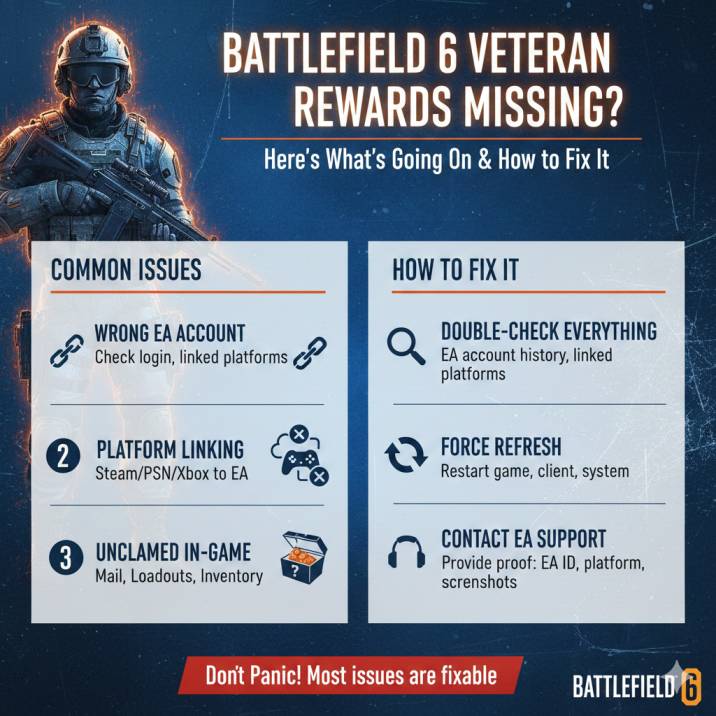
If your BF6 rewards didn’t show up, it’s usually due to one of these common issues, and unfortunately this one tops the list for most affected players.
1. You’re logged into the wrong EA account
This is the number one reason.
Even if:
All your Battlefield games are in your Steam or EA App library
You’ve been playing Battlefield for years
You’ve used the same PC or console the whole time
If Battlefield 6 is launched on an EA account that doesn’t own those older games, the system simply won’t unlock veteran rewards.
This can easily happen if you’ve ever created a second EA account, changed emails, linked the wrong account to Steam or console, or forgot which EA login you originally used years ago. From the game’s perspective, ownership history doesn’t exist unless it’s tied to the active EA account, and that’s why the rewards never appear.
2.Your platform account isn’t linked properly
Playing on Steam, PlayStation, or Xbox? Your platform account must be linked to the same EA account that owns the older Battlefield titles for veteran rewards to unlock correctly.
Battlefield 6 checks ownership through EA’s account system, not just what shows up in your platform library, so even a small mismatch can cause problems.
If you’ve ever switched EA accounts, changed emails, unlinked and relinked accounts, or played older Battlefield games on a different console or PC setup, this can easily break the reward sync.
In those cases, Battlefield 6 may not recognize your veteran status at all, even though everything looks fine on the surface. This is especially common for long-time players who’ve moved between platforms over the years.
3.The rewards need to be claimed manually
Not all Battlefield 6 rewards are auto-added the moment you log in. In some cases, the game expects you to manually claim or acknowledge them first. A lot of players see the notification pop up, assume the items were added automatically, and move on without checking further.
Some players get the notification but forget to check:
In-game Mail / Inbox
Loadouts
Cosmetics or Inventory menus
If you didn’t click or claim anything, the rewards may still be sitting there, unclaimed and untouched. They won’t appear in your loadout until that final step is done, which makes it feel like they never arrived at all.
4.It’s just a backend hiccup
Battlefield launches and backend bugs — name a more iconic duo. Sometimes everything is technically working, just not syncing properly behind the scenes.
In some cases:
The message appears
The inventory doesn’t update
A relog fixes it for some players, while others need EA Support to re-apply the rewards once the backend catches up.
How to fix Battlefield 6 veteran rewards not showing
Try these steps in order — skipping around usually doesn’t help. The fixes are simple, but they rely on doing things in the right sequence so the game and EA’s backend can properly sync your account.
Start by double-checking that you’re logged into the correct EA account when launching Battlefield 6.
This alone resolves the issue for a huge number of players.
Next, make sure your Steam, PlayStation, or Xbox account is properly linked to that same EA account, especially if you’ve ever switched platforms or emails.
Once you’re in-game, take the time to check your Mail, Loadouts, and Inventory menus carefully.
Don’t assume rewards are auto-equipped.
After that, fully close the game, sign out of the EA App or Steam, restart your system, and relaunch.
It sounds basic, but this refresh often forces rewards to appear. If none of that works, EA Support is the final step.
Read also: Matchmaking Not Working in BF6: Solved
Step 1: Double-check your EA account
Log into EA Account settings and take a moment to confirm which EA account actually owns your older Battlefield games.
This is especially important if you’ve been playing Battlefield for a long time, as many players end up with multiple EA accounts without realizing it. Old email addresses, console-era logins, or forgotten PC accounts can all come back to cause problems here.
Make sure the account you’re signed into shows your previous Battlefield titles in its game history or library. Once you’ve confirmed that, launch Battlefield 6 using that exact EA account and no other. Even a small mismatch will prevent veteran rewards from unlocking, so being absolutely certain here can save you a lot of time and frustration later on.
Step 2: Check platform linking
Make sure your account is linked correctly, because Battlefield 6 relies heavily on proper platform-to-EA account connections to verify veteran status. If you’re playing on PC through Steam, or on console via PlayStation Network or Xbox Live, each of those platform accounts must be linked to the same EA account that owns your older Battlefield games.
Steam → EA
PlayStation Network → EA
Xbox Live → EA
Take your time to verify this in your EA Account settings. If something looks off — like a platform being linked to an unfamiliar EA account — unlinking and then relinking it can sometimes trigger a resync on EA’s backend. This process often helps the system re-detect ownership and unlock missing rewards.
Step 3: Look in the right in-game places
Once in Battlefield 6, don’t assume your veteran rewards will magically appear or auto-equip the moment you log in. A lot of players miss this step simply because the game doesn’t always make it obvious where the rewards end up.
Take a few minutes to carefully check the following areas:
Mail / Notifications
Loadouts
Customization / Inventory
Scroll through each section slowly and make sure you’re not overlooking anything new, especially cosmetic items that blend in with existing gear. In many cases, the rewards are already there — they just haven’t been equipped or acknowledged yet. Skipping this step is one of the easiest ways to think your rewards are missing when they’re actually waiting to be claimed.
Step 4: Force a refresh
This sounds basic, but it works more often than you’d expect, especially when the issue is caused by a temporary sync problem between the game and EA’s servers. Sometimes Battlefield 6 simply doesn’t refresh your account data properly on the first login, which can prevent veteran rewards from appearing.
Fully close the game
Sign out of EA App or Steam
Restart your PC or console
Sign back in and relaunch
Doing this forces the game to recheck your entitlements and refresh your inventory from scratch. For many players, this quick reset is enough to make missing rewards suddenly appear, even if nothing else seemed to work beforehand.
Step 5: Make sure everything’s updated
Before assuming something is seriously wrong, it’s worth double-checking that everything on your end is fully up to date. Battlefield 6 relies on backend updates and client-side patches working together, and running an outdated version can cause rewards not to sync properly.
Make sure Battlefield 6 is fully updated with the latest patch installed. Next, check that your EA App or Steam client is also up to date, as older client versions can interfere with account syncing. If you’re playing on PC, also confirm that any optional content packs or add-ons have been downloaded and installed. Missing or paused downloads can sometimes prevent veteran rewards from appearing correctly in-game.
Read also: BF6 Battle Royale Specialist Challenge 4 Not Tracking: Solved
Still missing? Time to contact EA Support
If your Battlefield 6 veteran rewards are still missing after all that, EA Support is your best bet.
At this point, you’ve likely ruled out account mix-ups, platform linking issues, and simple sync problems.
The good news is that EA Support can manually fix this by reapplying the entitlement — but you’ll want to be prepared before reaching out, as having the right info upfront can speed things up significantly.
What to have ready
EA ID / email
Platform you’re playing on
Screenshots showing:
Older Battlefield games in your library
Any in-game reward messages
Your inventory with missing items
Approximate date and time the reward message appeared
Providing clear proof makes it much easier for support to verify your veteran status and resolve the issue without unnecessary back-and-forth.
EA Support message
Subject: Battlefield 6 Veteran Rewards Missing
Hi,
I own previous Battlefield games on this EA account and received a notification that my Battlefield 6 veteran rewards were available, but nothing is appearing in my inventory or loadouts after logging in. I’ve checked multiple times to make sure the rewards weren’t automatically equipped or placed elsewhere in the game.
I’ve confirmed that I’m logged into the correct EA account, verified my platform linking, and checked all in-game reward locations including Mail, Loadouts, and Inventory. I’ve also restarted the game and client to rule out any sync issues.
Could you please verify my entitlement and reapply the Battlefield 6 veteran rewards to my account if necessary?
EA ID:
Platform:
Thanks.
Quick FAQ
Why are my Battlefield 6 veteran rewards missing?
Most of the time, it comes down to an EA account mismatch, a platform account that isn’t properly linked, or rewards that were never manually claimed in-game. Backend sync issues can also play a role, especially around launch or major updates.
Do Battlefield 6 loyalty rewards unlock automatically?
Not always. Some loyalty rewards require you to manually claim or acknowledge them through in-game Mail, Loadouts, or Inventory menus before they appear or can be equipped.
Can EA Support fix missing veteran rewards?
Yes. If your ownership of previous Battlefield titles checks out, EA Support can manually re-apply veteran rewards to your account and resolve the issue.
Bottom line
If your Battlefield 6 veteran rewards aren’t showing, don’t panic. In most cases, it comes down to a simple EA account mix-up, a platform linking issue, or a temporary sync problem on the backend.
These are all common, fixable issues, especially around a new release or major update. And if you’ve already tried everything and the rewards still aren’t there, EA Support can usually sort it out quickly once you provide proof of ownership and account details.