
So you’ve just dropped a Fine Viperwolf Tooth into the Hunter’s Rest contribution basket…
You got the XP…
And then—nothing.
No quest update. No completion. Just confusion staring back at you like the game forgot what you just did.
Don’t worry — you didn’t mess anything up. This is a known progression bug in Avatar: Frontiers of Pandora, and a lot of players run into it during their playthrough. It’s one of those moments where the game technically accepts your contribution but fails to properly update the quest state behind the scenes.
The good news? You’re not stuck, your save isn’t broken, and you didn’t waste your item. Let’s break down what’s actually happening and how to fix it without wasting more time or resources.
Read also: Etuwa’s Fire Part 2 Bug: Why Etuwa Isn’t Spawning: Solved
What’s Actually Going On?
The Hunter’s Rest contribution is part of the larger Community Contributions quest chain, and that’s where the problem starts. The game doesn’t always properly “register” your donation when you place an item into the basket — even though it accepts the item and rewards you with XP like everything worked normally.
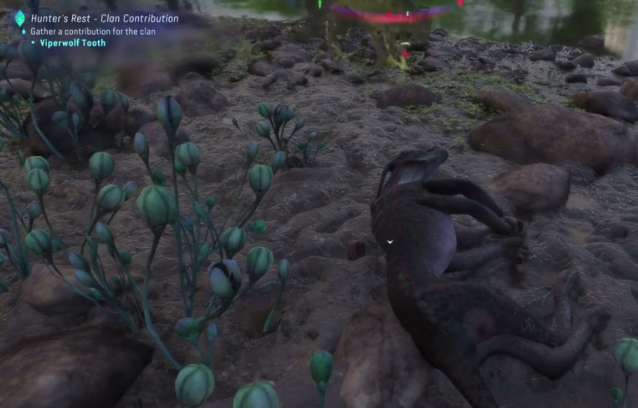
In short, the game and the quest log aren’t on the same page.
The game knows you donated.
The quest, however, hasn’t caught up yet.
This usually happens if you:
- Found Hunter’s Rest earlier than intended
- Donated the item before the Community Contributions quest fully activated
- Played in co-op at any point during the quest
- Or experienced a world-state refresh issue where the game didn’t update properly
None of this is your fault. It’s a scripting and progression-sync issue on the game’s side, not something you did wrong as a player.
How to Fix the Hunter’s Rest Contribution Bug
Try these fixes in order — most players only need one of them to get the quest moving again. The goal here is to force the game to refresh its internal quest state so it finally recognizes your contribution.
Some of these fixes might seem simple, but they’re surprisingly effective because the issue isn’t your item or your progress — it’s how the game updates its world state in the background. Even small actions like fast traveling or re-tracking a quest can trigger that update.
You don’t need to restart your save, reload an old checkpoint, or farm more materials unless you want to. Just work through the steps one by one, and stop as soon as the quest updates properly.
In most cases, one quick refresh is all it takes to get things back on track.
Read also: Stuck at 93% in From the Ashes? Solved
✅ Fix 1: Re-track the Community Contributions Quest
This is the easiest and most reliable fix, and for many players it solves the issue instantly.
Start by opening your Quest Log and locating the Community Contributions quest. Once you find it, untrack the quest completely. This clears the current objective state that may be stuck or partially loaded. After that, track the quest again so the game refreshes its focus.
Next, fast travel away from Hunter’s Rest — any other region or nearby camp works. Give the game a few seconds to fully load, then travel back to Hunter’s Rest and check the objective again.
This process forces the game to re-sync the quest data and often makes the contribution register properly. It’s a simple reset, but it fixes the issue for a large number of players.
✅ Fix 2: Fast Travel Reset
If the quest still isn’t updating after re-tracking it, a simple fast travel reset can often do the trick.
Fast travel to a completely different region — not just a nearby camp, but somewhere far enough that the game fully unloads the current area. Once you arrive, wait a few seconds to let the world finish loading and stabilize. Then fast travel back to Hunter’s Rest and check the quest objective again.
This works because fast traveling forces the game to refresh its world state and reload quest triggers. In many cases, the contribution suddenly registers as complete the moment you return, even if nothing else changed.
✅ Fix 3: Donate to Another Basket First
This one sounds strange, but it works more often than you’d expect.
Find another community contribution basket somewhere else in the world and donate any valid item to it. It doesn’t have to be related to Hunter’s Rest — any active contribution spot will do. Once you’ve made that donation, return to Hunter’s Rest and check the quest again.
What this does is essentially “wake up” the contribution system. Donating to a different basket forces the game to re-evaluate active contribution quests, which can cause the previously stuck objective to update correctly. It’s a simple workaround, but surprisingly effective for this particular bug.
✅ Fix 4: Try a Different Viperwolf Tooth
Even though the game clearly states that any Viperwolf Tooth should work, some players have reported success after using a different rarity — such as Superior instead of Fine. It shouldn’t matter at all, but in practice, the game can be surprisingly picky when it comes to registering contribution items.
If you have more than one Viperwolf Tooth in your inventory, try donating a different one and see if the quest updates afterward. In some cases, the game seems to fail to recognize the first item properly, even though it accepts it and gives XP. Swapping to another rarity can force the system to refresh and correctly flag the objective as complete.
It’s not ideal, but it’s a quick thing to test before moving on to more involved fixes.
✅ Fix 5: Co-op Reset Trick
If you’ve played in co-op at any point, this fix is definitely worth trying. Co-op sessions can sometimes desync quest progress between players, which leads to objectives not updating correctly once you return to your own world.
To reset things, join another player’s world and let it fully load — don’t rush it. Once you’re in, stay for a moment, then leave the session and return to your own save. This process forces the game to refresh its quest flags and re-evaluate your progression.
It might sound simple, but this trick fixes a surprising number of stuck objectives and is often the final step needed to get the Hunter’s Rest contribution to register properly.
✅ Important: Your Save Is Not Broken
This isn’t a permanent bug, and you don’t need to restart your game or reload an old save. Even though it feels like something is seriously wrong, the issue is just that the quest hasn’t updated its internal state yet.
Once the game refreshes that state — whether through fast travel, re-tracking the quest, or completing another contribution — everything snaps back into place and the objective completes normally. Your progress is still there, and nothing has been lost.
So don’t panic or waste time redoing content. This is a temporary syncing issue, not a corrupted save or a hard progression block.
Quick FAQ
Is this a known bug?
Yes — this is a well-known issue that many players run into while doing the Hunter’s Rest contribution. The game sometimes fails to properly register the donation even though it accepts the item and awards XP. It’s a common progression-sync problem, not something unique to your save.
Do I need a specific Viperwolf Tooth?
Usually no. Any Viperwolf Tooth should work. However, some players have had better luck switching to a different rarity (for example, using a Superior tooth instead of a Fine one). It’s not required, but it can help force the quest to update.
Can this lock my progress permanently?
No — this bug does not permanently block progression. Once the game refreshes its internal quest state (through fast travel, re-tracking, or another contribution), the objective will complete normally. Your save is safe.
Read more articles: