
Be honest — if you’ve queued into mosh pit in Call of Duty: Black Ops 7 and sighed “Overload again?”, you’re probably not imagining things.
A lot of players are running into the exact same issue: Overload feels like it shows up way more often than other modes.
It’s not a bad mode by any means — the objectives are solid and it can be fun in the right lobby — but when it starts dominating your sessions, it gets old fast. After a few matches, it stops feeling like variety and starts feeling like repetition.
Naturally, that leads to some fair questions. What’s actually going on behind the scenes? Is the mosh pit rotation broken, or just poorly balanced? Is this a bug, or something intentional? And most importantly — is there anything you can do to see it less often, or are you stuck with it for now?
Let’s break it down.
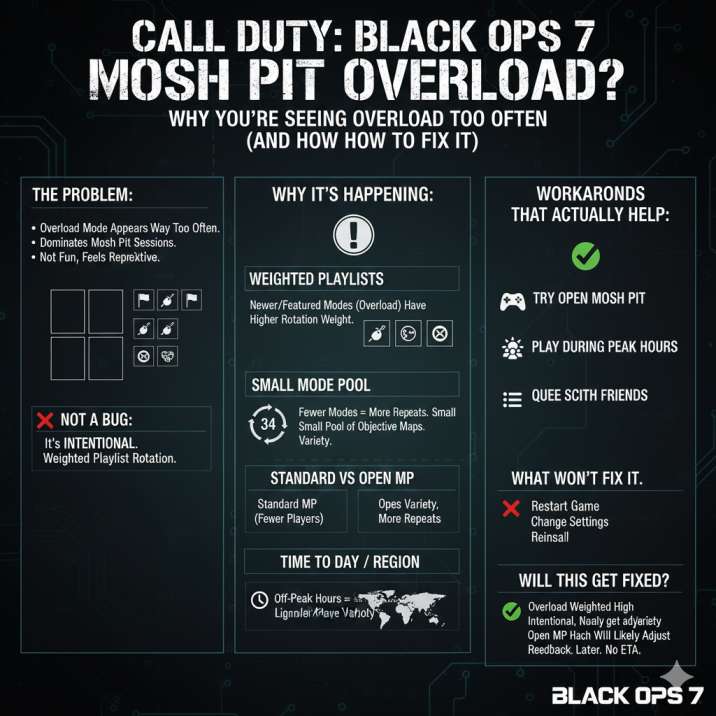
Why Overload Keeps Showing Up So Often
Short answer: it’s intentional — not random, and not a bug.
Long answer: Call of Duty: Black Ops 7 doesn’t use pure RNG for its mosh pit playlists. Instead, it relies on weighted playlist rotation, which means the game subtly nudges certain modes to appear more often than others.
In practice, that means a few things are happening at once.
Some modes are naturally favored based on engagement and matchmaking needs. Newer or highlighted modes — like Overload — tend to get pushed harder so more players experience them, especially early in their lifecycle. On top of that, the system is designed to prioritize fast matchmaking over perfect variety, which helps keep queue times low but can lead to noticeable repetition.
Because Overload is still relatively new and clearly being promoted, it currently has a higher rotation weight than older modes. That’s the real reason it keeps popping up so frequently — not bad luck, not a broken playlist, just how the rotation is set up right now.
Read also: Prestige 8 Pyrologist Bugged? Complete Guide for Black Ops 7 Zombies Players
Mosh Pit Has a Small Mode Pool (So Repeats Are Inevitable)
Mosh pit playlists don’t include every mode available in Call of Duty: Black Ops 7.
Instead, they rotate through a fairly small selection of objective-based modes, which is meant to keep matches focused and queue times short.
The problem shows up when two things happen at the same time. First, the overall mode pool is small to begin with. Second, one of those modes — in this case, Overload — has a higher rotation weight than the others.
When you combine those two factors, repetition becomes almost unavoidable.
That’s why it can feel like you’re getting Overload back-to-back or multiple times in a single session.
It’s not that the game is forcing it on you every match — it’s simply statistically more likely to be selected compared to the rest of the playlist.
Standard vs Open Mosh Pit Makes This Worse
This issue becomes even more noticeable because Call of Duty: Black Ops 7 split mosh pit into two separate playlists: Standard Mosh Pit and Open Mosh Pit, with the latter using lighter SBMM.
That split matters more than it might seem at first. When players spread out across two playlists, each one ends up with a smaller overall player pool. If you’re sticking to Standard Mosh Pit, that usually means fewer active lobbies running at any given moment. To keep matchmaking fast, the system often drops you into matches that are already in progress instead of spinning up brand-new ones.
When Overload already has higher rotation weight, this leads to it being reused more frequently in Standard Mosh Pit. The result is a noticeable loop where Overload keeps cycling back in.
That’s why some players feel like they’re seeing it nonstop, while others — especially those hopping between playlists or playing at peak hours — barely notice the problem at all.
Read also: Missing Claymores in Black Ops 7 (No Claymores, Betties, or Blast Traps)
Time of Day and Region Also Matter
Your experience with mosh pit rotation in Call of Duty: Black Ops 7 can change a lot depending on when and where you’re playing.
If you’re queuing up late at night or during off-peak hours, the game is working with a much smaller player pool. Fewer players means fewer active lobbies, so matchmaking focuses on filling games as quickly as possible rather than creating fresh ones.
As a result, variety takes a back seat.
When that happens, mode rotation tightens up. If Overload is already running on your server, there’s a good chance you’ll get dropped straight back into another Overload match instead of something different. It’s not bad luck — it’s simply the system prioritizing speed over diversity to keep matches moving.
Is This a Bug?
Nope — this isn’t a bug.
This issue isn’t caused by a broken playlist, a tracking problem, or anything on your end. There’s nothing wrong with your game client, your settings, or your connection. What you’re seeing is simply how the playlist system in Call of Duty: Black Ops 7 is currently designed.
Mosh pit rotations are controlled server-side, and right now Overload is intentionally weighted to appear more often.
While that can be frustrating if you’re looking for variety, it’s a normal part of how playlists work during certain phases of a game’s lifecycle.
The good news is that this kind of thing usually gets adjusted over time. Once enough player feedback rolls in, rotation weights tend to get tweaked quietly through playlist updates — often without much fanfare or even a mention in the patch notes.

How to See Less Overload (What Actually Helps)
If Overload fatigue is starting to set in, there are a few things that can genuinely help — even if none of them are perfect fixes.
First, try Open Mosh Pit. A lot of players report seeing better mode variety there, likely because of the lighter SBMM and a slightly different matchmaking flow. It’s not guaranteed, but it’s often an improvement over Standard.
Playing during peak hours can also make a big difference. When more players are online, there are more active lobbies and more modes running at the same time, which naturally reduces repetition. Late-night sessions are where Overload tends to loop the hardest.
Queuing with friends helps too. Parties are more likely to be placed into fresh or newly created lobbies rather than recycled ones, which can break the Overload streak.
Finally, if a mode-specific playlist is available, that’s the cleanest option. Skipping mosh pit entirely removes the rotation problem altogether.
On the flip side, some things simply won’t help. Restarting the game, changing settings, reinstalling, or swapping loadouts won’t affect playlist rotation at all. This isn’t something you’re doing wrong — it’s just how the system works right now.
Why Overload Feels Extra Repetitive
Overload tends to stand out more than most other modes, and that’s a big reason it feels so repetitive even when the rotation isn’t completely lopsided.
The mode leans heavily into objectives, has a slower overall pace, and follows a very distinct match flow compared to faster, more familiar modes. Because of that, each Overload match feels more deliberate — and more memorable. When you play it multiple times in a short span, your brain flags it immediately.
So even if Overload isn’t technically appearing every single match, it sticks in your memory far more than quick, forgettable modes, which makes the repetition feel worse than it actually is.
Will This Get Fixed?
Most likely, yes.
Looking at how Call of Duty has handled playlist issues in the past, this kind of repetition usually gets smoothed out over time. Developers tend to quietly tweak playlist weights, spread modes out more evenly, and reduce how often a single mode dominates the rotation.
The catch is that these changes rarely get much visibility. They’re often pushed through routine playlist updates and don’t always show up in patch notes, which can make it feel like nothing changed — until you suddenly notice better variety.
There’s no official timeline for when that adjustment might happen, but historically, this kind of issue doesn’t stick around forever.
Wrapping Up
- You’re not crazy — Overload really is showing up a lot
- It’s happening because of playlist weighting and small mosh pit mode pools
- Standard Mosh Pit makes the repetition more noticeable
- This is intentional, not a bug or a broken playlist
- Switching playlists or playing at different times can help for now
Until Treyarch tweaks the rotation, that’s just the current reality. The upside is that now you know why it’s happening — and what you can do to avoid it as much as possible.