
Many players are reporting that the SCW-10 assault rifle in Battlefield 6 is not unlocking even after completing the Close Quarters Challenge 1 and 2 assignments.
The issue is happening across PC, Xbox, and PS5, with some users also noticing similar problems with other assignment-based weapons like the QBZ-192 and SG553R.
✅ Quick Solution: If your SCW-10 isn’t unlocking after completing the required challenges, try restarting the game, repairing files, and replaying one round in Close Quarters mode. EA has acknowledged the issue, and a server-side fix is reportedly in development.
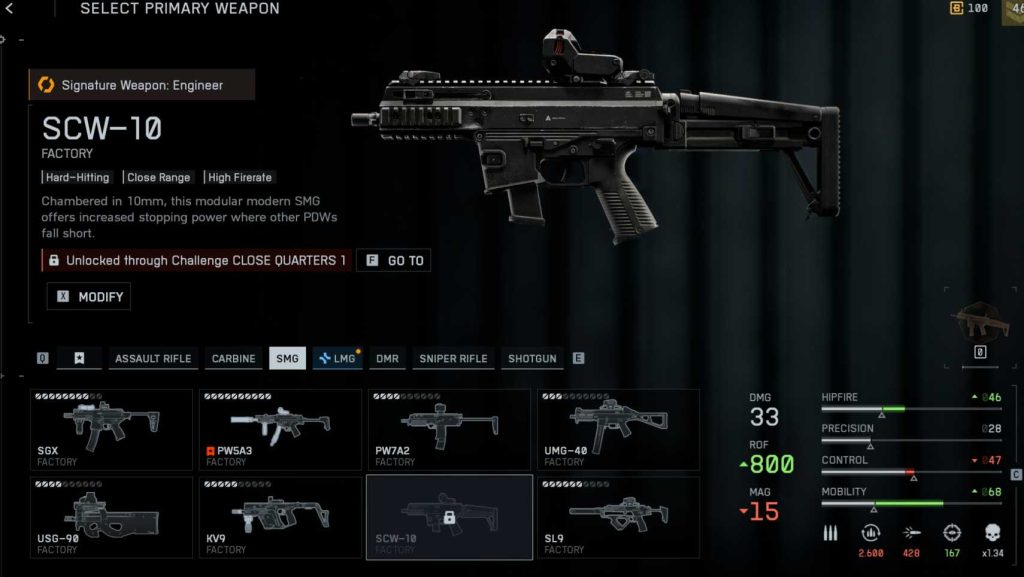
Why the SCW-10 Fails to Unlock After Completing Close Quarters Challenges
The Battlefield 6 SCW-10 unlock glitch is tied to a recent assignment system update that broke the reward validation process for several weapon challenges.
Here’s what’s likely happening:
- The Close Quarters Challenge 1 completion flag doesn’t correctly trigger the weapon unlock script.
- EA’s backend assignment tracker is marking the challenge as complete, but not granting the reward in your player profile.
- The issue affects all platforms — PC, PS5, and Xbox Series X/S.
- The bug started appearing after the assignment system patch rolled out earlier this week.
In short, your progress is saved, but the server fails to “hand over” the SCW-10 to your account.
Fix 1: Replay a Full Close Quarters Match After Finishing the Challenge
Some players report that replaying one additional match in Close Quarters Mode triggers the missing unlock.
This forces the server to recheck your challenge status.
Steps:
- Launch Close Quarters Mode again.
- Play one complete match (don’t quit early).
- After the round ends, check your weapon inventory.
In several cases, this method forces Battlefield 6 to process the SCW-10 unlock correctly.
Fix 2: Restart Battlefield 6 and EA App to Refresh Assignment Data
Restarting both the game and launcher can refresh your EA backend session, which often re-syncs assignment progress.
To do it:
- Exit Battlefield 6 completely.
- Log out of the EA App (or Steam).
- Wait 30 seconds, then relaunch both.
- Load into your Career → Assignments menu to verify completion.
This refresh helps Battlefield 6 revalidate your completed assignment data from the EA servers.
Fix 3: Repair Battlefield 6 Game Files
If your weapon unlock data is corrupted locally, a game file repair can restore the missing SCW-10.
On EA App:
- Go to My Library → Battlefield 6 → Manage → Repair.
On Steam:
- Right-click Battlefield 6 → Properties → Installed Files → Verify Integrity of Game Files.
After repair, launch the game, open Assignments, and check if the SCW-10 is now unlocked.
Fix 4: Play the Next Challenge Step (Close Quarters 2)
Some players report that completing Close Quarters 2 triggers the unlock for the SCW-10, even though it should have been awarded in step 1.
If your Close Quarters 2 is already active, finish its objectives — it might retroactively fix your missing reward.
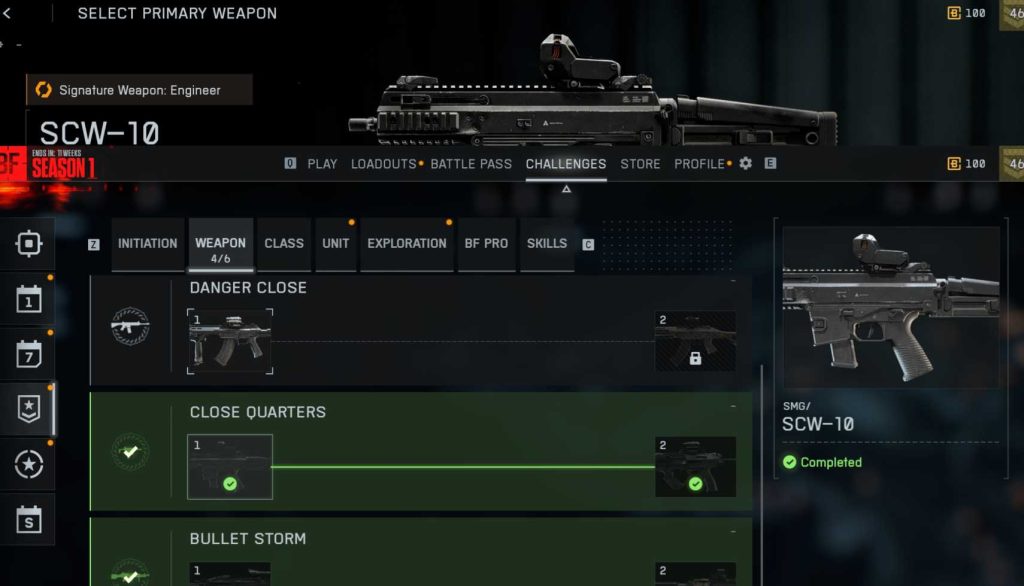
Fix 5: Check EA’s Assignment Tracker for Delayed Unlocks
EA’s system sometimes logs the completion but delays weapon availability for several hours.
Go to https://ea.com/rewards and log into your EA account.
Under Battlefield 6 Assignments, verify whether the SCW-10 shows as “Completed.”
If it’s listed but missing in-game, it’s a backend sync issue, not your account.
Fix 6: Clear Battlefield 6 Cache (PC and Console)
For PC:
- Close the EA App.
- Go to
%ProgramData%/EA Desktopand delete the Cache folder. - Restart and log back in.
For Xbox/PlayStation:
- Go to Storage → Saved Data → Battlefield 6 → Delete Reserved Space.
Then launch Battlefield 6 again. This forces the game to re-pull unlock data from EA’s servers.
Fix 7: Re-Equip and Unequip Weapon Slot in Loadout Menu
Sometimes the new weapon is unlocked but doesn’t appear because of a UI sync bug.
Go to Loadout → Assault → Primary Weapon.
Scroll through all available guns and back out twice.
If the SCW-10 becomes visible after re-entering the menu, equip it manually.
Fix 8: Re-Link EA Account (Steam or Console)
Desynchronization between EA and Steam/PlayStation accounts can block new content unlocks.
To re-link:
- Visit https://myaccount.ea.com.
- Go to Connections → Unlink your linked platform.
- Relaunch Battlefield 6 — it will prompt you to reconnect.
- Confirm linking again.
Once your connection refreshes, log back in and recheck your SCW-10 unlock status.
Fix 9: Complete Another Weapon Assignment
Many players report that finishing a different assignment (like Danger Close 1 or Marksman Challenge) triggers a system-wide unlock refresh.
Once another assignment completes, EA’s backend refreshes your weapon entitlement list, which can cause previously stuck weapons like the SCW-10 to appear instantly.
Fix 10: Contact EA Support with Proof of Completion
If none of the above steps work, reach out to EA’s support team.
- Visit https://help.ea.com.
- Log in and choose Battlefield 6 → Missing Unlock or Item.
- Attach a screenshot of your completed Close Quarters 1 challenge.
- Mention “SCW-10 not unlocking after completion.”
EA support can manually verify your assignment data and issue the unlock through their internal tools.
Fix 11: Wait for the Next Server-Side Assignment Sync
EA occasionally runs backend refreshes that reapply missing assignment rewards.
These silent updates can trigger the SCW-10 unlock automatically once synced.
Keep the game installed and log in every 24 hours — some players received the gun days later without doing anything.
Fix 12: Avoid Joining Servers Mid-Match When Doing Assignments
Joining in-progress matches can sometimes prevent proper completion triggers.
Always start assignments in fresh matches, especially when working on Close Quarters 1.
Completing objectives from the first round to the end increases the chance of your progress registering correctly on EA’s servers.
Fix 13: Track Weapon Progress Through the EA Companion App
Use the Battlefield Companion App to confirm whether your assignment data is stored.
If it shows Challenge Completed but the SCW-10 is greyed out, your issue is sync-based — not user error.
Fix 14: Avoid Custom or Portal Servers for Assignment Unlocks
Assignments sometimes fail to track properly in custom or non-official servers.
If you completed Close Quarters 1 in a Portal server, replay it in a standard Conquest or Rush mode server to ensure your unlock registers.
Fix 15: Wait for EA’s Official Assignment System Patch
EA has acknowledged several broken Battlefield 6 weapon assignments (SCW-10, QBZ-192, and others) in internal bug reports.
The fix will arrive via a server-side update — no download required.
Keep an eye on @BattlefieldComm and EA Help announcements, as this patch is expected soon.
Why Didn’t the SCW-10 Unlock After Completing Close Quarters 1 & 2 in Battlefield 6?
If you completed both Close Quarters Challenge 1 and 2 in Battlefield 6 and the SCW-10 assault rifle still didn’t unlock, you’ve run into a known assignment tracking bug. This glitch prevents the game from registering that the weapon reward should be added to your inventory, even though the assignment progress is marked as complete.
The issue began after EA DICE updated the assignment and progression system earlier this month. During the patch, certain reward scripts failed to connect correctly to the Close Quarters assignment ID, meaning the backend recognizes completion but never grants the weapon.
Players on PC, PlayStation 5, and Xbox Series X/S have all reported the same issue. Some users have found that replaying one extra Close Quarters match, verifying files, or restarting Battlefield 6 forces the game to resync progress.
Until EA’s next patch, the SCW-10 unlock may remain stuck in “Completed” status for some accounts, but the fix is expected soon through a server-side update.
Is the SCW-10 Weapon Unlock Bug Affecting Everyone in Battlefield 6?
The Battlefield 6 SCW-10 unlock bug is widespread, but it doesn’t affect every player. The issue appears for those who completed Close Quarters 1 after EA changed the assignment validation process in a recent update. Players who completed the challenge earlier—before the patch—usually have the weapon unlocked successfully.
Reports from the EA Answers HQ, Reddit, and official Battlefield forums show the glitch impacting players across all platforms, with both PC and PlayStation 5 users most frequently affected. The bug can also affect similar weapons tied to assignments, such as the QBZ-192 and SG553R.
EA has acknowledged the issue internally and is tracking affected accounts. While not universal, it’s significant enough to warrant a global fix, which EA is expected to deploy through a backend patch rather than a full client update.
If you’ve already completed the required challenges, keep the game installed and log in daily. Once EA runs the next assignment synchronization refresh, your SCW-10 unlock should process automatically without redoing objectives.
What Causes the Battlefield 6 SCW-10 Assignment to Glitch?
The Battlefield 6 SCW-10 assignment glitch occurs due to a server synchronization failure between your in-game progress and EA’s backend reward system. Essentially, when you finish the Close Quarters 1 objectives, the completion is logged correctly—but the unlock trigger doesn’t activate.
Technical analysis from community reports suggests this was caused by EA’s assignment data migration, which restructured how rewards are linked to challenge IDs. Some assignments, like SCW-10 and Danger Close (QBZ-192), were assigned outdated validation IDs, preventing the weapon unlock script from executing.
In addition, cross-platform users (Steam ↔ EA App or console ↔ EA Play) experience higher desync rates, where progress saves locally but doesn’t upload to the server. This makes the “Assignment Completed” status appear, but the gun remains unavailable.
The best temporary fixes include replaying one match in Close Quarters Mode, clearing cache, or repairing game files. For many players, these actions resync the assignment data and trigger the SCW-10 unlock.
EA has confirmed this glitch is unintentional and part of a broader assignment reward bug being patched in the next Battlefield 6 update.
Did EA Change the Close Quarters Assignment Requirements in Battlefield 6?
Yes — EA DICE quietly adjusted the Close Quarters assignment requirements in Battlefield 6 during a recent update, but the change unintentionally broke some weapon unlocks like the SCW-10. The new challenge system reorganized progression tiers, moving certain objectives between Close Quarters 1 and 2, which caused confusion and backend mismatches.
Previously, completing Close Quarters 1 would immediately unlock the SCW-10 rifle. However, after the update, the reward validation step was tied incorrectly to Close Quarters 2. As a result, players who completed Close Quarters 1 after the patch didn’t receive the unlock—even though their assignment screen shows 100 percent completion.
EA Support has acknowledged this issue in community reports and confirmed that no new gameplay requirements were added; the problem lies purely in backend tracking.
Until EA issues the correction, players can attempt workarounds like replaying Close Quarters matches, completing Close Quarters 2, or repairing the game installation. These actions occasionally refresh the assignment logic and grant the missing SCW-10 unlock.
Why Do Some Battlefield 6 Weapons Show “Completed” but Don’t Unlock?
When Battlefield 6 weapons show “Completed” but remain locked, it’s usually due to a backend validation error in EA’s reward tracking system. This issue has become common after recent assignment patches that changed how progress syncs between local saves and EA servers.
Here’s what happens: the assignment milestones (kills, assists, headshots, etc.) record properly, so your in-game tracker marks them as complete. However, when Battlefield 6 attempts to communicate with the EA server to confirm the reward unlock, that final confirmation fails — leaving the item stuck in a “completed but unclaimed” state.
Weapons currently known to be affected include the SCW-10, QBZ-192, and several assault gadgets.
To resolve it, you can try:
- Repairing game files or verifying integrity (PC).
- Replaying one match in the relevant challenge mode.
- Clearing cache or deleting reserved space (console).
- Waiting for EA’s next backend refresh cycle.
Once EA re-syncs your progress globally, all assignments marked as completed should correctly award their associated weapons.
Is the SCW-10 Unlock Bug Linked to Recent Battlefield 6 Assignment Updates?
Yes — the Battlefield 6 SCW-10 unlock bug is directly linked to the most recent assignment system update that EA DICE rolled out. The update changed how assignments, progress milestones, and unlock triggers communicate with EA’s backend servers. Unfortunately, during that restructuring, the Close Quarters 1 and 2 challenges were affected.
The patch caused a disconnect between progress tracking and reward validation, meaning players could fully complete the required objectives for the SCW-10 assault rifle, yet never receive the weapon. This issue is not user-related — it’s the result of broken validation IDs within the updated assignment database.
EA Support has confirmed that this problem was logged shortly after the assignment update went live. While DICE is currently testing a server-side fix, the only temporary solution is to replay Close Quarters matches or complete another weapon challenge to refresh your unlock status.
Until EA’s backend patch arrives, the SCW-10 unlock issue will persist intermittently across all platforms.
Does the Danger Close Assignment Also Bug Like the SCW-10 Unlock Issue?
Yes — the Danger Close assignment suffers from the same backend problem that’s preventing the SCW-10 unlock in Battlefield 6. Many players have reported completing the Danger Close 1 objectives (required for the QBZ-192) and receiving in-game completion notifications, but the weapon remains locked afterward.
The issue occurs because both Close Quarters and Danger Close assignments use the same reward validation system. When EA DICE updated assignment dependencies, some of the IDs responsible for triggering weapon rewards became misaligned. As a result, Battlefield 6 recognizes your challenge completion but fails to assign the item to your account inventory.
Interestingly, players who went on to complete Danger Close 2 or Close Quarters 2 often saw their previous weapons unlock retroactively — suggesting that completing subsequent assignments forces a data resync.
EA is already aware of both the SCW-10 and QBZ-192 unlock bugs, and fixes for these specific assignments are expected to be rolled out together in an upcoming patch.
Can Completing Close Quarters 2 Before 1 Cause the Battlefield 6 SCW-10 Glitch?
Yes — completing Close Quarters 2 before Close Quarters 1 can cause the Battlefield 6 SCW-10 glitch, depending on how the game logs your assignment sequence. The SCW-10 is meant to unlock after Close Quarters 1, while Close Quarters 2 unlocks the SL9. However, due to a coding conflict in Battlefield 6’s assignment structure, finishing 2 first can “skip” the reward link tied to 1.
The system assumes you already completed Close Quarters 1 when it detects progression in 2, resulting in no weapon unlock for SCW-10. The assignment tracker still marks it as “Completed,” but the server doesn’t process the unlock reward.
To fix it, replay a full Close Quarters match while having Challenge 1 active, or repair your game files to re-sync progress. Some players have reported that completing an unrelated assignment afterward (like Marksman Challenge 1) triggered the SCW-10 to appear automatically.
EA has acknowledged this specific order-related bug and is expected to correct it in their next assignment tracking patch.
Why Are Battlefield 6 Assignments Tracking Progress but Not Granting Rewards?
If your Battlefield 6 assignments show as completed but aren’t granting rewards, you’re facing a backend validation error that prevents EA’s servers from finalizing unlocks.
This glitch started appearing after recent updates changed how assignment milestones sync between local saves and EA’s cloud database. The progress-tracking logic still records gameplay objectives — like kills, assists, or match completions — but the reward confirmation stage fails when sending data to the server.
This means players see the “Assignment Completed” pop-up, but no weapon, gadget, or gear appears in their inventory. The most affected challenges include Close Quarters 1 (SCW-10), Danger Close 1 (QBZ-192), and some Assault gadget assignments.
The best short-term solutions are to replay one more match in the same challenge mode, repair game files, or clear your EA cache to re-sync your progress. EA has confirmed that all completed but “stuck” assignments will eventually auto-unlock once their server refresh update goes live.
Is the SCW-10 Unlock Issue Platform-Specific (PC, PS5, Xbox)?
No — the Battlefield 6 SCW-10 unlock issue is not platform-specific. It affects players across PC, PlayStation 5, and Xbox Series X/S, as the root cause is tied to EA’s backend servers, not the individual client software.
Whether you play Battlefield 6 via EA App, Steam, or console, the assignment system communicates with the same central database to process rewards. Since the Close Quarters Challenge bug stems from incorrect assignment linking, every platform experiences the same failure to deliver the SCW-10 unlock once objectives are completed.
That said, the issue might appear more frequently on PC because updates and patches often roll out slightly earlier there, meaning PC users encounter assignment sync problems before console players.
EA Support has confirmed that the fix will be deployed globally and simultaneously across all platforms. Once the update rolls out, players on PC, PS5, and Xbox who have completed Close Quarters 1 and 2 should automatically receive the SCW-10 assault rifle in their armory.