
Players across Battlefield 6 are reporting that the KORD 6P67 light machine gun isn’t unlocking even after completing the required Rapid Fire 1 assignment. This persistent issue affects players on PC, Xbox, and PlayStation, and continues even after multiple restarts, repairs, and replays of Team Deathmatch (TDM) matches.
✅ Quick Solution: If your KORD 6P67 isn’t unlocking despite completing the Rapid Fire 1 challenge, try repairing the game, replaying one TDM or Conquest match, and logging out of your EA App before restarting the game. EA has acknowledged the bug and is working on a server-side progress sync fix.
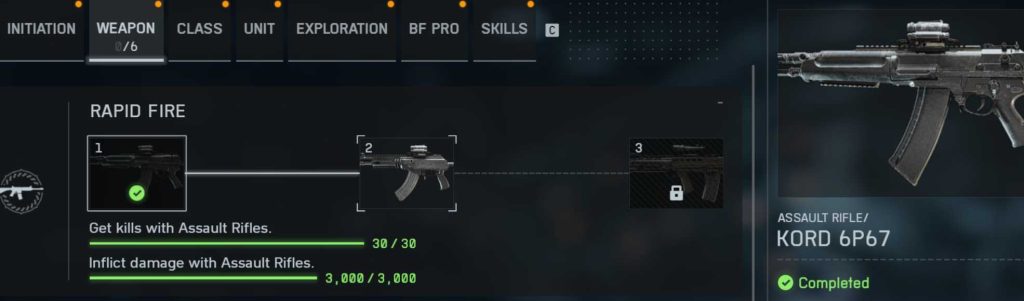
Why the KORD 6P67 Fails to Unlock After Completing Rapid Fire 1
This issue is caused by a progress tracking error in EA’s updated assignment validation system. When you complete Rapid Fire 1, Battlefield 6 logs your progress locally but fails to push the unlock flag to EA’s backend.
The problem seems to have worsened after the latest title update, which altered how assignments sync between local clients and servers.
Key causes include:
- Broken assignment reward validation IDs in EA’s database.
- Missing progress sync between TDM completion and career unlock lists.
- Desynchronization after the last EA App patch on PC and console.
- Cached “Completed but not granted” data stuck in your profile files.
Fix 1: Replay One Match in Team Deathmatch or Conquest
Many Battlefield 6 players have confirmed that replaying one full TDM or Conquest match after completing Rapid Fire 1 forces the unlock.
Steps:
- Launch Battlefield 6.
- Choose All-Out Warfare → Team Deathmatch.
- Play one complete match (do not quit early).
- Return to your Loadout → LMG category and check for KORD 6P67.
If the unlock trigger was missed earlier, this often refreshes the server sync and grants the gun automatically.

Fix 2: Repair Battlefield 6 Game Files via EA App
A corrupted or incomplete patch can block assignment completion from registering.
To fix:
- Open EA App → My Library → Battlefield 6.
- Click Manage → Repair.
- Wait for all files to verify and reinstall missing data.
- Launch the game and check your Assignments tab.
After this, your profile resyncs and may trigger any “stuck” rewards, including the KORD 6P67 unlock.
Fix 3: Clear EA App and Battlefield 6 Cache Files
Cache corruption is a major cause of Battlefield 6 weapon unlock bugs.
For PC:
- Close Battlefield 6 and EA App.
- Press Win + R, type:
%ProgramData%/EA DesktopDelete the Cache folder. - Restart EA App and relaunch Battlefield 6.
For Console:
- Go to Settings → Storage → Saved Data → Battlefield 6 → Delete Reserved Space.
This resets profile data and can restore missing unlocks like the KORD 6P67.
Fix 4: Log Out of EA Account and Re-Login
Sometimes, EA account tokens expire, preventing your progress from syncing properly.
Solution: Log out of your EA App or console account, restart your system, and log back in.
This refreshes your authentication session and ensures your assignment data syncs directly to EA’s backend.
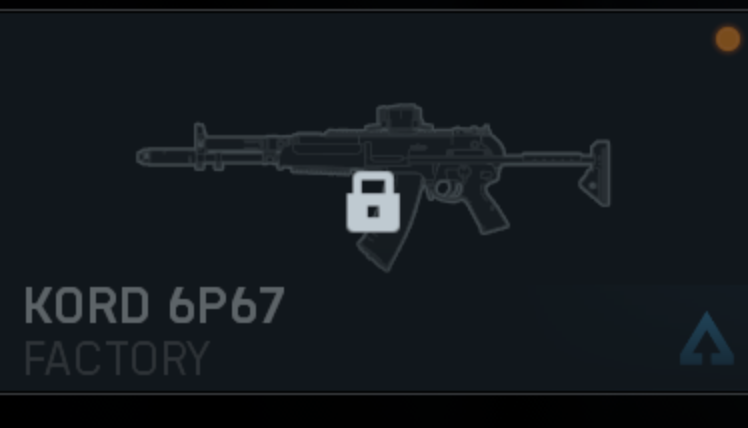
Fix 5: Equip the Weapon in Lobby Loadout (Even if Locked)
A few players report that the KORD 6P67 can be selected in the pre-match lobby loadout even when it shows locked in the main menu.
Try entering a TDM lobby and navigating to:
Loadout → LMGs → KORD 6P67.
If it’s selectable, equip it and complete the match. Afterward, it should appear unlocked permanently in your main menu.
Fix 6: Complete Another Weapon Assignment
Battlefield 6 sometimes triggers stuck unlocks after finishing a new challenge.
If you’ve completed Rapid Fire 1, start another assignment (like Close Quarters 1 or Danger Close 1) and finish it fully.
After completion, EA’s system re-verifies your assignment completion list and may automatically unlock the KORD 6P67 along with any other missed rewards.
Fix 7: Re-Link Your EA and Platform Accounts
If your EA account is out of sync with your platform (Steam, PlayStation, Xbox), unlocks may not process.
Steps:
- Visit https://myaccount.ea.com.
- Go to Connections.
- Unlink your linked platform.
- Relaunch Battlefield 6 — it will prompt re-linking.
Once the connection refreshes, your missing assignment rewards like the KORD 6P67 may appear automatically.
Fix 8: Avoid Joining Mid-Match When Doing Assignments
Joining a match already in progress can sometimes cause Battlefield 6 to fail assignment triggers.
Always begin your Rapid Fire 1 challenge from a fresh match, as joining late might prevent backend tracking from starting properly.
Fix 9: Check for “Completed but Not Granted” in EA Rewards Tracker
Go to https://ea.com/rewards and check your unlock status.
If it shows Rapid Fire 1 – Completed but the KORD 6P67 isn’t listed, you’ve confirmed a sync issue.
This proves that your progress is stored — EA just hasn’t sent the reward yet. A future patch will automatically fix this without needing to redo challenges.
Fix 10: Reinstall Battlefield 6 (Last Resort)
If none of the above solutions work, perform a clean reinstall of Battlefield 6.
While it’s time-consuming, it can clear broken progression caches and reconnect to EA’s reward servers.
Be sure to back up settings first. After reinstalling, log in again and check for your KORD 6P67 unlock status.
Fix 11: Play with Cross-Play Disabled
Some reports suggest that Cross-Play interference may delay progress syncs.
Turn it off via Settings → Gameplay → Cross-Play → Off, then play one Rapid Fire match again.
This reduces desync issues between platforms and may trigger the missing unlock.
Fix 12: Avoid Portal Servers for Assignments
Assignments don’t always track correctly in custom or Portal servers.
Ensure all Rapid Fire objectives were completed in official All-Out Warfare or TDM servers.
Fix 13: Complete Another Objective Within the Same Match
When you’re one step away from finishing the Rapid Fire 1 challenge, also complete another assignment (like 10 headshots or 5 assists).
This sometimes triggers a multi-progress sync, forcing EA’s backend to validate both achievements together — fixing missing unlocks in the process.
Fix 14: Contact EA Support with Proof of Completion
If your KORD 6P67 is still locked after all troubleshooting, contact EA Help and attach a screenshot showing your Rapid Fire 1 challenge as completed.
EA’s support team can manually verify the assignment and push the unlock directly to your account.
Fix 15: Wait for EA’s Next Assignment Sync Update
EA DICE has already acknowledged broken assignment rewards like the SCW-10, QBZ-192, and now the KORD 6P67.
They are testing a server-side refresh patch that will automatically restore missing unlocks.
This fix won’t require a download — once it’s live, all accounts marked as “Completed” will receive their missing weapons instantly.
Why Is the KORD 6P67 Not Unlocking in Battlefield 6 Even After Completing Rapid Fire 1?
If your KORD 6P67 isn’t unlocking even after completing the Rapid Fire 1 challenge, you’re facing the widespread Battlefield 6 weapon unlock bug. Players across PC, Xbox, and PlayStation confirm that the challenge registers as complete, but the weapon remains locked.
This issue occurs because of a server-side validation failure introduced after the most recent Battlefield 6 assignment update. The game tracks your challenge progress locally, but the EA backend fails to confirm and grant the reward. As a result, the system shows “Completed” while the gun stays unavailable.
To temporarily fix it, try replaying a full TDM or Conquest match, verifying game files, or clearing cache to force a resync. For some users, completing a different assignment (like Danger Close 1) triggers the missing unlock automatically.
EA DICE has officially acknowledged the KORD 6P67 unlock glitch and confirmed a server-side patch is in testing. Once live, all players with completed Rapid Fire 1 assignments should automatically receive the weapon.
Is the KORD 6P67 Unlock Bug Happening to Everyone in Battlefield 6?
No — while the Battlefield 6 KORD 6P67 unlock bug is widespread, it doesn’t affect every player. Those who finished the Rapid Fire 1 challenge before the recent patch usually unlocked the weapon without issue, but players completing it afterward often find it stuck in “Completed” status.
This suggests the issue is tied to timing and assignment-data changes made during EA’s latest backend update. Reports on EA Answers HQ, Steam, and Reddit show users across PC, PS5, and Xbox Series X/S encountering identical problems.
While not platform-specific, the bug impacts a large number of players globally, leading EA to flag it as a known progress issue under active investigation.
If you’re affected, your progress isn’t lost — it’s stored in EA’s servers but waiting for validation. Keep logging in daily; once the backend resync update rolls out, your KORD 6P67 unlock will appear automatically without needing to redo the challenge.
Did the Latest Battlefield 6 Update Break Weapon Unlock Progress?
Yes — the latest Battlefield 6 update unintentionally disrupted how assignment rewards are processed, leading to multiple reports of completed challenges not granting weapons such as the KORD 6P67, SCW-10, and QBZ-192.
The update modified internal assignment dependencies to improve tracking accuracy, but several challenge IDs became mismatched with their corresponding weapon rewards. Consequently, when you complete the Rapid Fire 1 assignment, the server logs progress but skips the unlock flag.
Players noticed this immediately after the update, especially those finishing challenges post-patch. The symptom is clear: “Assignment Completed” shows correctly, yet the weapon remains locked in the Loadout Menu.
EA DICE has confirmed that the issue is not intentional and will be resolved through a server-side synchronization fix, meaning you won’t need to download a patch. Once EA’s fix goes live, all affected progress will sync properly and previously completed assignments will automatically award their missing weapons.
Why Does Battlefield 6 Show Challenges as Complete but Weapons Still Locked?
When Battlefield 6 displays a challenge as complete but doesn’t deliver the weapon, it’s due to a reward-validation sync error between the local client and EA’s backend servers. The game correctly tracks your gameplay progress (kills, assists, etc.) but fails to receive confirmation that the weapon reward should be applied.
This issue first appeared after EA modified the assignment system to a new structure. Some assignment IDs, including Rapid Fire 1, are no longer linked correctly to their weapon IDs. As a result, the challenge shows “Completed” even though no unlock occurs.
You can try to fix it by replaying one match in Rapid Fire mode, repairing game files, or clearing cache to refresh your profile data. These steps sometimes retrigger the missing unlock event.
EA Support has clarified that all “completed but unclaimed” rewards will automatically sync after their next global assignment refresh, ensuring no permanent loss of earned weapons.
Is the KORD 6P67 Unlock Issue Specific to EA App or Consoles?
No — the Battlefield 6 KORD 6P67 unlock bug is not platform-specific. It affects players on PC (EA App and Steam) as well as consoles (PlayStation and Xbox). The cause lies within EA’s central server infrastructure, not in individual client software.
Every platform uses the same backend database for assignment validation and reward distribution. Therefore, the KORD 6P67 not unlocking problem is identical whether you’re on PC or console.
While PC players often experience it first because updates deploy earlier through the EA App, console users report the same behavior after syncing with the updated backend. Cross-play users may notice delays in reward registration, but that’s part of the same validation bug.
EA has confirmed the fix will be global and platform-wide. Once deployed, all accounts with Rapid Fire 1 marked as complete will automatically receive the KORD 6P67 light machine gun in their inventory — no manual claim required.
How to Fix the KORD 6P67 Not Unlocking After Rapid Fire 1 Challenge
If the KORD 6P67 LMG doesn’t unlock after completing Rapid Fire 1 in Battlefield 6, you’re dealing with a known assignment validation bug. The game records your completion locally but fails to register it on EA’s backend, leaving the weapon locked.
✅ Fix steps that work for many players:
- Play one more full match in Team Deathmatch or Conquest — completing another match often triggers the unlock validation.
- Repair your game files via the EA App or Steam to ensure no assignment scripts are corrupted.
- Log out of your EA account, restart your PC or console, then log back in to refresh your session token.
- Avoid joining mid-match when completing assignments — start fresh to ensure tracking works.
Your progress isn’t lost — once EA performs their assignment sync update, the KORD 6P67 will unlock automatically for anyone who has already finished Rapid Fire 1.
Can Repairing the Game or Restarting EA App Fix Weapon Unlock Bugs in Battlefield 6?
Yes — repairing the game and restarting the EA App are two of the most effective quick fixes for weapon unlock bugs in Battlefield 6. Many players found that after verifying files and relaunching the launcher, the missing unlock (like the KORD 6P67) appeared instantly.
Why it helps:
- Repairing your game scans and restores corrupted assignment data that might prevent unlock triggers.
- Restarting the EA App refreshes your authentication session and re-establishes a clean connection to EA’s servers, ensuring progress sync works correctly.
How to repair:
- EA App → My Library → Battlefield 6 → Manage → Repair.
- Steam → Properties → Installed Files → Verify Integrity.
After the process completes, restart your system and relaunch Battlefield 6. In most cases, the Rapid Fire 1 reward (KORD 6P67) appears in the Loadout Menu once the backend revalidates your progress.
Does Completing a TDM Match Unlock the KORD 6P67 Bugged Weapon?
Yes — playing and completing a full Team Deathmatch (TDM) or Conquest match has helped many players unlock the KORD 6P67 that was stuck after finishing Rapid Fire 1.
The bug occurs because the unlock trigger occasionally fails to activate immediately after the challenge completion. Playing another full match forces EA’s assignment system to re-scan your account’s challenge data and award pending items.
To improve success:
- Enter an official server (not Portal or Custom).
- Play the entire round — do not leave early.
- At the post-match screen, wait for all XP and progress to sync before exiting.
Several players confirmed that after one extra TDM game, the KORD 6P67 appeared as unlocked in their Loadout. If it doesn’t appear immediately, restart Battlefield 6 once more to prompt a reward synchronization check.
How to Force Battlefield 6 to Sync Unlock Progress with EA Servers
If your Battlefield 6 assignments (like Rapid Fire 1) show as complete but rewards remain locked, you can manually force EA servers to resync progress by refreshing your account connection.
Here’s how:
- Log out of your EA App or console account completely.
- Clear the cache:
- On PC: delete
%ProgramData%/EA Desktop/Cache. - On consoles: delete Battlefield 6’s Reserved Space under Saved Data.
- On PC: delete
- Restart your device.
- Log back in and remain idle on the main menu for about a minute to let your account data sync.
- Launch All-Out Warfare and check your assignments tab.
This process re-establishes communication with EA’s backend reward database. If your KORD 6P67 unlock was pending, it should now appear after syncing.
Can Reinstalling or Verifying Game Files Fix KORD 6P67 Progression Issues?
Yes — reinstalling Battlefield 6 or verifying game files can fix persistent KORD 6P67 progression issues, especially if earlier patches or cache corruption caused the Rapid Fire 1 unlock data to fail.
Verifying files (preferred first):
- EA App → Manage → Repair.
- Steam → Properties → Installed Files → Verify Integrity.
This ensures all assignment-related scripts are intact and up to date.
If verification doesn’t work, a clean reinstall removes residual cache, damaged profile data, and outdated configurations that may block reward synchronization. Always back up custom settings before uninstalling.
After reinstalling, log back into your EA account and allow the game to sync your assignments from the server. Players report that previously stuck weapons, including the KORD 6P67, appear immediately once the new installation reconnects to EA’s reward servers.
Is the Battlefield 6 KORD 6P67 Bug Linked to the Rapid Fire Challenge System?
Yes — the Battlefield 6 KORD 6P67 not unlocking bug is directly linked to the Rapid Fire challenge system. Players report that completing Rapid Fire 1 successfully registers in the assignment tracker, but the backend fails to trigger the unlock event for the weapon.
The issue began after DICE updated Battlefield 6’s assignment structure, modifying how challenge progress communicates with EA’s backend. Unfortunately, the Rapid Fire 1 and Rapid Fire 2 assignments were among those affected. The result is a “completed” status appearing on-screen without the corresponding KORD 6P67 unlock.
Because this issue stems from EA’s validation system, it impacts all platforms — PC, Xbox, and PlayStation. The progress data is stored correctly, but the server fails to issue the reward flag.
Temporary workarounds include replaying one Team Deathmatch or Conquest round, verifying game files, or logging out and back into the EA App to refresh progress sync. EA has confirmed the Rapid Fire challenge bug is under review and will be corrected in an upcoming backend update.
Why Do Previously Unlocked Weapons Relock After New Updates in Battlefield 6?
Previously unlocked weapons in Battlefield 6 can sometimes appear re-locked after updates because of assignment data resynchronization issues. When EA rolls out patches that alter assignment structures, it re-indexes your player progression. If that sync process fails or the database IDs shift, some unlock flags — like for the KORD 6P67 or SCW-10 — revert temporarily.
Essentially, the game client and EA’s backend fall out of sync during the update process. Your account still contains the unlock record, but the client no longer recognizes it until a full synchronization occurs.
In most cases, simply restarting Battlefield 6, repairing the game, or re-logging into your EA account restores the missing weapons. If not, they usually reappear automatically once EA’s servers complete their background sync cycle.
This behavior is common after patches that modify assignment dependencies or reward logic. It’s not permanent — once EA finishes its database refresh, all valid unlocks are restored without losing progress.
Is There a Visual Glitch Showing KORD 6P67 as Locked Even When Unlocked in Match?
Yes — many players have encountered a visual glitch where the KORD 6P67 shows as locked in the main menu but is actually usable in pre-match loadouts or mid-game. This bug occurs because Battlefield 6’s UI inventory sometimes fails to update after backend validation.
When this happens, the weapon remains greyed out in the menu, but in certain modes (like TDM or Conquest) you can still select and use it from the in-match loadout screen. After completing a round with it equipped, the weapon often appears permanently unlocked in the next session.
This confirms the issue is visual, not gameplay-restricted — the assignment and reward data exist in your profile, but the menu interface isn’t refreshing correctly.
To fix it, clear cache, restart the EA App, or open the loadout menu in the pre-match lobby and scroll through your weapons to force a refresh. EA is aware of this interface bug and plans to patch it in a future update alongside other weapon visibility errors.
Does EA’s Backend Progress Sync Cause Missing Unlocks in Battlefield 6?
Yes — EA’s backend synchronization system is the core reason behind missing unlocks and delayed weapon rewards in Battlefield 6. Every completed assignment, such as Rapid Fire 1 (KORD 6P67) or Close Quarters 1 (SCW-10), must validate with EA’s servers before the weapon is granted to your account.
When the backend sync fails — due to maintenance, account desync, or network delay — your local game marks the assignment complete but never receives confirmation of the reward. This leads to situations where challenges are marked 100% finished yet weapons remain locked.
EA occasionally runs backend refresh cycles to realign data across all player profiles. When that happens, missing weapons typically unlock automatically without requiring additional action.
To manually speed up synchronization, players can log out and back into their EA account, clear cache, or repair the game files. EA has confirmed that affected accounts will receive pending unlocks once the next backend sync patch is deployed.
Are Battlefield 6 Progression Bugs Connected to Cross-Platform Account Sync?
Yes — Battlefield 6 progression bugs can often be traced to cross-platform account synchronization issues. When your EA account is linked across multiple platforms (e.g., PC, PlayStation, Xbox), each platform stores local progress data that must sync to EA’s master database.
If you complete an assignment on one platform (say PC via EA App) and then log into another (like Xbox or PlayStation), the local data may temporarily override or delay the reward validation. This can lead to assignment completion without unlocks, especially for challenges like Rapid Fire 1 or Danger Close 1.
To avoid cross-sync bugs:
- Always ensure your EA account is fully linked to your main platform.
- Avoid switching between platforms before an assignment fully updates.
- Re-sync manually by logging out and back into EA App or console profile.
EA is reportedly optimizing multi-platform progression synchronization in future Battlefield 6 patches to prevent delayed or missing unlocks. Until then, it’s best to complete and claim challenges on a single platform session to minimize risk.
Final Thoughts
The Battlefield 6 KORD 6P67 not unlocking issue is part of a larger assignment synchronization bug introduced after the latest patch.
While frustrating, the good news is your progress isn’t lost — it’s stored in EA’s system but not yet validated.
By replaying one match, repairing files, and clearing cache, many players have successfully triggered their KORD 6P67 unlocks.
For everyone else, EA has confirmed an upcoming fix that will automatically resolve the problem for all affected users.