
A number of FC Mobile players are reporting a frustrating issue in the Footyverse Claw Machine where the event stops working after showing an ERR_CACHE or page load error. After the claw machine breaks, players cannot continue the play, cannot reload the event, and — the worst part — lose their 500 Footyverse tokens without receiving any reward.
This FC Mobile claw machine bug seems to happen on Android more frequently, and the broken URL shown in the event only adds to the confusion.
Here’s what’s causing the error and how you can recover your lost tokens.
Why the Footyverse Claw Machine Bug Happens
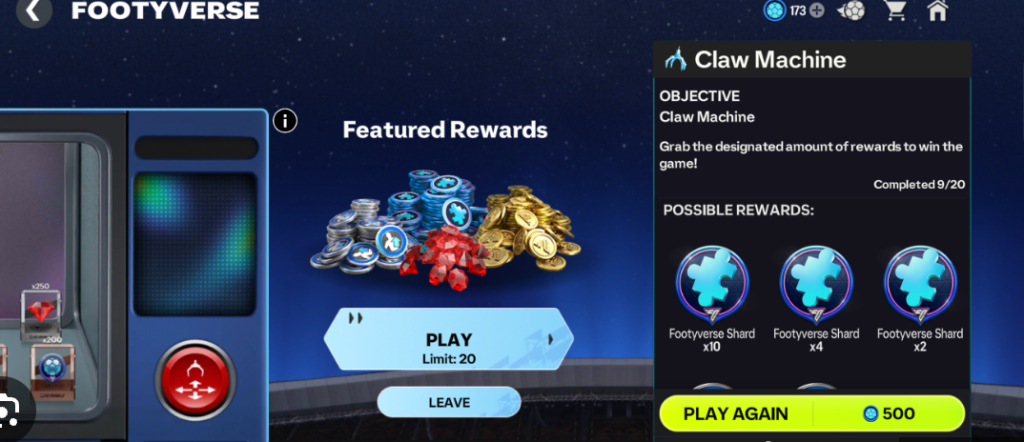
The error appears because the game attempts to load an external event page hosted on EA’s CDN (Content Delivery Network). When the CDN fails or the cached version becomes corrupted, the claw machine does not complete its play sequence.
This causes:
- The claw machine to freeze
- The ERR_CACHE_MISS or similar browser-style error
- Broken link loading
- Tokens being deducted
- No reward being given
The bug is not caused by your phone — it’s a server response failure during the event play.
???? Quick Fix
You must contact EA Help with your User ID + Screenshot to request a manual refund of your 500 Footyverse tokens.
The game cannot refund tokens automatically because the play never completed server-side.
Fix #1: Report Your Issue With User ID to EA Help
To recover your tokens, you must submit:
- Your User ID
- Time the error happened
- Screenshot of the error (if available)
EA Help → Technical Issues → FC Mobile → Missing Items/Tokens
This is currently the only way to recover lost Footyverse tokens.
Fix #2: Clear FC Mobile App Cache Before Opening Footyverse Again (Android)
Because Android often stores cached event pages, clearing the app cache prevents the broken CDN link from reloading.
Go to:
Settings → Apps → FC Mobile → Storage → Clear Cache
Then relaunch the game.
This fixes most repeat ERR_CACHE_MISS issues.
Fix #3: Disable Data Saver or VPN Before Using Event Features
Data Saver, VPNs, or restricted networks can block access to EA’s CDN, causing the claw machine link to fail.
Turn off:
- VPN
- Data Saver
- Ad-blocking DNS
- Private DNS
Then retry the Footyverse event.
Fix #4: Switch Between Mobile Data and Wi-Fi
Because the event page loads from an external server, switching networks forces Android to request a fresh CDN version.
Try:
- Switch to mobile data
- Reopen the event
- Switch back if needed
This often fixes event pages that fail to load on a single network.
Fix #5: Update FC Mobile to the Latest Version
Older versions of the app occasionally load outdated event URLs that no longer exist.
Updating ensures you’re accessing the correct Footyverse claw machine path.
Fix #6: Reopen the Game After the Claw Machine Error
Force-close the game completely:
- Swipe away the app
- Reopen FC Mobile
- Enter Footyverse again
This resets active event sessions that get stuck after the cache error.
Fix #7: Avoid Pressing Back During Event Animations
Pressing the < back button while the claw machine animation is loading can interrupt the reward script and cause token loss.
Wait for the animation to finish before interacting with the screen.
Fix #8: Disable Chrome WebView Updates Temporarily
Some Android devices load in-game event pages through Android System WebView.
If recent WebView updates cause compatibility issues, external event pages can fail.
Try:
Settings → Apps → Android System WebView → Uninstall updates
This resets WebView and often restores event functionality.
Fix #9: Try Opening the Game on Another Device to Complete the Event
Since the error is often device-specific, logging in on another Android or iOS device can sometimes load the event correctly.
Your progress is cloud-synced, so it’s safe to try.
Fix #10: Wait for EA to Patch Footyverse CDN Errors (Ongoing Fix)
The broken URL provided:
.../claw-machine/dist/index.html
indicates a server or CDN deployment issue.
EA usually patches these event CDN failures in waves.
If many players report it, EA will update the event link and refund lost tokens.
Fix #11: Log Out and Log Back Into FC Mobile to Refresh the Event Token State
Sometimes the Footyverse claw machine bug happens because the game fails to sync your token balance properly after the server error.
Logging out → restarting → logging back in forces FC Mobile to pull a fresh token state from EA’s servers.
This won’t restore missing tokens automatically, but it prevents future plays from getting stuck.
Fix #12: Use the In-Game “Help” Button Under Settings → Customer Support
Instead of going to EA Help externally, use the in-app support button, which auto-attaches device logs and Footyverse event data.
This helps EA confirm the claw machine ERR_CACHE bug and refund your 500 tokens faster.
Players receive responses quicker when logs are included automatically.
Fix #13: Avoid Multi-Tasking or Switching Apps While the Claw Machine Loads
Switching apps or opening notifications during the Footyverse event can break the internal WebView renderer.
This triggers ERR_CACHE errors and incomplete reward scripts.
Keep the game in the foreground while the claw machine animation loads to avoid losing more Footyverse tokens.
Fix #14: Disable Battery Optimization for FC Mobile (Android)
Battery optimization sometimes restricts WebView and CDN requests, causing the claw machine not loading bug.
Go to:
Settings → Battery → App Optimization → FC Mobile → Don’t Optimize
This ensures event pages load fully before consuming your tokens.
Fix #15: Use a Different Browser Engine if Your Device Supports It
Some Android devices allow switching between WebView providers:
- Chrome WebView
- Samsung WebView
- Browser WebView
Switching WebView engines refreshes the event page environment and fixes many Footyverse claw machine URL errors.
Fix #16: Turn Off Ad Blockers or Private DNS Settings That Block CDN Links
DNS-based ad blockers often block CDN URLs like the one used for the FC Mobile claw machine:
eaassets-a.akamaihd.net/fifa/u/f/fcm23/
Turn off:
- AdGuard DNS
- Blokada
- Private DNS
- NextDNS
This prevents the token-deducting-but-no-reward issue caused by blocked event scripts.
Fix #17: Try Playing the Footyverse Event During Lower Server Load Times
CDN events like the claw machine often fail during peak hours.
Trying again during:
- Late night
- Early morning
- Off-peak regional hours
reduces the chance of receiving the ERR_CACHE Footyverse claw machine error.
Fix #18: Make Sure You Have Enough Storage for FC Mobile to Cache Event Data
Low device storage prevents FC Mobile from storing temporary event files, causing incomplete loads and broken reward scripts.
Keep at least 1–2 GB free to prevent event errors and future token loss.
Fix #19: Restart Your Internet Router (Wi-Fi) to Fix Broken CDN Routing
Sometimes akamaihd.net CDN links break because your router cached a bad route.
Restarting the router forces a fresh DNS connection and allows the Footyverse machine to load normally.
This is especially useful if the error persists across multiple tries.
Fix #20: Screenshot All Footyverse Errors for Faster EA Token Refunds
To ensure EA refunds your 500 Footyverse tokens, always screenshot:
- The ERR_CACHE message
- The broken claw machine URL
- Your token count before/after
These screenshots help EA verify the issue instantly and speed up the manual refund process.
How to fix the FC Mobile Footyverse Claw Machine error?
The FC Mobile Footyverse Claw Machine error usually appears as an ERR_CACHE or blank event page, caused by the game failing to load the external Footyverse event script. Because the claw machine is hosted on an EA CDN (Akamai), a broken or cached link prevents the animation and reward script from finishing. This results in a failed play, leaving players stuck without receiving rewards.
To fix it, clear the FC Mobile app cache on Android, switch between Wi-Fi and mobile data, disable VPN or private DNS, and restart the game. These steps force the device to reload the event script correctly. If the error persists, it means the event didn’t complete server-side, and you must contact EA Help with your User ID to restore missing tokens. This is currently the most reliable solution until EA patches the Footyverse claw machine bug.
Can you recover lost Footyverse Tokens after an event bug in FC Mobile?
Yes — you can recover lost Footyverse Tokens in FC Mobile if you experienced a claw machine bug, ERR_CACHE error, or broken link during the Footyverse event. When the claw machine animation fails to load, the server deducts your 500 tokens but never delivers the reward because the event script did not finish properly. This is a known FC Mobile Footyverse Claw Machine issue that affects Android users more frequently.
To get your tokens refunded, submit a ticket to EA Help with your User ID, screenshots of the error, and your token count before/after the event. EA has already refunded Footyverse Tokens for many players when this bug occurred. Because the error happens server-side, players cannot restore lost tokens on their own — only EA can apply the refund manually.
Does reinstalling or clearing cache fix the Claw Machine issue?
Clearing cache may temporarily fix the FC Mobile Claw Machine issue, but reinstalling the game will not recover lost tokens or fully fix the broken event link. The ERR_CACHE error is caused by corrupted CDN data or a failed Footyverse event load, not by the app installation itself. Clearing the app cache forces your device to reload the event assets and can prevent future claw machine errors.
However, reinstalling the game does nothing to reverse the token loss, because token deduction happens server-side, not on the device. If you already lost 500 Footyverse Tokens due to a failed claw machine play, you must contact EA for recovery. Cache clearing helps prevent future errors, but it does not fix the underlying server glitch.
Why does the Footyverse event show a broken web link or blank page?
The Footyverse event showing a broken web link or blank page is caused by the game failing to load the external event interface hosted on EA’s Akamai CDN. When the link breaks, you may see something like:
.../claw-machine/dist/index.html
This typically triggers ERR_CACHE_MISS, ERR_BLOCKED_BY_RESPONSE, or a blank screen. Such errors occur when CDN files fail to load due to network restrictions, expired cached versions, VPN interference, or temporary server outages.
Because the claw machine’s reward animation depends on the web interface loading correctly, any failure results in a Footyverse claw machine bug, token loss, or frozen event screen. Clearing cache, switching networks, and disabling VPNs often refresh the page, but a server-side failure must be fixed by EA.
Will EA refund players affected by the Footyverse Claw Machine glitch?
Yes — EA has been refunding players affected by the Footyverse Claw Machine glitch, especially those who lost 500 Footyverse Tokens without receiving a reward. Because the glitch is tied to a broken event script or CDN failure, players cannot restore tokens on their own. EA Support must review your User ID and manually credit your account with the missing tokens.
Many players who reported the error with screenshots and timestamps confirmed that EA refunded their tokens within a short time. EA typically asks for:
- User ID
- Approximate time of the failed play
- Screenshot of the error (optional but helpful)
Until the Footyverse claw machine bug is fully patched, EA is handling refunds manually for affected accounts.
Is the Footyverse Claw Machine hosted on an external EA web client?
Yes — the Footyverse Claw Machine in FC Mobile is hosted on an external EA web client, not inside the core game engine.
When you tap the claw machine, the app loads a mini-webpage stored on EA’s CDN.
This page contains the animation, the prize logic, and the event UI.
Because it loads externally, anything that interrupts the request — a blocked script, failed cache, expired link, or slow server — will break the claw machine.
This is why players see browser-style errors such as ERR_CACHE_MISS, blank white screens, or a non-loading interface.
FC Mobile is essentially embedding a webpage inside the game.
When that mini-webpage fails, the claw machine freezes, the play never completes, and your Footyverse tokens disappear without reward.
It is a server-side issue, not a device issue.
Does the ERR_CACHE message mean the game couldn’t connect to EA’s server?
Yes — the ERR_CACHE or ERR_CACHE_MISS message usually means the FC Mobile app failed to connect correctly to the EA server hosting the Footyverse claw machine.
This error appears when the game tries to load the external event page but receives either incomplete data or no data at all.
The server may be overloaded, temporarily unreachable, or serving outdated cached files.
Android WebView often shows this message when:
- The CDN file changed
- The cached file is corrupted
- The device can’t fetch fresh data
- The connection is blocked or timed out
Because the claw machine depends on a successful server connection to award tokens, the ERR_CACHE error breaks the reward process, causing token loss.
It’s a connectivity or caching failure between the app and EA’s event servers — not a gameplay bug inside your device.
Can the Claw Machine bug be caused by expired event links or cache corruption?
Absolutely — the Footyverse Claw Machine bug is often caused by expired event links or corrupted cache that stops the external event webpage from loading.
When EA updates event assets, older cached versions on your device may no longer match the server’s expected version.
This mismatch triggers ERR_CACHE, blank screens, or incomplete scripts.
Expired links also occur when the CDN rotates versions, and your device still holds an old URL that no longer exists.
That’s why clearing cache or switching internet connections sometimes fixes the claw machine temporarily.
If the expired link prevents the animation from loading, the token deduction script may still run, but the reward script never completes — leaving players with lost Footyverse tokens and no prize.
This is one of the most common causes of the claw machine not loading.
Is this Footyverse Claw Machine issue happening only on Android devices?
No — the issue is not exclusive to Android, but Android users experience it far more often because the game uses Android System WebView to load the Footyverse event.
WebView aggressively caches scripts and webpage components, so when EA updates the event URL, Android devices may still try to load an outdated cached version.
This results in ERR_CACHE errors, failed animations, or the claw machine interface not loading.
iOS can also experience broken event screens, but iOS handles web components differently and refreshes cached data more reliably.
Most reports of the FC Mobile Footyverse Claw Machine error come from:
- Android phones
- Devices using VPN/Private DNS
- Phones with aggressive cache management
So while not Android-only, the platform is more prone to running into the error.
Why is the Footyverse link pointing to a broken Akamai CDN URL?
The Footyverse claw machine link points to an Akamai CDN URL because EA hosts event assets, webpages, and animations through Akamai’s global network.
A broken CDN URL usually happens when:
- The event file was moved
- EA pushed a new version
- The CDN cache expired
- The asset was deleted or replaced
- Your device cached an outdated link
- The CDN node in your region is down
When this happens, you see a URL like:
eaassets-a.akamaihd.net/.../claw-machine/dist/index.html
If the CDN node cannot serve this file, the claw machine interface fails to load.
The game deducts tokens but never receives the reward response.
This results in the well-known Footyverse Claw Machine glitch, where players lose tokens due to the broken CDN link.
Final Thoughts
The FC Mobile Footyverse claw machine error is not caused by your device.
It’s a server loading failure that causes the reward script to break and your 500 tokens to be deducted without completing the event.
To get your tokens back:
✔ Contact EA Help with your User ID
✔ Provide screenshot or timestamp
✔ Wait for EA to manually refund the tokens